Produk Selesaiview
The Targus Presenter AMP09AP is a multimedia presentation remote designed for ease of use during presentations. It features a laser pointer for highlighting content, backlit buttons for low-light environments, and an ergonomic design for comfortable handling. This remote also offers cursor control for remote program access and volume adjustment for media. Its wireless technology provides a range of up to 50 feet, and the USB receiver conveniently stores within the presenter.
Panduan Pengaturan
1. Membongkar
Carefully remove the Targus Presenter AMP09AP and its components from the packaging. The box should contain:
- One Targus Presentation Remote
- One USB Receiver
2. Pemasangan Baterai
The Targus Presenter AMP09AP requires batteries (not included). Use alkaline batteries for optimal performance.
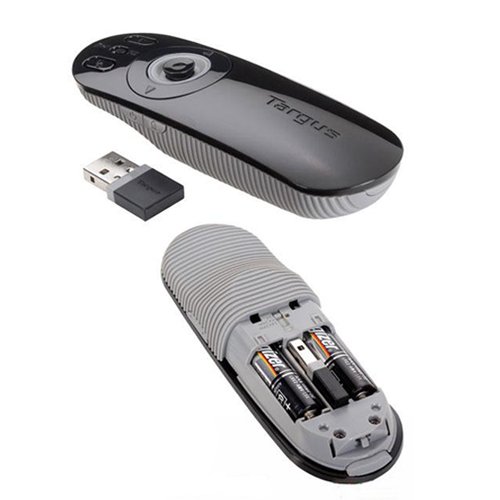
- Locate the battery compartment on the back of the presenter.
- Buka penutup ruang baterai.
- Masukkan baterai yang diperlukan, pastikan polaritas yang benar (+/-).
- Tutup penutup ruang baterai dengan rapat.
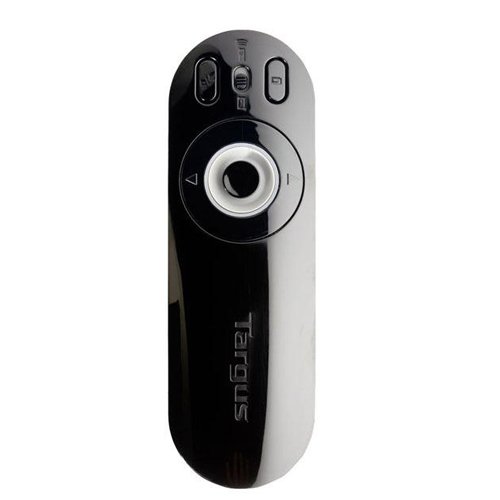
Image: The Targus Presenter AMP09AP, its USB receiver, and the open battery compartment revealing two AAA batteries.
3. Menghubungkan Penerima USB
- Remove the USB receiver from its storage slot within the presenter.
- Colokkan penerima USB ke port USB yang tersedia di komputer Anda.
- Komputer seharusnya secara otomatis mendeteksi dan menginstal driver yang diperlukan.
The remote is now ready for use.
Petunjuk Pengoperasian
Mode Presentasi
The presenter's simplistic layout allows for easy navigation during presentations.
Gambar: Atas view of the Targus Presenter AMP09AP, highlighting the laser pointer button, slide navigation buttons, and the mode switch.
- Laser penunjuk: Press and hold the dedicated laser button to activate the laser pointer for highlighting content.
- Slide Berikutnya: Press the forward arrow button to advance to the next slide.
- Slide Sebelumnya: Press the backward arrow button to return to the previous slide.
- Tombol Lampu Latar: Buttons are backlit for visibility in dimly lit rooms.
Cursor Control Mode
The presenter features cursor control for remote access to programs and media functions.
- Activating Cursor Control: Use the mode switch (located at the top right of the remote) to toggle between presentation and cursor control modes.
- Moving Cursor: Use the central circular button (joystick/directional pad) to move the mouse cursor on the screen.
- Mengklik: Press the center of the circular button to perform a left-click action.
- Kontrol Volume: Adjust the volume for music and videos remotely using the designated volume controls (if available on your specific model).
Range Nirkabel
The wireless technology allows operation up to 50 feet (approximately 15 meters) from the computer, providing flexibility during presentations.
Pemeliharaan
- Pembersihan: Wipe the presenter with a soft, dry cloth. Avoid using harsh chemicals or abrasive cleaners.
- Penggantian Baterai: Replace batteries when the indicator light (if present) signals low power, or when performance degrades. Ensure correct polarity during replacement.
- Penyimpanan: When not in use, store the USB receiver inside the presenter's dedicated slot to prevent loss. Store the presenter in a cool, dry place.
Penyelesaian Masalah
| Masalah | Kemungkinan Penyebab | Larutan |
|---|---|---|
| Penyaji tidak merespons | Baterai lemah atau mati | Ganti baterai dengan baterai alkaline baru. |
| Penyaji tidak merespons | Penerima USB tidak terhubung dengan benar | Pastikan penerima USB terpasang dengan benar ke port USB yang berfungsi di komputer Anda. Coba port USB lain. |
| Penyaji tidak merespons | Diluar jangkauan | Move closer to the computer (within 50 feet / 15 meters). |
| Penunjuk laser tidak berfungsi | Baterai lemah | Ganti baterai. |
| Cursor control erratic or not working | Interference or mode not activated | Ensure no obstructions between presenter and receiver. Check if cursor control mode is active using the mode switch. |
Spesifikasi
| Fitur | Detil |
|---|---|
| Merek | Targus |
| Nomor Model | AMP09AP-51 |
| Warna | Hitam dan Abu-abu |
| Dimensi (P x L x T) | Ukuran 12.1x3.8x2.5 cm |
| Berat Barang | 140 gram |
| Teknologi Konektivitas | Nirkabel |
| Range Nirkabel | Hingga 50 kaki (sekitar 15 meter) |
| Jenis Baterai | Alkali (tidak termasuk) |
| Komponen yang Termasuk | Presentation Remote, USB Receiver |
| Fitur Khusus | Ergonomic design, Laser pointer, Cursor control, Backlit buttons |
Garansi dan Dukungan
For warranty information and technical support, please refer to the documentation provided with your purchase or visit the official Targus websitus. Simpan bukti pembelian Anda untuk klaim garansi.


