1. Pendahuluan
This manual provides detailed instructions for the installation, operation, and maintenance of your Gewiss GW10701 Programmable Thermostat. This device is designed to control heating and air conditioning systems, allowing you to manage room temperature efficiently and comfortably. Please read this manual thoroughly before installation and use to ensure proper functionality and safety.
2. Informasi Keselamatan
Selalu perhatikan tindakan pencegahan keselamatan berikut untuk mencegah cedera pribadi atau kerusakan pada perangkat:
- Pemasangan hanya boleh dilakukan oleh personel yang berkualifikasi sesuai dengan kode dan peraturan kelistrikan setempat.
- Putuskan aliran listrik ke sistem pemanas/pendingin di pemutus sirkuit utama sebelum memasang atau memperbaiki termostat.
- Jangan biarkan termostat terkena air atau kelembapan yang berlebihan.
- Gunakan hanya jenis baterai yang ditentukan dan pastikan polaritasnya benar selama pemasangan.
- Keep batteries out of reach of children. Do not dispose of batteries in fire.
- Do not attempt to open or repair the thermostat yourself. Contact qualified service personnel.
3. Produk Lebihview
The Gewiss GW10701 is a wall-mounted programmable thermostat featuring an LCD display and intuitive controls for temperature management.
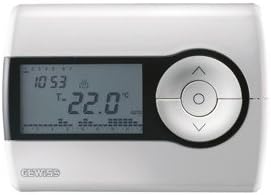
Gambar 1: Depan view of the Gewiss GW10701 Thermostat. It features a clear LCD screen displaying time and temperature, alongside a circular control panel with directional buttons and a central confirmation button for easy navigation and setting adjustments.
3.1. Komponen
- Layar LCD: Shows current time, temperature, operating mode, and programming settings.
- Tombol Kontrol: Typically include UP/DOWN arrows for temperature adjustment, MODE button for selecting operating modes (e.g., Heat, Cool, Auto, Off), and a SET/PROG button for accessing programming menus. (Note: Specific button functions may vary slightly; refer to on-screen prompts.)
- Kompartemen Baterai: Located on the rear or side, houses the power supply batteries.
- Piring pemasangan: Untuk pemasangan di dinding yang aman.
4. Instalasi
4.1. Memilih Lokasi
Select a central location on an interior wall, approximately 1.5 meters (5 feet) above the floor. Avoid locations near heat sources (lamps, direct sunlight, fireplaces), drafts (windows, doors), or areas with poor air circulation.
4.2. Memasang Termostat
- Putuskan Daya: Turn off the power to your heating/cooling system at the main circuit breaker.
- Separate Base Plate: Carefully detach the front cover of the thermostat from its base plate.
- Mark dan Drill: Hold the base plate against the wall at your chosen location. Mark the drilling points. Drill holes and insert wall anchors if necessary.
- Pelat Dasar Pengaman: Fasten the base plate to the wall using the provided screws.
- Pengkabelan (jika ada): Connect the system wires to the appropriate terminals on the base plate. Refer to the wiring diagram provided with your heating/cooling system or consult a qualified electrician. Note: While the thermostat is battery-powered, it controls a 230V system. Ensure correct wiring.
- Pasang Baterai: Insert the required batteries into the battery compartment, observing correct polarity (+/-).
- Pasang Termostat: Carefully reattach the thermostat front cover to the base plate, ensuring it clicks securely into place.
- Pulihkan Daya: Turn on the power to your heating/cooling system at the main circuit breaker.
5. Operasi
5.1. Pengaturan Awal
Upon first power-up or after battery replacement, you may need to set the current time and date. Follow the on-screen prompts or refer to the programming section.
5.2. Mengatur Suhu
Gunakan UP Dan TURUN arrow buttons to adjust the desired temperature. The display will show the set temperature temporarily, then revert to the current room temperature.
5.3. Mode Operasi
Tekan tombol MODE button (or similar) to cycle through available operating modes:
- PANAS: Termostat akan mengaktifkan sistem pemanas ketika suhu ruangan turun di bawah suhu yang telah ditetapkan.
- KEREN: The thermostat will activate the air conditioning system when the room temperature rises above the set temperature.
- MOBIL: Termostat secara otomatis beralih antara pemanasan dan pendinginan untuk mempertahankan kisaran suhu yang telah ditetapkan.
- MATI: Sistem pemanas dan pendingin dimatikan.
6. Pemrograman
The Gewiss GW10701 allows you to create custom heating/cooling schedules for different times of the day and days of the week. This feature helps optimize energy consumption and comfort.
6.1. Pengaturan Waktu dan Tanggal
- Tekan tombol MENGATUR or PROG tombol untuk masuk ke menu pengaturan.
- Navigate using the arrow buttons to find "Time" or "Date" settings.
- Use the arrow buttons to adjust the values (hour, minute, day, month, year).
- Confirm each setting with the MENGATUR or central button.
6.2. Creating a Program Schedule
The thermostat typically offers daily or weekly programming options. You can set different temperatures for various periods (e.g., Wake, Day, Evening, Sleep).
- Tekan tombol PROG tombol untuk masuk ke mode pemrograman.
- Pilih hari atau kelompok hari yang ingin Anda program (misalnya, Senin-Jumat, Sabtu-Minggu, atau hari-hari tertentu).
- For each period (e.g., "Wake"), set the desired start time and temperature using the arrow buttons.
- Advance to the next period and repeat the process.
- Save your program and exit programming mode.
Consult the on-screen menu and specific button labels on your device for precise programming steps, as interfaces can vary.
7. Pemeliharaan
7.1. Penggantian Baterai
The thermostat is powered by batteries. When the battery indicator appears on the display, replace the batteries promptly to ensure continuous operation. Typically, 2x AA or AAA alkaline batteries are required.
- Carefully remove the front cover of the thermostat.
- Keluarkan baterai lama dan buang secara bertanggung jawab.
- Masukkan baterai baru, pastikan polaritasnya benar.
- Pasang kembali penutup depan.
7.2. Pembersihan
Clean the thermostat's exterior with a soft, dry cloth. Do not use abrasive cleaners, solvents, or spray cleaners directly onto the device, as this can damage the display or internal components.
8. Penyelesaian masalah
| Masalah | Kemungkinan Penyebab | Larutan |
|---|---|---|
| Tampilan kosong atau redup. | Baterai lemah atau mati. | Ganti baterai dengan yang baru. |
| Sistem Pemanas/Pendingin tidak merespons. |
|
|
| Pembacaan suhu tampaknya tidak akurat. | Lokasi termostat dipengaruhi oleh angin atau sumber panas. | Pastikan termostat tidak terkena sinar matahari langsung, angin, atau peralatan yang menghasilkan panas. |
9. Spesifikasi
- Pabrikan: Gewiss
- Nomor Model: GW10701 (Chorus)
- Dimensi (P x L x T): Ukuran 13x2.3x9.2 cm
- Berat: 9.07 gram
- Warna: Putih
- Bahan: Plastik
- Catu Daya: Bertenaga baterai
- Beralih Voltage: 230 Volt (for controlled system)
- Tipe Tampilan: LCD atau LED
- Tipe Pemasangan: Terpasang di dinding
- Fitur Kontrol: Programmable, Button control
- Penggunaan: Heating systems, Air conditioning systems
10. Garansi dan Dukungan
For warranty information, technical support, or service inquiries regarding your Gewiss GW10701 Thermostat, please refer to the warranty card included with your product or visit the official Gewiss website. You may also contact your local Gewiss distributor or retailer for assistance.
Gewiss Official Weblokasi: www.gewiss.com


