1. Pendahuluan
Terima kasih sudah membeliasing the KLH R5100 Surround Sound Receiver. This receiver is designed to provide high-quality audio and video performance for your home entertainment system. It features multiple audio and video inputs, surround sound processing, and a powerful amplifier to deliver an immersive listening experience. Please read this manual thoroughly before operating the unit to ensure proper setup and optimal performance.
2. Informasi Keselamatan Penting
Untuk mengurangi risiko sengatan listrik, kebakaran, atau kerusakan pada unit, harap perhatikan tindakan pencegahan keselamatan berikut:
- Sumber Daya: Connect the unit only to an AC 120V, 60Hz power supply.
- Ventilasi: Pastikan ventilasi memadai. Jangan menghalangi lubang ventilasi. Berikan ruang yang cukup di sekitar unit agar aliran udara lancar.
- Air dan Kelembaban: Jangan biarkan unit terkena hujan, kelembapan, atau kelembapan berlebih. Jangan letakkan benda berisi cairan, seperti vas, di atas unit.
- Panas: Jauhkan unit dari sumber panas seperti radiator, pemanas, kompor, atau peralatan lainnya (termasuk amppengangkat) yang menghasilkan panas.
- Pembersihan: Cabut unit dari stopkontak sebelum membersihkan. Gunakan kain kering untuk membersihkannya.
- Pelayanan: Jangan mencoba memperbaiki unit ini sendiri. Serahkan semua perbaikan kepada teknisi servis yang berkualifikasi.
- Kabel: Lindungi kabel daya agar tidak terinjak atau terjepit, terutama pada bagian steker, stopkontak, dan titik keluarnya kabel dari unit.
3. Isi Paket
Harap periksa apakah paket Anda berisi item berikut:
- KLH R5100 Surround Sound Receiver
- Unit Kontrol Jarak Jauh
- Panduan Pengguna
- Kabel Audio/Video (tipe RCA)
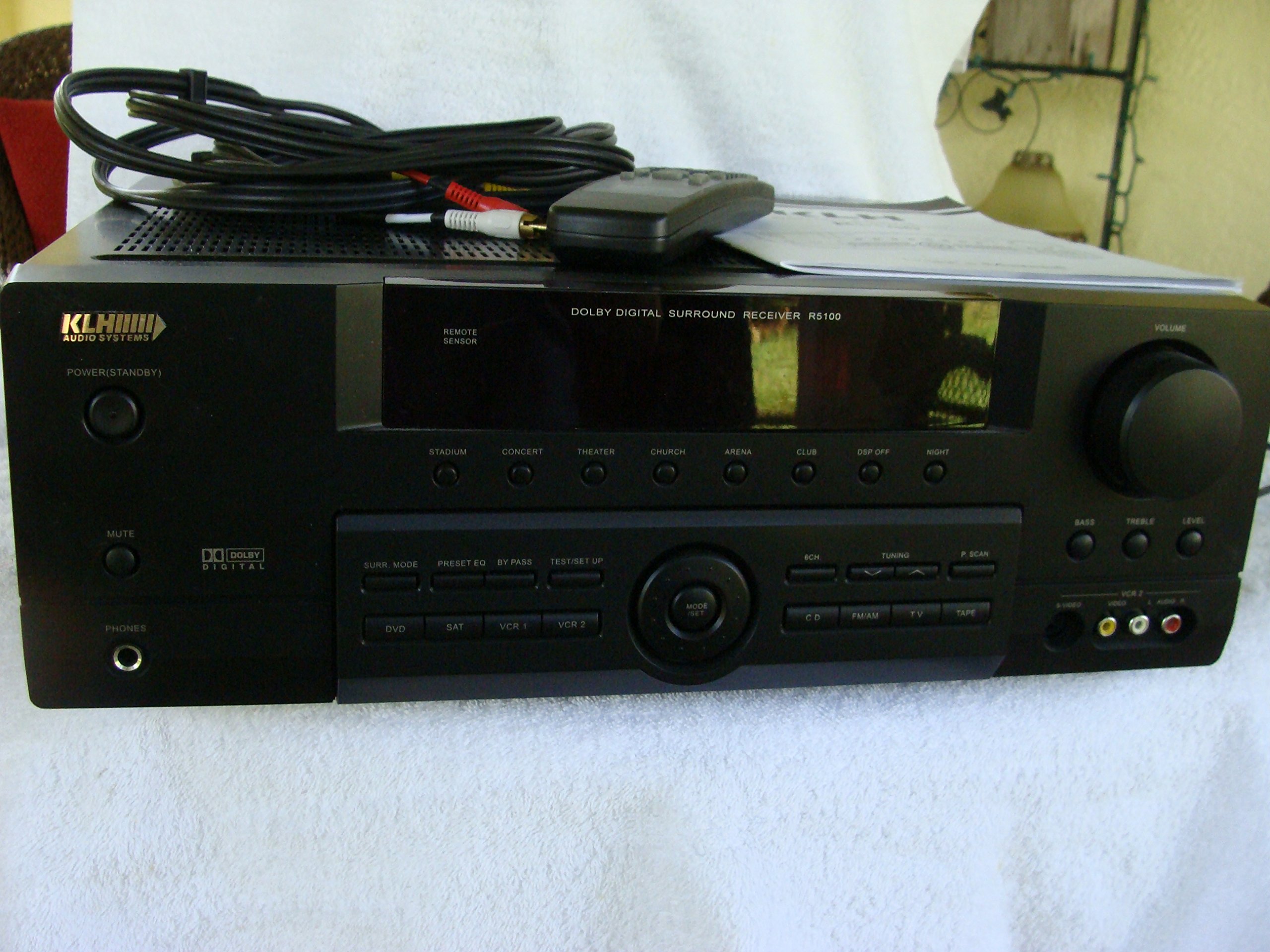
Image: The KLH R5100 receiver, its remote control, user manual, and included audio/video cables.
4. Produk Lebihview
4.1 Kontrol Panel Depan
The front panel provides access to essential controls and indicators for daily operation.

Gambar: Detail view of the receiver's front panel, highlighting the display, volume control, and input selection buttons.
- Tombol Daya: Menghidupkan atau mematikan penerima.
- Pemilih Masukan: Buttons for DVD, SAT, VCR 1, VCR 2, CD, FM/AM, TV, TAPE to choose your audio/video source.
- Tombol Volume: Menyesuaikan volume keluaran keseluruhan.
- Surround Mode Buttons: Select various sound fields like Stadium, Concert, Theater, Church, Arena, Club, DSP Off, Night.
- Bass/Treble/Level: Controls for adjusting audio tone and individual channel levels.
- Jack Headphone: Untuk didengarkan secara pribadi.
4.2 Sambungan Panel Belakang
The rear panel houses all input and output terminals for connecting your audio and video components, as well as speakers.

Image: The full rear panel of the receiver, displaying all connection ports for audio, video, and speakers.
- Terminal Pembicara: Connections for Main (Front Left/Right), Center, and Rear (Surround Left/Right) speakers.
- Audio Inputs (RCA): For connecting CD players, tape decks, VCRs, TVs, and other stereo audio sources.
- Video Inputs/Outputs (RCA/S-Video): For connecting video sources like DVD players, VCRs, and TVs.
- Input Audio Digital (Optik/Koaksial): For connecting digital audio sources like DVD players or set-top boxes.
- 6CH Direct Input: For connecting external multi-channel decoders or players with 5.1 analog outputs.
- Subwoofer Keluar: Output RCA untuk menghubungkan subwoofer aktif.
- Terminal Antena: For FM and AM antennas.
4.3 Unit Pengendali Jarak Jauh
The remote control provides convenient access to all receiver functions from your listening position.

Gambar: Close-up view of the remote control unit, detailing its buttons for various functions.
- Daya Hidup/Mati: Menghidupkan atau mematikan penerima.
- Pemilih Masukan: Dedicated buttons for each input source (DVD, CD, TV, etc.).
- Volume Naik/Turun: Menyesuaikan volume master.
- Bisu: Mematikan sementara output audio.
- Mode keliling: Cycles through available surround sound modes.
- Level/Test: For adjusting individual speaker levels and running a test tone.
- Kontrol Penyetel: For FM/AM station tuning and memory functions.
5. Pengaturan
5.1 Menghubungkan Speaker Anda
Ensure the receiver is unplugged from the power outlet before making any connections.
- Speaker Depan: Connect your main left and right speakers to the 'MAIN SPEAKERS (8Ω)' terminals. Ensure correct polarity (+ to + and - to -).
- Pembicara Tengah: Connect your center channel speaker to the 'CENTER SPEAKER (8Ω)' terminals.
- Speaker Belakang: Connect your surround left and right speakers to the 'REAR SPEAKERS (8Ω)' terminals.
- subwoofer: Connect an active subwoofer to the 'SUBWOOFER OUT' RCA jack using a single RCA cable.

Gambar: Detail view of the speaker connection terminals on the rear panel.
5.2 Menghubungkan Sumber Audio/Video
Use appropriate cables (RCA, Optical, Coaxial) to connect your source components to the receiver.
- Pemutar DVD: Connect the audio output of your DVD player to the 'DVD' audio input jacks (RCA) on the receiver. For digital audio, use either the 'DIGITAL IN OPTICAL' or 'DIGITAL IN COAXIAL' input. Connect the video output to the 'DVD' video input.
- CD player: Connect the audio output of your CD player to the 'CD' audio input jacks (RCA).
- TV/Cable Box: Connect the audio output of your TV or cable box to the 'TV' audio input jacks (RCA). Connect video output to the 'TV' video input.
- Perangkat lain: Use 'SAT', 'VCR 1', 'VCR 2', or 'TAPE' inputs for other audio/video components as needed.

Image: A close-up of the digital audio inputs (Coaxial, Optical) and the 6-channel direct input section on the rear panel.
5.3 Koneksi Antena
Hubungkan antena FM dan AM yang disertakan ke terminal masing-masing di panel belakang untuk penerimaan radio.
6. Petunjuk Pengoperasian
6.1 Operasi Dasar
- Nyalakan: Tekan tombol daya pada panel depan atau remote control.
- Pilih Masukan: Press the desired input selector button (e.g., 'DVD', 'CD') on the front panel or remote control to choose your source.
- Sesuaikan Volume: Turn the Volume knob on the front panel or use the Volume Up/Down buttons on the remote control.
6.2 Surround Sound Modes
The R5100 offers various sound modes to enhance your listening experience:
- Stadion: Simulates the acoustics of a large stadium.
- Konser: Creates a concert hall ambiance.
- Teater: Optimized for movie playback, enhancing dialogue and effects.
- Gereja: Replicates the spaciousness of a church.
- Arena: Provides a wide, open sound field.
- Klub: Simulates a lively club environment.
- DSP Off: Disables digital sound processing for a direct stereo signal.
- Malam: Reduces dynamic range for late-night listening without disturbing others.
Press the 'SURR. MODE' button on the remote or front panel to cycle through these modes.
6.3 Kontrol Nada
Use the BASS and TREBLE controls on the front panel or remote to adjust the low and high frequency response. The LEVEL controls allow for fine-tuning of individual speaker output levels.
6.4 Pengoperasian Tuner
To listen to radio:
- Press the 'FM/AM' input selector.
- Use the 'TUNING' buttons on the front panel or remote to find stations.
- Press 'MEMORY' to store favorite stations, and 'P.SCAN' to scan through presets.
7. Pemeliharaan
To ensure the longevity and optimal performance of your KLH R5100 receiver, follow these maintenance guidelines:
- Pembersihan: Wipe the exterior surfaces with a soft, dry cloth. Do not use abrasive cleaners, waxes, or solvents as they may damage the finish.
- Ventilasi: Regularly check that the ventilation openings are not obstructed by dust or debris. Use a soft brush or vacuum cleaner to gently remove any build-up.
- Kabel Daya: Inspect the power cord periodically for any signs of damage. If damaged, discontinue use and contact qualified service personnel.
- Penyimpanan: Jika menyimpan unit untuk jangka waktu yang lama, cabut stekernya dari stopkontak dan tutupi untuk melindunginya dari debu.
8. Penyelesaian masalah
If you encounter problems with your receiver, refer to the following common issues and solutions before seeking professional service.
| Masalah | Kemungkinan Penyebab | Larutan |
|---|---|---|
| Tidak ada daya | Kabel daya tercabut; stopkontak tidak aktif | Pastikan kabel daya terpasang dengan aman; Periksa stopkontak dengan perangkat lain. |
| Tidak ada suara | Incorrect input selected; Speakers not connected properly; Volume too low; Mute function active | Select correct input source; Check speaker connections and polarity; Increase volume; Deactivate Mute |
| Kontrol jarak jauh tidak berfungsi | Batteries depleted; Obstruction between remote and receiver; Remote sensor blocked | Replace batteries; Remove any obstructions; Ensure remote sensor on receiver is clear |
| Penerimaan radio buruk | Antena tidak terhubung atau posisinya salah. | Connect antennas securely; Adjust antenna position for better reception |
| Suara terdistorsi | Input signal too high; Speaker impedance mismatch; Damaged cables | Reduce source volume; Ensure speakers match 8Ω impedance; Check and replace damaged cables |
9. Spesifikasi
The following are the technical specifications for the KLH R5100 Surround Sound Receiver:
- Nomor Model: R5100
- Dimensi Produk: 16.88x6.88x15.75 inci
- Berat Barang: 24.2 pon
- Sumber Daya: AC 120V, 60Hz
- Konsumsi Daya: 320W
- Mode Keluaran Audio: Mengelilingi
- Konfigurasi Saluran Suara Surround: 5.1
- Teknologi Konektivitas: RCA, 3.5mm Jack, Optical, Coaxial
- Perangkat yang Kompatibel: Pembicara
- Tipe Pengontrol: Terpencil
- Fitur Khusus: Advanced Room Calibration (as per product listing, though specific details may vary)
- Warna: Hitam
10. Garansi dan Dukungan
For warranty information and customer support, please refer to the documentation included with your purchase or contact KLH customer service directly. Keep your proof of purchase for any warranty claims.


