Perkenalan
This manual provides instructions for the Vivanco RR 220 remote control, designed for compatibility with Samsung Smart TVs. Please read this manual thoroughly before using the device to ensure proper operation and to understand its features.
Isi Paket
- Vivanco RR 220 Remote Control
- Panduan Pengguna ini
Catatan: Baterai tidak termasuk dan harus dibeli secara terpisah.
Pengaturan
1. Pemasangan Baterai
- Temukan tempat baterai di bagian belakang remote control.
- Geser penutup baterai ke bawah atau tekan kait dan angkat untuk membukanya.
- Insert two (2) AAA batteries, ensuring the positive (+) and negative (-) terminals align with the markings inside the compartment.
- Pasang kembali penutup baterai, pastikan terpasang dengan aman hingga berbunyi klik.
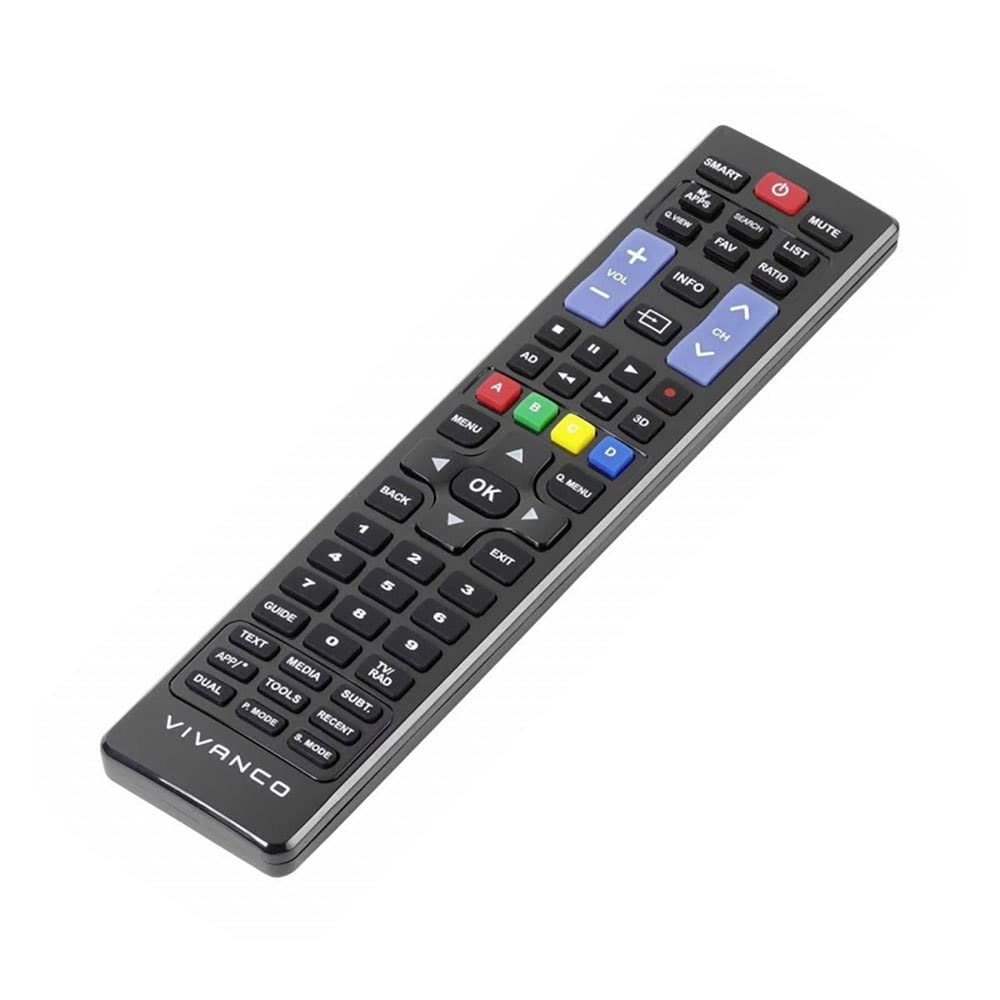
Gambar 1: Vivanco RR 220 remote control. This image displays the front of the remote control, highlighting its 57 buttons and ergonomic design. The battery compartment is located on the reverse side.
2. Penggunaan Awal
The Vivanco RR 220 is pre-programmed for Samsung Smart TVs. No additional setup or pairing is typically required. Once batteries are installed, point the remote control towards your Samsung Smart TV and press the Power button to test functionality.
Petunjuk Pengoperasian
The remote control features 57 buttons, providing comprehensive control over your Samsung Smart TV and compatible devices. Below are common button functions:
- Tombol Daya: Menyalakan atau mematikan TV.
- Tombol Angka (0-9): For direct channel selection or data input.
- Volume Naik/Turun: Menyesuaikan volume audio.
- Saluran Atas/Bawah: Mengganti saluran TV.
- Tombol Bisu: Mematikan suara TV.
- Tombol Navigasi (Atas, Bawah, Kiri, Kanan, Enter): Digunakan untuk menavigasi menu dan memilih opsi.
- Tombol Kembali/Kembali: Kembali ke layar atau menu sebelumnya.
- Smart Hub/Home Button: Accesses the Smart Hub or main menu of your Samsung Smart TV.
- Tombol Sumber/Masukan: Memilih sumber masukan (HDMI, AV, dll.).
- Tombol Warna (Merah, Hijau, Kuning, Biru): For specific functions within certain applications or menus, as indicated on-screen.
- Kontrol Pemutaran Ulang (Putar, Jeda, Hentikan, Maju Cepat, Mundur): Controls media playback on compatible devices or apps.
For specific functions related to your TV model, refer to your Samsung TV's user manual.
Pemeliharaan
Membersihkan Kendali Jarak Jauh
- Gunakan kain lembut dan kering untuk menyeka permukaan remote control.
- Untuk kotoran membandel, sedikit dampen kain dengan air atau pembersih lembut non-abrasif.
- Jangan gunakan bahan kimia keras, pelarut, atau bantalan pembersih abrasif, karena dapat merusak lapisan atau komponen internal remote.
- Ensure no liquid enters the remote control through button gaps or the battery compartment.
Penggantian Baterai
Replace batteries when the remote's response becomes sluggish or it stops functioning. Always replace both batteries simultaneously with new AAA alkaline batteries. Do not mix old and new batteries or different types of batteries.
Penyelesaian Masalah
| Masalah | Kemungkinan Penyebab | Larutan |
|---|---|---|
| Kontrol jarak jauh tidak berfungsi. |
|
|
| Beberapa tombol tidak berfungsi. |
|
|
Spesifikasi
- Merek: Vivanco
- Nama Model: RR 220
- Nomor Model Produk: 38016
- Perangkat yang Kompatibel: Home cinema, DVD/Blu-ray player, Television (Samsung Smart TV compatible)
- Teknologi Konektivitas: Wireless IR (Infrared)
- Jumlah Tombol: 57
- Jenis Baterai: 2 x AAA (Alkaline recommended)
- Baterai Termasuk: TIDAK
- Dimensi Produk: Ukuran 18x4.8x2.3 cm
- Berat Produk: 80 gram
- Jangkauan Maksimum: 15 meter
- Fitur Khusus: IPTV, DVB-T, HDTV compatibility


