1. Pendahuluan
Thank you for choosing the Fonestar AS-24U Hi-Fi USB/SD/MP3 AmpPenguat suara. Manual ini memberikan informasi penting untuk pengoperasian perangkat Anda yang aman dan efisien. Harap baca dengan saksama sebelum digunakan dan simpan untuk referensi di masa mendatang.
2. Petunjuk Keselamatan
- Catu Daya: Pastikan amplifier is connected to a power source matching the specified voltage (230V).
- Ventilasi: Jangan menghalangi lubang ventilasi. Berikan ruang yang cukup di sekitar unit agar aliran udara lancar dan mencegah panas berlebih.
- Kelembaban: Pertahankan amplifier away from water, moisture, and high humidity environments. Do not expose it to dripping or splashing.
- Sumber Panas: Hindari menempatkan unit di dekat sumber panas seperti radiator, ventilasi pemanas, kompor, atau peralatan penghasil panas lainnya.
- Pembersihan: Cabut kabel daya sebelum membersihkan. Gunakan kain kering dan lembut. Jangan gunakan cairan pembersih atau pembersih aerosol.
- Pelayanan: Jangan mencoba untuk memperbaiki produk ini sendiri. Rujuk semua servis ke personel servis yang berkualifikasi.
- Entri Benda/Cair: Jangan sekali-kali memasukkan benda apa pun ke dalam produk ini melalui celah karena dapat menyentuh volatilitas yang berbahaya.tagtitik e atau bagian yang mengalami hubungan arus pendek yang dapat mengakibatkan kebakaran atau sengatan listrik.
3. Produk Lebihview
3.1 Panel Depan
The front panel features controls for power, input selection, volume adjustment, and USB/SD media playback. It also includes a display for media information.
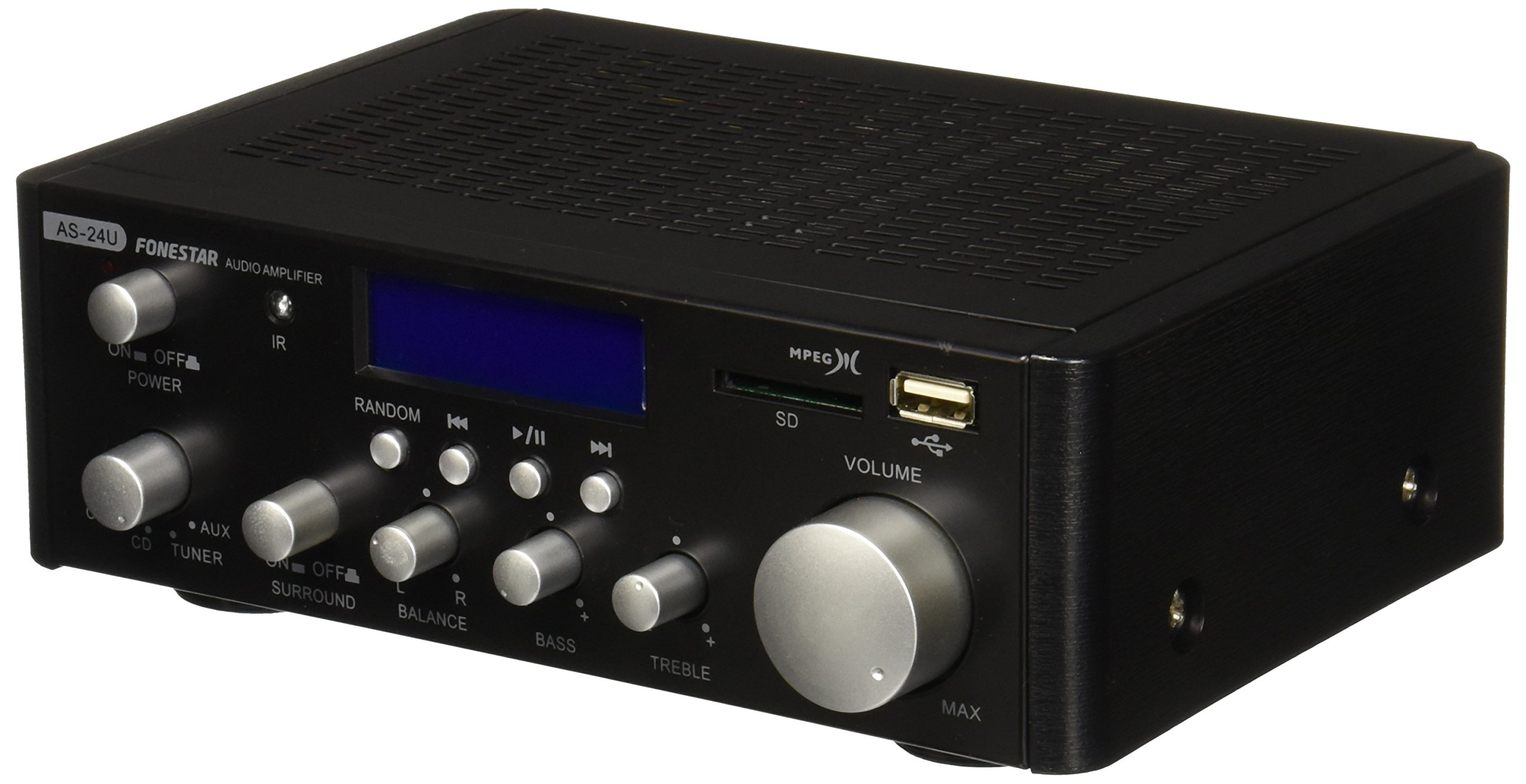
Gambar 1: Depan view of the Fonestar AS-24U amplifier, showing the main controls and display.
3.2 Panel Belakang
The rear panel provides all necessary connections for audio input sources, speaker outputs, and power.

Gambar 2: Belakang view of the Fonestar AS-24U amplifier, detailing input/output ports and power connection.
- INPUT (AUX, TUNER, CD): RCA stereo inputs for connecting external audio sources.
- SPEAKER OUT (STEREO): Spring clip terminals for connecting passive speakers (4-8 Ω).
- SPEAKER OUT (SURROUND): Additional spring clip terminals for surround speakers (8 Ω).
- DAYA DI: AC power input for the main power cable.
- JILIDTAGPEMILIH E: Switch for selecting between 115V and 230V power input. Ensure this is set correctly for your region.
3.3 Kontrol Jarak Jauh
Remote control yang disertakan memungkinkan pengoperasian yang mudah. amplifier's media playback functions.
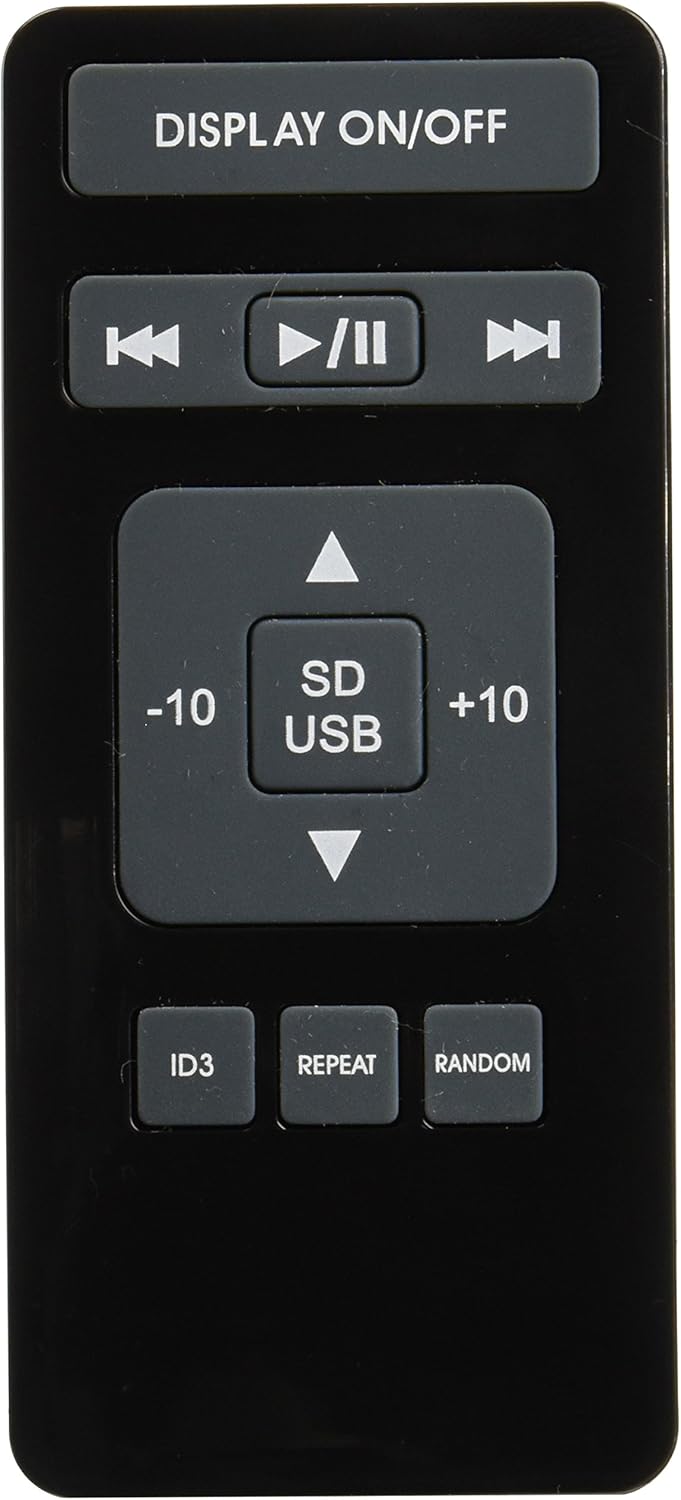
Image 3: Remote control for the Fonestar AS-24U amplifier, showing buttons for media playback and display control.
- TAMPILAN HIDUP/MATI: Toggles the front panel display.
- PLAY/PAUSE, PREVIOUS/NEXT: Kontrol untuk pemutaran media.
- SD / USB: Selects between SD card and USB drive as the media source.
- -10/+10: Skips tracks by 10.
- ID3: Displays ID3 tag informasi untuk MP3 files.
- MENGULANG: Toggles repeat modes (e.g., repeat one, repeat all).
- ACAK: Toggles random playback.
4. Pengaturan
4.1 Menghubungkan Speaker
- Pastikan ampAmplifier dimatikan dan kabelnya dicabut.
- Connect your passive speakers to the SPEAKER OUT terminals on the rear panel.
- Match the positive (+) terminal on the amplifier to the positive (+) terminal on your speaker, and the negative (-) to the negative (-).
- For stereo speakers, use the 4-8 Ω terminals. For surround speakers, use the 8 Ω terminals. Ensure your speakers' impedance matches the ampspesifikasi lifier.
4.2 Menghubungkan Sumber Audio
- Connect your audio devices (e.g., CD player, tuner, auxiliary device) to the corresponding RCA INPUT jacks (CD, TUNER, AUX) on the rear panel.
- Ensure left and right channels are correctly matched (red for right, white for left).
4.3 Sambungan Daya
- Verify the VOLTAGE SELECTOR switch on the rear panel is set to the correct voltage for your region (e.g., 230V).
- Connect the power cable to the POWER IN socket on the rear panel and then to a suitable wall outlet.
5. Petunjuk Pengoperasian
5.1 Menghidupkan/Mematikan
Tekan tombol daya di panel depan untuk menghidupkan amplifier on or off. A soft start protection circuit is integrated.
5.2 Memilih Sumber Input
Use the input selector knob or buttons on the front panel to choose between CD, TUNER, AUX, USB, or SD inputs.
5.3 Menyesuaikan Volume
Rotate the main volume knob on the front panel to adjust the overall sound level. Start with a low volume and gradually increase it to a comfortable listening level.
5.4 Pemutaran USB/SD
- Masukkan flash drive USB atau kartu SD yang berisi audio MP3. filemasukkan ke dalam slot yang sesuai di panel depan.
- Select the USB or SD input using the input selector.
- Use the playback controls (Play/Pause, Previous/Next) on the front panel or remote control to manage your music.
- The remote control allows for additional functions like skipping 10 tracks (+10/-10), displaying ID3 tags, repeating tracks, and random playback.
6. Pemeliharaan
6.1 Pembersihan
Untuk membersihkan amplifier, first unplug it from the power outlet. Use a soft, dry cloth to wipe down the exterior surfaces. Do not use abrasive cleaners, waxes, or solvents as they may damage the finish.
6.2 Penyimpanan
Jika menyimpan amplifier for an extended period, ensure it is unplugged, clean, and stored in a cool, dry place away from direct sunlight and extreme temperatures.
7. Penyelesaian masalah
- Tidak Ada Daya:
- Periksa apakah kabel daya terhubung dengan aman ke kedua amppenguat suara dan stopkontak dinding.
- Pastikan stopkontak berfungsi.
- Verify the VOLTAGE SELECTOR switch is set correctly.
- Tidak ada suara:
- Konfirmasikan bahwa sumber input yang benar telah dipilih.
- Periksa semua sambungan speaker untuk memastikan polaritas yang benar dan terpasang dengan aman.
- Pastikan volume dinaikkan, bukan dimatikan.
- Coba uji dengan sumber audio yang berbeda.
- Suara Terdistorsi:
- Kurangi volumenya.
- Periksa kompatibilitas impedansi speaker.
- Ensure audio cables are not damaged and are securely connected.
- Masalah Pemutaran USB/SD:
- Ensure the USB drive or SD card is formatted to a compatible file sistem (misalnya, FAT32).
- Verifikasi bahwa audio files dalam format MP3.
- Coba gunakan USB drive atau kartu SD yang berbeda.
8. Spesifikasi
| Merek | Bintang FONE |
| Model | AS-24U |
| Stereo Power Output | 25 + 25 W max, 15 + 15 W RMS (4 Ω), 12 + 12 W RMS (8 Ω) |
| Surround Power Output | 10 + 10 W max, 6 + 6 W RMS (8 Ω) |
| Masukan | 3 stereo (CD, Tuner, AUX), 2 x RCA 400 mV |
| Perlindungan | Soft start, short circuit, overload |
| Jil.tage | 230 Volt |
| Dimensi (P x L x T) | 5 x 5 x 10 cm (sekitar 50 x 50 x 100 mm) |
| Berat | 1.9 kg |
| Konektivitas Pembicara | Berkabel |
9. Garansi dan Dukungan
This Fonestar AS-24U amplifier comes with a standard manufacturer's warranty. Please refer to the warranty card included with your purchase for specific terms and conditions. For technical support, service, or warranty claims, please contact your retailer or the official Fonestar customer service.


