1. Pendahuluan
1.1. Lebihview
The Hager WITTY charging station is designed for charging electric vehicles in accordance with Mode 3 (IEC 61851-1) and Mode 2 standards. It supports both Type 3 and standard socket connections, offering flexible charging solutions for various electric vehicles. This device operates on a 3-phase + Neutral, 32A electrical supply, delivering power from 4 kW to 22 kW.
1.2. Petunjuk Keselamatan
- Installation must be performed by a qualified electrician in accordance with local and national electrical codes.
- Do not attempt to open or repair the charging station yourself. Contact qualified service personnel.
- Ensure the charging station is properly grounded.
- Do not use the charging station if it is damaged or shows signs of malfunction.
- Keep children and unauthorized persons away from the charging station during operation.
- Avoid exposing the charging station to extreme temperatures, direct sunlight for prolonged periods, or corrosive substances.
2. Deskripsi Produk
2.1. Fitur
- Compatible with Mode 3 (Type 3) and Mode 2 charging.
- Free access operation.
- Power output: 4 kW to 22 kW.
- Input: 3-phase + Neutral, 32A.
- Integrated status indicator light.
2.2. Komponen
The Hager WITTY charging station typically includes:
- Unit stasiun pengisian daya
- Perangkat keras pemasangan (sekrup, jangkar)
- Panduan pengguna (dokumen ini)

Gambar 1: Depan view of the Hager WITTY charging station with a green operational light, mounted on a textured wall.
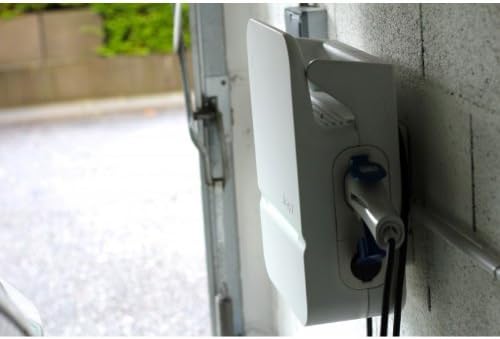
Gambar 2: Samping view of the Hager WITTY charging station, illustrating the cable connection point and the unit's profile.
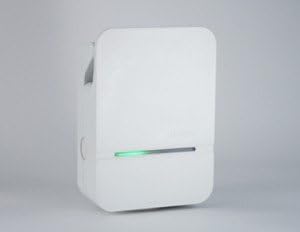
Gambar 3: Detail bagian depan view of the Hager WITTY charging station, emphasizing the integrated green status light.
3. Pengaturan
3.1. Lokasi Instalasi
Choose a suitable location that is protected from direct impact, excessive moisture, and extreme temperatures. Ensure adequate ventilation and accessibility for maintenance.
3.2. Pemasangan
- Tandai titik pengeboran pada dinding menggunakan templat yang disediakan (jika ada) atau dengan mengukur lubang pemasangan pada unit.
- Bor lubang dan masukkan jangkar dinding yang sesuai.
- Secure the charging station to the wall using the provided screws.
3.3. Sambungan Listrik
PERINGATAN: Instalasi listrik harus dilakukan oleh ahli listrik yang berkualifikasi.
- Ensure the main power supply is disconnected before beginning any electrical work.
- Connect the 3-phase + Neutral (3Ph+N) 32A power supply to the designated terminals inside the charging station.
- Pastikan landasan yang tepat telah dipasang.
- Verify all connections are secure and correctly wired according to the wiring diagram provided with the unit (refer to the separate installation guide for detailed diagrams).
- Close the charging station cover securely.
4. Operasi
4.1. Memulai Pengisian Daya
- Ensure the charging station is powered on and the status indicator light is green (ready).
- Connect the charging cable to your electric vehicle's charging port.
- Connect the other end of the charging cable to the charging station's outlet (Type 3 or Mode 2 socket).
- The charging station will automatically initiate the charging process. The status indicator light may change to blue or flashing green, depending on the charging status.
4.2. Menghentikan Serangan
- Lepaskan kabel pengisi daya dari kendaraan listrik Anda terlebih dahulu.
- Disconnect the charging cable from the charging station.
- The charging station will return to a ready state (green indicator light).
4.3. Indikator Status
- Lampu hijau: Ready for charging.
- Blue Light (or flashing green): Pengisian sedang berlangsung.
- Red Light (or flashing red): Error or fault detected. Refer to the Troubleshooting section.
- Tidak Ada Cahaya: Power off or system fault.
5. Pemeliharaan
5.1. Pembersihan
Clean the exterior of the charging station with a soft, damp Gunakan kain. Jangan gunakan pembersih abrasif, pelarut, atau bahan kimia keras. Pastikan unit dimatikan sebelum dibersihkan.
5.2. Inspeksi
Periodically inspect the charging station for any signs of damage, wear, or loose connections. Check the charging cable for fraying or damage. If any damage is found, discontinue use and contact a qualified technician.
6. Penyelesaian masalah
| Masalah | Kemungkinan Penyebab | Larutan |
|---|---|---|
| No power/No light | Power supply disconnected; Circuit breaker tripped. | Check power supply; Reset circuit breaker. If problem persists, contact a qualified electrician. |
| Lampu indikator merah | Internal fault; Overcurrent; Ground fault. | Disconnect and reconnect the vehicle. If the error persists, power cycle the unit. If still red, contact service. |
| Pengisian daya tidak dimulai | Cable not properly connected; Vehicle not ready to charge; Charging station fault. | Ensure cable is securely connected to both vehicle and station. Check vehicle's charging status. Power cycle the charging station. |
7. Spesifikasi
| Fitur | Detil |
|---|---|
| Model | XEV103 |
| Mode Pengisian Daya | Mode 3 (IEC 61851-1), Mode 2 |
| Jenis Konektor | Type 3 / Standard Socket |
| Masukan Voltage | 3-phase + Neutral |
| Max Saat Ini | 32A |
| Daya Keluaran | 4 kW hingga 22 kW |
| Mengakses | Akses Gratis |
| ASIN | B00CSJUVKA |
8. Garansi dan Dukungan
For warranty information and technical support, please refer to the official Hager website or contact your local Hager distributor. Keep your purchase receipt for warranty claims.
Spare parts availability: Information not available.


