Perkenalan
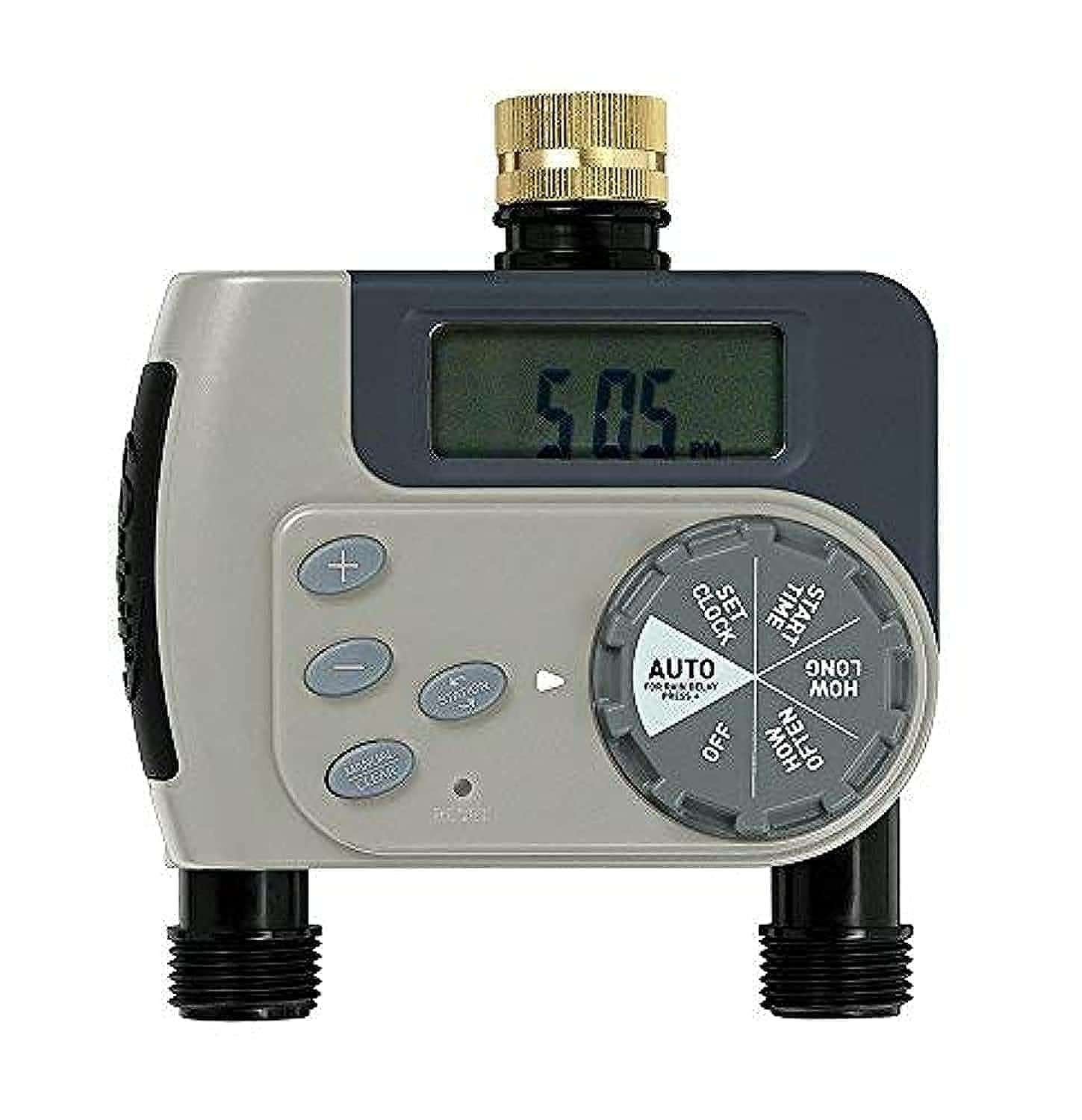
The Orbit 94148 Buddy II is a battery-operated watering timer designed to automate your garden irrigation system. This device connects to your outdoor faucet and allows you to program watering schedules for two independent outlets, providing flexibility for various watering needs such as micro-jets, drip systems, and garden sprinklers.
Informasi Keselamatan
- Hanya untuk penggunaan luar ruangan.
- Gunakan hanya dengan air dingin.
- Do not submerge the timer in water.
- Protect from freezing temperatures to prevent damage.
Isi Paket
The Orbit 94148 Buddy II watering timer package includes:
- One Orbit 94148 Buddy II Two-Outlet Watering Timer.
- Panduan Pengguna (dokumen ini).
Catatan: AA batteries are required for operation and are not included in the package.
Pengaturan
Follow these steps to set up your Orbit 94148 Buddy II watering timer:
- Pasang Baterai: Open the battery compartment and insert the required AA batteries (not included). Ensure correct polarity.
- Hubungkan ke Keran: Securely attach the timer to your outdoor faucet. Hand-tighten only to prevent damage.
- Hubungkan Selang: Attach your garden hoses or irrigation lines to the two independent outlets on the timer.
Petunjuk Pengoperasian
The Orbit 94148 Buddy II offers both automatic programming and manual watering options.
Pemrograman Otomatis
To program the timer for automatic watering:
- Tetapkan Waktu Saat Ini: Use the dial to set the current time of day.
- Tetapkan Waktu Mulai: Pilih waktu yang diinginkan untuk memulai penyiraman.
- Atur Durasi Penyiraman: Select the length of each watering cycle, ranging from 1 to 240 minutes.
- Tetapkan Frekuensi: Determine how often watering occurs. Options include every 6 hours, every 12 hours, or daily intervals from 1 to 7 days.
- Aktifkan Mode Otomatis: Turn the dial to the "Auto" position to enable the programmed watering schedule.
Each of the two outlets can be programmed independently, allowing for different watering schedules for separate areas of your garden.
Penyiraman Manual
To manually water without affecting your programmed schedule:
- Turn the dial to the "Manual" position.
- Select the desired watering duration.
- The water will flow for the selected duration and then automatically shut off.
- To stop manual watering early, turn the dial back to the "Off" or "Auto" position.
Pemeliharaan
Regular maintenance ensures optimal performance and longevity of your watering timer.
- Penggantian Baterai: When the battery indicator shows low power, replace the AA batteries promptly. Always use fresh batteries.
- Pembersihan: Periodically check the filter washer at the faucet connection for debris and clean if necessary to maintain proper water flow.
- Musim dingin: Before the first frost, disconnect the timer from the faucet, remove batteries, and store the unit indoors in a dry, protected area to prevent freeze damage.
Penyelesaian Masalah
If you encounter issues with your watering timer, consider the following:
- Tidak Ada Aliran Air:
- Periksa apakah keran sudah terbuka sepenuhnya.
- Ensure batteries are correctly installed and have sufficient power.
- Verify that the timer is set to "Auto" or a manual watering cycle is active.
- Inspect the filter washer for clogs.
- Timer Not Programming:
- Confirm batteries are fresh and properly inserted.
- Ensure the dial is firmly clicked into each setting position during programming.
- Bocor:
- Periksa semua koneksi untuk kekencangan.
- Ensure rubber washers are properly seated at all connection points.
- Do not overtighten connections, as this can damage washers.
Spesifikasi
| Nomor Model | 94148 |
| Dimensi (P x L x T) | Ukuran 12x18.5x20 cm |
| Berat | 460 gram |
| Sumber Daya | Baterai AA (tidak termasuk) |
| Bahan | Damar |
| Jumlah Pengaturan | 10 |
| Warna | Hijau |
| Pabrikan | Produk Irigasi Orbit, Inc. |
Garansi dan Dukungan
The Orbit 94148 Buddy II Battery-Operated Two-Outlet Watering Timer comes with a Garansi 2 tahun sejak tanggal pembelian. Garansi ini mencakup cacat bahan dan pengerjaan dalam penggunaan normal.
For warranty claims or technical support, please refer to the contact information provided on the product packaging or the official Orbit weblokasi.