Perkenalan
This manual provides essential instructions for the safe and efficient operation, maintenance, and care of your Quest 35200 Stainless Steel Cordless Electric Coffee Percolator. Please read all instructions carefully before first use and retain this manual for future reference.

Image: The Quest 35200 Stainless Steel Cordless Electric Coffee Percolator, featuring a polished stainless steel body, black handle, and a black base with a power button.
Petunjuk Keselamatan Penting
Saat menggunakan peralatan listrik, tindakan pencegahan keselamatan dasar harus selalu diikuti untuk mengurangi risiko kebakaran, sengatan listrik, dan/atau cedera pada orang, termasuk yang berikut ini:
- Baca semua petunjuk.
- Jangan sentuh permukaan yang panas. Gunakan gagang atau kenop.
- To protect against fire, electric shock, and injury to persons, do not immerse cord, plugs, or the percolator base in water or other liquid.
- Pengawasan ketat diperlukan saat peralatan apa pun digunakan oleh atau di dekat anak-anak.
- Cabut steker dari stopkontak saat tidak digunakan dan sebelum membersihkan. Biarkan dingin sebelum memasang atau melepas komponen, dan sebelum membersihkan alat.
- Jangan mengoperasikan alat apa pun dengan kabel atau steker yang rusak, atau setelah alat mengalami malfungsi atau rusak dengan cara apa pun. Kembalikan alat ke fasilitas servis resmi terdekat untuk pemeriksaan, perbaikan, atau penyetelan.
- Penggunaan aksesori tambahan yang tidak direkomendasikan oleh produsen alat dapat mengakibatkan kebakaran, sengatan listrik, atau cedera pada orang.
- Jangan gunakan di luar ruangan.
- Jangan biarkan kabel menggantung di tepi meja atau meja dapur, atau menyentuh permukaan panas.
- Jangan menaruhnya di atas atau di dekat kompor gas atau listrik yang panas, atau di dalam oven yang sedang dipanaskan.
- Selalu pasang steker ke alat terlebih dahulu, lalu colokkan kabel ke stopkontak. Untuk memutuskan sambungan, putar kontrol apa pun ke "mati", lalu cabut steker dari stopkontak.
- Jangan menggunakan alat ini untuk tujuan lain selain yang dimaksudkan.
- Panas dapat terjadi jika tutup dibuka selama siklus penyeduhan.
- Peralatan ini hanya untuk penggunaan rumah tangga.
Produk Selesaiview dan Fitur
The Quest 35200 Electric Coffee Percolator is designed for convenient coffee brewing. Key features include:
- Desain Tanpa Kabel: Memudahkan proses menuang dan menyajikan.
- Konstruksi Baja Tahan Karat: Tahan lama dan mudah dibersihkan.
- Built-in Filter: Eliminates the need for disposable paper filters.
- Kapasitas 1.5 Liter: Brews multiple cups of coffee.
- Daya 1100W: Ensures quick brewing.
- Fungsi Tetap Hangat: Maintains coffee temperature for 30-45 minutes.
- Mati Otomatis: Meningkatkan keamanan dan efisiensi energi.
- 360° Detachable Base: For flexible placement and easy lifting.
- Lampu Indikator Daya: Menunjukkan status operasional.
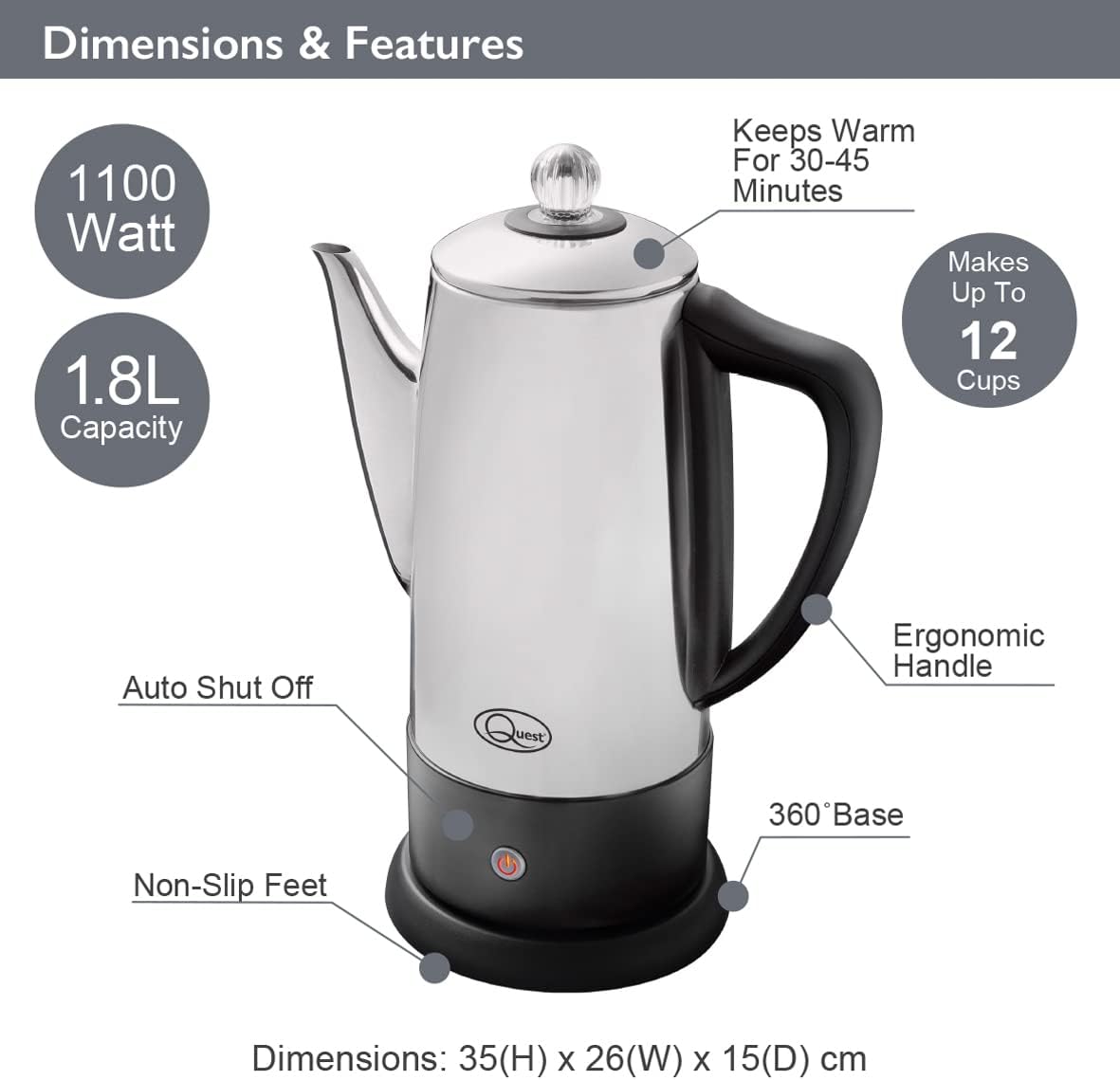
Image: Diagram illustrating the Quest 35200 percolator with callouts for its features: 1100 Watt power, 1.8L capacity (note: product title states 1.5L, using 1.8L from image), auto shut-off, non-slip feet, 360° base, ergonomic handle, keeps warm for 30-45 minutes, and makes up to 12 cups. Dimensions are 35(H) x 26(W) x 15(D) cm.

Image: A collage of four close-up views of the percolator: the interior with water level markings up to 12 cups, the removable filter basket filled with ground coffee, the illuminated power indicator light on the base, and the transparent lid knob.
Pengaturan
- Membongkar: Carefully remove all packaging materials and inspect the percolator for any damage.
- Pembersihan Awal: Before first use, wash the interior of the percolator, the filter basket, and the stem in warm, soapy water. Rinse thoroughly and dry. Wipe the exterior with a damp kain.
- Penempatan: Place the percolator base on a stable, flat, heat-resistant surface, away from the edge of the counter.
- Sambungan Daya: Pastikan kabel daya mudah diakses dan tidak terhalang.
Petunjuk Pengoperasian
Follow these steps to brew coffee with your Quest 35200 percolator:
- Tambahkan air: Fill the percolator with cold, fresh water to your desired level, observing the internal markings. Do not exceed the maximum fill line.
- Insert Stem and Basket: Place the percolator stem into the center well of the percolator. Then, place the filter basket onto the stem.
- Tambahkan Bubuk Kopi: Add your preferred amount of coarse-ground coffee into the filter basket. Do not use fine-ground coffee as it may seep through the filter.
- Tutup Aman: Pasang tutupnya dengan rapat pada alat penyaring kopi.
- Hubungkan Daya: Place the percolator onto its 360° detachable power base. Plug the power cord into a suitable electrical outlet.
- Mulai Menyeduh: Press the power button on the base. The indicator light will illuminate, signifying that brewing has begun.
- Siklus Perkolasi: The water will heat and begin to percolate through the coffee grounds. The brewing process typically takes several minutes, depending on the amount of water.
- Tetap Hangat: Once the brewing cycle is complete, the percolator will automatically switch to a keep-warm mode, indicated by the power light changing color or remaining illuminated. This function keeps coffee warm for approximately 30-45 minutes.
- Melayani: Carefully remove the percolator from its base and pour coffee into cups. Be cautious of hot surfaces and steam.
- Memutuskan: After serving, unplug the percolator from the wall outlet.

Image: A visual guide showing four steps for using the percolator: 1. Adding cold water to the pot. 2. Adding ground coffee to the filter basket. 3. Pressing the power switch on the base. 4. Pouring the brewed coffee into a cup.

Image: A diagram highlighting the percolator's keep warm functionality, stating it keeps coffee warm for up to 45 minutes, has a 1.8L capacity, and makes up to 12 cups.

Gambar: Close-up view of the percolator's 360° detachable base, showing the central electrical connector.
Perawatan dan Pembersihan
Regular cleaning ensures optimal performance and longevity of your percolator.
- Selalu Cabut Kabel: Before cleaning, ensure the percolator is unplugged from the power outlet and has cooled down completely.
- Membongkar: Remove the lid, filter basket, and stem.
- Komponen Cuci: Wash the lid, filter basket, and stem in warm, soapy water. Rinse thoroughly and dry.
- Interior Bersih: Wash the interior of the percolator with warm, soapy water and a soft sponge or brush. Rinse thoroughly to remove all soap residue.
- Eksterior Bersih: Usap bagian luar alat penyaring kopi dengan air.amp Gunakan kain. Jangan gunakan pembersih abrasif atau spons gosok, karena dapat merusak lapisan baja tahan karat.
- Pembersihan Dasar: Bersihkan basis daya dengan iklanamp kain. Jangan pernah merendam alas daya dalam air atau cairan lainnya.
- Pengeringan: Ensure all parts are completely dry before reassembling or storing the percolator.
- Kerak: Over time, mineral deposits may build up. To descale, fill the percolator with a mixture of equal parts water and white vinegar. Bring to a boil and let it sit for an hour before emptying and rinsing thoroughly. Repeat if necessary.
- Keamanan Mesin Pencuci Piring: The percolator is BUKAN dishwasher safe. Hand wash all components.
Penyelesaian Masalah
If you encounter issues with your percolator, refer to the following common problems and solutions:
| Masalah | Kemungkinan Penyebab | Larutan |
|---|---|---|
| Mesin penyaring kopi tidak menyala. | Not plugged in; power button not pressed; no power at outlet. | Ensure unit is plugged in and power button is pressed. Check outlet with another appliance. |
| Kopinya terlalu encer. | Not enough coffee grounds; coffee grounds too coarse; water level too high. | Increase coffee grounds. Use medium-coarse grounds. Reduce water level. |
| Kopi terlalu kuat. | Too many coffee grounds; coffee grounds too fine; water level too low. | Reduce coffee grounds. Use coarser grounds. Increase water level. |
| Coffee grounds in brewed coffee. | Coffee grounds too fine; filter basket not seated correctly. | Use coarser grounds. Ensure filter basket is properly seated on the stem. |
| Percolator leaks. | Overfilled; lid not seated correctly. | Do not fill above the maximum line. Ensure lid is firmly and correctly placed. |
Jika masalah berlanjut setelah mencoba solusi ini, silakan hubungi dukungan pelanggan.
Spesifikasi
| Fitur | Detil |
|---|---|
| Nomor Model | 35200 |
| Merek | PENCARIAN |
| Warna | Perak |
| Kapasitas | 1.5 Liter (sekitar 12 cangkir) |
| Kekuatan | 1100W |
| Jil.tage | 240V |
| Fitur Khusus | Cordless, Built-in Filter, Keep Warm Function |
| Dimensi (P x L x T) | 13.19 x 9.25 x 6.1 inci (33.5 x 23.5 x 15.5 cm) |
| Berat Barang | 2.2 pon (1 kg) |
| Aman untuk Mesin Pencuci Piring | TIDAK |
Garansi dan Dukungan
Untuk informasi garansi dan dukungan pelanggan, silakan merujuk ke dokumen yang diberikan pada saat pembelian atau hubungi pengecer Anda. Simpan bukti pembelian Anda untuk klaim garansi apa pun.