1. Produk Lebihview
Thank you for choosing the HOMCOM Mobile TV Stand with Wheels. This versatile and compact TV stand is designed to provide convenient storage and mobility for your entertainment setup. It features a contemporary design, ample storage space, and smooth-rolling casters for easy repositioning.

Image 1.1: The HOMCOM Mobile TV Stand in a living room setting, showcasing its compact design and functionality with a television placed on its top surface.
2. Informasi Keselamatan Penting
Harap baca dan pahami semua petunjuk sebelum perakitan dan penggunaan. Simpan panduan ini untuk referensi di kemudian hari.
- Kapasitas Berat: Do not exceed the maximum recommended load of 15 kg (33 lbs) for the TV stand. This stand is suitable for televisions under 42 inches.
- Penempatan Stabil: Pastikan dudukan TV diletakkan pada permukaan yang rata dan stabil.
- Keselamatan Anak: Jauhkan anak-anak dari area perakitan. Komponen kecil dapat menyebabkan bahaya tersedak.
- Penggunaan yang Tepat: Use this product only for its intended purpose as a TV stand or a small coffee table.
- Memindahkan Stand: When moving the stand, ensure all items are securely placed or removed to prevent falling. Lock the wheels once the stand is in its desired position.
3. Isi Paket
Sebelum memulai perakitan, pastikan semua komponen yang tercantum di bawah ini ada dan tidak rusak. Jika ada komponen yang hilang atau rusak, silakan hubungi dukungan pelanggan.

Image 3.1: A visual representation of the product packaging, indicating that the item is shipped in one package.
Komponen yang diharapkan:
- Panel Atas
- Panel Bawah
- Panel Samping (x2)
- Rak Tengah
- Casters (x4, 2 with brakes)
- Perangkat Keras Perakitan (sekrup, pasak, dll.)
- Manual Instruksi
4. Petunjuk Perakitan
Assembly is required for this product. Follow the steps carefully for a quick and easy setup.
4.1. Sebelum Anda Memulai
- Bersihkan area yang luas untuk perakitan.
- Gather necessary tools: Phillips head screwdriver (not included).
- Buka kemasan semua komponen dan letakkan pada permukaan yang lembut dan bersih untuk mencegah goresan.
4.2. Perakitan Langkah demi Langkah
- Pasang Roda: Secure the four casters to the bottom panel using the provided screws. Ensure the two casters with brakes are positioned on the same side for easy access.
- Merakit Panel Samping: Attach the side panels to the bottom panel using the appropriate hardware.
- Insert Middle Shelf: Slide the middle shelf into the designated slots between the side panels. Secure it with the provided hardware. This creates the double storage space.
- Pasang Panel Atas: Place the top panel onto the assembled structure and secure it with the remaining hardware.
5. Petunjuk Pengoperasian
This TV stand is designed for ease of use and versatility.
5.1. Using the Wheels
The stand is equipped with 4 swivel casters, 2 of which have brakes, allowing for easy movement and secure positioning.
- Untuk Memindahkan: Unlock the two casters with brakes by flipping the lever upwards. Gently push the stand to your desired location.
- Untuk Mengamankan: Once the stand is in position, press the lever downwards on the two casters with brakes to lock them. This prevents unintended movement.

Gambar 5.1: Close-up view of one of the stand's caster wheels, highlighting its 360-degree swivel capability and the integrated brake mechanism for stability.
5.2. Utilizing Storage Space
The TV stand features a double storage area, separated by a middle shelf, ideal for organizing audio/video equipment, books, or decorative items.
- Place media devices, remote controls, or other accessories on the shelves.
- The open design allows for easy access and ventilation for electronic components.
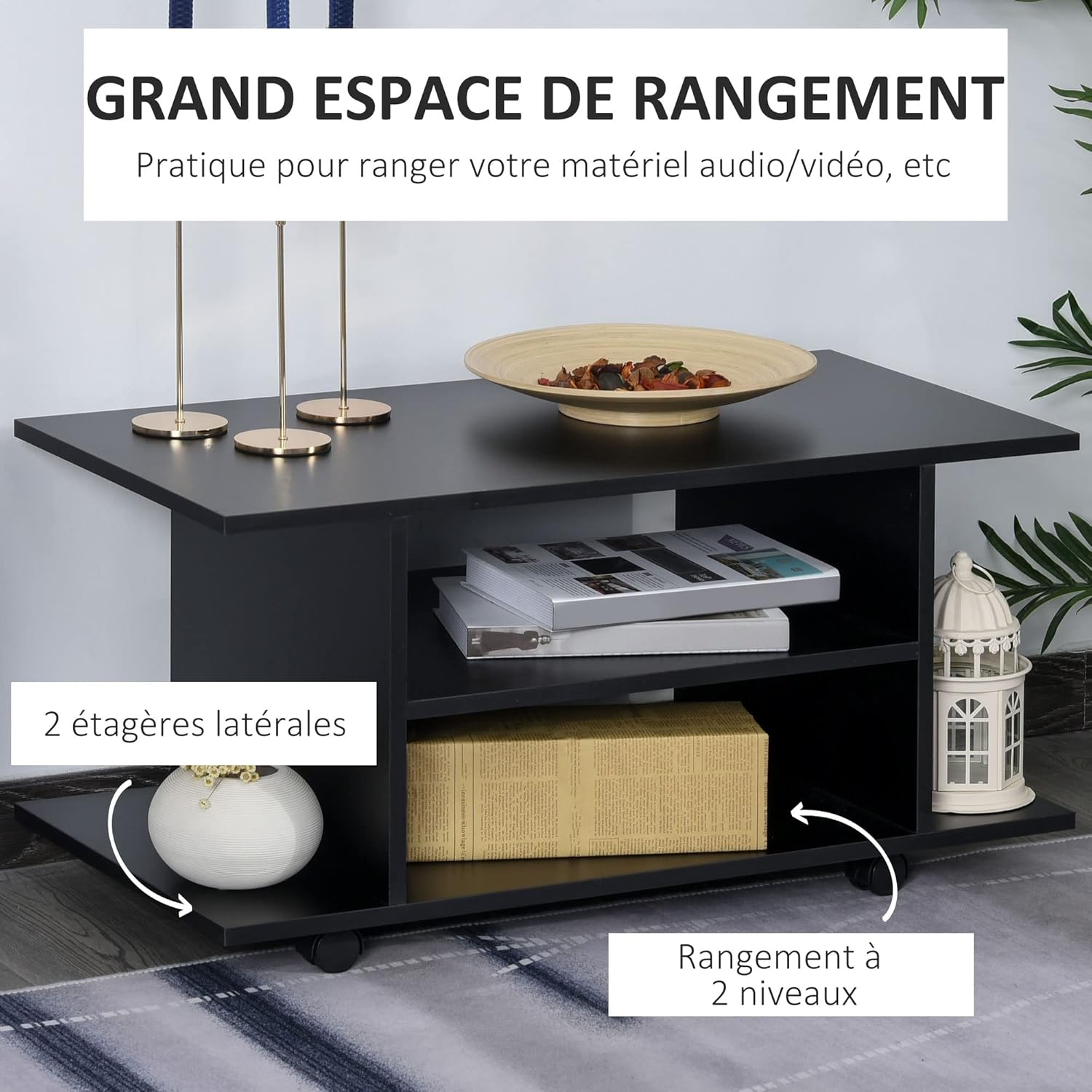
Gambar 5.2: Gambaran detail view of the TV stand's double storage compartments, showing how they can be used to store various items like books and small decorative pieces.
5.3. Video Demonstrasi Produk
Video 5.3: A short demonstration video showcasing the HOMCOM Mobile TV Stand, its features, and how it can be easily moved and positioned in a room.
6. Perawatan dan Pemeliharaan
To ensure the longevity and appearance of your HOMCOM Mobile TV Stand, follow these care guidelines:
- Pembersihan: Bersihkan permukaan dengan kain lembut dan kering.amp kain. Hindari penggunaan bahan kimia keras atau pembersih abrasif, yang dapat merusak lapisan akhir.
- Tumpahan: Clean up spills immediately to prevent staining or damage to the wood material.
- Paparan sinar matahari: Hindari paparan sinar matahari langsung dalam jangka waktu lama untuk mencegah pemudaran atau perubahan warna.
- Pemeriksaan Perangkat Keras: Periksa semua sekrup dan pengencang secara berkala untuk memastikan kekencangannya. Kencangkan kembali jika perlu.
7. Penyelesaian masalah
Jika Anda mengalami masalah dengan dudukan TV Anda, lihat masalah umum dan solusi berikut:
- Dudukannya goyang:
Larutan: Check all assembly screws and ensure they are tightened securely. Verify that the stand is on a flat, even surface. - Roda Tidak Berputar dengan Lancar:
Larutan: Ensure the wheel brakes are disengaged. Check for any debris or obstructions around the casters. - Kesulitan Merakit:
Larutan: Review the assembly instructions carefully. Ensure all parts are correctly oriented before tightening screws. Do not force parts together.
8. Spesifikasi Produk
| Fitur | Spesifikasi |
|---|---|
| Nomor Model | Nomor telepon 02-06100531 |
| Dimensi Keseluruhan (P x L x T) | 80 x 40 x 40 cm (31.5 x 15.7 x 15.7 inci) |
| Shelf Dimensions (L x W x H) | 48 x 40 x 15.2 cm (18.9 x 15.7 x 6 inci) |
| Bahan | Kayu |
| Warna | Hitam |
| Berat | 11.5 kg (25.3 pon) |
| Beban Maksimum yang Direkomendasikan | 15 kg (33 pon) |
| Ukuran TV yang Sesuai | Under 42 inches |
| Fitur Khusus | 4 swivel casters (2 with brakes), compact design, double storage space, easy assembly |
| Perakitan Diperlukan | Ya |

Image 8.1: A diagram illustrating the key dimensions of the TV stand, including its length, width, and height.
9. Garansi dan Dukungan
HOMCOM products are designed for quality and durability. For specific warranty information, please refer to the terms and conditions provided at the time of purchase or contact your retailer.
If you have any questions, require assistance with assembly, or need to report a missing/damaged part, please contact HOMCOM customer support through the official brand store or your point of purchase.
Toko Merek HOMCOM: Visit the HOMCOM Store


