Perkenalan
The Behringer NEKKST K8 is an ultra-linear 150-Watt reference-class studio monitor designed for accurate sound reproduction. It features an 8-inch woofer and a 1-inch silk dome tweeter, utilizing advanced waveguide technology for optimal acoustic dispersion and a wide 'sweet zone'. This monitor operates in a true bi-amping mode with two separate amplifiers for enhanced sound clarity.

Gambar: Depan view of the Behringer NEKKST K8 Studio Monitor, showcasing the 8-inch woofer and 1-inch tweeter.
Petunjuk Keselamatan Penting
Please read and follow all safety instructions before operating the Behringer NEKKST K8 studio monitor. Retain these instructions for future reference.
- Risiko Sengatan Listrik: Do not open the device. Refer all servicing to qualified service personnel.
- Jangan biarkan peralatan ini terkena hujan atau kelembapan.
- Jangan gunakan peralatan ini di dekat air.
- Bersihkan hanya dengan kain kering.
- Jangan halangi lubang ventilasi apa pun. Pasang sesuai petunjuk produsen.
- Jangan memasang di dekat sumber panas seperti radiator, pemanas, kompor, atau peralatan lainnya (termasuk amppengangkat) yang menghasilkan panas.
- Lindungi kabel daya agar tidak terinjak atau terjepit, terutama pada bagian steker, stopkontak, dan titik keluarnya kabel dari peralatan.
- Gunakan hanya perlengkapan/aksesoris yang ditentukan oleh produsen.
- Cabut peralatan ini saat terjadi badai petir atau bila tidak digunakan dalam waktu lama.

Image: Safety and regulatory labels found on the Behringer NEKKST K8, indicating electrical warnings and compliance information.
Pengaturan
Membongkar
Carefully unpack your NEKKST K8 monitor. Inspect the unit for any signs of damage that may have occurred during transit. Retain the original packaging for future transport or storage.
Koneksi
The NEKKST K8 offers both balanced XLR and unbalanced RCA input options. Connect your audio source (e.g., audio interface, mixer) to the appropriate input on the rear panel of the monitor.
- Masukan XLR: For balanced audio signals, providing optimal noise rejection.
- Masukan RCA: For unbalanced audio signals, commonly used with consumer audio equipment.
Ensure the monitor is powered off before making any connections.
Placement and Room Compensation
Proper placement of your studio monitors is crucial for accurate sound reproduction. The NEKKST K8 features 'ROOM COMPENSATION' switches on the rear panel to help optimize its performance for your specific acoustic environment.
- Free Field: Use this setting when the monitor is placed away from walls and corners.
- Dinding: Select this setting if the monitor is placed close to a wall.
- Sudut: Choose this setting if the monitor is placed in a corner, which typically results in increased bass response.
Experiment with these settings to achieve the most balanced sound in your listening space.
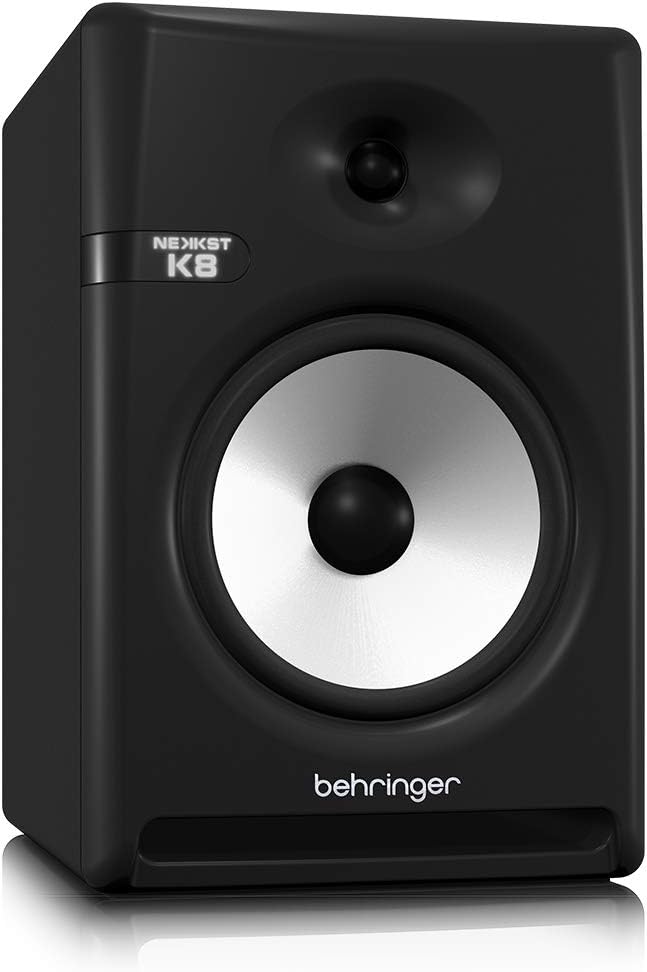
Image: Rear panel of the Behringer NEKKST K8, displaying XLR and RCA inputs, along with various control switches for room compensation and frequency adjustments.

Gambar: Detail view of the NEKKST K8's rear control panel, highlighting the input trim, frequency adjustments, and room compensation switches.
Koneksi Daya
Connect the provided power cord to the AC IN socket on the rear panel and then to a suitable power outlet. Ensure the power switch is in the OFF position before connecting to power.
Operasi
Menyalakan/Mematikan
After all connections are made, switch the power button on the rear panel to the ON position. It is recommended to power on your monitors last and power them off first to prevent any pops or clicks through your speakers.
Input Trim Adjustment
The 'INPUT TRIM' knob on the rear panel allows you to adjust the input sensitivity of the monitor. Start with the knob at a lower setting and gradually increase it to achieve a comfortable listening level without distortion. This control helps match the output level of your audio source to the monitor's input.
Frequency Adjustments
The NEKKST K8 provides 'HIGH FREQUENCY' and 'LOW FREQUENCY' switches for fine-tuning the monitor's response to your listening environment and personal preference. These switches allow you to cut or boost specific frequency ranges.
- FREKUENSI TINGGI: Adjusts the treble response. Options typically include flat, -2 dB, +2 dB.
- LOW FREQUENCY: Adjusts the bass response. Options typically include flat, -2 dB, -4 dB, -6 dB. This can be useful for compensating for room acoustics or when using a subwoofer.
Refer to the markings on the rear panel for specific dB adjustments.
Pemeliharaan
Pembersihan
To clean the exterior of your NEKKST K8 monitor, use a soft, dry cloth. Do not use liquid cleaners, abrasive cleaners, or solvents, as these can damage the finish or internal components. Ensure the monitor is unplugged before cleaning.
Penyimpanan
If storing the monitor for an extended period, it is recommended to use the original packaging to protect it from dust and physical damage. Store in a cool, dry place away from direct sunlight and extreme temperatures.
Penyelesaian Masalah
| Masalah | Kemungkinan Penyebab | Larutan |
|---|---|---|
| Tidak ada suara |
|
|
| Suara terdistorsi |
|
|
| Hum atau kebisingan |
|
|
If the problem persists after trying these solutions, please contact Behringer customer support.
Spesifikasi
| Nama Model | K8 |
| Jenis Pembicara | Memantau |
| Diameter Woofer | 8 inci |
| Diameter Tweeter | 1 inci |
| Daya Keluaran Maksimum Speaker | 150 Watt |
| Apatage | 150 watt |
| Respon Frekuensi | 20000 Hz (Upper limit; full range typically wider) |
| Teknologi Konektivitas | RCA, XLR |
| Mode Keluaran Audio | Stereo |
| Sumber Daya | Listrik Kabel |
| Dimensi Produk | 13.4"Panjang x 13.4"Lebar x 18.8"T |
| Berat Barang | 19.18 pon |
| Bahan | Plastik, Logam, Kain |
| Pabrikan | Suku Musik AS |
| UPC | 748252139344 |
Informasi Garansi
The Behringer NEKKST K8 Studio Monitor comes with a Limited Warranty. For detailed information regarding warranty terms, conditions, and registration, please refer to the official Behringer websitus atau kartu garansi yang disertakan dengan produk Anda.
Mendukung
For further assistance, technical support, or to download the latest drivers and software, please visit the official Behringer websitus atau hubungi departemen layanan pelanggan mereka.
Anda juga dapat mengunjungi Toko Behringer di Amazon untuk informasi produk dan aksesori.