Perkenalan dan Selesaiview
The Eton Scorpion II is a rugged, multipowered portable emergency weather radio and flashlight designed for reliability in various conditions. This compact unit is an essential tool for outdoor activities and emergency preparedness, offering multiple ways to stay informed and powered.
Key features include AM/FM/NOAA weather bands for critical updates, a built-in LED flashlight for illumination, and a USB port for charging smartphones. Its robust exterior and aluminum carabiner ensure durability, while multiple power options provide continuous operation.
Pengaturan
Before initial use, it is recommended to fully charge the Scorpion II using the USB port. This ensures the internal 800 mAh Lithium Ion battery is ready for extended use.
- Tagihan Awal: Connect the provided USB cable to the unit's USB input port and to a standard USB power source (e.g., computer, wall adapter). Allow several hours for a full charge.
- Antena: For optimal radio reception, extend the telescopic antenna fully.

Petunjuk Pengoperasian
Daya Hidup/Mati
Tekan dan tahan tombol Kekuatan button located on the unit to turn the radio on or off.
Penyetelan Radio
Gunakan Pita button to cycle through AM, FM, and NOAA weather bands. Use the Sesuaikan +/- buttons to manually adjust the frequency. The digital display will show the current frequency.
Kontrol Volume
Sesuaikan level output audio menggunakan Suara +/- tombol.
LED Flashlight & SOS
Tekan tombol Senter button to activate the built-in LED flashlight. Some models may include an SOS function, which can be activated by pressing and holding the flashlight button, causing the light to flash Morse code for distress.

Pengisian Daya Ponsel Pintar
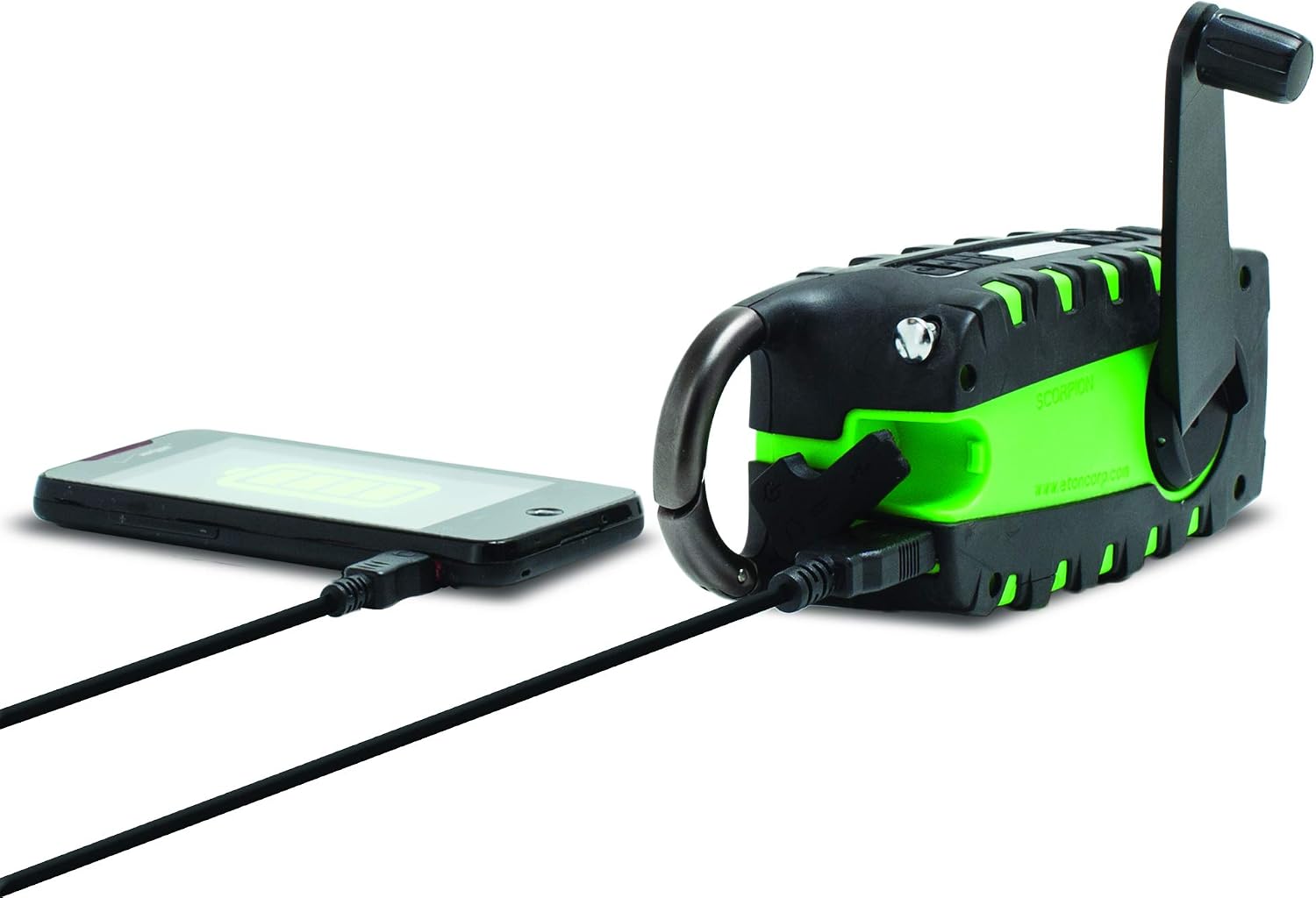
The unit features a USB output port to charge compatible smartphones. Connect your smartphone's charging cable to the Scorpion II's USB output. Ensure the Scorpion II has sufficient charge for this function.

Sumber Daya
The Eton Scorpion II offers multiple ways to power the unit and charge external devices:
- Engkol tangan: Extend the hand crank handle and rotate it clockwise or counter-clockwise for manual power generation. Continuous cranking will charge the internal battery and power the radio.
- Panel Surya: Place the unit with its solar panel facing direct sunlight. The solar panel will slowly charge the internal battery. This method is ideal for maintaining charge over time or for trickle charging.
- Pengisian Daya USB: Use the micro-USB input port to charge the internal battery from any standard USB power source. This is the fastest method for a full charge.

Pemeliharaan
To ensure the longevity and optimal performance of your Eton Scorpion II, follow these maintenance guidelines:
- Pembersihan: Lap unit dengan lembut, damp kain. Jangan gunakan bahan kimia keras atau pembersih abrasif.
- Perawatan Baterai: For best battery life, fully charge the unit at least once every 3 months, even if not in use. Avoid completely draining the battery frequently.
- Penyimpanan: Simpan radio di tempat yang sejuk dan kering, jauhkan dari sinar matahari langsung dan suhu ekstrem.
- Tahan Air: The rugged exterior provides protection against splashes and dust, but the unit is not fully waterproof. Avoid submerging it in water.
Penyelesaian Masalah
If you encounter issues with your Eton Scorpion II, refer to the following common troubleshooting steps:
- Tidak Ada Daya: Ensure the unit is charged. Try hand cranking for a few minutes or connecting to a USB power source.
- Penerimaan Radio Buruk: Fully extend the telescopic antenna. Try repositioning the unit to a different location, especially near a window or outdoors.
- Smartphone Not Charging: Verify that the Scorpion II has sufficient battery charge. Ensure the smartphone's charging cable is securely connected to the unit's USB output port.
- Senter Tidak Berfungsi: Check if the unit is powered on and has battery charge. Press the flashlight button firmly.
Spesifikasi
| Dimensi Produk | 2.2x3.6x7.2 inci |
| Berat Barang | 10.6 ons |
| Nomor Model Barang | NSP101WXGR |
| Baterai | 2 Lithium Ion batteries required (internal) |
| Teknologi Konektivitas | USB |
| Sumber Daya | Solar Powered, Hand Crank, USB |
| Band Radio Didukung | AM, FM, NOAA Weather |
| Fitur Khusus | Portable, LED Flashlight, Smartphone Charger |
Apa yang ada di dalam kotak
- Eton Scorpion II Rugged Multipowered Portable Emergency Weather Radio & Flashlight Green
- Kabel Pengisian Daya USB
Garansi dan Dukungan
For warranty information, technical support, or service inquiries, please refer to the documentation included with your product or visit the official Eton weblokasi. Simpan kwitansi pembelian Anda untuk klaim garansi.


