1. Pendahuluan
Terima kasih sudah membeliasing the RCA DEDE-240M4 24-inch HD LED Television. This manual provides essential information for the safe and efficient operation of your new television. Please read this manual thoroughly before using the product and retain it for future reference.
2. Informasi Keselamatan
- Keamanan Listrik: Do not expose the television to rain or moisture to prevent fire or electric shock. Ensure the power cord is not damaged or pinched.
- Ventilasi: Ensure adequate ventilation around the television. Do not block ventilation openings. Avoid placing the TV on soft surfaces like carpets or blankets.
- Penempatan: Place the television on a stable, level surface. Avoid direct sunlight, heat sources, and excessive dust.
- Pembersihan: Cabut steker televisi sebelum membersihkan. Gunakan kain lembut dan kering. Jangan gunakan cairan pembersih atau pembersih aerosol.
- Baterai: Buang baterai bekas secara bertanggung jawab. Jangan mencampur baterai lama dan baru atau berbagai jenis baterai.
3. Isi Paket
Harap periksa apakah semua item ada dalam paket:
- RCA DEDE-240M4 24-inch HD LED Television
- Kontrol Jarak Jauh
- Kabel Listrik
- Meja TV (Alas dan Sekrup)
- Baterai AAA (2) untuk Remote Control
- User Manual (dokumen ini)
4. Produk Lebihview
4.1 Sambungan Panel Belakang
The rear panel of your television provides various ports for connecting external devices. Refer to the image below for a visual guide.

Image 1: Rear panel connections of the RCA DEDE-240M4 television. From left to right, ports include USB, L/R Audio Input, Video/Y/Pb/Pr Component Input, HDMI/MHL, VGA, PC/Audio Input, Earphone, ANT (Antenna), and Coaxial Digital Audio Out.
- Kabel USB: Untuk menghubungkan perangkat penyimpanan USB untuk memutar media files (JPEG, MP3, Movie).
- INPUT (L/R, VIDEO/Y/Pb/Pr): Analog audio and video inputs for older devices.
- HDMI/MHL: High-Definition Multimedia Interface inputs for digital audio and video. MHL (Mobile High-Definition Link) support allows connecting compatible mobile devices. There are 3 HDMI inputs.
- VGA (PC INPUT): Untuk menghubungkan komputer.
- PC/AUDIO INPUT: Audio input for PC connection.
- TELINGA: Untuk menghubungkan headphone.
- ANT (Antena): Untuk menghubungkan antena eksternal atau sinyal TV kabel.
- COAXIAL (DIGITAL AUDIO OUT): For connecting to a digital audio receiver or sound system.
4.2 Kontrol Jarak Jauh
The remote control allows you to operate your television from a distance. Insert the two AAA batteries provided, ensuring correct polarity.
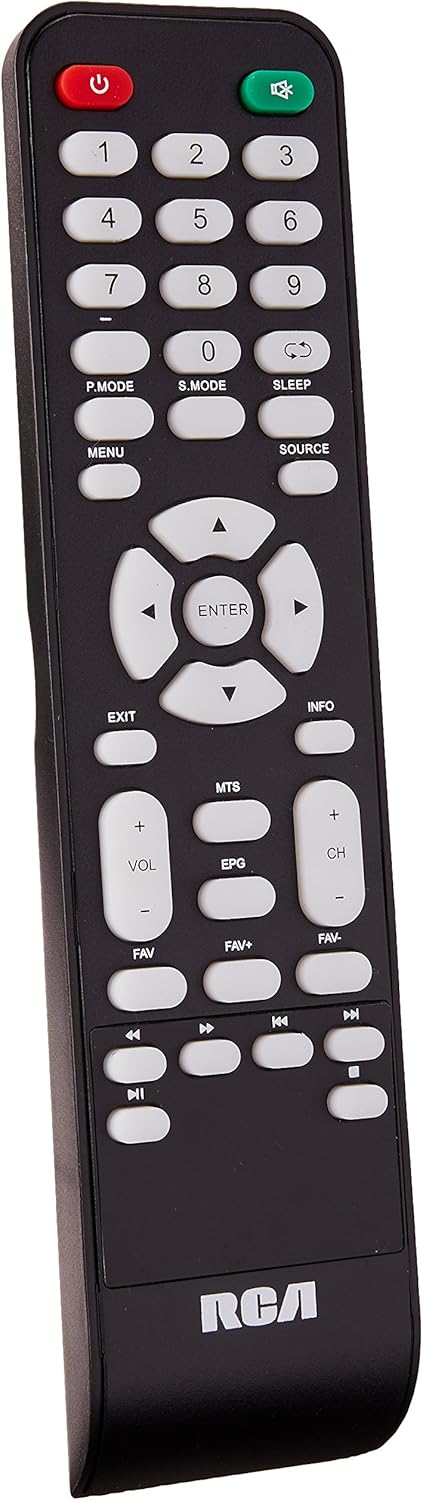
Image 2: Remote control for the RCA DEDE-240M4 television. Key buttons include Power, Number Pad, P.MODE, S.MODE, SLEEP, MENU, SOURCE, EXIT, INFO, directional arrows with ENTER, VOL+/-, CH+/-, MTS, EPG, FAV, FAV+, FAV-, and media playback controls.
- POWER (Red): Menyalakan atau mematikan TV.
- Tombol Angka (0-9): Untuk pemilihan saluran langsung.
- P. MODE: Picture Mode selection.
- S.MODE: Sound Mode selection.
- TIDUR: Setel pengatur waktu tidur.
- TIDAK BISA: Mengakses menu utama.
- SUMBER: Selects the input source (HDMI, AV, USB, TV).
- KELUAR: Keluar dari menu atau fungsi saat ini.
- INFORMASI: Menampilkan informasi program.
- Directional Arrows (Up/Down/Left/Right) & ENTER: Menavigasi menu dan mengonfirmasi pilihan.
- VOL +/-: Menyesuaikan tingkat volume.
- CH +/-: Mengubah saluran.
- MTs: Multi-channel Television Sound (SAP/Stereo).
- EPG: Electronic Program Guide (for digital channels).
- FAV / FAV+ / FAV-: Accesses and navigates favorite channels.
- Kontrol Pemutaran Media: Play, Pause, Stop, Fast Forward, Rewind, Next/Previous Track (for USB media).
5. Pengaturan
5.1 Memasang Dudukan
- Letakkan TV dengan hati-hati menghadap ke bawah pada permukaan yang lembut dan bersih untuk mencegah kerusakan layar.
- Sejajarkan alas penyangga dengan lubang pemasangan di bagian bawah TV.
- Kencangkan dudukan menggunakan sekrup yang tersedia. Jangan terlalu kencang.
- Tempatkan TV tegak pada permukaan yang stabil.
5.2 Menghubungkan Perangkat Eksternal
Ensure the TV and all devices are powered off before making any connections.
- Antena/Kabel: Connect an RF coaxial cable from your antenna or cable wall outlet to the ANT input on the TV.
- HDMI Devices (e.g., Blu-ray player, game console): Connect an HDMI cable from the device's HDMI output to any of the HDMI inputs on the TV.
- Perangkat USB: Insert a USB flash drive into the USB port for media playback.
- Koneksi PC: Connect a VGA cable from your computer's VGA output to the TV's VGA input. Connect an audio cable from your computer's audio output to the TV's PC/AUDIO INPUT.
- Sistem audio: For digital audio, connect a coaxial digital audio cable from the TV's COAXIAL output to your audio receiver. For headphones, use the EARPHONE jack.
5.3 Menghidupkan
- Sambungkan kabel daya ke input daya TV, lalu colokkan ujung lainnya ke stopkontak dinding.
- Press the POWER button on the remote control or on the TV itself.
- Ikuti petunjuk di layar untuk pengaturan awal, termasuk pemilihan bahasa dan pemindaian saluran.
6. Operasi
6.1 Fungsi Dasar
- Daya Hidup/Mati: Press the POWER button on the remote or TV.
- Penyesuaian Volume: Use VOL +/- buttons on the remote.
- Pemilihan Saluran: Use CH +/- buttons or the number pad on the remote.
- Pemilihan Sumber Masukan: Press the SOURCE button on the remote to cycle through available inputs (TV, HDMI1, HDMI2, HDMI3, AV, PC, USB). Press ENTER to confirm.
6.2 Navigasi Menu
Press the MENU button to access the main menu. Use the directional arrows to navigate through options and ENTER to select. Use EXIT to close the menu.
Pemutaran Media USB 6.3
Insert a USB flash drive into the USB port. The TV should automatically detect the device and prompt you to open the media browser. If not, select the USB source using the SOURCE button. You can play JPEG images, MP3 audio, and various video formats.
7. Pemeliharaan
- Pembersihan Layar: Usap layar secara perlahan dengan kain lembut dan bebas serat. Untuk noda membandel, usap layar dengan lembut.ampBasahi kain dengan air atau pembersih layar khusus (oleskan pada kain, jangan langsung ke layar).
- Pembersihan Kabinet: Bersihkan lemari TV dengan kain lembut dan kering.
- Penyimpanan: If storing the TV for an extended period, unplug it, remove batteries from the remote, and cover it to protect from dust.
8. Penyelesaian masalah
| Masalah | Solusi yang mungkin |
|---|---|
| Tidak ada daya | Pastikan kabel daya terpasang dengan benar ke TV dan stopkontak. Periksa apakah stopkontak berfungsi. |
| Tidak ada gambar, tetapi ada suara | Periksa pilihan sumber input. Pastikan perangkat eksternal dihidupkan dan terhubung dengan benar. |
| Tidak ada suara, tetapi gambar ada | Check the volume level and ensure the TV is not muted. Check audio cable connections for external devices. |
| Kontrol jarak jauh tidak berfungsi | Replace the batteries with new AAA batteries, ensuring correct polarity. Ensure there are no obstructions between the remote and the TV's IR sensor. |
| Pesan "Tidak Ada Sinyal" | Verify the correct input source is selected. Check antenna/cable connection or external device connections. Perform a channel scan if using an antenna. |
9. Spesifikasi
| Fitur | Spesifikasi |
|---|---|
| Model | DEDE-240M4 |
| Ukuran Layar | 24 inci |
| Teknologi Tampilan | LED (LCD Type) |
| Resolusi | 720p (Maximum) |
| Rasio Aspek | 16:9 |
| Konektivitas | 3x HDMI, 1x USB, 1x RF Antenna, 1x PC (VGA), 1x PC Audio In, 1x Component (Video/Y/Pb/Pr), 1x L/R Audio In, 1x Coaxial Digital Audio Out, 1x Earphone Out |
| Jenis Pemasangan | Dudukan Meja |
| Dimensi (dengan dudukan) | 62.5 x 9.4 x 40 cm (kurang lebih) |
| Berat | 4.6 kg (perkiraan) |
| Baterai Diperlukan | 2 AAA (termasuk) |
10. Garansi dan Dukungan
For warranty information and technical support, please refer to the warranty card included with your product or visit the official RCA websitus. Simpan struk pembelian Anda sebagai bukti pembelian untuk klaim garansi apa pun.


