1. Pendahuluan
The Edifier P180 is a stereo earbud headset designed for clear audio and convenient communication. Featuring an inline microphone and control, it offers a comfortable listening experience for various devices.

Figure 1: Edifier P180 Wired Earbud Headset
2. Apa yang ada di dalam kotak
- Edifier P180 Earbud Headset
- Kabel
3. Fitur Utama
- Classic Comfort: Ergonomic design for comfortable wear without irritating the ear canal.
- Kualitas Suara Luar Biasa: Equipped with 16mm neodymium magnetic monomers for high-fidelity audio playback.
- Integrated Microphone and Control: 3.5mm stereo earphones with a built-in microphone and remote button for mobile phone communication.
- Fungsionalitas: Single button control for picking up/hanging up calls and skipping songs (device dependent for iOS/Android).
- Desain Tahan Lama: Constructed with quality materials for longevity.

Figure 2: Ergonomic design for comfortable fit.
4. Pengaturan
- Membongkar: Carefully remove the Edifier P180 headset from its packaging.
- Memeriksa: Check the earbuds and cable for any visible damage.
- Menghubungkan: Insert the 3.5mm audio jack into the headphone port of your compatible device (smartphone, tablet, computer, etc.). Ensure the jack is fully inserted for proper audio and microphone function.
- Posisi: Place the earbuds comfortably in your ears. The ergonomic design is intended to rest well without causing irritation.
5. Petunjuk Pengoperasian
The Edifier P180 features an inline control button for easy management of calls and music playback.
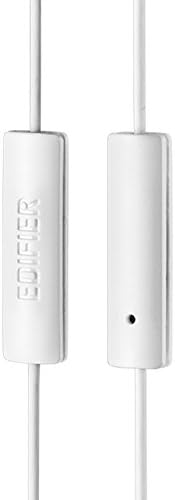
Figure 3: Inline microphone and control button.
- Menjawab / Mengakhiri Panggilan: Press the control button once to answer an incoming call. Press it again to end an active call.
- Playing/Pausing Music: Press the control button once to play or pause audio playback.
- Melewatkan Trek: Double-press the control button to skip to the next track. Triple-press to go to the previous track (functionality may vary by device and operating system).
- Asisten Suara: Long-press the control button to activate your device's voice assistant (e.g., Siri, Google Assistant).
Video 1: Produk resmi selesaiview of the Edifier P180 Classic Earbud Headsets, demonstrating features and usage.
6. Pemeliharaan
- Pembersihan: Gently wipe the earbuds and cable with a soft, dry cloth. Avoid using harsh chemicals or abrasive materials.
- Penyimpanan: Saat tidak digunakan, simpan headset di tempat yang bersih dan kering, jauhkan dari suhu ekstrem dan sinar matahari langsung. Hindari kabel yang kusut.
- Hindari Kelembaban: Do not expose the headset to water or excessive moisture, as this can damage the internal components.
7. Penyelesaian masalah
- Tidak ada suara:
- Pastikan jack 3.5 mm terpasang sepenuhnya ke port audio perangkat Anda.
- Periksa pengaturan volume perangkat Anda.
- Uji coba earbud dengan perangkat lain untuk mengesampingkan masalah yang spesifik pada perangkat tersebut.
- Mikrofon Tidak Berfungsi:
- Pastikan jack 3.5 mm terpasang sepenuhnya.
- Periksa pengaturan input mikrofon perangkat Anda.
- Uji mikrofon dengan perangkat atau aplikasi lain.
- Audio Intermiten:
- Check the cable for any kinks or damage.
- Pastikan jack audio bersih dan bebas dari kotoran.
8. Spesifikasi
| Fitur | Spesifikasi |
|---|---|
| Nomor Model | Bagian 180 |
| Respon Frekuensi | 20 Hz - 20,000 Hz |
| Jack Headphone | 3.5 mm Jack |
| Teknologi Konektivitas | Berkabel |
| Berat Barang | 1.76 ons (50 gram) |
| Dimensi Produk | 2.01x5.59x0.91 inci |
| Bahan | Neodimium |
| Jenis Kontrol | Inline Control Button |
| Impedansi | 32 Ohm |
| Kontrol Kebisingan | Isolasi Suara |
9. Garansi & Dukungan
The Edifier P180 headset is backed by a Garansi 1 tahun. For any support inquiries or warranty claims, please refer to the contact information provided with your purchase or visit the official Edifier weblokasi.


