Perkenalan
The ASTRO Gaming A40 TR Headset and MixAmp Pro TR are designed to provide a high-fidelity audio experience for gaming on PlayStation 4 and PC. The A40 TR headset offers user customization, allowing transformation from an open-back to a closed-back noise-canceling headset with optional Mod Kits. The MixAmp Pro TR features all-digital components for clear, interference-free audio and voice communication, with customizable settings via the ASTRO Command Center software.

Image: The ASTRO Gaming A40 TR Headset and MixAmp Pro TR, showcasing both components together. The headset is black with gold accents, and the MixAmp is a compact black unit with control dials.
Isi Paket
Pastikan semua item yang tercantum di bawah ini termasuk dalam kemasan produk Anda:
- ASTRO A40 TR Headset
- ASTRO MixAmp Pro TR
- A40 TR Inline Mute Cable (2.0m)
- TOSlink Optical Cable (3.0m)
- Micro-USB Cable (3.0m)
- Digital Daisy Chain Cable (0.5m)
- Swappable Microphone
Pengaturan
Menghubungkan ke PlayStation 4 (PS4)
- Hubungkan TOSlink Optical Cable from the MixAmp Pro TR's OPTICAL port to the PS4's Optical Out port.
- Hubungkan Kabel Micro-USB from the MixAmp Pro TR's USB port to an available USB port on the PS4.
- Hubungkan A40 TR Inline Mute Cable from your A40 TR Headset to the headset port on the front of the MixAmp Pro TR.
- Di PS4 Anda, navigasikan ke Settings > Sound and Screen > Audio Output Settings.
- Mengatur Pelabuhan Keluaran Utama ke Keluaran Digital (Optik).
- Memilih Dolby Digital (Bitstream) for the audio format.
- Pergi ke Pengaturan > Perangkat > Perangkat Audio.
- Mengatur Perangkat Input ke USB Headset (ASTRO MixAmp Pro TR).
- Mengatur Perangkat Keluaran ke USB Headset (ASTRO MixAmp Pro TR).
- Menyesuaikan Kontrol Volume (Headphone) untuk maksimal.
- Mengatur Output ke Headphone ke Audio Obrolan or Semua Audio as preferred.
Menghubungkan ke PC
- Hubungkan Kabel Micro-USB from the MixAmp Pro TR's USB port to an available USB port on your PC.
- Hubungkan A40 TR Inline Mute Cable from your A40 TR Headset to the headset port on the front of the MixAmp Pro TR.
- On your PC, ensure the MixAmp Pro TR is selected as the default playback and recording device in your sound settings.
- Unduh dan instal ASTRO Command Center software from the official ASTRO Gaming website to customize settings, update firmware, and manage EQ presets.
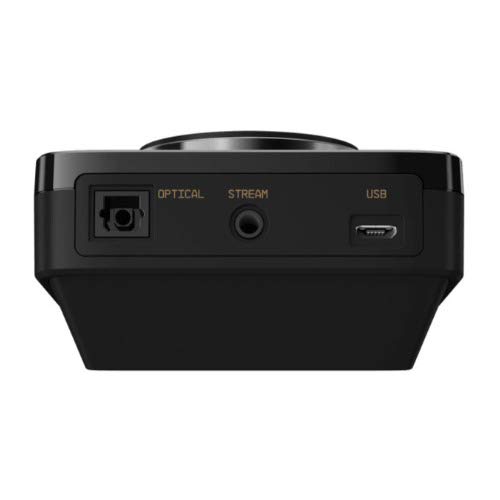
Gambar: Belakang view of the ASTRO MixAmp Pro TR, highlighting the Optical, USB, AUX, and Stream ports for various connections.
Operating the MixAmp Pro TR
CampuranAmp Pro TR provides intuitive controls for managing your audio experience:
- Tombol Pengatur Volume Utama: The large dial on the left controls the overall volume of your headset. Rotate clockwise to increase volume, counter-clockwise to decrease.
- Game/Voice Balance Dial: The smaller dial on the right allows you to adjust the balance between game audio and voice chat.
- Rotate towards "GAME" to prioritize game audio.
- Rotate towards "VOICE" to prioritize voice chat.
- EQ Presets Button: Located in the center, this button cycles through four customizable equalizer presets. The active preset is indicated by the illuminated icon (star, headphone, etc.). These presets can be configured using the ASTRO Command Center software.
- Dolby Button: Activates or deactivates Dolby Surround Sound. When active, the Dolby logo will illuminate.
- Tombol Bisukan Mikrofon: Located on the A40 TR Inline Mute Cable, this switch mutes or unmutes your microphone. When muted, the MixAmp's volume dials will typically glow red.
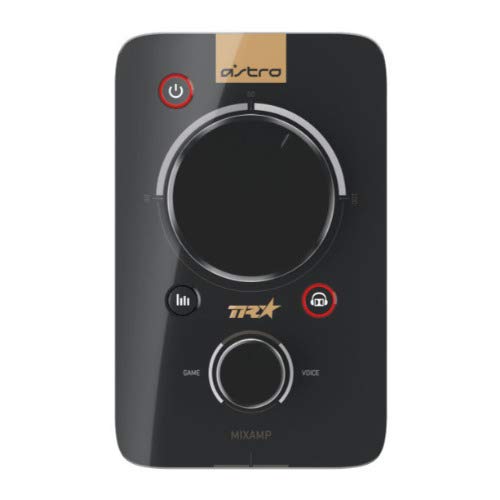
Gambar: Atas view of the ASTRO MixAmp Pro TR, showing the large master volume dial, the smaller game/voice balance dial, and the EQ preset buttons.
Pemeliharaan
- Pembersihan: Use a soft, dry cloth to clean the headset and MixAmp. Avoid abrasive cleaners or solvents.
- Penyimpanan: Store the headset and MixAmp di tempat sejuk dan kering, terhindar dari sinar matahari langsung dan suhu ekstrem.
- Perawatan Kabel: Tangani kabel dengan hati-hati untuk mencegah kerusakan. Hindari tekukan tajam atau tarikan yang berlebihan.
- Bantalan Telinga: Periodically check ear cushions for wear and tear. Replacement cushions are available from ASTRO Gaming.
Penyelesaian Masalah
If you encounter issues with your ASTRO Gaming A40 TR Headset or MixAmp Pro TR, try the following solutions:
| Masalah | Larutan |
|---|---|
| Tidak ada audio dari headset. |
|
| Mikrofon tidak berfungsi. |
|
| Kualitas audio terdistorsi atau buruk. |
|
For more detailed troubleshooting, please refer to the official ASTRO Gaming support resources.
Spesifikasi
- Nomor Model: Nomor telepon 939-001511
- Respon Frekuensi: 20 - 20,000 Hz
- Impedansi Nominal: 48 ohm
- Tekanan ikat kepala: 2.6N
- Dimensi Produk: 9.06x13.87x4.33 inci
- Berat Barang: 1.06 pon
- Konektivitas: Optik, USB
- Kesesuaian: PlayStation 4, PC
Garansi dan Dukungan
For detailed warranty information and product support, please visit the official ASTRO Gaming websitus atau merujuk pada dokumentasi yang disediakan:
Ensure you register your product on the ASTRO Gaming website for the latest updates and support.


