Perkenalan
The Master & Dynamic MW60 Wireless Bluetooth Foldable Headphones are designed to deliver a high-quality audio experience with effective sound isolation. They feature 45mm neodymium drivers for clear audio reproduction across various music genres. Equipped with Bluetooth 4.1, these headphones offer wireless connectivity and up to 16 hours of battery life. Constructed with lightweight stainless steel and aluminum, and featuring leather ear pads, the MW60 headphones are designed for comfort and durability, with a foldable design for portability.
Apa yang ada di dalam kotak
- Master & Dynamic MW60 Wireless Headphones
- Kabel Audio (3.5mm)
- Adaptor Audio
- Kabel Pengisian USB ke USB Mikro
- Carry Case for Headphones
- Carry Pouch for Accessories
Produk Selesaiview
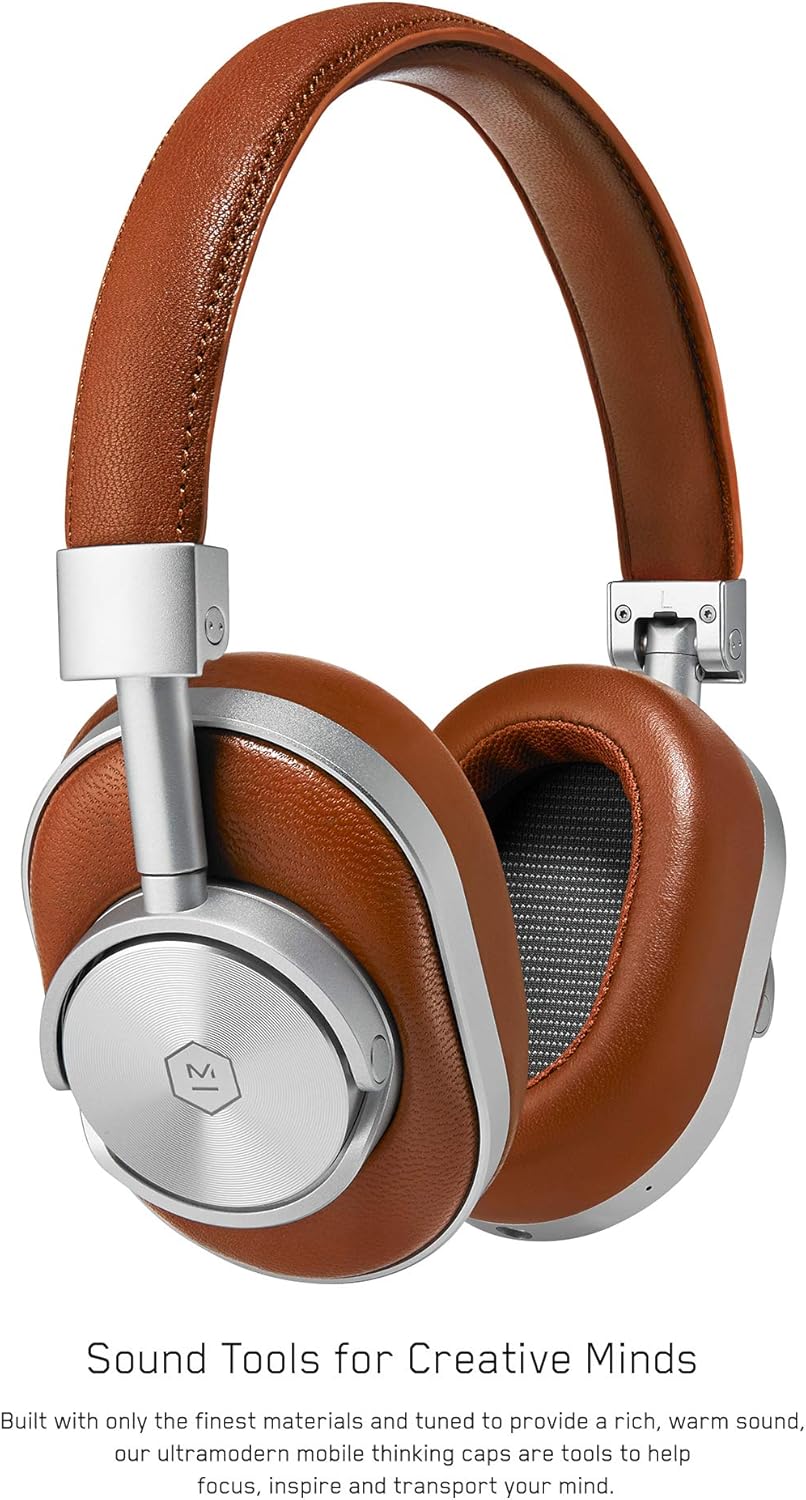
Gambar 1: Depan view of the Master & Dynamic MW60 Wireless Headphones. This image displays the over-ear design with silver metal accents and brown leather earcups and headband.

Gambar 2: Close-up of the right earcup showing the control buttons and ports. Visible controls include volume up/down, a multi-function button, and the power/pairing switch. A 3.5mm audio jack and micro USB charging port are also present.
Kontrol dan Port
- Power/Pairing Switch: Located on the earcup, used to turn the headphones on/off and initiate Bluetooth pairing.
- Tombol Multi-fungsi: Controls playback (play/pause), call management, and voice assistant activation.
- Tombol Volume Naik / Turun: Adjusts audio volume. Can also be used for track skipping (hold for next/previous track).
- Jack Audio 3.5mm: Untuk koneksi kabel gunakan kabel audio yang disertakan.
- Port USB Mikro: Untuk mengisi daya baterai internal.
- Mikropon: Terintegrasi untuk panggilan bebas genggam.
Pengaturan
Mengisi Daya Headphone
- Connect the Micro USB end of the charging cable to the Micro USB port on the headphone earcup.
- Hubungkan ujung USB-A kabel pengisi daya ke port USB yang memiliki daya (misalnya, komputer, adaptor dinding).
- Lampu indikator akan menunjukkan status pengisian daya. Pengisian daya penuh biasanya memakan waktu sekitar 2 jam.
Pairing Bluetooth
- Pastikan headphone terisi penuh.
- Slide the Power/Pairing switch to the ON position.
- To enter pairing mode, slide and hold the Power/Pairing switch to the far right (pairing icon) until the indicator light begins to flash.
- Pada perangkat Anda (ponsel pintar, tablet, komputer), aktifkan Bluetooth dan cari perangkat yang tersedia.
- Select "MW60" from the list of detected devices.
- Once paired, the indicator light will turn solid blue or white, depending on the model.
Petunjuk Pengoperasian
Fungsi Dasar
- Daya Hidup/Mati: Slide the Power/Pairing switch to the ON or OFF position.
- Putar/Jeda: Tekan tombol Multifungsi sekali.
- Kontrol Volume: Tekan tombol Volume Naik (+) atau Volume Turun (-).
- Lagu Berikutnya: Tekan dan tahan tombol Volume Naik (+).
- Lagu Sebelumnya: Tekan dan tahan tombol Volume Turun (-).
Manajemen Panggilan
- Menjawab/Mengakhiri Panggilan: Tekan tombol Multifungsi sekali.
- Tolak Panggilan: Tekan dan tahan tombol Multifungsi.
- Aktifkan Voice Assistant: Tekan dua kali tombol Multifungsi.
Koneksi Kabel
To use the headphones with a wired connection, plug the included 3.5mm audio cable into the audio jack on the earcup and the other end into your audio source. The headphones will automatically switch to wired mode, conserving battery life.
Pemeliharaan
Pembersihan
- Bersihkan headphone dengan kain lembut dan kering.
- Jangan gunakan bahan kimia keras atau bahan abrasif.
- For leather parts, use a specialized leather cleaner if necessary, following product instructions.
Penyimpanan

Gambar 3: The MW60 headphones folded into a compact form, demonstrating their portability and ease of storage in the included carry case.
- When not in use, fold the headphones and store them in the provided carry case to protect them from dust and damage.
- Hindari menyimpan pada suhu ekstrem atau kelembapan tinggi.
Penyelesaian Masalah
| Masalah | Solusi yang mungkin |
|---|---|
| Headphone tidak menyala | Pastikan headphone terisi penuh. Sambungkan ke sumber daya menggunakan kabel Micro USB. |
| Tidak dapat memasangkan melalui Bluetooth | Ensure headphones are in pairing mode (flashing indicator light). Turn off and on Bluetooth on your device. Try forgetting the device on your phone and re-pairing. Ensure no other devices are actively connected. |
| Gangguan audio atau koneksi yang terputus-putus. | Ensure your device is within the Bluetooth range. Avoid physical obstructions between the headphones and your device. Minimize interference from other wireless devices. |
| Tidak ada suara dalam mode kabel. | Ensure the 3.5mm audio cable is securely connected to both the headphones and the audio source. Check the volume levels on both the headphones and the audio source. |
| Earcups detach easily | Ensure earcups are properly aligned and securely attached to the magnetic mounts. |
Spesifikasi
| Fitur | Detil |
|---|---|
| Nama Model | MW60S2 |
| Teknologi Konektivitas | Nirkabel (Bluetooth 4.1) |
| Jenis Penggerak Audio | 45mm Neodymium Dynamic Drivers |
| Daya Tahan Baterai | Hingga 16 jam |
| Bahan | Aluminum, Stainless Steel, Leather |
| Berat Barang | 3 pon (sekitar 1.36 kg) |
| Dimensi Produk | 10 x 3.75 x 8 inci (25.4 x 9.5 x 20.3 cm) |
| Impedansi | 32 Ohm |
| Kontrol Kebisingan | Sound Isolation (Passive) |
| Jack Headphone | 3.5 mm Jack |
Garansi dan Dukungan
Warranty information for your Master & Dynamic MW60 Wireless Headphones is typically provided with your purchase. Please refer to the documentation included in your product packaging for specific warranty terms and conditions.
For technical support, service, or further inquiries, please contact Master & Dynamic customer service directly. Contact details can usually be found on the manufacturer's official websitus atau dalam dokumentasi produk Anda.


