Perkenalan
This manual provides comprehensive instructions for the VINABTY RM-YD025 replacement remote control. This remote is designed to function with various Sony TV models without requiring any programming. Simply insert the batteries, and the remote is ready for use.

Image: The VINABTY RM-YD025 remote control positioned near a television, illustrating its intended use.
Pengaturan
Instalasi Baterai
The RM-YD025 remote control requires two (2) AA batteries for operation. Batteries are not included with the remote control.
- Temukan penutup kompartemen baterai di bagian belakang remote control.
- Slide the cover downwards or press the latch and lift to open the compartment.
- Masukkan dua baterai AA, pastikan terminal positif (+) dan negatif (-) sejajar dengan tanda yang ada di dalam kompartemen.
- Pasang kembali penutup ruang baterai dengan menggesernya kembali ke tempatnya hingga terkunci dengan aman.
Once batteries are installed, the remote control is ready for immediate use with compatible Sony TV models without any additional programming.
Petunjuk Pengoperasian
The VINABTY RM-YD025 remote control provides full functionality for your compatible Sony TV. Below is a guide to the primary buttons and their functions.
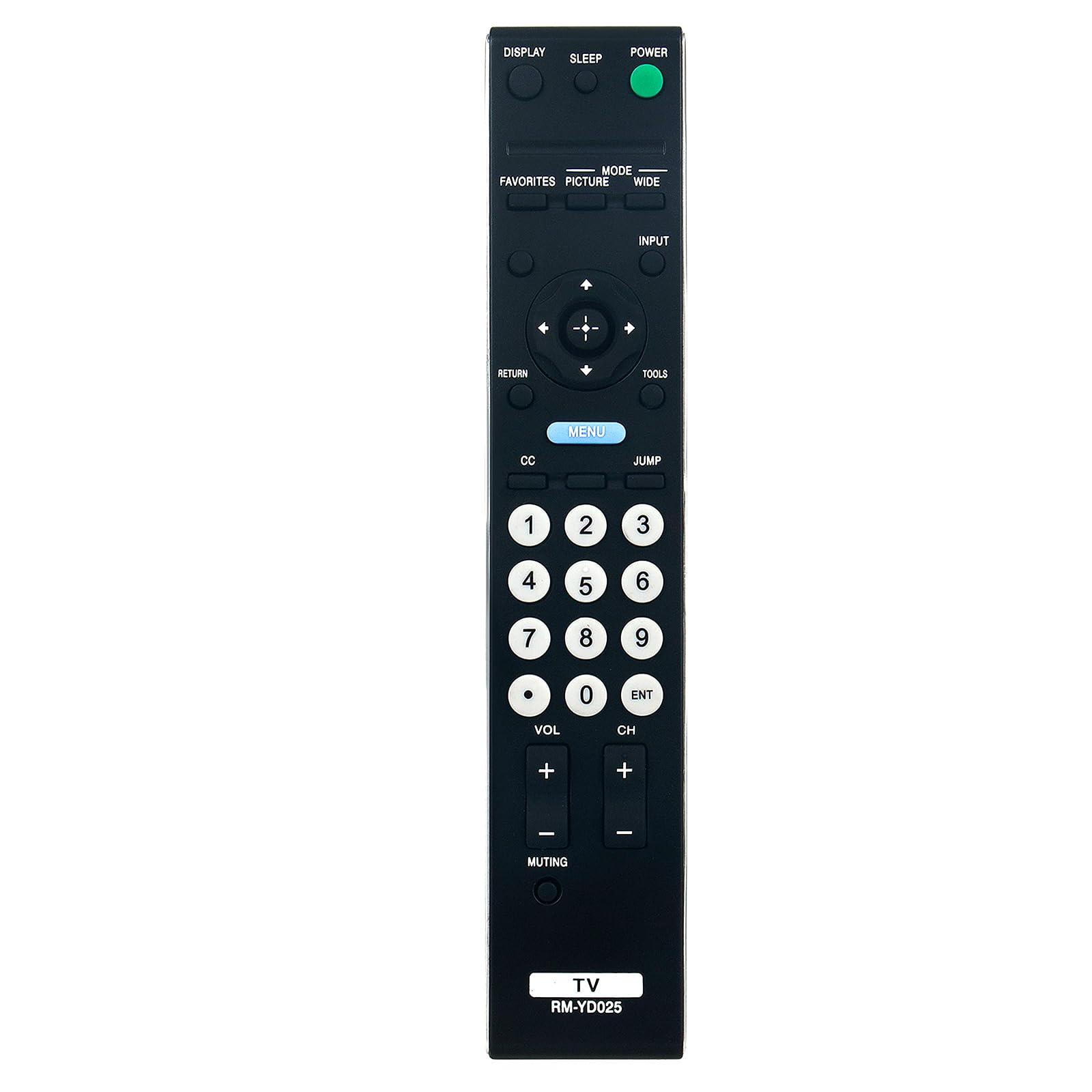
Gambar: Depan view of the VINABTY RM-YD025 remote control, displaying all control buttons.
Fungsi Tombol
| Tombol | Fungsi |
|---|---|
| KEKUATAN | Menyalakan atau mematikan TV. |
| MENAMPILKAN | Displays on-screen information such as channel number, time, and input source. |
| TIDUR | Sets the sleep timer for automatic TV shutdown. |
| FAVORIT | Mengakses saluran atau konten favorit. |
| GAMBAR | Adjusts picture settings (e.g., brightness, contrast). |
| MODE | Switches between different display modes. |
| LEBAR | Mengubah rasio aspek layar. |
| MASUKAN | Memilih sumber input (misalnya, HDMI, AV). |
| Papan Arah (Atas, Bawah, Kiri, Kanan) | Menavigasi menu dan opsi. |
| ENTER (Center Button) | Konfirmasikan pilihan. |
| KEMBALI | Kembali ke layar atau menu sebelumnya. |
| PERALATAN | Mengakses pengaturan cepat atau menu alat. |
| MENU | Opens the main TV menu. |
| CC (Teks Tertutup) | Activates or deactivates closed captions. |
| MELOMPAT | Beralih antara tampilan saat ini dan sebelumnya viewsaluran edisi. |
| Tombol Angka (0-9) | Pemilihan saluran langsung. |
| VOL +/- | Menyesuaikan tingkat volume. |
| CH +/- | Mengubah saluran ke atas atau ke bawah. |
| MENDIAMKAN | Menonaktifkan atau mengaktifkan audio TV. |
| THT | Confirms channel entry or other selections. |
Kesesuaian
The VINABTY RM-YD025 remote control is compatible with a wide range of Sony TV models. A partial list of compatible models includes:
- KDL-46S4100, KDL-40S4100, KDL-52S4100
- KDL-22L4000, KDL-40S504, KDL-19M4000
- KDL-40S5100, KDL-40SL150, KDL-40V5100, KDL-40VE5
- KDL-46S504, KDL-46S5100, KDL-46V5100, KDL-46VE5, KDL-46VL150
- KDL-52S5100, KDL-52V5100, KDL-52VE5, KDL-52VL150, KDL-55V5100
- RM-YD028, SUWL500, 148718031
- KDL-22L5000, KDL-26L5000, KDL-32L504, KDL-32LL150
- KDL-32S5100, KDL-32XBR9, KDL-37L5000
- KDL-40V4150, KDL-40W4100, KDL-42V4100
- KDL-46V4100, KDL-46W4100, KDL-46W4150
- KDL-52W4100, 148072211, KDL32BX310, KDL19M4000B
This remote is designed as a direct replacement and should work with these models without any additional setup.
Pemeliharaan
Pembersihan
Untuk menjaga tampilan dan fungsi remote control, bersihkan secara teratur:
- Gunakan kain lembut dan kering untuk menyeka permukaan remote.
- Untuk kotoran membandel, sedikit dampBilas kain dengan air atau pembersih ringan non-abrasif. Hindari kelembapan berlebih.
- Jangan gunakan bahan kimia keras, pelarut, atau bantalan pembersih abrasif, karena dapat merusak lapisan atau komponen internal remote.
Perawatan Baterai
Proper battery care ensures optimal performance and longevity:
- Replace both batteries simultaneously when they are depleted. Do not mix old and new batteries, or different types of batteries.
- If the remote control will not be used for an extended period (e.g., one month or more), remove the batteries to prevent leakage and potential damage to the remote.
- Buang baterai bekas sesuai dengan peraturan setempat.
Penyelesaian Masalah
If you encounter issues with your VINABTY RM-YD025 remote control, try the following troubleshooting steps:
- Jarak Jauh Tidak Merespons: Ensure the batteries are inserted correctly with the correct polarity (+/-). Replace old batteries with new AA batteries.
- Fungsi Intermiten: Check for any obstructions between the remote control and the TV's infrared receiver. Ensure you are within the effective range of the TV.
- Tombol Tertentu Tidak Berfungsi: If only certain buttons are unresponsive, try cleaning the remote control, especially around the buttons, to remove any dirt or debris that might be interfering with their operation.
- TV Not Responding to Any Remote: If your TV does not respond to this remote or any other remote, there might be an issue with the TV's infrared receiver. Consult your TV's user manual for troubleshooting TV-specific issues.
This remote control does not require programming. If it does not function after installing new batteries and verifying compatibility, please refer to the support section.
Spesifikasi
Key specifications for the VINABTY RM-YD025 remote control:
| Fitur | Detil |
|---|---|
| Nomor Model | RM-YD025 |
| Perangkat yang Kompatibel | Sony Televisions |
| Jenis Baterai | 2 x baterai AA (tidak termasuk) |
| Dimensi Produk | 5 x 1.9 x 0.5 inci (sekitar 12.7 x 4.8 x 1.3 cm) |
| Berat Barang | 2.39 ons (sekitar 67.7 gram) |
| Warna | Hitam |
| Fitur Khusus | Desain ergonomis |

Image: The VINABTY RM-YD025 remote control displaying its physical dimensions.
Informasi Garansi
Warranty details for the VINABTY RM-YD025 remote control are typically provided by the seller or manufacturer at the time of purchase. Please refer to your purchase documentation or contact the seller directly for specific warranty terms and conditions.
Mendukung
For further assistance, technical support, or inquiries regarding your VINABTY RM-YD025 remote control, please contact the seller through your purchase platform. Provide your order details and a clear description of the issue for efficient support.


