1. Pendahuluan
This manual provides detailed instructions for the installation, operation, and maintenance of your Alpine CDE-163BT Advanced Bluetooth CD Receiver. Please read this manual thoroughly before using the unit to ensure proper operation and to prevent damage. Keep this manual for future reference.
The Alpine CDE-163BT is a versatile car stereo receiver featuring advanced Bluetooth connectivity for hands-free calling and audio streaming, CD playback, USB input, and FM/AM tuner capabilities. It is designed to deliver high-quality audio performance and user-friendly control.
2. Pengaturan dan Instalasi
2.1 Isi Paket
Sebelum memulai pemasangan, pastikan semua komponen sudah lengkap:
- Alpine CDE-163BT Head Unit
- Tali pengaman
- Lengan Pemasangan dan Cincin Trim
- Microphone for Bluetooth Hands-Free Calling
- Manual Pemilik (dokumen ini)
- Perangkat Keras Pemasangan (sekrup, braket)
2.2 Diagram Pengkabelan
Refer to the wiring diagram provided with the unit's installation guide for specific connections. Key connections include:
- Kekuatan: Yellow (constant 12V), Red (switched 12V), Black (ground).
- Pembicara: White/White-Black (Front Left), Gray/Gray-Black (Front Right), Green/Green-Black (Rear Left), Purple/Purple-Black (Rear Right).
- Antena: Blue (power antenna/amplifier remote turn-on).
- Mikropon: Connect the supplied microphone to the dedicated input for hands-free calling.
Peringatan: Incorrect wiring can cause damage to the unit or vehicle's electrical system. If you are unsure about any wiring connections, consult a qualified professional installer.
2.3 Penyalaan Awal
After installation, turn on your vehicle's ignition. The unit should power on. Follow any on-screen prompts for initial setup, such as language selection or clock setting.
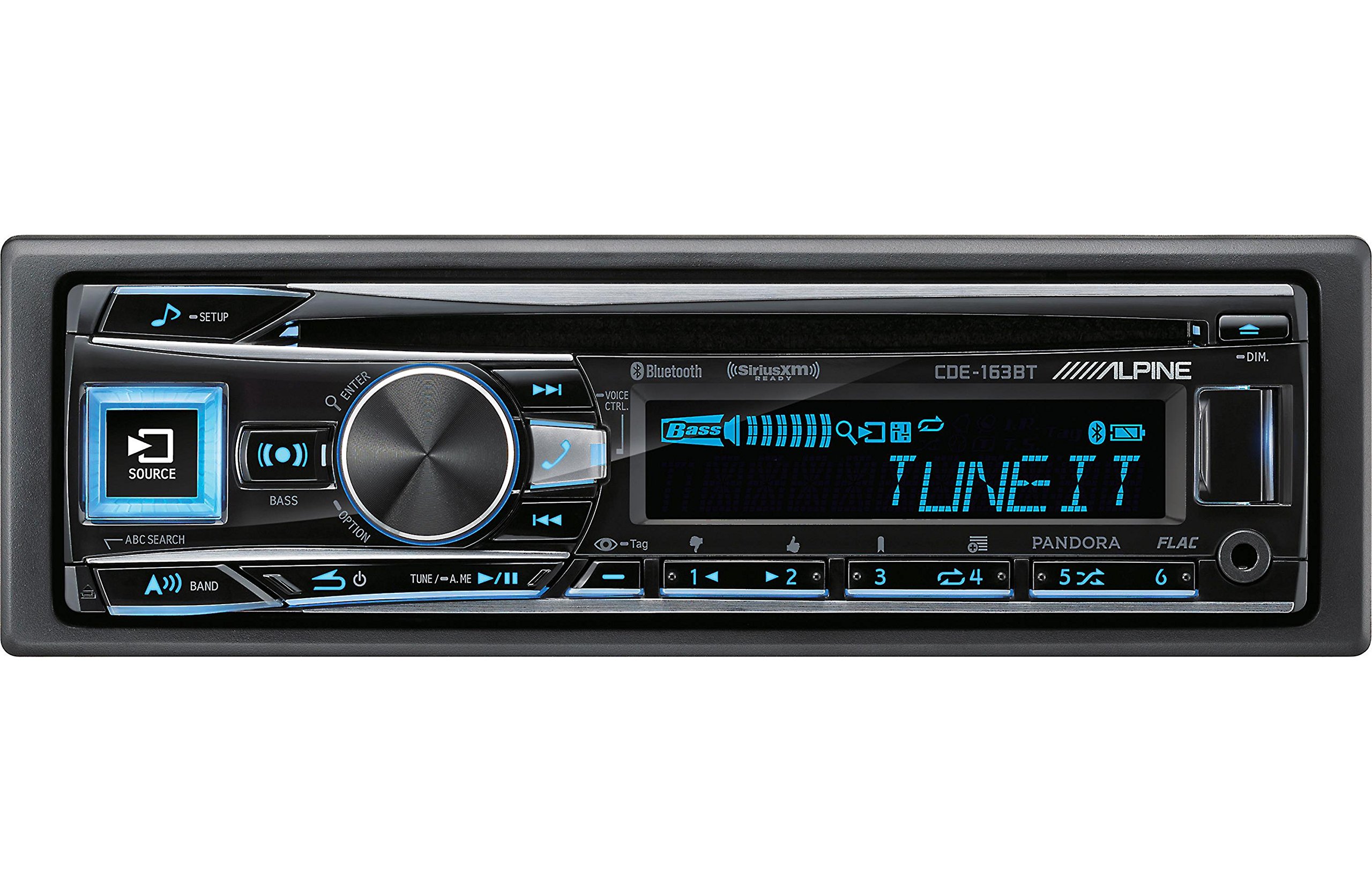
Figure 2.3.1: Front panel of the Alpine CDE-163BT receiver. This image displays the main controls, including the large rotary knob, source button, setup button, and display screen showing "TUNEIT" and "Bass" indicators.
3. Operasi
3.1 Kontrol Panel Depanview
Biasakan diri Anda dengan kontrol utama di panel depan:
Gambar 3.1.1: Rinci view of the Alpine CDE-163BT front panel. Key controls include the SOURCE button (left, illuminated), SETUP button (top left), large central rotary knob for volume and selection, BASS/OPTION button, VOICE CTRL button, and various preset/track skip buttons along the bottom.
- Tombol SUMBER: Selects the audio source (CD, Tuner, USB, Bluetooth Audio, AUX).
- Tombol PENGATURAN: Accesses the main setup menu for system adjustments.
- Rotary Knob (Volume/ENTER): Turns to adjust volume. Press to confirm selections in menus.
- BASS/OPTION Button: Provides quick access to bass settings or other options depending on the current mode.
- VOICE CTRL Button: Activates voice control features on connected smartphones.
- Tombol BAND: Switches between FM1, FM2, FM3, and AM bands in tuner mode.
- TUNE/A.ME/II Buttons: Used for manual tuning, auto memory, and play/pause functions.
- Track Skip/Preset Buttons (1-6): Used for skipping tracks or selecting radio presets.
- Tombol DIM: Menyesuaikan kecerahan tampilan.
3.2 Power On/Off and Source Selection
- Untuk memutar unit ON, press any button (e.g., SOURCE or the Rotary Knob).
- Untuk memutar unit MATI, press and hold the power button (often integrated with the TUNE/A.ME button).
- Tekan tombol SUMBER button repeatedly to cycle through available audio sources: CD, Tuner, USB, Bluetooth Audio, AUX.
3.3 Kontrol Volume
Rotate the large central Rotary Knob Putar searah jarum jam untuk meningkatkan volume dan putar berlawanan arah jarum jam untuk mengurangi volume.
3.4 Pengaturan Audio
Tekan tombol BASS/OPTION button or navigate through the SETUP menu to adjust audio settings such as Bass, Treble, Balance (left/right), and Fader (front/rear). Use the Rotary Knob to adjust values and press it to confirm.
3.5 Radio Operation (FM/AM Tuner)
- Select "Tuner" as the source using the SUMBER tombol.
- Tekan tombol PITA untuk beralih antara pita FM1, FM2, FM3, dan AM.
- Penyetelan Manual: Tekan tombol LAGU buttons (◀ / ▶) to manually tune frequencies.
- Cari Tuning: Tekan dan tahan tombol LAGU tombol untuk secara otomatis mencari stasiun kuat berikutnya.
- Stasiun Preset: To store a station, tune to the desired frequency, then press and hold one of the numbered preset buttons (1-6) until you hear a beep. To recall a preset, simply press the corresponding numbered button.
3.6 Pemutaran CD
- Insert a CD into the disc slot. The unit will automatically switch to CD source and begin playback.
- Use the ◀ / ▶ buttons to skip tracks.
- Tekan tombol TUNE/A.ME/II button for Play/Pause.
- Tekan tombol ABC SEARCH button to search for tracks by name.
3.7 Konektivitas Bluetooth
The CDE-163BT features built-in Bluetooth for hands-free calling and audio streaming.
3.7.1 Memasangkan Perangkat Bluetooth
- Pastikan Bluetooth diaktifkan di perangkat seluler Anda.
- On the CDE-163BT, go to the SETUP menu and select "Bluetooth Setup".
- Choose "Pairing" or "Device Search".
- On your mobile device, search for available Bluetooth devices and select "Alpine CDE-163BT".
- Confirm the pairing code if prompted. Once paired, the Bluetooth icon on the receiver's display will illuminate.
3.7.2 Panggilan Bebas Genggam
- Saat ada panggilan masuk, perangkat akan menampilkan ID penelepon. Tekan tombol MEMASUKI button (Rotary Knob) to answer.
- Untuk mengakhiri panggilan, tekan tombol MEMASUKI tombol lagi.
- Use the supplied microphone for clear communication.
- Tekan tombol VOICE CTRL button to activate your smartphone's voice assistant.
3.7.3 Streaming Audio Bluetooth
- Select "Bluetooth Audio" as the source.
- Start playback on your paired mobile device. Audio will stream through the receiver.
- Use the ◀ / ▶ buttons on the receiver to skip tracks.
3.8 Pemutaran USB
- Connect a USB storage device (e.g., USB flash drive) to the USB port.
- Pilih "USB" sebagai sumber. Perangkat akan secara otomatis mendeteksi dan mulai memutar audio yang kompatibel. files (including FLAC format).
- Use the ◀ / ▶ buttons to skip tracks.
- The unit supports various audio formats.
3.9 Pandora and SiriusXM Ready
- Pandora: Connect your iPhone or Android smartphone via USB or Bluetooth and launch the Pandora app. Select Pandora as the source on the receiver to control the app.
- SiriusXM: This unit is SiriusXM Ready. An optional SiriusXM Connect Vehicle Tuner and subscription are required for satellite radio reception. Connect the tuner and select SiriusXM as the source.
3.10 Pengaturan Tampilan
- Tekan tombol REDUP tombol untuk menyesuaikan kecerahan layar.
- Access the SETUP menu to customize display colors for buttons and the screen.
4. Pemeliharaan
4.1 Membersihkan Unit
Wipe the front panel with a soft, dry cloth. For stubborn stains, dampen the cloth lightly with water. Avoid using harsh chemicals, abrasive cleaners, or solvents as they can damage the finish.
4.2 Perawatan Cakram
Handle CDs by their edges. Keep discs clean and free of scratches. If a disc is dirty, wipe it gently from the center outwards with a soft, lint-free cloth. Do not use solvents or abrasive cleaners on discs.
5. Penyelesaian masalah
If you experience issues with your CDE-163BT, refer to the table below for common problems and solutions.
| Masalah | Kemungkinan Penyebab | Larutan |
|---|---|---|
| Tidak ada daya | Kabel salah pasang; Sekring putus; Pengapian kendaraan mati. | Periksa sambungan daya; Ganti sekering; Hidupkan kunci kontak kendaraan. |
| Tidak ada suara | Volume terlalu rendah; Bisukan diaktifkan; Kabel speaker salah; Ampmatikan. | Increase volume; Deactivate mute; Check speaker connections; Check ampkekuatan pengangkat. |
| Bluetooth tidak terhubung | Device not in pairing mode; Bluetooth off on phone; Interference. | Ensure phone Bluetooth is on and discoverable; Re-attempt pairing; Move closer to unit. |
| CD skips or won't play | Dirty or scratched disc; Disc inserted incorrectly. | Clean disc; Insert disc correctly; Try a different disc. |
| Perangkat USB tidak dikenali | Incompatible format; Damaged USB device; Loose connection. | Memastikan files are compatible; Try a different USB device; Reconnect USB device. |
If the problem persists after attempting these solutions, please contact Alpine customer support.
6. Spesifikasi
Below are the technical specifications for the Alpine CDE-163BT Advanced Bluetooth CD Receiver:
- Nomor Model: 79380
- Dimensi Produk: 5x11x10 inci
- Berat Barang: 4.05 pounds (4.1 Pounds)
- Teknologi Komunikasi Nirkabel: Bahasa Indonesia: Bluetooth
- Teknologi Konektivitas: Bahasa Indonesia: Bluetooth
- Fitur Khusus: Built-In Bluetooth, FM Tuner
- Fitur Tampilan Lainnya: Nirkabel
- Warna: HITAM
- Pabrikan: Pegunungan Alpen
- Teknologi Konektivitas: Bahasa Indonesia: Bluetooth
- Perangkat yang Kompatibel: Telepon pintar
- Tipe Konektor: Jack 3.5mm, USB
- Mode Keluaran Audio: Mono, Stereo
- Konfigurasi Saluran Suara Surround: 4 Saluran
- Apatage: 200 watt
- Tanggal Pertama Tersedia: 19 Januari 2016
7. Garansi dan Dukungan Pelanggan
7.1 Informasi Garansi
Alpine products are manufactured to the highest quality standards. This product is covered by a limited warranty. Please refer to the separate warranty card included with your purchase for specific terms, conditions, and duration of coverage. Retain your proof of purchase for warranty claims.
7.2 Dukungan Pelanggan
For technical assistance, troubleshooting beyond this manual, or warranty service, please contact Alpine customer support:
- Weblokasi: Visit the official Alpine webSitus untuk sumber daya dukungan, FAQ, dan formulir kontak.
- Telepon: Refer to the Alpine website or your warranty card for regional customer service phone numbers.
- Pusat Layanan Resmi: For repairs, locate an authorized Alpine service center through the official weblokasi.
When contacting support, please have your product model number (CDE-163BT) and serial number ready.


