Perkenalan
The Intermec PB51 is a rugged, 4-inch direct thermal mobile receipt printer designed for demanding field service, route accounting, and point-of-service applications. It offers fast, reliable printing performance to enhance productivity for mobile workers.
This manual provides essential information for the proper setup, operation, maintenance, and troubleshooting of your PB51 printer.
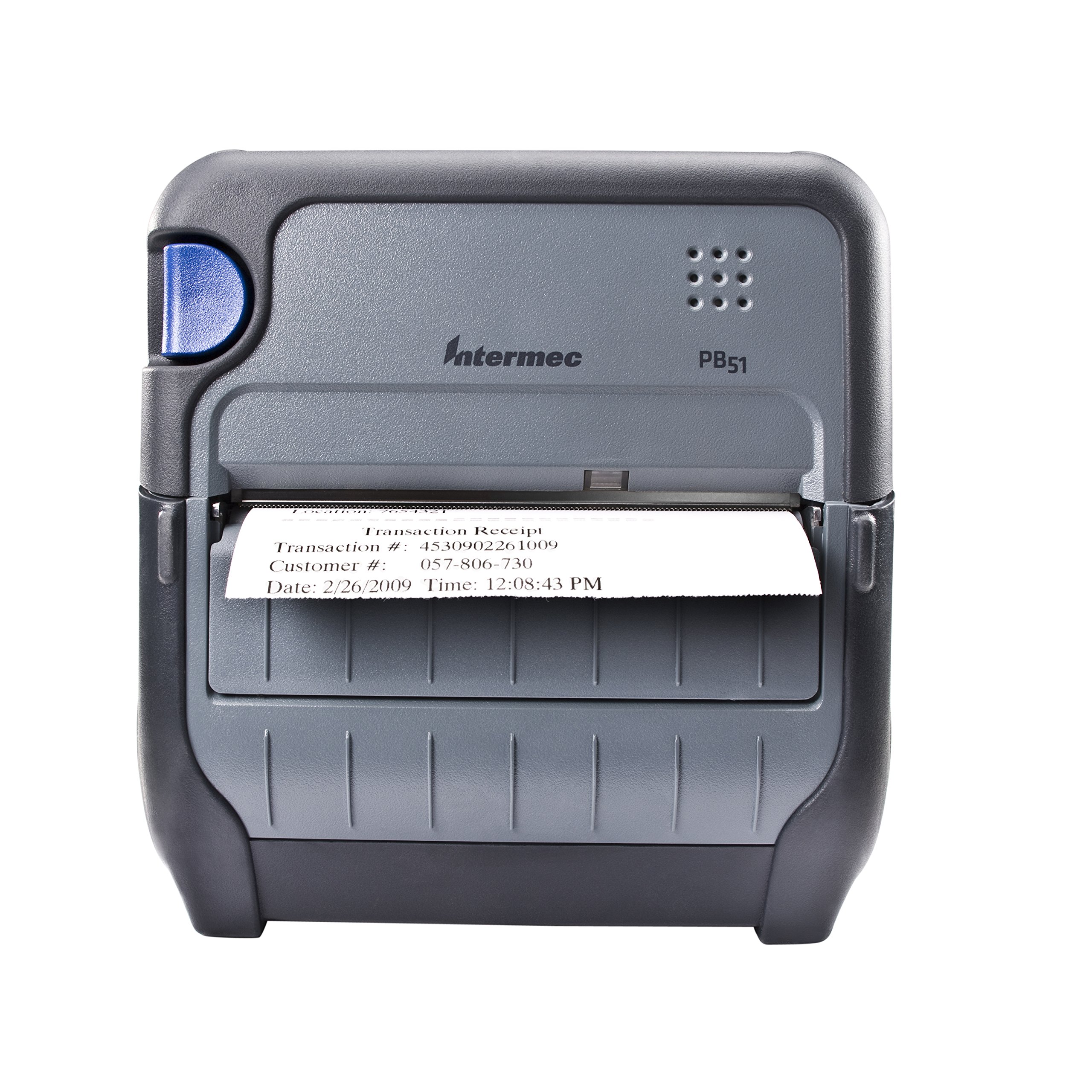
Gambar 1: Depan view of the Intermec PB51 mobile receipt printer. A receipt is partially ejected from the front slot, displaying "Transaction Receipt", "Transaction #: 4530902261009", "Customer #: 057-806-730", and "Date: 2/26/2009 Time: 12:08:43 PM". The printer features a dark gray casing with a blue button on the left side and the "Intermec PB51" logo on the top panel.
Pengaturan
1. Membongkar dan Inspeksi
- Keluarkan printer dan semua aksesori secara hati-hati dari kemasannya.
- Pastikan semua komponen yang tercantum dalam slip pengiriman ada.
- Inspect the printer for any visible damage. If damage is found, contact your supplier immediately.
2. Pemasangan dan Pengisian Baterai
- Pastikan printer dimatikan.
- Locate the battery compartment on the printer.
- Masukkan baterai, pastikan posisinya sejajar dengan kontak.
- Tutup rapat tempat baterai.
- Connect the AC adapter to the printer and a power outlet. The battery indicator light will show charging status. Allow the battery to fully charge before first use.
3. Memuat Kertas Termal
- Buka penutup kompartemen kertas.
- Insert the thermal paper roll with the print-side facing the print head.
- Pull a small amount of paper out past the print mechanism.
- Close the paper compartment cover firmly until it latches.
- The printer's paper sensors will detect the paper, minimizing lost transactions.
4. Connectivity Setup (Bluetooth / USB / Serial)
- Bluetooth dapat digunakan untuk berbagai keperluan, seperti: Turn on the printer and enable Bluetooth on your host device (e.g., smartphone, tablet, or computer). Pencarian untuk available devices and select the PB51. Pair using the default PIN (refer to the printer's display or documentation for the specific PIN).
- Kabel USB: Connect the printer to your host device using a standard USB cable. Install the necessary printer drivers on your host device if prompted.
- Serial: Connect the printer to your host device using a serial cable. Configure the serial port settings (baud rate, data bits, parity, stop bits) on both the printer and the host device to match.
Petunjuk Pengoperasian
1. Menghidupkan/Mematikan
- Untuk menghidupkan, tekan dan tahan tombol daya hingga layar menyala.
- To power off, press and hold the power button until the display indicates shutdown, then release.
2. Mencetak Tanda Terima
- Ensure the printer is powered on and connected to your host device.
- Open the application on your host device that generates receipts or invoices.
- Initiate the print command from your application. The PB51 is designed for 20-30% faster time-to-receipt printing.
- The printer will automatically feed and print the receipt.
- Tear off the receipt along the serrated edge.
3. Menggunakan Layar LCD
The standard LCD display provides important information about the printer's status, battery level, connectivity, and error messages. Use the navigation buttons (if present) to scroll through menu options and settings.
Pemeliharaan
1. Membersihkan Kepala Cetak
- Matikan printer dan lepaskan dari sumber listrik apa pun.
- Buka kompartemen kertas.
- Usap permukaan kepala cetak dengan lembut menggunakan kain bebas serat.ampdengan isopropil alkohol.
- Biarkan kepala cetak mengering sepenuhnya sebelum menutup penutup dan menghidupkan printer.
- Perform this cleaning regularly, especially if print quality degrades.
2. Perawatan Baterai
- Untuk memaksimalkan masa pakai baterai, hindari mengosongkan baterai sepenuhnya secara sering.
- Store the printer and battery in a cool, dry place when not in use for extended periods.
- Use only genuine Intermec replacement batteries.
3. Pembersihan Umum
Bersihkan bagian luar printer dengan kain lembut dan kering.amp cloth. Do not use harsh chemicals or abrasive cleaners. Ensure no liquid enters the printer's openings.
Penyelesaian Masalah
| Masalah | Kemungkinan Penyebab | Larutan |
|---|---|---|
| Printer tidak menyala | Low or dead battery; faulty power adapter; loose battery connection. | Charge the battery; check power adapter connection; re-seat the battery. |
| Tidak ada keluaran cetak | No paper; paper loaded incorrectly; connectivity issue; print head dirty. | Load paper correctly; check Bluetooth/USB/Serial connection; clean print head. |
| Kualitas cetak buruk | Dirty print head; incorrect paper type; low battery. | Clean print head; ensure thermal paper is used; charge battery. |
| Masalah konektivitas | Incorrect pairing; driver issues; out of range. | Re-pair Bluetooth; reinstall drivers; move closer to host device. |
If the problem persists after attempting these solutions, please contact Intermec customer support.
Spesifikasi
| Fitur | Detil |
|---|---|
| Nama Model | PB51B33004100 |
| Teknologi Percetakan | Termal Langsung |
| Keluaran Printer | Satu warna |
| Ukuran Media Maksimum | 4 inci |
| Teknologi Konektivitas | USB, Serial, Bluetooth |
| Berat Barang | 42 ons (sekitar 2.63 pon) |
| Dimensi Paket | 10.2x10x5 inci |
| Tipe Pengendali | Android (kompatibel) |
| Pabrikan | Intermec |
Garansi dan Dukungan
Specific warranty information for the Intermec PB51 printer is not available in this document. Please refer to the warranty card included with your product or visit the official Intermec (now Honeywell) websitus untuk mengetahui syarat dan ketentuan garansi secara terperinci.
For technical support, service, or to purchase accessories, please contact your authorized Intermec/Honeywell dealer or visit their official support portal.


