1. Pendahuluan
Terima kasih telah memilih KOLINK Refractor Midi-Tower computer case. This manual provides essential information for the proper installation, operation, and maintenance of your new PC chassis. Please read this manual carefully before beginning the assembly process to ensure a smooth and safe build.
1.1 Informasi Keselamatan
- Selalu cabut catu daya dari stopkontak sebelum memasang atau melepas komponen apa pun.
- Kenakan tali pergelangan tangan antistatis untuk mencegah kerusakan akibat pelepasan muatan elektrostatik (ESD) pada komponen sensitif.
- Handle components with care. Avoid touching pins or circuit boards directly.
- Jauhkan komponen dan peralatan kecil dari jangkauan anak-anak.
- Pastikan ventilasi yang baik di sekitar casing untuk mencegah panas berlebih.
2. Isi Paket
Mohon pastikan bahwa semua item berikut ada di dalam paket Anda:
- KOLINK Refractor Midi-Tower Chassis
- Kotak Aksesori (berisi sekrup, penahan, pengikat kabel, dll.)
- User Manual (dokumen ini)
If any items are missing or damaged, please contact your retailer or KOLINK support.
3. Produk Lebihview
Familiarize yourself with the key features and components of your KOLINK Refractor Midi-Tower.
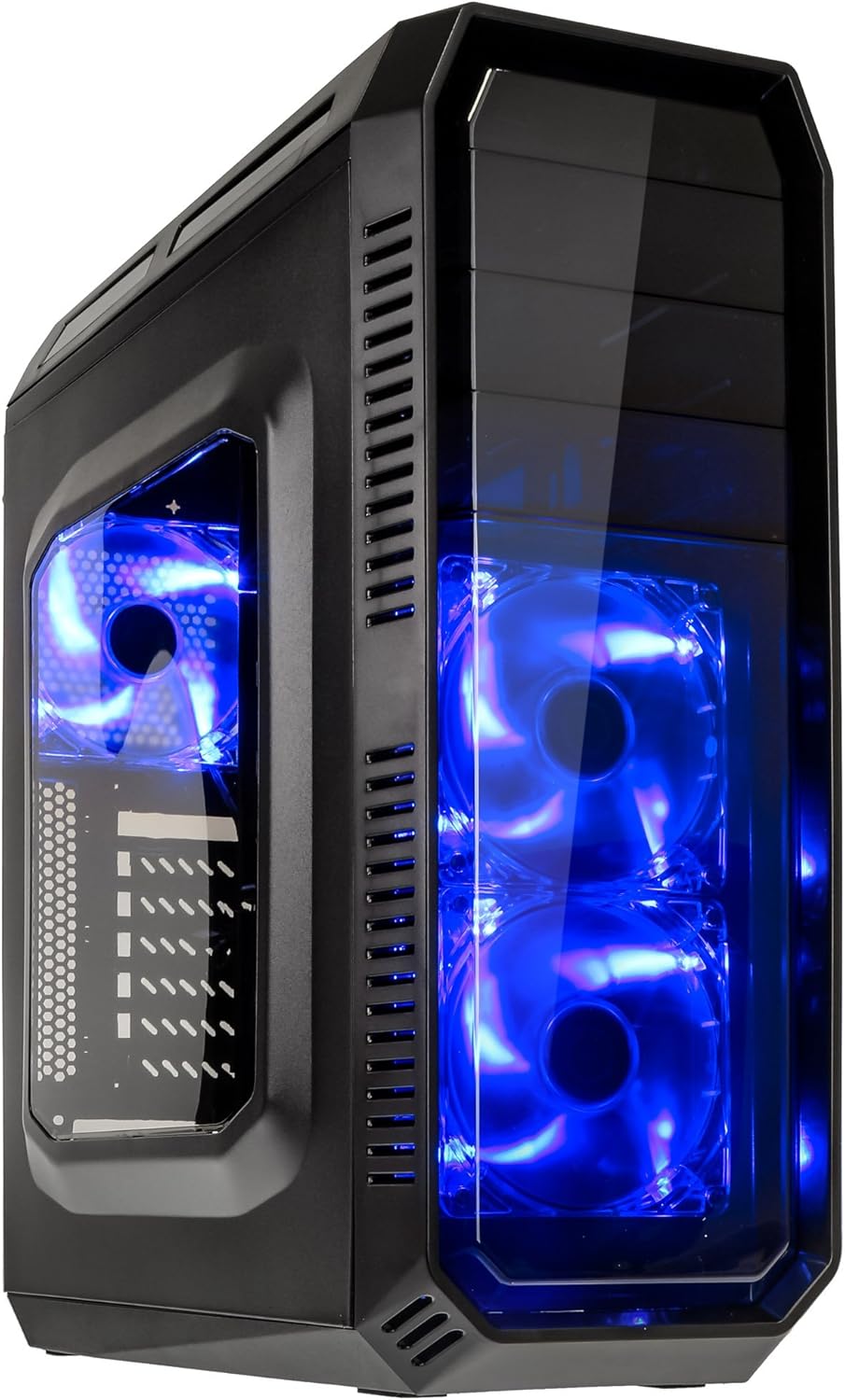
This image displays the KOLINK Refractor Midi-Tower from a front-left perspective, highlighting its sleek black design. The front panel features two pre-installed 120mm blue LED fans, visible through a transparent section, providing both cooling and aesthetic appeal. The left side panel includes a window, allowing visibility of internal components.

Bagian depan atas view of the case, illustrating the conveniently located I/O panel on the top. This panel includes two USB 3.0 ports, two USB 2.0 ports, and audio input/output jacks. The top surface also features a mesh area for additional ventilation, contributing to optimal airflow.

This image shows the right side panel of the KOLINK Refractor Midi-Tower. It is a solid black panel, designed for cable management behind the motherboard tray, ensuring a clean and organized interior.

This composite image provides three distinct views of the case. The left panel shows the front with its blue LED fans. The middle panel displays the rear of the case, featuring the motherboard I/O cutout, seven expansion slots, and a 120mm fan mount. The right panel offers a close-up of the top I/O ports, including USB 3.0, USB 2.0, and audio jacks.

A detailed close-up of the top I/O panel. It clearly shows the power and reset buttons, two USB 3.0 ports, two USB 2.0 ports, and the microphone and headphone jacks, providing easy access for peripherals.
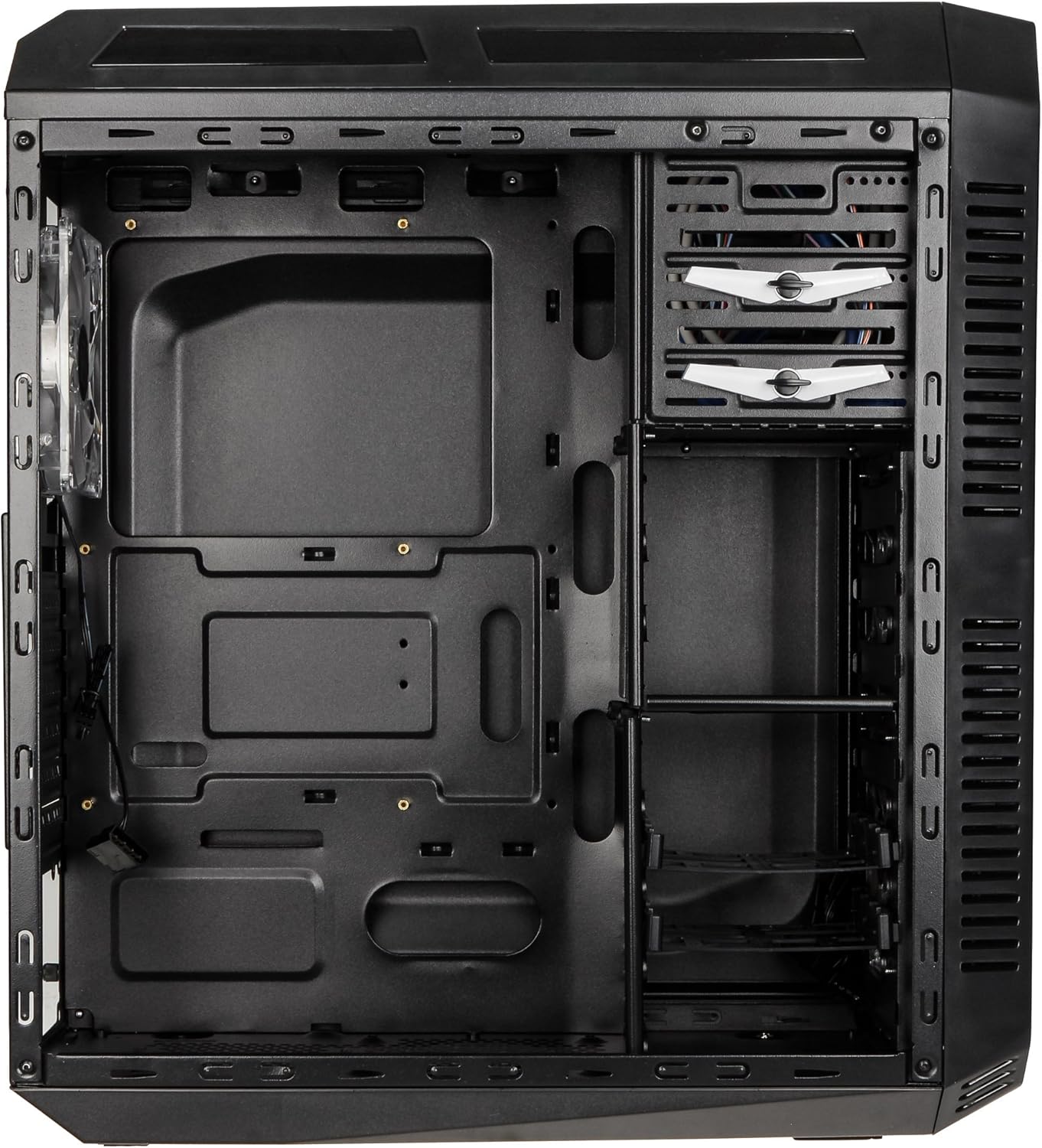
This image presents the interior of the case from the left side, revealing the spacious motherboard tray compatible with ATX motherboards. It features a large cutout behind the CPU area for easy cooler installation and multiple grommeted holes for efficient cable routing.

Sebuah internal view from the right side, focusing on the drive bay configuration. The case offers three external 5.25-inch bays and seven internal 2.5/3.5-inch drive bays, providing ample storage expansion options.

A closer look at the internal drive bays, illustrating the design for mounting 2.5-inch or 3.5-inch storage drives. These bays are designed for easy installation and removal of hard drives and SSDs.

Gambar ini memberikan gambaran internal. view looking down from the top, showcasing the pre-installed 120mm blue LED fan at the rear for exhaust. The top panel's mesh area for additional fan mounting is also visible, contributing to overall system cooling.
4. Pengaturan dan Instalasi
Follow these steps to install your computer components into the KOLINK Refractor Midi-Tower.
4.1 Menyiapkan Kasus
- Letakkan wadah tersebut di atas permukaan yang datar dan stabil.
- Remove the left and right side panels by unscrewing the thumbscrews at the rear of the case and sliding the panels backward.
4.2 Instalasi Papan Utama
- Install the I/O shield that came with your motherboard into the cutout at the rear of the case.
- Ensure the correct motherboard standoffs are installed for your ATX motherboard. Adjust or add standoffs as necessary using the provided accessory kit.
- Letakkan motherboard Anda dengan hati-hati di atas penyangga, sejajarkan lubang sekrupnya.
- Kencangkan motherboard dengan sekrup yang sesuai dari kit aksesori.
4.3 Instalasi Catu Daya
- Position your ATX power supply unit (PSU) in the designated compartment at the bottom rear of the case.
- Sejajarkan PSU dengan lubang sekrup di bagian belakang casing.
- Secure the PSU using the screws provided with your power supply.
4.4 Instalasi Drive
5.25-inch External Drives:
- Remove the desired 5.25-inch bay cover from the front panel.
- Slide your optical drive or other 5.25-inch device into the bay from the front.
- Secure the drive using the tool-less clips or screws.
2.5/3.5-inch Internal Drives:
- Locate the internal drive bays.
- Mount your 2.5-inch SSD or 3.5-inch HDD into the drive trays.
- Slide the populated drive trays back into the drive cage until they click into place.
4.5 Pemasangan Kartu Ekspansi
- Lepaskan penutup slot ekspansi yang diperlukan di bagian belakang casing.
- Insert your graphics card or other PCIe expansion card into the corresponding slot on the motherboard.
- Secure the card with the provided screws.
4.6 Manajemen Kabel
Utilize the cable routing holes and tie-down points behind the motherboard tray to organize cables. This improves airflow and gives your build a cleaner appearance.
4.7 Fan Installation (Optional)
The case comes with two 120mm blue LED fans pre-installed at the front and one 120mm blue LED fan at the rear. Additional fan mounting locations include:
- Top: 1x 120/140mm fan
- Bottom: 1x 120mm fan (under the PSU)
Install additional fans as needed for optimal cooling, ensuring proper airflow direction.
5. Petunjuk Pengoperasian
5.1 Penyalaan Awal
- Once all components are installed and cables are connected, replace both side panels.
- Hubungkan monitor, keyboard, mouse, dan perangkat periferal lainnya.
- Connect the power cable to the PSU and then to a wall outlet.
- Press the power button on the top I/O panel to start your system.
5.2 Front Panel I/O Usage
Panel I/O bagian atas menyediakan akses mudah ke:
- Port USB 3.0 (x2): Untuk transfer data berkecepatan tinggi dengan perangkat yang kompatibel.
- Port USB 2.0 (x2): Untuk menghubungkan perangkat USB standar.
- Audio Jacks (Headphone/Microphone): Untuk menghubungkan headset atau perangkat audio eksternal.
- Tombol Daya: Untuk menghidupkan/mematikan sistem.
- Tombol Reset: Untuk memulai ulang sistem.
5.3 Lampu LED
The pre-installed front and rear fans feature blue LED lighting, which illuminates when the system is powered on, adding an aesthetic element to your build.
6. Pemeliharaan
Regular maintenance helps ensure optimal performance and longevity of your computer system.
6.1 Pembersihan
- Filter Debu: The case includes a removable dust filter under the PSU. Regularly remove and clean this filter to prevent dust buildup and maintain airflow.
- Luar: Lap permukaan luar dengan lembut, damp kain. Hindari pembersih abrasif.
- Pedalaman: Periodically use compressed air to remove dust from internal components and fan blades. Ensure the system is powered off and unplugged before cleaning the interior.
6.2 Optimasi Aliran Udara
Ensure that the case's ventilation areas (front, top, rear, bottom) are not obstructed. Proper cable management also contributes significantly to unrestricted airflow within the case.
7. Penyelesaian masalah
Bagian ini membahas masalah umum yang mungkin Anda temui.
7.1 Permasalahan Umum
- Sistem Tidak Menyala:
- Periksa apakah kabel daya terhubung dengan aman ke catu daya (PSU) dan stopkontak dinding.
- Pastikan sakelar PSU dalam posisi 'ON'.
- Pastikan kabel tombol daya panel depan terhubung dengan benar ke motherboard.
- Confirm all internal power cables (24-pin ATX, CPU, GPU) are properly seated.
- Kipas Tidak Berputar:
- Check if the fan power cables are correctly connected to the motherboard or fan controller.
- Ensure the system is receiving power.
- Port USB Tidak Berfungsi:
- Verify that the front panel USB 3.0 and USB 2.0 headers are correctly connected to the motherboard.
- Ensure the device you are connecting is functioning correctly.
- Audio Ports Not Working:
- Check that the front panel audio header (HD Audio) is correctly connected to the motherboard.
- Confirm your audio drivers are installed and up to date.
For further assistance, please refer to your motherboard manual or contact KOLINK support.
8. Spesifikasi
Spesifikasi teknis terperinci untuk KOLINK Refractor Midi-Tower.
| Fitur | Spesifikasi |
|---|---|
| Nama Model | Refractor Midi-Tower |
| Dimensi (L x T x D) | 190 x 475 x 445 mm (7.5 x 18.7 x 17.5 inci) |
| Bahan | Steel (body), Plastic (front) |
| Berat | Sekitar 4.8 kg (10.6 lbs) |
| Warna | Hitam |
| Faktor Bentuk | Menara Midi |
| Kompatibilitas Papan Induk | ATX |
| External Drive Bays | 3x 5.25 inci |
| Ruang Drive Internal | 7x 2.5/3.5-inch |
| Slot Ekspansi | 7 |
| Kipas yang sudah terpasang sebelumnya | 2x 120mm (front, blue LED), 1x 120mm (rear, blue LED) |
| Fan Support (Total Possible) | Front: 2x 120mm, Top: 1x 120/140mm, Bottom: 1x 120mm, Rear: 1x 120mm |
| Panel Masukan/Keluaran | 2x USB 3.0, 2x USB 2.0, 1x Audio In/Out |
| Panjang Kartu Grafis Maksimum | 360 mm |
| Tinggi Pendingin CPU Maksimum | 174 mm |
| Kompatibilitas PSU | Standard ATX (optional) |
| Filter Debu | Floor (under PSU, removable) |
9. Garansi dan Dukungan
KOLINK products are manufactured to high-quality standards. This product is covered by a manufacturer's warranty against defects in materials and workmanship. The specific terms and duration of the warranty may vary by region and retailer.
Please retain your proof of purchase for warranty claims. For technical support, warranty inquiries, or to report missing/damaged parts, please contact your point of purchase or visit the official KOLINK websitus untuk sumber daya dukungan.
KOLINK Official Weblokasi: www.kolink.eu (Please note: This is a general link and may not lead directly to a support page for this specific model.)