1. Lebihview
The iHome iBT35 is a rugged, portable, and waterproof Bluetooth stereo speaker designed for both indoor and outdoor use. It features a built-in speakerphone for hands-free calling and is engineered to withstand various environmental conditions, making it an ideal companion for travel and outdoor activities.

Gambar 1.1: Depan view of the iHome iBT35 speaker, showcasing its black body, blue trim, and attached carabiner clip.
2. Fitur Utama
- Desain kokoh: Built to withstand military-grade drop tests, offering durability against accidental falls.
- Tahan Air (Nilai IP67): Fully waterproof, allowing submersion up to 3 feet for 30 minutes. It also floats, making it suitable for poolside use.
- Konektivitas Bluetooth: Wirelessly stream audio from compatible devices.
- Speakerphone Terintegrasi: Answer and end calls directly from the speaker.
- Daya Tahan Baterai yang Lama: Up to 8 hours of playback in normal mode, extendable to 14 hours in Eco mode.
- Port Aux-in: For wired connection to non-Bluetooth audio sources.
- Carabiner Clip with Bottle Opener: Convenient for portability and utility.
3. Pengaturan
3.1 Mengisi Daya Speaker
Before initial use, fully charge the iBT35 speaker. Use the provided Micro USB cable to connect the speaker's 'POWER IN' port to a USB power source (e.g., computer USB port, USB wall adapter). The charging indicator light will show the charging status.

Image 3.1: Side panel of the iBT35 with the protective door open, showing the AUX-IN, POWER IN, and ON/ECO/OFF switch.
3.2 Menghidupkan/Mematikan
Locate the 'ON/ECO/OFF' switch behind the waterproof door on the side of the speaker. Slide the switch to 'ON' to power on the speaker. To conserve battery, slide the switch to 'ECO' mode, which slightly reduces volume levels for extended playback. Slide to 'OFF' to power down.
3.3 Pemasangan Bluetooth
- Pastikan speaker dihidupkan.
- Tekan dan tahan tombol Tombol pemasangan Bluetooth (often combined with Play/Pause) on the top panel until the Bluetooth indicator light flashes, indicating it's in pairing mode.
- Di perangkat seluler Anda, aktifkan Bluetooth dan cari perangkat yang tersedia.
- Select "iHome iBT35" from the list.
- Setelah berhasil dipasangkan, lampu indikator Bluetooth akan menyala terus, dan Anda akan mendengar konfirmasi berupa suara.
3.4 Using Aux-in
For devices without Bluetooth, connect an audio cable (not included) from your device's headphone jack to the 'AUX-IN' port on the speaker (located behind the waterproof door). The speaker will automatically switch to Aux-in mode.
4. Petunjuk Pengoperasian
4.1 Kontrol Panel Atas
- Tombol power (lingkaran dengan garis vertikal): Press to power on/off (short press for power, long press for pairing if combined).
- Volume Naik (+): Tingkatkan volume pemutaran.
- Volume Turun (-): Kurangi volume pemutaran.
- Putar/Jeda (ikon putar/jeda): Play or pause audio playback. Also functions as Bluetooth pairing button (long press).
- Lagu Berikutnya (double arrow right): Skip to the next audio track. Also functions as 'Talk' button for calls.
- Lagu Sebelumnya (double arrow left): Go to the previous audio track. Also functions as 'End' button for calls.
4.2 Fungsi Speakerphone
When paired with a mobile phone:
- Menjawab Panggilan: Press the 'Talk' button (Next Track button) to answer an incoming call.
- Akhiri Panggilan: Press the 'End' button (Previous Track button) to end an active call.
5. Pemeliharaan
5.1 Maintaining Waterproofing
To ensure the iBT35 remains waterproof, always make sure the side protective door covering the ports (AUX-IN, POWER IN, ON/ECO/OFF switch) is completely closed and securely sealed before exposing the speaker to water or moisture.
5.2 Pembersihan
Bersihkan speaker dengan sikat yang lembut dan halus.amp cloth. Do not use abrasive cleaners or solvents, as these may damage the finish or rubberized coating.
5.3 Resetting the Speaker
If the speaker becomes unresponsive or experiences connectivity issues, locate the small 'RESET' pinhole button behind the side waterproof door. Use a thin object (like a paperclip) to gently press and hold the reset button for a few seconds. This will restart the speaker without losing pairing information.
6. Penyelesaian masalah
- Tidak Ada Daya: Ensure the speaker is charged. Connect it to a power source using the Micro USB cable. Check the 'ON/ECO/OFF' switch is in the 'ON' or 'ECO' position.
- Tidak Dapat Dipasangkan melalui Bluetooth: Make sure the speaker is in pairing mode (flashing Bluetooth indicator). Ensure your device's Bluetooth is enabled and within range. Try turning both devices off and on again. If issues persist, perform a reset on the speaker.
- Kualitas Suara Buruk/Distorsi: Reduce the volume on both the speaker and your connected device. Ensure there are no obstructions between the speaker and the Bluetooth device. If using Aux-in, check the cable connection.
- Speaker Not Waterproof: Verify that the side protective door is fully closed and sealed. Any gap will compromise its waterproof capabilities.
Helpful Video: iHome iBT35 Waterproof Bluetooth Speaker Overview
Video ini memberikan gambaran visualview of the iHome iBT35 speaker, demonstrating its design, features, and rugged capabilities, including its waterproof nature and various ports.
7. Spesifikasi
| Fitur | Detil |
|---|---|
| Nama Model | iBT35 |
| Jenis Pembicara | Luar ruangan |
| Fitur Khusus | Built-in Microphone, Waterproof (IP67) |
| Penggunaan yang Direkomendasikan | Smartphones, Tablets, Outdoor Activities |
| Perangkat yang Kompatibel | Komputer desktop, Laptop, Ponsel pintar, Tablet |
| Dimensi Produk | 8"Panjang x 4"Lebar x 4"T |
| Berat Barang | 1.5 pon |
| Metode Kontrol | Menyentuh |
| Komunikasi Nirkabel | Bahasa Indonesia: Bluetooth |
| Sumber Daya | Bertenaga Baterai |
| Jenis Penggerak Audio | Driver Dinamis |
| Gaya | Luar Ruangan yang Kasar |
| Pabrikan | SAYA RUMAH |
| Daya Keluaran Maksimum Speaker | 3 Watt |
| Mode Keluaran Audio | Stereo |
| Jenis Pemasangan | Freestanding |
| UPC / GTIN | 047532910162 |
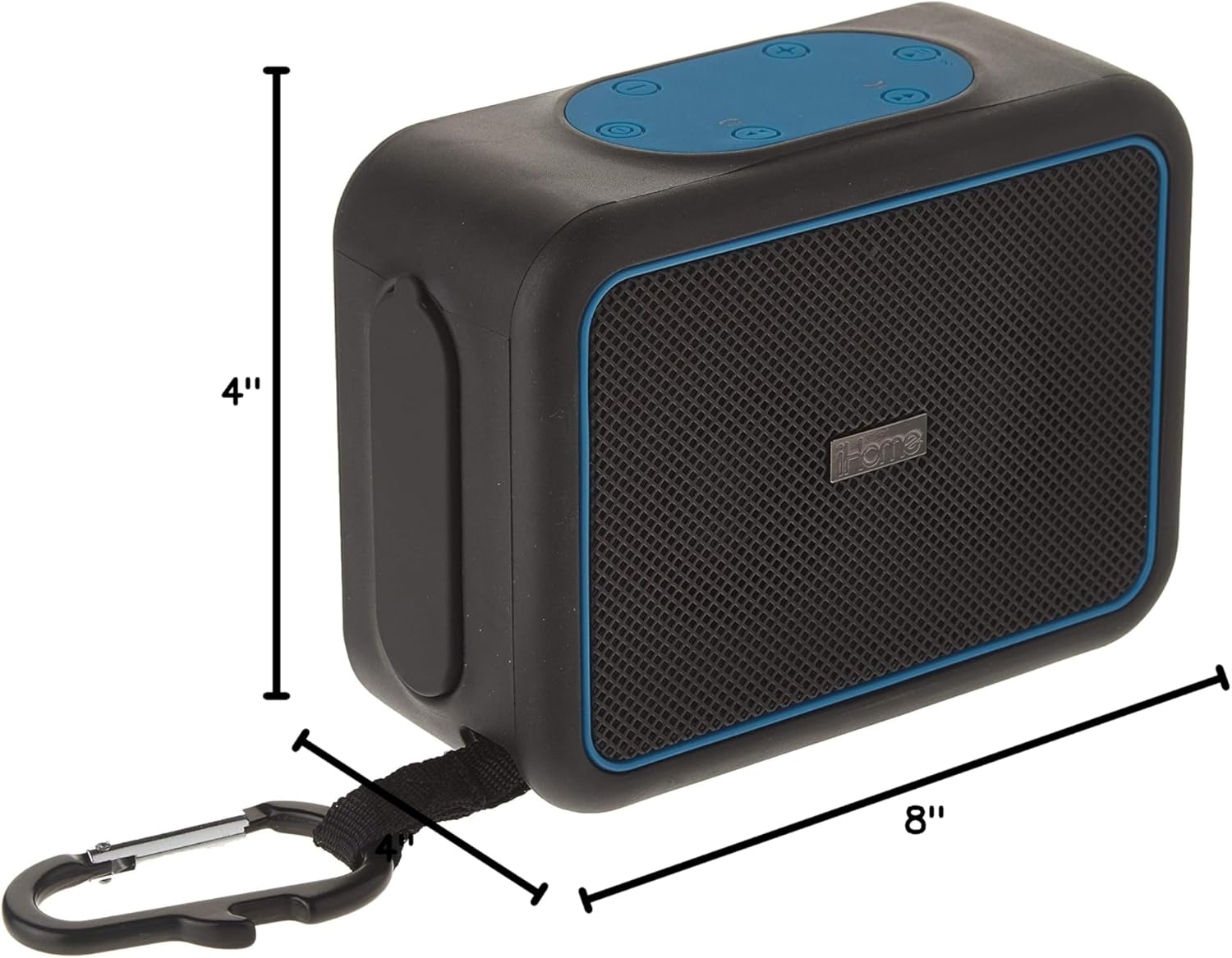
Image 7.1: Dimensions of the iHome iBT35 speaker.
8. Garansi dan Dukungan
The iHome iBT35 speaker comes with an Extended Warranty. For specific warranty terms, conditions, and to register your product, please refer to the warranty card included in your product packaging or visit the official iHome support website. For technical assistance or further inquiries, please contact iHome customer support.