1. Pendahuluan
This manual provides detailed instructions for the safe and efficient operation of your Optoma EH416 Full HD 3D DLP Projector. Please read this manual thoroughly before using the projector and retain it for future reference. Proper use and maintenance will ensure optimal performance and longevity of your device.
Informasi Keselamatan
- Jangan melihat langsung ke lensa proyektor saat lampuamp sedang menyala. Cahaya yang sangat terang dapat menyebabkan kerusakan mata.
- Pastikan ventilasi yang memadai di sekitar proyektor. Jangan menghalangi lubang ventilasi.
- Gunakan hanya kabel daya yang disertakan dengan proyektor. Sambungkan ke stopkontak yang diarde dengan benar.
- Jangan biarkan proyektor terkena hujan, uap air, atau kelembapan yang berlebihan.
- Serahkan semua perbaikan kepada teknisi servis yang berkualifikasi. Jangan mencoba membuka atau memperbaiki proyektor sendiri.
2. Apa yang ada di dalam kotak
Please verify that all items listed below are present in your package. If any items are missing or damaged, contact your dealer immediately.
- Optoma EH416 Projector
- Kabel Listrik
- Kabel VGA ke VGA
- Kontrol Jarak Jauh
- Tas Pembawa
- Baterai untuk Remote Control
- Multilingual CD-ROM User’s Manual
- Kartu Mulai Cepat
- Kartu Garansi
3. Produk Lebihview
Fitur Utama
- Kecerahan Tinggi: 4200 lumens for clear images in various lighting conditions.
- Kontras Tinggi: 20,000:1 contrast ratio for sharp, luminous images with deep blacks.
- Resolusi FullHD: Native 1080p (1920x1080) resolution, supporting up to WUXGA (1920x1200).
- Advanced Optical Lens: Features a 1.6x zoom and vertical lens shift for flexible installation.
- Konektivitas Luas: Dual HDMI (one with MHL support), dual audio-in, VGA, and more.
- sRGB Color Profile: Enables vibrant and highly accurate colors based on Rec. 709 HDTV specification.
- Penyesuaian Warna Dinding: Compensates for brightness loss when projecting on non-white surfaces.
- Edge Mask: Eliminates soft edges and jaggedness on the projection border for a smooth image.
- Audio Terintegrasi: Speaker 10W internal.
Komponen Proyektor
The image below illustrates the main components of the Optoma EH416 projector, including the lens, control panel, and various ports.
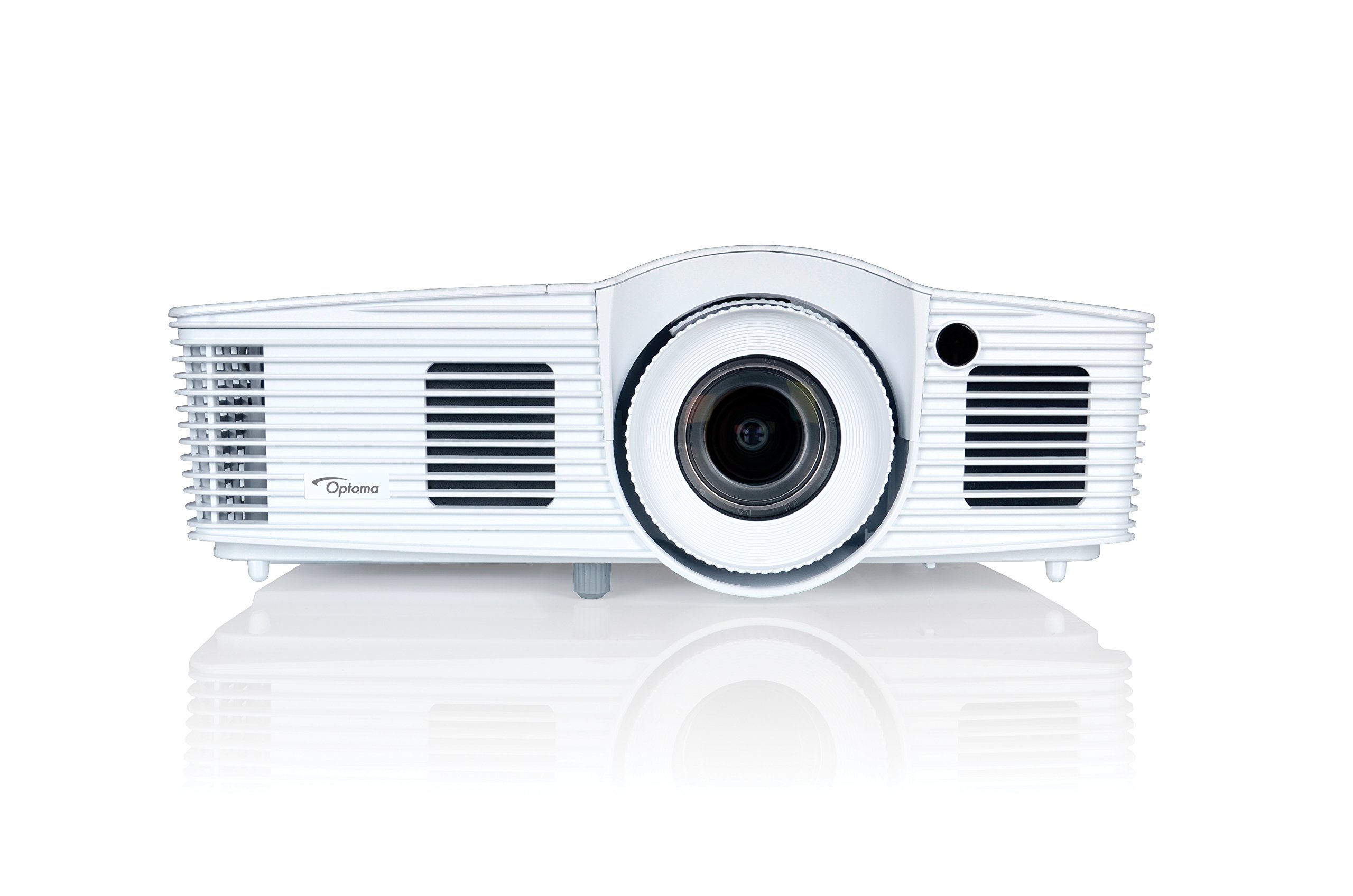
Gambar 1: Depan view of the Optoma EH416 Projector, showing the lens and primary controls.
Port Konektivitas
The Optoma EH416 projector offers a wide range of connectivity options located on the rear panel for versatile integration with various devices.
- HDMI (x2): Digital input for high-definition video and audio. One port supports MHL for mobile devices.
- VGA (x2): Analog input for computer connections.
- Audio In (x2): 3.5mm stereo jack for analog audio input.
- Suara keluar: 3.5mm stereo jack for connecting external speakers.
- USB-A: For power output or service.
- RS232: Untuk mengontrol proyektor melalui komputer atau sistem kontrol.
- RJ45 (Ethernet): Untuk kontrol dan manajemen jaringan.
4. Pengaturan
Penempatan Proyektor
The Optoma EH416 offers flexibility in placement due to its 1.6x zoom and vertical lens shift capabilities. Position the projector on a stable surface or mount it securely. Adjust the distance from the screen to achieve the desired image size. The 1.6x zoom allows for a larger image from a shorter distance or a smaller image from a longer distance without moving the projector.
Menghubungkan Perangkat
- Sambungan Daya: Hubungkan kabel daya ke input daya proyektor, lalu ke stopkontak listrik yang memiliki ground.
- Sumber Video:
- For HDMI devices (e.g., Blu-ray player, laptop): Connect an HDMI cable from your device to one of the HDMI ports on the projector.
- For VGA devices (e.g., older laptops): Connect a VGA cable from your device to a VGA port on the projector. If audio is also required, connect a separate 3.5mm audio cable from your device to an Audio In port on the projector.
- For MHL compatible mobile devices: Connect an MHL cable to the designated HDMI/MHL port.
- Keluaran Audio (Opsional): If using external speakers, connect an audio cable from the projector's Audio Out port to your sound system.
Menyalakan/Mematikan
- Untuk menghidupkan: Tekan tombol daya pada panel kontrol proyektor atau remote control. Lampu indikator daya akan berubah menjadi biru.
- Untuk mematikan: Press the power button twice. The projector will enter a cooling down cycle before completely shutting off. Do not unplug the projector during the cooling cycle.
5. Mengoperasikan Proyektor
Operasi Dasar
- Pemilihan Sumber: Use the 'Source' button on the remote or control panel to cycle through available input sources (HDMI1, HDMI2/MHL, VGA1, VGA2).
- Navigasi Menu: Press the 'Menu' button to access the On-Screen Display (OSD). Use the arrow keys to navigate and 'Enter' to select options.
- Kontrol Volume: Use the volume buttons on the remote control to adjust the audio output from the built-in speaker or Audio Out port.
Penyesuaian Gambar
- Fokus dan Zoom: Rotate the focus and zoom rings on the projector lens to achieve a sharp and appropriately sized image.
- Koreksi Keystone: If the image appears trapezoidal, use the 'Keystone' function in the OSD menu or the dedicated button on the remote to correct the image shape. The EH416 supports ±40° vertical keystone correction.
- Pergeseran Lensa Vertikal: This feature allows you to physically move the image up or down without tilting the projector, minimizing keystone distortion. Adjust the lens shift dial located near the lens.
- Penyesuaian Warna Dinding: Access this feature in the OSD menu to compensate for the color of your projection surface (e.g., blackboard, light yellow wall). This helps maintain accurate color reproduction even on non-white walls.
- sRGB Color Profile: For the most accurate and vibrant colors, especially when connecting to a PC, Mac, or sRGB compatible source, select the sRGB picture mode in the OSD. This profile adheres to the Rec. 709 HDTV specification.
- Edge Mask: This function, found in the OSD, helps to refine the edges of the projected image, eliminating any soft or jagged appearance on the border.
6. Pemeliharaan
Membersihkan Proyektor
- Lensa: Gunakan kain lembut dan bebas serat yang khusus dirancang untuk lensa optik. Jangan gunakan pembersih abrasif.
- Casing: Bersihkan proyektor casindengan kain lembut dan kering. Untuk kotoran membandel, gunakan kain yang sedikit kering.amp Basuh kain dengan deterjen ringan, lalu lap hingga kering.
- Ventilasi Udara: Regularly check and clean the air vents to prevent dust buildup, which can lead to overheating. Use a soft brush or compressed air.
Lamp Peduli
Proyektor lamp memiliki umur yang terbatas. Ketika lamp life is nearing its end, a warning message may appear on the screen. Refer to the full user manual on the included CD-ROM for detailed instructions on lamp replacement. Always use genuine Optoma replacement lampuntuk memastikan kinerja dan keamanan yang optimal.
7. Penyelesaian masalah
This section addresses common issues you might encounter. For more detailed troubleshooting, refer to the comprehensive user manual on the included CD-ROM.
- Tidak Ada Gambar di Layar:
- Check if the projector is powered on and the lamp menyala.
- Verify that the video source device is powered on and functioning correctly.
- Ensure the video cable (HDMI, VGA) is securely connected to both the projector and the source device.
- Pilih sumber input yang tepat menggunakan tombol 'Sumber' pada remote atau proyektor.
- Gambar Buram atau Terdistorsi:
- Sesuaikan cincin fokus pada lensa proyektor.
- If the image is trapezoidal, use the keystone correction function.
- Ensure the projector is perpendicular to the screen or use vertical lens shift.
- Tidak ada suara:
- Periksa tingkat volume pada proyektor dan perangkat sumber.
- If using an analog VGA connection, ensure a separate audio cable is connected.
- Pastikan output audio tidak dibisukan.
- Kontrol Jarak Jauh Tidak Berfungsi:
- Periksa dan ganti baterai.
- Pastikan tidak ada penghalang antara remote dan penerima IR proyektor.
8. Spesifikasi
| Fitur | Detil |
|---|---|
| Nomor Model | EH416 |
| Resolusi Tampilan | 1920x1080 (HD Penuh) |
| Kecerahan | 4200 lumen cahaya |
| Rasio Kontras | 20,000:1 |
| Teknologi Konektivitas | Wireless, HDMI, MHL, VGA |
| Dimensi Produk | 8.81x12.36x4.48 inci |
| Berat Barang | 6.6 pon |
| Penggunaan yang Direkomendasikan | Bisnis, Pendidikan |
| Pabrikan | TEKNOLOGI OPTOMA |
| Tanggal Pertama Tersedia | 5 April 2016 |
9. Garansi dan Dukungan
Your Optoma EH416 projector comes with a manufacturer's warranty. Please refer to the included warranty card for specific terms, conditions, and registration information. For technical support, product registration, or to download the latest drivers and firmware, please visit the official Optoma website or contact Optoma customer service.


