1. Pendahuluan
Thank you for choosing the Lenco PDR-030 DAB+/FM Portable Digital Radio. This manual provides essential information for setting up, operating, and maintaining your device. The PDR-030 offers high-quality digital radio reception (DAB+) and traditional FM radio, along with features such as an integrated rechargeable battery for portability, an RDS display, station memory, and an alarm clock function.
Komponen yang Termasuk:
- Lenco PDR-030 Digital Radio
- AC Power Adapter (220 Volt)
- Panduan Pengguna
2. Informasi Keselamatan Penting
- Jangan biarkan perangkat terkena hujan atau kelembapan untuk mencegah kebakaran atau sengatan listrik.
- Pastikan tegangan adaptor dayatage cocok dengan catu daya lokal Anda.
- Jangan membuka casing. Serahkan semua servis kepada personel yang berkualifikasi.
- Hindari meletakkan unit di dekat sumber panas atau terkena sinar matahari langsung.
- Handle the integrated battery with care. Do not attempt to replace it yourself.
- Jauhkan perangkat dari medan magnet yang kuat.
3. Produk Lebihview
Familiarize yourself with the main components and controls of your Lenco PDR-030 radio.
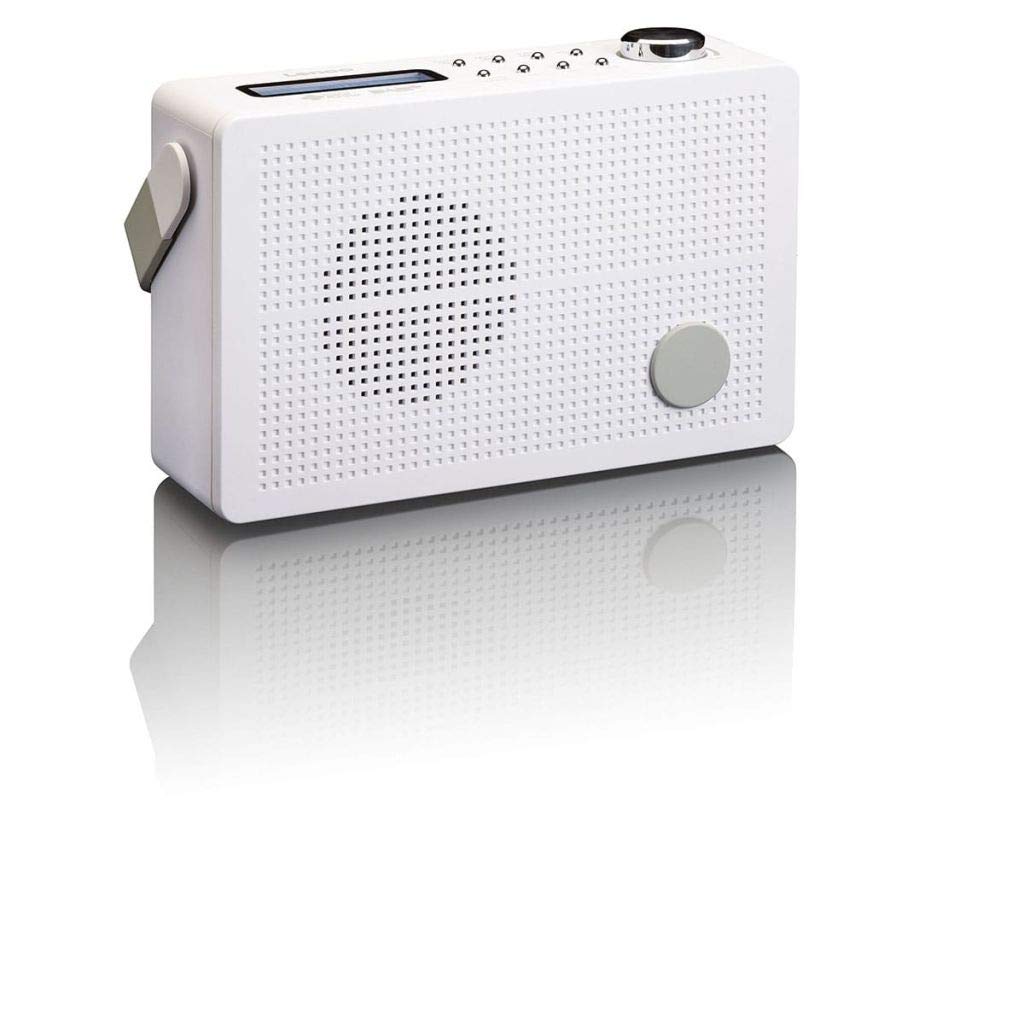
Gambar 3.1: Front Panel of Lenco PDR-030 Radio. Features include a blue backlit LCD display, power/source button, alarm, sleep, info/menu, preset buttons, select/snooze, scan, previous, next buttons, and a rotary volume knob.
Kontrol dan Fitur Utama:
- Menampilkan: Two-line illuminated LCD for time, date, station name, and information.
- Power/Source Button: Turns the radio on/off and switches between DAB+ and FM modes.
- Tombol Volume: Menyesuaikan tingkat keluaran audio.
- Antena teleskopik: Untuk penerimaan sinyal radio yang optimal.
- Jack Headphone (3.5mm): Untuk didengarkan secara pribadi.
- Alarm/Sleep/Info/Menu/Preset Buttons: For various functions including setting alarms, sleep timer, accessing information, menu navigation, and managing station presets.
- Select/Snooze/Scan/Prev/Next Buttons: For station tuning, menu selection, and snooze function.
4. Pengaturan
4.1 Menyalakan Radio
The PDR-030 can be powered by the included AC adapter or its integrated rechargeable battery.
- Daya AC: Connect the supplied 220V AC power adapter to the DC input jack on the radio and then to a wall outlet. The radio will automatically begin charging the internal battery.
- Daya Baterai: The integrated Lithium-ion battery allows for portable use. Ensure the battery is sufficiently charged before use without the AC adapter.
4.2 Pengaturan Antena
Extend the telescopic antenna fully for optimal reception of both DAB+ and FM signals. Adjust its position for the best signal quality.
4.3 Pengaktifan Awal dan Pemindaian Stasiun
- Tekan tombol Sumber daya tombol untuk menyalakan radio.
- Upon first use, the radio will automatically enter DAB+ mode and perform a full scan for available digital radio stations. This may take a few minutes.
- Setelah pemindaian selesai, radio akan menyetel ke stasiun pertama yang tersedia.
5. Petunjuk Pengoperasian
5.1 Daya Hidup/Mati
Tekan tombol Sumber daya tombol untuk menghidupkan atau mematikan radio.
5.2 Pemilihan Mode (DAB+/FM)
Tekan tombol Sumber button repeatedly to switch between DAB+ and FM radio modes.
5.3 Stasiun Penyetelan
- Mode DAB+:
- Setelah pemindaian awal, gunakan Sebelumnya Dan Berikutnya tombol untuk menavigasi daftar stasiun DAB+ yang tersedia.
- To perform a new full scan, press the Menu button, navigate to "Full Scan" using Sebelumnya/Berikutnya, dan tekan Memilih.
- Mode FM:
- Tekan tombol Pindai tombol untuk memindai secara otomatis stasiun FM berikutnya yang tersedia.
- For manual tuning, press and hold the Sebelumnya or Berikutnya tombol untuk menyesuaikan frekuensi.
5.4 Saving and Recalling Preset Stations
Radio ini memungkinkan Anda menyimpan hingga 10 stasiun preset DAB+ dan 10 stasiun preset FM.
- Untuk Menyimpan Preset:
- Dengarkan stasiun yang diinginkan.
- Tekan dan tahan tombol Telah ditetapkan sebelumnya Tekan tombol hingga "Preset Store" muncul di layar.
- Gunakan Sebelumnya/Berikutnya tombol untuk memilih nomor preset (1-10).
- Tekan Memilih untuk mengkonfirmasi dan menyimpan stasiun.
- Untuk Mengingat Preset:
- Tekan tombol Telah ditetapkan sebelumnya tombol sebentar.
- Gunakan Sebelumnya/Berikutnya tombol untuk memilih nomor preset yang diinginkan.
- Tekan Memilih to tune to the preset station.
5.5 Kontrol Volume
Putar Kenop Volume Putar searah jarum jam untuk meningkatkan volume dan putar berlawanan arah jarum jam untuk menurunkannya.
5.6 RDS Functionality (FM Mode)
In FM mode, the RDS (Radio Data System) function displays information such as station name, program type, and other broadcast data on the two-line LCD display.
5.7 Fungsi Jam Alarm
The PDR-030 can be used as an alarm clock with two separate alarm times.
- Menyetel Alarm:
- Tekan tombol Alarm tombol.
- Menggunakan Sebelumnya/Berikutnya to select Alarm 1 or Alarm 2, then press Memilih.
- Follow the on-screen prompts to set the alarm time, duration, source (Buzzer or Radio), frequency (Daily, Once, Weekdays, Weekends), and volume.
- Ensure the alarm is set to "On" and press Memilih untuk menyimpan.
- Fungsi Tunda: Saat alarm berbunyi, tekan tombol Tidur sebentar tombol untuk membisukan suara sementara untuk jangka waktu tertentu.
- Pengatur Waktu Tidur: Tekan tombol Tidur button repeatedly to set a sleep timer (e.g., 15, 30, 45, 60 minutes) after which the radio will automatically turn off.
5.8 Koneksi Headphone
Connect 3.5mm stereo headphones to the headphone jack for private listening. The internal speaker will be muted automatically.
6. Pemeliharaan
6.1 Pembersihan
Wipe the radio's exterior with a soft, dry cloth. Do not use abrasive cleaners, waxes, or solvents as they may damage the finish. Ensure no liquids enter the device.
6.2 Perawatan Baterai
The integrated Lithium-ion battery is designed for long life. To maximize battery lifespan:
- Hindari mengosongkan baterai sepenuhnya secara sering.
- If storing the radio for an extended period, charge the battery to approximately 50% and store in a cool, dry place.
- Do not attempt to replace the battery yourself. Contact qualified service personnel if battery issues arise.
7. Penyelesaian masalah
| Masalah | Kemungkinan Penyebab | Larutan |
|---|---|---|
| Tidak ada daya | AC adapter not connected or faulty; battery discharged. | Check AC adapter connection. Charge the battery. |
| Penerimaan DAB+/FM yang buruk | Antena tidak terpasang; area sinyal lemah; gangguan. | Fully extend and adjust the telescopic antenna. Move the radio to a location with better signal. Avoid placing near other electronic devices. |
| Tidak ada suara | Volume too low; headphones connected; mute activated. | Increase volume. Disconnect headphones. Check if mute is active (if applicable). |
| Alarm tidak berbunyi | Alarm not activated; alarm volume too low; incorrect time setting. | Ensure alarm is set to "On". Check alarm volume. Verify current time and alarm time settings. |
8. Spesifikasi
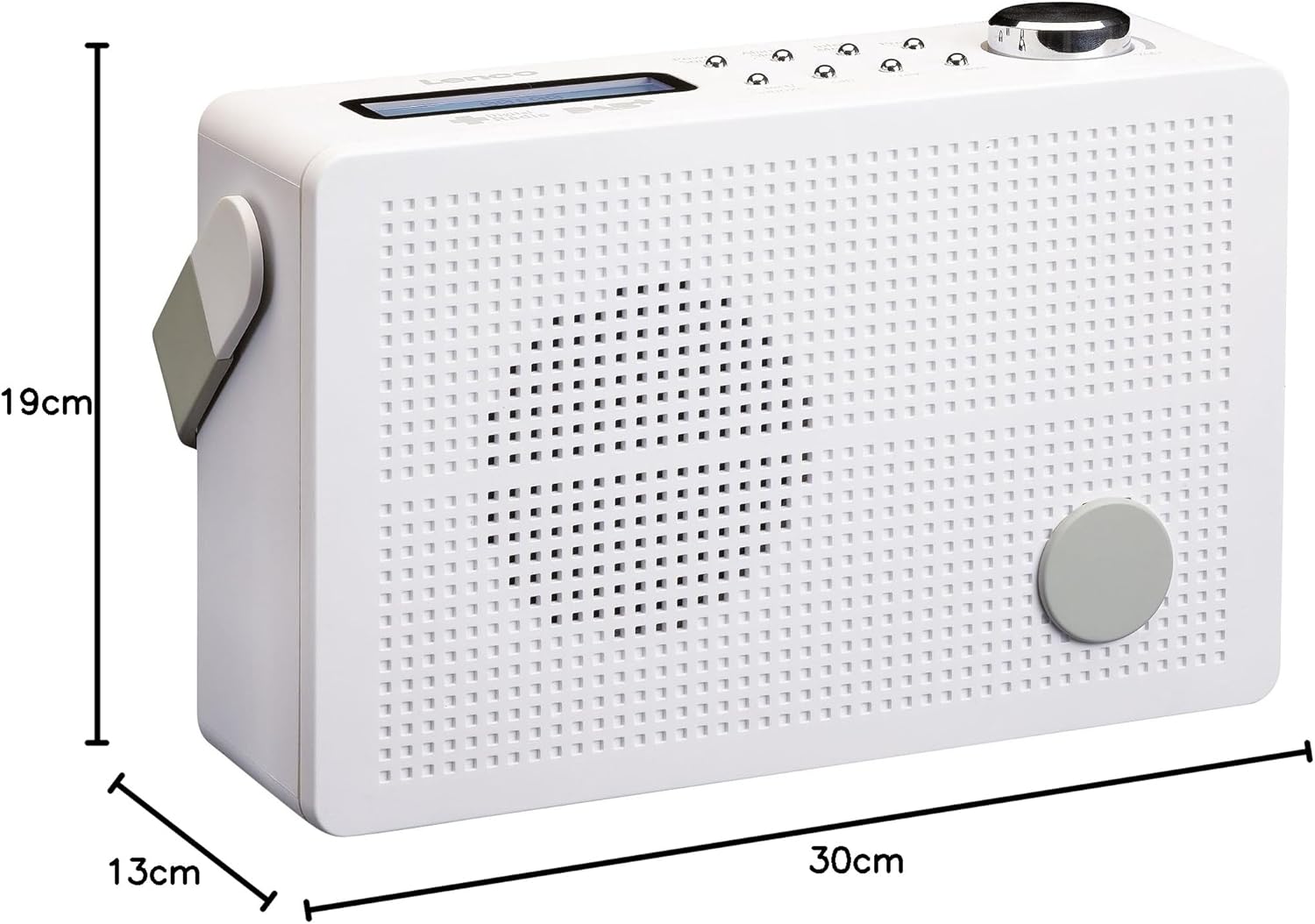
Gambar 8.1: Lenco PDR-030 Dimensions.
| Fitur | Detil |
|---|---|
| Nomor Model | PDR-030 |
| Teknologi Penyetel | DAB+, FM (Ukw) |
| Sumber Daya | Battery-Powered (Integrated Lithium-ion), AC Adapter |
| AC Jiltage | 220 Volt |
| Dimensi Produk (P x L x T) | 21.4 x 6.5 x 13.8 cm (approx. 22.5 x 8.5 x 15 cm as per another spec) |
| Berat Barang | 9 g (Note: This seems incorrect, likely 670g from description) |
| Jenis Bahan | Plastik |
| Antarmuka Perangkat Keras | 3.5 mm Audio (Headphone Jack) |
| Fitur Khusus | Portable, RDS Display, Alarm Clock, Station Memory (10 DAB+, 10 FM) |
Note: Some dimensions and weight specifications provided by the manufacturer may vary slightly. The description states 670 grams for weight, while specifications list 9g. Please refer to the product packaging for the most accurate information.
9. Garansi dan Dukungan
Lenco products are designed for reliability and performance. This product typically comes with a 24-month manufacturer's warranty from the date of purchase, covering defects in materials and workmanship. Please retain your proof of purchase for warranty claims.
For technical support, service, or warranty inquiries, please refer to the contact information provided on the Lenco official website or your local retailer. Do not attempt to repair the device yourself.
Untuk informasi lebih lanjut, Anda dapat mengunjungi Lenco Store on Amazon.