Perkenalan
This manual provides comprehensive instructions for the safe and effective use of your Winplus AC55925-80 3-in-1 Emergency Socket Power Bank. This device combines a compact power bank, a USB car charger, and an emergency glass-breaking tool. Please read this manual thoroughly before operation and retain it for future reference.
Produk Selesaiview
The Winplus 3-in-1 Emergency Socket Power Bank is designed for convenience and safety, offering multiple functionalities in a compact form factor.

Figure 1: Winplus 3-in-1 Emergency Socket Power Bank with key features highlighted.
Komponen:
- Compact Power Bank: Provides portable power for charging devices.
- Pengisi Daya Mobil USB: Plugs into a 12V car socket to charge devices and the power bank.
- Emergency Glass-Breaking Tool: Integrated for emergency situations.
- Port Keluaran USB: For connecting charging cables to devices.
- Port Masukan Mikro USB: For charging the internal power bank.
- Indikator LED: Menampilkan status pengisian daya.

Gambar 2: Rinci view of the device's ports.
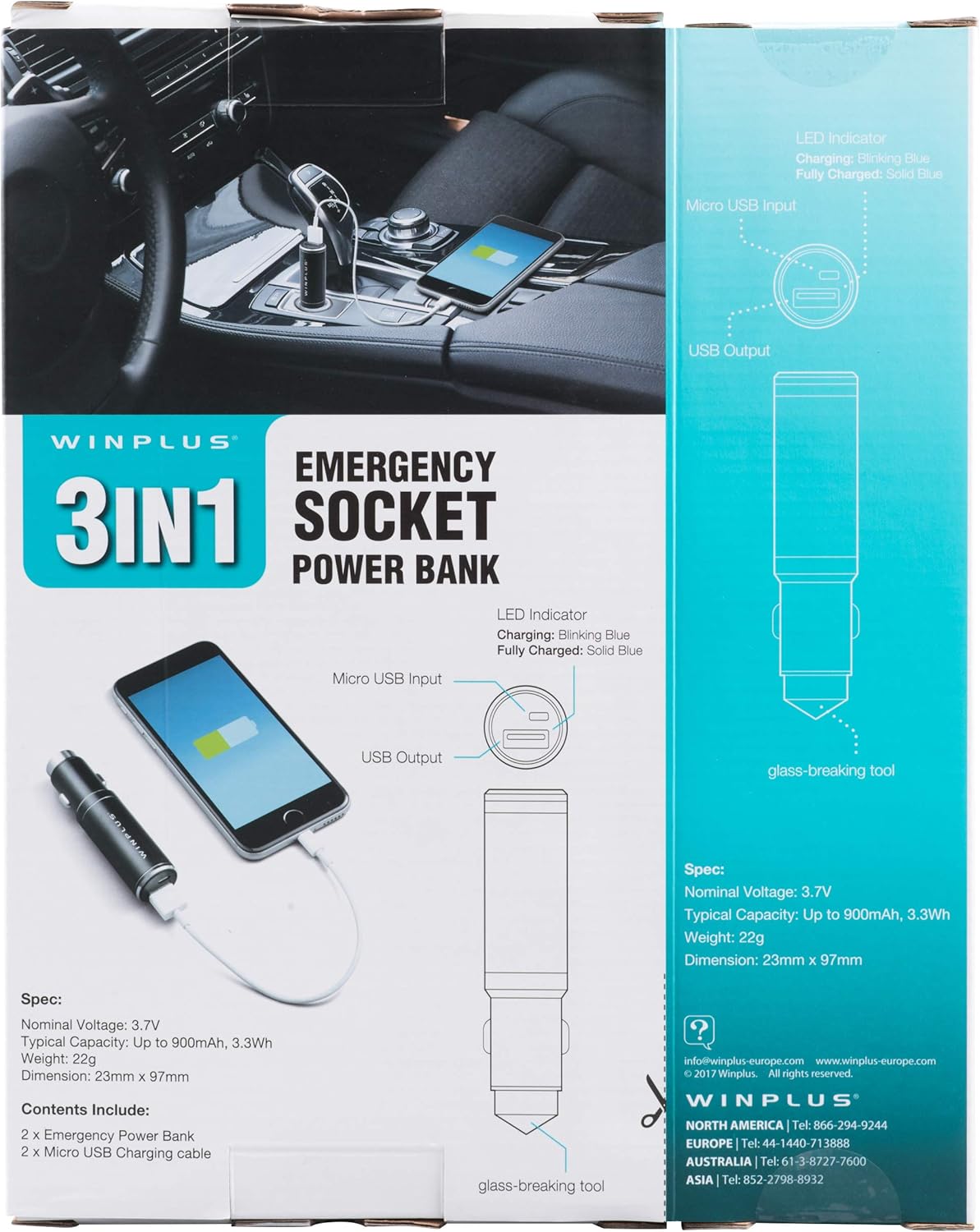
Figure 3: LED indicator status and glass-breaking tool location.
Pengaturan
Pengisian Awal Power Bank:
- Locate the Micro USB Input port on the device.
- Connect the provided Micro USB charging cable to the Micro USB Input port.
- Connect the other end of the USB cable to a standard USB power source (e.g., a computer USB port, a wall adapter, or the car's 12V socket when used as a car charger).
- The LED indicator will blink blue during charging.
- Once fully charged, the LED indicator will turn solid blue.
Note: It is recommended to fully charge the power bank before its first use.
Petunjuk Pengoperasian
Menggunakan sebagai Bank Daya Portabel:
- Ensure the power bank is charged (solid blue LED indicator).
- Connect your device's charging cable to the USB Output port on the power bank.
- Connect the other end of the cable to your mobile device (smartphone, tablet, etc.).
- Power bank akan secara otomatis mulai mengisi daya perangkat Anda.
Using as a USB Car Charger:
- Insert the Winplus 3-in-1 device into your vehicle's 12V accessory socket (cigarette lighter socket).
- Connect your device's charging cable to the USB Output port on the Winplus device.
- Hubungkan ujung kabel yang lain ke perangkat seluler Anda.
- Your device will begin charging. The internal power bank will also charge simultaneously if it is not full.
Using the Emergency Glass-Breaking Tool:
The emergency glass-breaking tool is located at the tip of the device, opposite the USB ports. This tool is intended for emergency use only to break vehicle side windows in situations where occupants are trapped.
- In an emergency, firmly press the tip of the tool against a corner of a side window.
- Apply steady pressure until the spring-loaded mechanism activates and shatters the glass.
- Once the glass is broken, carefully clear any remaining shards before exiting the vehicle.
PERINGATAN: Use this tool only in genuine emergencies. Misuse can cause serious injury. Keep out of reach of children.
Pemeliharaan
- Jaga agar perangkat tetap kering. Kelembapan dapat merusak sirkuit internal.
- Jangan sampai terkena suhu ekstrim (panas atau dingin).
- Bersihkan perangkat dengan kain lembut dan kering. Jangan gunakan bahan kimia keras atau pembersih abrasif.
- Simpan di tempat sejuk dan kering saat tidak digunakan.
- Hindari menjatuhkan atau membenturkan perangkat dengan keras.
Penyelesaian Masalah
| Masalah | Kemungkinan Penyebab | Larutan |
|---|---|---|
| Perangkat tidak mengisi daya. | Baterai power bank habis. Kabelnya rusak. USB port is dirty or damaged. | Isi ulang power bank. Coba kabel pengisi daya yang lain. Clean the USB ports carefully or try another port. |
| Indikator LED tidak menyala. | Device is not connected to a power source. Device is fully charged (if solid blue). Perangkat rusak. | Ensure proper connection to a power source. Check if it's already solid blue. Hubungi dukungan pelanggan jika masalah terus berlanjut. |
| Pengisian lambat. | Cable is not suitable. Power source is low current. Device being charged has high power requirements. | Use a high-quality charging cable. Connect to a higher current USB adapter. This device provides 2.1A output, which is standard for fast charging most phones. |
Spesifikasi
- Model: AC55925-80
- Volume Nominaltage: 3.6V
- Kapasitas Khas: Up to 2500 mAh, 9 Wh
- Komposisi Sel Baterai: Polimer Litium
- Keluaran USB: Tegangan 5V / 2.1A
- Input Micro USB: Tegangan 5V / 0.5A
- Ukuran: 23 mm x 127 mm (perkiraan)
- Berat Barang: 510 g (for the 2-pack)
- Tipe Konektor: Micro USB (Input), USB Type-A (Output)
Informasi Keselamatan
- Jangan membongkar, membuka, atau merusak kemasan baterai.
- Jangan biarkan baterai terkena panas atau api. Hindari penyimpanan di bawah sinar matahari langsung.
- Jangan membuat baterai hubung singkat. Jangan menyimpan baterai secara sembarangan di dalam kotak atau laci karena baterai dapat saling hubung singkat atau dihubung singkat oleh benda logam lainnya.
- Jangan sampai paket baterai terkena kejut mekanis.
- Jika baterai bocor, jangan biarkan cairan terkena kulit atau mata. Jika terkena, segera cuci area yang terkena dengan banyak air dan segera konsultasikan ke dokter.
- Jangan gunakan pengisi daya apa pun, kecuali yang khusus disediakan untuk digunakan bersama peralatan tersebut.
- Jauhkan baterai dari jangkauan anak-anak.
- Segera dapatkan bantuan medis jika paket baterai telah tertelan.
- Selalu beli baterai yang benar untuk peralatan tersebut.
- Jaga agar baterai tetap bersih dan kering.
- Jangan biarkan baterai terisi daya dalam waktu lama bila tidak digunakan.
- Buang baterai dengan benar sesuai dengan peraturan setempat.
Garansi dan Dukungan
For warranty information or technical support, please contact Winplus North America Inc. directly.
- Pabrikan: Winplus North America Inc
- Informasi Kontak: Refer to product packaging or the official Winplus websitus untuk rincian dukungan terkini.
You can also visit the Winplus webSitus untuk FAQ dan informasi produk tambahan: www.winplus-europe.com


