1. Produk Lebihview
The Fender Monterey Bluetooth Speaker delivers clear, powerful audio with a design inspired by classic Fender amplifiers. This speaker is engineered for high-fidelity sound reproduction, featuring 120 watts of power, two woofers, and two tweeters. It supports audio streaming via Bluetooth and direct connection through a 3.5mm auxiliary jack or RCA inputs.
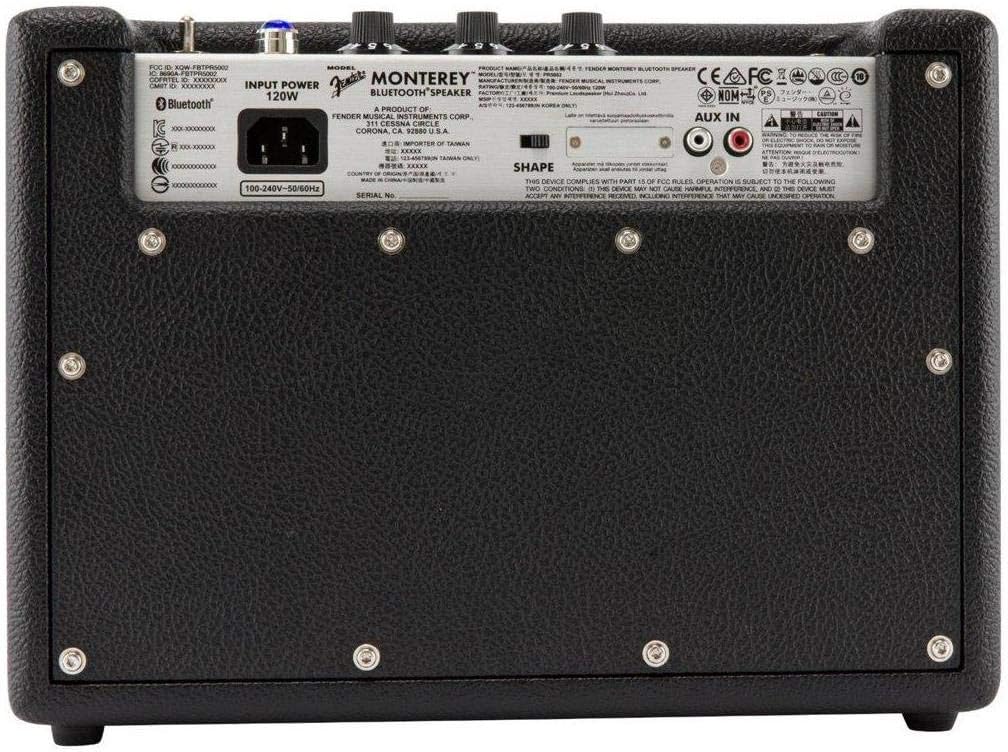
Gambar 1: Depan view of the Fender Monterey Bluetooth Speaker, showcasing its classic amplifier-inspired grille and Fender logo.
2. Apa yang ada di dalam kotak
Verifikasi bahwa semua item yang tercantum di bawah ini disertakan dalam paket Anda:
- Fender Monterey Bluetooth Speaker
- Kabel Tambahan 3.5 mm
- RCA Kabel
- Kabel listrik
3. Panduan Pengaturan
3.1 Sambungan Daya
- Ensure the speaker's volume control is set to minimum before connecting power.
- Hubungkan kabel daya yang disertakan ke input AC di panel belakang speaker.
- Plug the other end of the power cable into a suitable wall outlet (100-240V, 50/60Hz).
- Flip the power switch on the top panel to the "ON" position. The speaker will emit a chime indicating it is powered on.
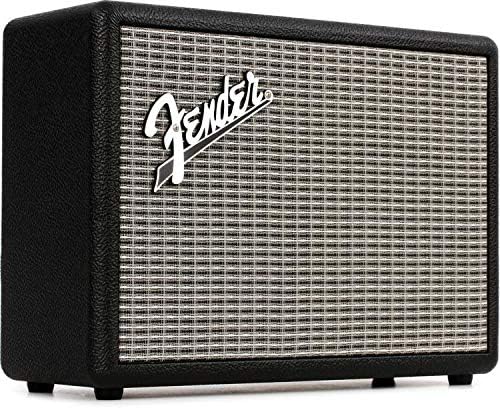
Figure 2: Rear panel of the Fender Monterey speaker, showing the power input and auxiliary connections.
3.2 Pemasangan Bluetooth
- Dengan speaker menyala, tekan tombol PASANGAN button on the top panel. The Bluetooth indicator light will begin to flash, indicating it is in pairing mode.
- On your audio device (smartphone, tablet, computer), navigate to the Bluetooth settings.
- Select "Fender Monterey" from the list of available devices.
- Once successfully paired, the Bluetooth indicator light on the speaker will turn solid blue, and a confirmation chime will sound.
3.3 Koneksi Input Tambahan
For devices without Bluetooth, use the provided 3.5mm auxiliary cable or RCA cable.
- Aux 3.5 mm: Connect one end of the 3.5mm cable to your audio device's headphone jack and the other end to the MINI input on the speaker's top panel.
- RCA: Connect the RCA cable to your audio device's RCA outputs and the other end to the Bahasa Indonesia: RCA inputs on the speaker's rear panel.
Select the appropriate source (BLUETOOTH, MINI, atau Bahasa Indonesia: RCA) menggunakan SUMBER tombol di panel atas.

Figure 3: Top panel controls of the Fender Monterey speaker, including Volume, Treble, Bass, Source, and Pair buttons.
4. Petunjuk Pengoperasian
4.1 Pemutaran Audio
- Ensure your audio source is connected and selected (Bluetooth, Mini, or RCA).
- Start playing audio from your connected device.
- Sesuaikan VOLUME knob on the speaker's top panel to your desired listening level.
4.2 Kontrol Nada
The Fender Monterey speaker features dedicated controls for customizing your sound:
- TIGA KALI LIPAT: Adjusts the high-frequency response of the audio. Turn clockwise for brighter sound, counter-clockwise for warmer sound.
- BAS: Adjusts the low-frequency response of the audio. Turn clockwise for more bass, counter-clockwise for less bass.
- MEMBENTUK: A toggle switch located on the rear panel. This control modifies the overall tonal character, offering different sound profiles. Experiment with both positions to find your preferred sound.
5. Pemeliharaan
- Pembersihan: Use a soft, dry cloth to clean the speaker's exterior. Avoid abrasive cleaners, solvents, or sprays that may damage the finish.
- Penyimpanan: Bila tidak digunakan dalam jangka waktu lama, simpan speaker di tempat sejuk dan kering, terhindar dari sinar matahari langsung dan suhu ekstrem.
- Ventilasi: Pastikan ventilasi yang baik di sekitar speaker untuk mencegah panas berlebih. Jangan menghalangi lubang ventilasi apa pun.
- Paparan Cairan: Keep the speaker away from liquids. In case of accidental spills, immediately disconnect power and allow it to dry completely before re-use.
6. Penyelesaian masalah
Tidak Ada Daya
- Ensure the power cable is securely connected to both the speaker and a working wall outlet.
- Verify the power switch on the top panel is in the "ON" position.
- Periksa apakah stopkontak dinding berfungsi dengan mencolokkan perangkat lain.
Tidak Ada Suara
- Confirm the correct audio source (Bluetooth, Mini, or RCA) is selected using the SUMBER tombol.
- Meningkatkan VOLUME knob on the speaker and the volume on your connected audio device.
- If using Bluetooth, ensure the device is properly paired and connected. Try re-pairing if necessary.
- If using auxiliary inputs, ensure cables are fully inserted and not damaged.
Masalah Pemasangan Bluetooth
- Ensure the speaker is in pairing mode (flashing Bluetooth indicator). Press the PASANGAN button if it's not flashing.
- Move your audio device closer to the speaker to ensure it's within range.
- Matikan dan hidupkan kembali fungsi Bluetooth pada perangkat audio Anda.
- If the speaker was previously paired with another device, disconnect it from that device first.
7. Spesifikasi Teknis
| Nomor Model | 6960200000 |
| Merek | Spatbor |
| Keluaran Wattage | 120 Watt |
| Konfigurasi Speaker | Two woofers, two tweeters |
| Konektivitas | Bluetooth, 3.5mm Auxiliary Input, RCA Input |
| Dimensi Produk (P x L x T) | 9.3" x 16.8" x 14.6" (23.6 cm x 42.7 cm x 37.1 cm) |
| Berat Barang | 18.6 pon (8.44 kg) |
| Warna | Hitam |
| Pabrikan | Fender Musical Instruments Corp. |
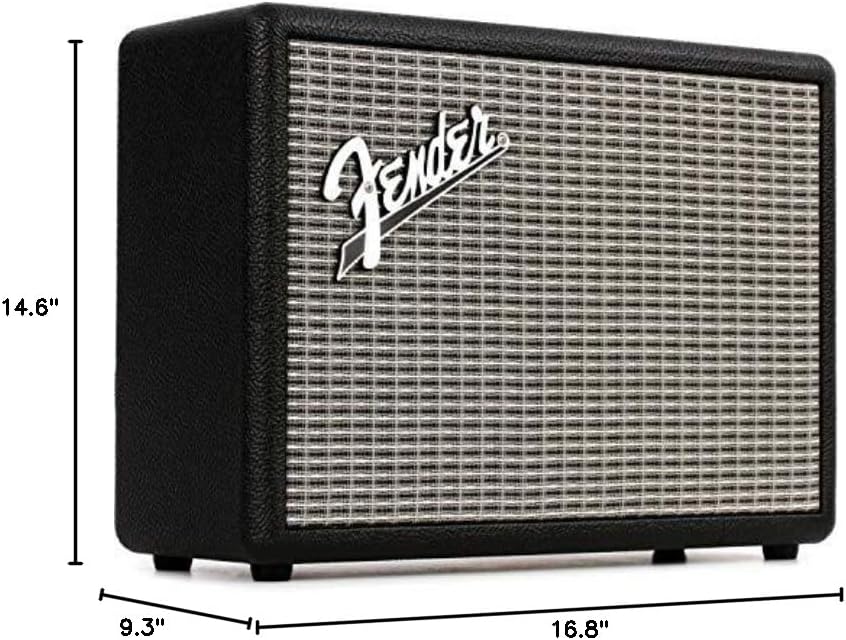
Figure 4: Dimensions of the Fender Monterey Bluetooth Speaker.
8. Garansi dan Dukungan
For warranty information, product registration, or technical support, please refer to the official Fender website or contact Fender customer service. Keep your proof of purchase for warranty claims.
Sumber Daya Daring: www.fender.com


