1. Pendahuluan
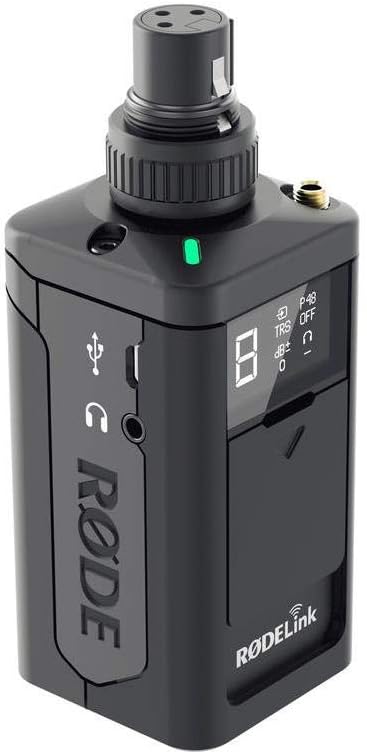
The RØDELink TX-XLR is a versatile wireless plug-on XLR transmitter designed for professional audio applications. It seamlessly integrates with your RØDELink digital wireless system, offering reliable audio transmission and the convenience of one-touch synchronization. This unit is capable of supplying P48 phantom power, making it compatible with a wide range of condenser microphones. Its flexible power options include 2 x AA batteries, Sony NP-F series batteries, or continuous power via micro USB.

Gambar 1.1: Depan view of the Rode RodeLink TX-XLR Wireless Plug-On XLR Transmitter, showcasing its compact design and XLR connector.
2. Fitur
- Fleksibilitas Sumber Daya: Operates on 2 x AA batteries, Sony NP-F series batteries, or continuous power via micro USB.
- Antena Dalaman: Features an integrated antenna for a streamlined design and robust wireless performance.
- Dual Input Connections: Equipped with an XLR input with a locking collar and a 3.5mm TRS locking jack socket for versatile microphone connectivity.
- Phantom Power (P48): Provides 48V phantom power for condenser microphones.
- Dimensi Kompak: Measures 120mm x 45mm x 45mm, making it highly portable.
- Konstruksi Kuat: Built with durable metal material for reliability in various environments.
- Digital Wireless System: Part of the RØDELink digital wireless system for secure and clear audio transmission.
3. Informasi Keselamatan
Please read and understand all safety instructions before using the TX-XLR transmitter. Failure to follow these guidelines may result in injury, damage to the device, or voiding of the warranty.
- Jangan biarkan unit terkena air atau kelembapan berlebihan.
- Hindari suhu ekstrem. Operasikan dan simpan perangkat dalam kondisi lingkungan yang direkomendasikan.
- Use only specified power sources (AA batteries, NP-F batteries, or micro USB power).
- Do not attempt to disassemble or modify the unit. Refer all servicing to qualified RØDE personnel.
- Jauhkan dari jangkauan anak-anak.
- Buang baterai secara bertanggung jawab sesuai dengan peraturan setempat.
4. Pengaturan
4.1 Powering the TX-XLR
The TX-XLR offers multiple power options:
- Baterai AA: Open the battery compartment and insert two (2) AA batteries, ensuring correct polarity.
- Sony NP-F Battery: The unit is designed to accept a Sony NP-F series battery. Align the battery with the compartment and slide it into place until it clicks.
- Mikro USB: Connect a micro USB cable to the micro USB port on the side of the unit and to a suitable USB power source (e.g., computer, USB wall adapter). This provides continuous power and can also charge rechargeable NP-F batteries if inserted.
Gambar 4.1: Sisi view of the TX-XLR, highlighting the micro USB port for power and the 3.5mm headphone monitoring jack.
4.2 Menyambungkan Mikrofon
The TX-XLR features an XLR input with a locking collar. Simply plug your XLR microphone into the top of the unit. For microphones requiring phantom power, ensure the P48 phantom power setting is enabled on the TX-XLR (refer to Section 5.1 for controls).
Additionally, a 3.5mm TRS locking jack socket is available for connecting lavalier microphones or other devices with a 3.5mm output.

Figure 4.2: Front panel of the TX-XLR, showing the OLED display and control buttons for easy access to settings.
4.3 Pairing with a RØDELink Receiver
The TX-XLR utilizes one-touch sync for quick and easy pairing with a compatible RØDELink receiver (e.g., RX-CAM). Follow these steps:
- Ensure both the TX-XLR and the RØDELink receiver are powered on.
- On the TX-XLR, navigate to the pairing menu using the control buttons.
- On the receiver, activate its pairing mode.
- The units should automatically detect and pair with each other. The display on both units will confirm a successful connection.
5. Operasi
5.1 Kontrol dan Tampilan
The TX-XLR features an intuitive OLED display and control buttons for managing settings:
- Tombol Daya: Press and hold to turn the unit on/off. A short press may activate/deactivate mute.
- Tombol Navigasi (Kiri/Kanan): Digunakan untuk menavigasi opsi menu dan menyesuaikan nilai.
- Tombol Pilih: Mengkonfirmasi pilihan atau masuk ke sub-menu.
- Tampilan OLED: Shows current channel, battery status, audio levels, phantom power status (P48), and other settings.
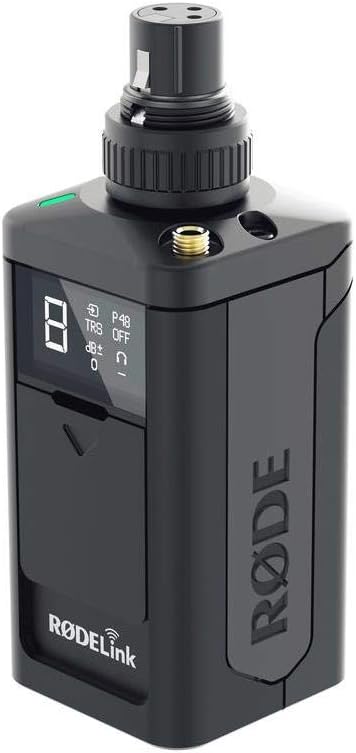
Gambar 5.1: Sudut view of the TX-XLR, providing a clear look at the display and the tactile control buttons.
5.2 Adjusting Audio Gain
To optimize your audio levels, you can adjust the gain on the TX-XLR. Use the navigation buttons to access the gain setting on the display and increase or decrease the input sensitivity as needed. Monitor your audio levels on the receiver or a connected monitoring device to prevent clipping.
5.3 Aktivasi Daya Phantom
If using a condenser microphone that requires 48V phantom power, navigate to the P48 setting on the TX-XLR's display and activate it. Ensure your microphone is connected before enabling phantom power.
6. Pemeliharaan
6.1 Pembersihan
To clean the TX-XLR, use a soft, dry cloth. Do not use abrasive cleaners, solvents, or harsh chemicals. Avoid getting moisture into any openings.
6.2 Penyimpanan
When not in use for extended periods, remove batteries from the unit to prevent leakage. Store the TX-XLR in a cool, dry place, away from direct sunlight and extreme temperatures.
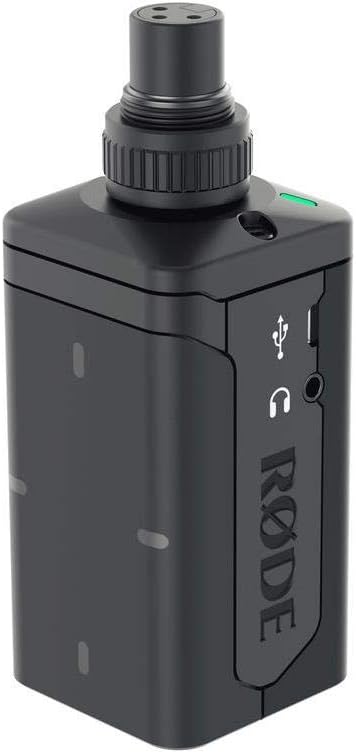
Gambar 6.1: Belakang view of the TX-XLR, illustrating the battery compartment for AA or NP-F series batteries.
7. Penyelesaian masalah
| Masalah | Kemungkinan Penyebab | Larutan |
|---|---|---|
| Tidak ada daya | Dead batteries; Incorrect battery insertion; USB cable not connected or faulty. | Replace batteries; Check battery polarity; Ensure USB cable is securely connected to a working power source. |
| Tidak ada keluaran audio | Transmitter not paired; Microphone not connected; Phantom power off (for condenser mics); Gain too low; Muted. | Re-pair transmitter and receiver; Check microphone connection; Enable P48 phantom power; Increase gain; Check mute status. |
| Poor audio quality / Dropouts | Interference; Out of range; Low battery. | Move away from other wireless devices; Reduce distance between transmitter and receiver; Replace or charge batteries. |
| Daya phantom tidak berfungsi | P48 setting disabled; Faulty microphone or cable. | Enable P48 in settings; Test with a different microphone or XLR cable. |
8. Spesifikasi
| Fitur | Detil |
|---|---|
| Nama Model | TX-XLR |
| Sumber Daya | 2 x AA battery, NP-F series battery, or micro USB |
| Antena | Intern |
| Koneksi Input | XLR with locking collar, 3.5mm TRS locking jack socket |
| Impedansi Masukan | 1kΩ (XLR), 10kΩ (3.5mm) |
| Dimensi (P x L x T) | 120mm x 45mm x 45mm (Product Dimensions: 17.78 x 7.62 x 12.7 cm) |
| Berat Barang | 222 gram |
| Bahan | Logam |
| Rentang Frekuensi | 20Hz - 20kHz |
| Teknologi Konektivitas | Nirkabel, USB |
| Fitur Khusus | Runs on Plug-In Power, Wireless Connectivity |
9. Garansi dan Dukungan
RØDE products are designed and manufactured to the highest quality standards. For information regarding warranty coverage, product registration, and technical support, please visit the official RØDE websitus atau hubungi departemen layanan pelanggan mereka.
Always refer to the official RØDE webSitus ini menyediakan informasi dan sumber daya pendukung terkini.