Perkenalan
Thank you for choosing the Brookstone Big Blue True Wireless Earbuds. These earbuds are designed to provide a seamless audio experience, allowing you to enjoy music and manage calls wirelessly. This manual provides essential information on setting up, operating, maintaining, and troubleshooting your new earbuds.
Fitur Utama:
- True wireless design for freedom of movement.
- Rich, full-range audio with deep bass.
- Integrated microphone with Qualcomm cVc noise-cancelling technology for clear calls.
- Bluetooth connectivity for easy pairing with your smartphone or device.

Image: Brookstone Big Blue True Wireless Earbuds in their black charging case.
Pengaturan
Apa yang ada di dalam kotak
- Brookstone Big Blue True Wireless Earbuds (Left and Right)
- Casing Pengisian Daya Nirkabel
Mengisi Daya Earbud dan Casing
- Masukkan kedua earbud ke dalam wadah pengisian daya. Pastikan keduanya terpasang dengan benar.
- Connect the charging case to a USB power source using the provided charging cable.
- The indicator lights on the case and earbuds will show charging status. Refer to the specific light patterns in your product packaging for details.
- Berikan waktu yang cukup untuk pengisian penuh sebelum penggunaan pertama.
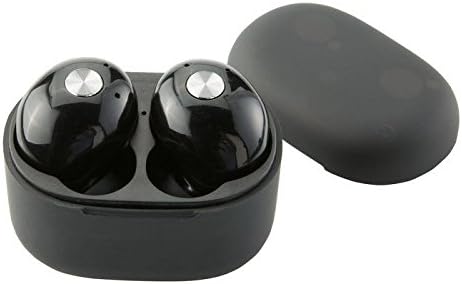
Gambar: Close-up view of the earbuds within the charging case, illustrating proper placement for charging.
Pairing Bluetooth
- Pastikan earbud terisi dayanya.
- Remove both earbuds from the charging case. They will automatically enter pairing mode, indicated by flashing LED lights (refer to your product packaging for specific light patterns).
- Pada telepon pintar atau perangkat Anda yang mendukung Bluetooth, buka pengaturan Bluetooth.
- Pencarian untuk new devices and select "BIG BLUE" (or similar name) from the list.
- Once connected, the earbud indicator lights will change, typically turning solid or off.
- Jika proses pemasangan gagal, masukkan kembali earbud ke dalam wadah, tutup, dan ulangi langkah-langkahnya.
Petunjuk Pengoperasian
Daya Hidup/Mati
- Nyalakan: Remove the earbuds from the charging case. They will automatically power on and attempt to connect to the last paired device.
- Matikan: Masukkan kembali earbud ke dalam wadah pengisi daya dan tutup kembali. Earbud akan mati secara otomatis dan mulai mengisi daya.
Pemutaran Musik dan Manajemen Panggilan
The earbuds feature integrated controls for media playback and call handling. Specific functions may vary slightly; refer to your product's quick start guide for exact button presses.
- Putar/Jeda: Typically a single press on either earbud.
- Lagu Berikutnya: Often a double press on the right earbud.
- Lagu Sebelumnya: Often a double press on the left earbud.
- Menjawab/Mengakhiri Panggilan: A single press on either earbud during an incoming call or active call.
- Tolak Panggilan: A long press on either earbud during an incoming call.
- Aktifkan Voice Assistant: A triple press or long press on an earbud (check specific model instructions).

Image: A man wearing a Brookstone Big Blue True Wireless Earbud, demonstrating typical use.
Pemeliharaan
Pembersihan
- Gunakan kain lembut, kering, dan bebas serat untuk membersihkan earbud dan wadah pengisi daya.
- Jangan gunakan pembersih abrasif, pelarut, atau semprotan aerosol.
- Gently clean ear tips and speaker grilles with a dry cotton swab to remove earwax or debris.
Penyimpanan
- Selalu simpan earbud dalam wadah pengisi dayanya saat tidak digunakan untuk melindunginya dan menjaganya tetap terisi daya.
- Simpan di tempat sejuk dan kering, jauhkan dari suhu ekstrem dan sinar matahari langsung.
Perawatan Baterai
- Untuk memperpanjang masa pakai baterai, hindari sering-sering menguras daya earbud dan wadahnya hingga habis.
- Isi daya perangkat secara teratur, meskipun tidak sering digunakan.
Penyelesaian Masalah
| Masalah | Solusi yang mungkin |
|---|---|
| Earbud tidak berpasangan dengan perangkat. |
|
| Sound skipping or cutting out. |
|
| Satu earbud tidak bersuara. |
|
| Earbud tidak dapat diisi dayanya. |
|
Spesifikasi
| Fitur | Detil |
|---|---|
| Nomor Model | BIG BLUE |
| Teknologi Komunikasi Nirkabel | Bahasa Indonesia: Bluetooth |
| Komponen yang Termasuk | Casing Pengisian Daya Nirkabel |
| Bahan | Plastik |
| Jenis Kontrol | Kontrol Media |
| Fitur Kabel | Tanpa Kabel |
| Berat Barang | 2.4 ons (0.15 pon) |
| Dimensi Produk | 3.35x1.57x5.71 inci |
| Fitur Khusus | Microphone Included, Noise Cancellation, Wireless |
| Warna | Hitam |
| Faktor Bentuk | Di Telinga |
| UPC / GTIN | 883594061516 |
Informasi Garansi
Brookstone products are designed with quality and reliability in mind. For specific warranty details regarding your Big Blue True Wireless Earbuds, please refer to the warranty card included in your product packaging or visit the official Brookstone websitus. Simpan bukti pembelian Anda untuk klaim garansi apa pun.
Dukungan Pelanggan
If you encounter any issues not covered in this manual or require further assistance, please contact Brookstone customer support. Contact information can typically be found on the product packaging or the official Brookstone weblokasi.