
Perkenalan
This manual provides comprehensive instructions for the setup, operation, and maintenance of your MASTER & DYNAMIC MH40 Over-Ear Headphones. Please read this guide thoroughly to ensure optimal performance and longevity of your device.
Isi Paket
Verifikasi bahwa semua item ada dalam paket Anda:
- MASTER & DYNAMIC MH40 Over-Ear Headphones
- Audio Cable with In-line Microphone
- USB-C Charging Cable (for Bluetooth functionality)
- Canvas Carrying Case
- User Manual (dokumen ini)
Produk Selesaiview
The MH40 headphones are designed with premium materials for durability and comfort. Key components include:
- Forged Aluminum Body: Provides a robust and lightweight structure.
- Lambskin Ear Pads: Offer comfort for extended listening sessions.
- Custom Neodymium Drivers: Engineered for superior sound reproduction.
- Ikat kepala yang dapat disesuaikan: Memastikan kecocokan yang aman dan nyaman.
- Kabel yang Dapat Dilepas: For both audio and charging.

Figure 1: MASTER & DYNAMIC MH40 Over-Ear Headphones, showcasing black metal and camo leather design.
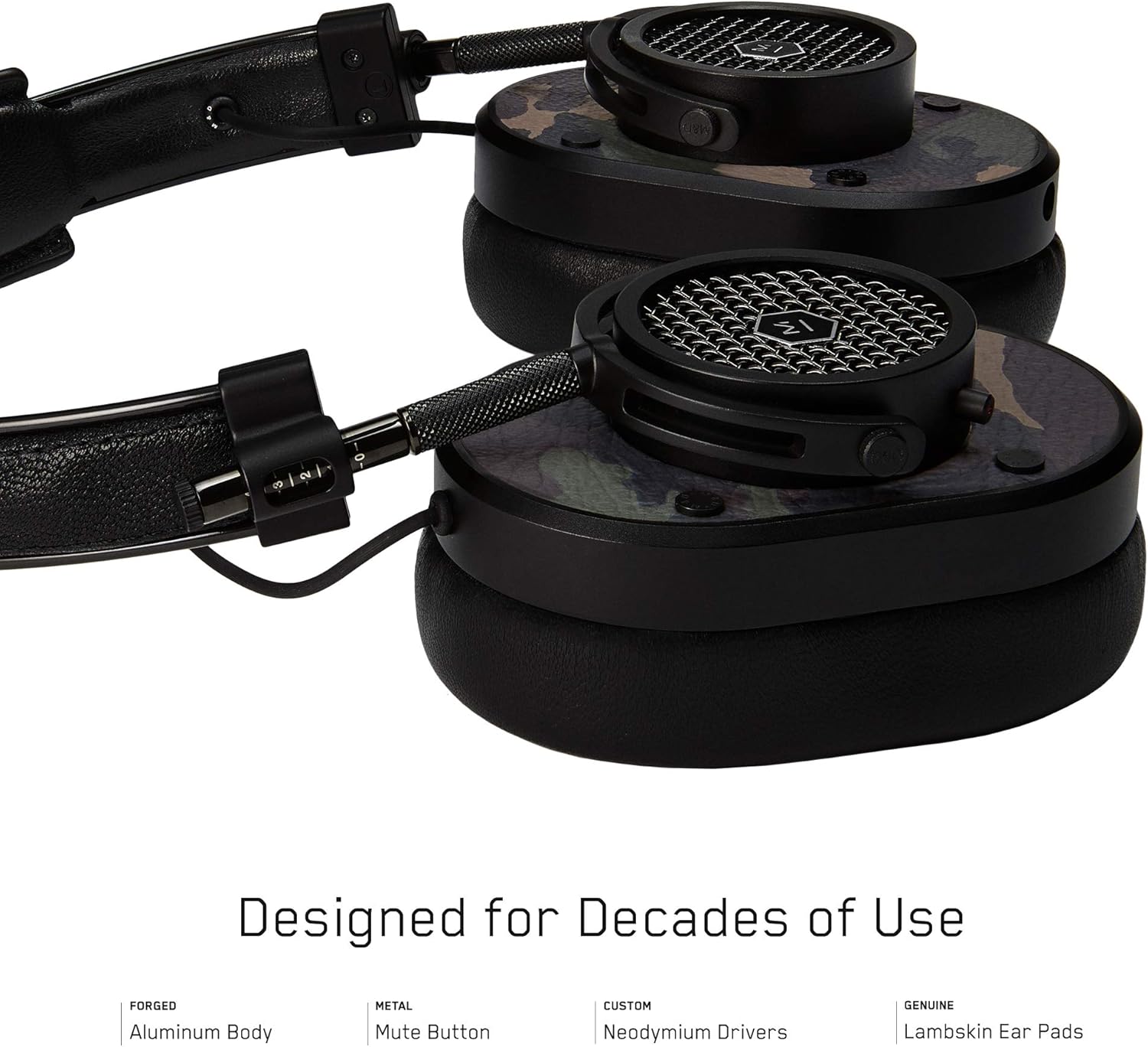
Gambar 2: Rinci view of the MH40 headphone earcups, highlighting the lambskin ear pads, metal grille, and adjustable hinge.
Pengaturan
1. Menyesuaikan Kesesuaian
- Gently extend or retract the metal arms on each side of the headband to adjust the height.
- Position the earcups so they fully cover your ears, ensuring a comfortable and secure fit.
- The lambskin ear pads are designed to conform to your head shape for optimal sound isolation and comfort.
2. Koneksi Kabel
- Locate the audio input port on the left earcup.
- Insert one end of the provided audio cable into the headphone's audio input.
- Connect the other end of the audio cable to your audio device's 3.5mm jack.
3. Pemasangan Bluetooth (Koneksi Nirkabel)
The MH40 headphones support Bluetooth connectivity for wireless audio. Ensure the headphones are charged before pairing.
- Nyalakan: Press and hold the power button (usually located on one of the earcups) until the indicator light flashes.
- Mode Penyandingan: Continue holding the power button or press a dedicated Bluetooth pairing button (if available) until the indicator light flashes rapidly, indicating pairing mode.
- Koneksi Perangkat: On your audio device (smartphone, tablet, computer), navigate to Bluetooth settings and select "MH40" from the list of available devices.
- Konfirmasi: The indicator light on the headphones will turn solid blue or green once successfully paired.
Note: The Bluetooth range is approximately 10 meters (33 feet).
Petunjuk Pengoperasian
Pemutaran Audio
- Putar/Jeda: Press the multi-function button (often on the in-line microphone or earcup) once.
- Lagu Berikutnya: Press the multi-function button twice rapidly.
- Lagu Sebelumnya: Press the multi-function button three times rapidly.
- Kontrol Volume: Use the volume up/down buttons on the in-line microphone or dedicated earcup controls.
Manajemen Panggilan
- Menjawab/Mengakhiri Panggilan: Tekan tombol multifungsi sekali.
- Tolak Panggilan: Tekan dan tahan tombol multifungsi selama kurang lebih 2 detik.
- Bisukan Mikrofon: The MH40 features a dedicated mute button, typically located on the earcup or in-line control. Press to mute/unmute during a call.
Pemeliharaan
- Pembersihan: Use a soft, dry cloth to wipe the headphones. For leather parts, use a specialized leather cleaner if necessary. Avoid harsh chemicals or abrasive materials.
- Penyimpanan: When not in use, store the headphones in the provided canvas carrying case to protect them from dust and scratches.
- Perawatan Kabel: Handle cables gently. Avoid sharp bends or excessive pulling to prevent damage. The retractable cable feature helps manage cable length.
- Bantalan Telinga: The magnetic ear pads are removable for cleaning or replacement. Gently pull them off and reattach by aligning the magnets.
Penyelesaian Masalah
Tidak Ada Suara
- wired: Ensure the audio cable is securely connected to both the headphones and the audio source. Check the volume level on both the headphones and the source device.
- Bluetooth dapat digunakan untuk berbagai keperluan, seperti: Verify that the headphones are powered on and successfully paired with your device. Check the volume levels. Try re-pairing the headphones.
Tidak Dapat Dipasangkan melalui Bluetooth
- Pastikan headphone berada dalam mode pemasangan (lampu indikator berkedip cepat).
- Pastikan Bluetooth diaktifkan pada perangkat sumber Anda.
- Dekatkan headphone ke perangkat Anda (dalam jarak 10 meter).
- Matikan dan hidupkan kembali headphone dan perangkat Anda, lalu coba pasangkan lagi.
- Jika sebelumnya sudah dipasangkan, coba "lupakan" perangkat tersebut pada sumber Anda dan pasangkan kembali.
Mikrofon Tidak Berfungsi
- Periksa apakah tombol mute mikrofon diaktifkan.
- Ensure the audio cable with the in-line microphone is fully inserted.
- Periksa pengaturan input mikrofon pada perangkat yang terhubung.
Spesifikasi
| Nama Model | MH40 |
| Teknologi Konektivitas | Kabel, Bluetooth |
| Teknologi Komunikasi Nirkabel | Bahasa Indonesia: Bluetooth |
| Bahan | Copper (components), Lambskin (ear pads), Canvas (carrying case) |
| Jenis Kontrol | Call Control, Touch |
| Fitur Kabel | Dapat ditarik |
| Berat Barang | 0.36 Kilogram (12.7 ons) |
| Jenis Penggerak Audio | Driver Dinamis |
| Jangkauan Bluetooth | 10 Meter |
| Bentuk Lubang Suara | Di atas telinga |
| Fitur Khusus | Carrying case included, Lightweight, Microphone Included, Noise Isolation, Wireless |
| Dimensi Produk | 7.48x6.3x2.76 inci |
| Pabrikan | MASTER & DYNAMIC |
| Warna | Black Metal / Camo Leather |
| Penempatan Telinga | Di Atas Telinga |
| Kontrol Kebisingan | Isolasi Suara |
| UPC | 858901007099 |
Garansi dan Dukungan
For detailed warranty information and customer support, please refer to the official MASTER & DYNAMIC websitus web atau hubungi layanan pelanggan mereka secara langsung. Simpan bukti pembelian Anda untuk klaim garansi.
Dukungan online: www.masterdynamic.com/support (Examptautan, tautan sebenarnya mungkin berbeda)


