1. Pendahuluan
Welcome to the user manual for your Xfinity XR15 Voice Control Remote. This remote is designed to enhance your Xfinity X1 experience by providing intuitive control over your entertainment system. With its advanced voice command capabilities and user-friendly design, navigating your TV content has never been easier.

Gambar 1: Depan view of the Xfinity XR15 Voice Control Remote.
2. Fitur Utama
- Kontrol Suara: Find content, change channels, and control your DVR using simple voice commands.
- Papan tombol dengan lampu latar: Buttons illuminate automatically when the remote is moved, ideal for low-light environments.
- Fitur Bidik di Mana Saja: Operates without needing to be pointed directly at your TV Box.
- Pemasangan Otomatis: Simplifies the setup process with compatible Xfinity equipment.
- Fitur Aksesibilitas: Easy access to Closed Captioning, video description, and voice guidance.
- Kontrol Input TV: Manage your TV's input source directly from the remote.
3. Pengaturan dan Pemasangan
3.1. Pemasangan Baterai
The Xfinity XR15 remote requires two AAA batteries. To install:
- Temukan kompartemen baterai di bagian belakang remote.
- Slide the battery cover down and off.
- Masukkan dua baterai AAA, pastikan polaritasnya benar (+ dan -).
- Geser kembali penutup baterai ke tempatnya hingga terdengar bunyi klik yang kuat.

Gambar 2: Lokasi kompartemen baterai.
3.2. Pemasangan Otomatis
The XR15 remote is designed for automatic pairing with Xfinity X1 TV Boxes (Xi6, Xi5, XG2, X1). Simply ensure your TV Box is powered on and follow these general steps:
- Point the remote at your TV Box.
- Tekan dan tahan tombol Bahasa Indonesia: Xfinity button (located below the directional pad) for 3-5 seconds.
- Follow any on-screen prompts that appear on your television.
- If prompted for a 3-digit pairing number, enter it even if it doesn't appear on screen.
The remote should automatically pair within a few minutes. If pairing is unsuccessful, ensure the remote is close to the TV and TV Box, and try again.
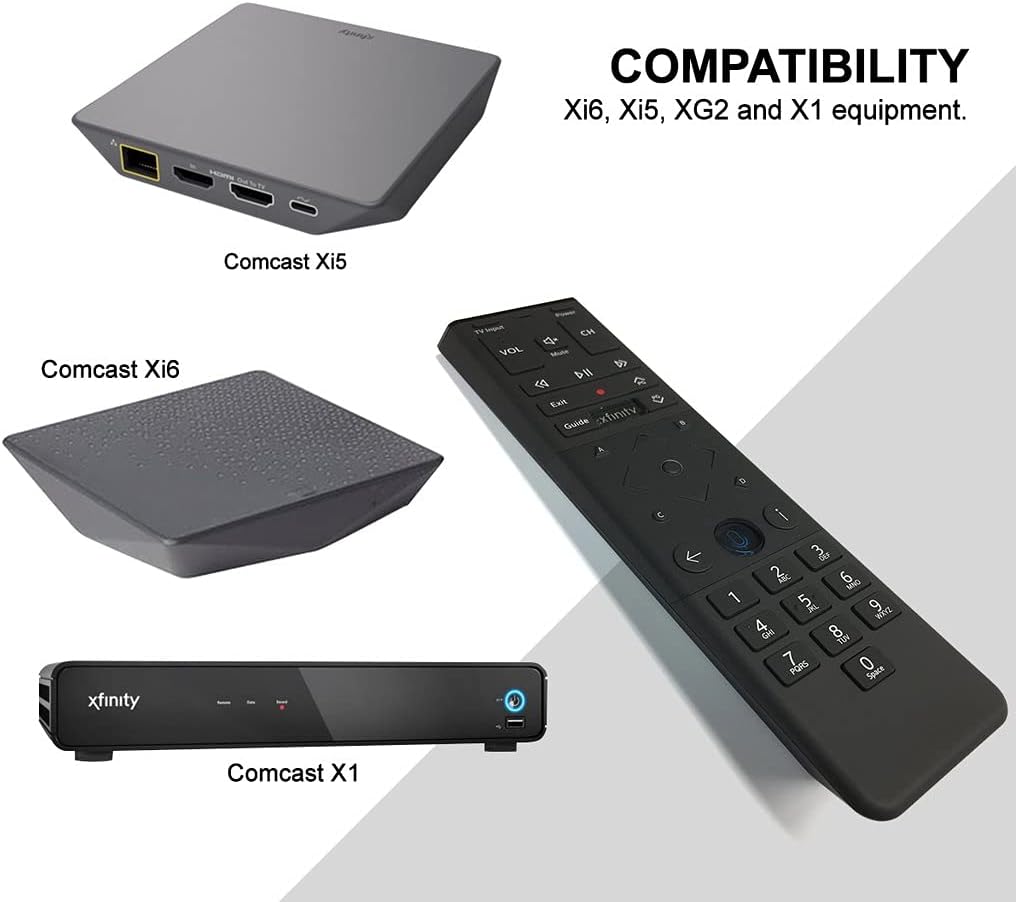
Figure 3: Compatible Xfinity TV Box models.
4. Fungsi Tombol
The XR15 remote features a comprehensive set of buttons for controlling your TV and Xfinity services. Refer to the diagram below for a visual guide.

Figure 4: Xfinity XR15 Remote Button Layout.
| Tombol | Fungsi |
|---|---|
| Kekuatan | Turns the TV and TV Box on or off. |
| Masukan TV | Beralih ke input berikutnya yang tersedia di TV Anda. |
| VOL +/- | Menambah atau mengurangi volume. |
| Bisu | Menghidupkan atau mematikan suara. |
| CH +/- | Memilih saluran berikutnya atau sebelumnya. |
| Putar/Jeda | Memutar atau menjeda siaran TV langsung, Xfinity On Demand, atau konten DVR. |
| FF (Maju Cepat) | Mempercepat pemutaran konten Xfinity On Demand atau DVR. |
| Rew (Rewind) | Memutar ulang konten Xfinity On Demand atau DVR. |
| KELUAR | Exits on-screen guides; stops and exits Xfinity On Demand and DVR content. |
| Record (red dot) | Merekam program yang sedang tayang atau menyimpan program mendatang ke DVR Anda. |
| Bahasa Indonesia: Xfinity | Displays the main menu of the guide, providing access to all guide features. |
| Memandu | Menampilkan jadwal acara TV. |
| Informasi (i) | Menampilkan informasi tentang program dan pemberitahuan. |
| Kembali | Navigates back in menus or returns to previous screens. |
| Tombol Angka (0-9) | Used for direct channel entry or predictive text (T9) for content search. |
5. Kontrol Suara
The voice control feature is a primary benefit of the XR15 remote. It allows you to quickly find content, change channels, and manage your DVR without typing.

Figure 5: Voice Control Button.
5.1. Using Voice Commands
- Tekan dan tahan tombol Kontrol Suara button (microphone icon) on the remote.
- Bicaralah dengan jelas ke mikrofon yang terletak di bagian atas remote.
- Lepaskan tombol saat Anda selesai berbicara.
Examples of Voice Commands:
- "Tune to CNN"
- "Find action movies"
- "Record this show"
- "Ada acara apa malam ini?"
- "Launch Netflix"
6. Spesifikasi
| Atribut | Detil |
|---|---|
| Dimensi Produk | 7x2x1 inci |
| Berat Barang | 3.52 ons |
| Nomor Model | 8541713007 |
| Baterai Diperlukan | 2 baterai AAA (termasuk) |
| Perangkat yang Kompatibel | Xfinity X1 TV Boxes (Xi6, Xi5, XG2, X1) |
| Warna | Hitam |
| Fitur Khusus | Consolidated All Power and TV Power functionality |
7. Pemeliharaan
7.1. Penggantian Baterai
When the remote's performance declines or the backlight feature becomes dim, it's time to replace the batteries. Follow the battery installation steps in Section 3.1.
7.2. Pembersihan
To clean your remote, use a soft, dry cloth. Avoid using liquid cleaners or abrasive materials, as these can damage the remote's surface or internal components.
8. Dukungan
For further assistance, please refer to the official Xfinity support resources or contact Xfinity customer service. Detailed troubleshooting guides and additional information can be found on the Xfinity weblokasi.


