Perkenalan
This manual provides detailed instructions for the setup, operation, maintenance, and troubleshooting of your Dual DT 450 manual turntable. Designed for optimal audio quality, this belt-driven turntable features a high-quality wooden housing, a balanced tonearm with adjustable tracking force, and an integrated switchable phono pre-amplifier. Please read these instructions carefully before using your turntable to ensure proper function and longevity.
Produk Selesaiview
The Dual DT 450 turntable is engineered to deliver an exceptional vinyl listening experience. Its robust construction and thoughtful features ensure stable playback and clear sound reproduction.
Fitur Utama:
- Desain: High-quality wooden housing for stable operation and a puristic aesthetic.
- Fleksibilitas: Connects to traditional HiFi systems via phono or AUX input; supports two speeds (33/45 RPM).
- Pra-amppengangkat: Built-in switchable phono pre-amplifier for easy connection.
- Sistem Pengambilan Magnetik: Features an Audio Technica AT 3600 cartridge with pre-set tracking force and a dampangkat lengan nada.
- Aksesoris yang disertakan: Turntable unit, platter with drive belt, counterweight, platter mat, dust cover, center puck, and user manual.
Produk Views:
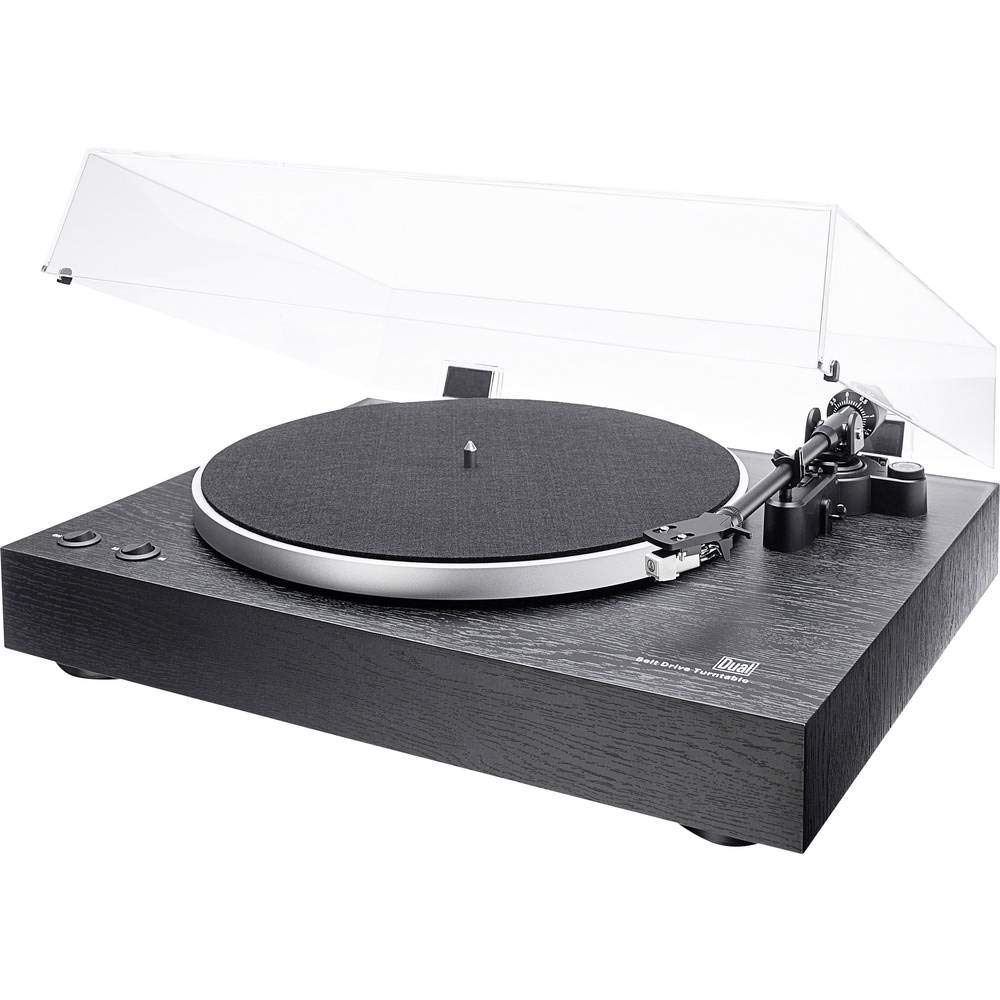
Keseluruhan view of the Dual DT 450 Turntable with its dust cover.

Terperinci view of the Audio Technica AT 3600 magnetic pickup system on the tonearm.

The Dual DT 450 Turntable with its transparent dust cover in the open position.

The Dual DT 450 Turntable with its transparent dust cover in the closed position, protecting the platter and tonearm.
Panduan Pengaturan
Follow these steps to correctly set up your Dual DT 450 turntable.
- Membongkar: Carefully remove all components from the packaging. Ensure all accessories listed in the product overview hadir.
- Penempatan: Place the turntable on a stable, level surface away from direct sunlight, heat sources, and strong vibrations.
- Pemasangan Piringan dan Sabuk: Place the platter onto the spindle. Carefully install the drive belt around the inner rim of the platter and around the motor pulley.
- Pemasangan Penyeimbang: Slide the counterweight onto the rear of the tonearm. Rotate it until the tonearm is balanced and floats freely. Then, adjust the counterweight to the recommended tracking force (refer to cartridge specifications, typically around 2-3 grams for the AT3600).
- Penyesuaian Anti-Skating: Set the anti-skating dial to match the tracking force you set. This helps prevent the stylus from skipping across the record.
- Pemasangan Penutup Debu: Attach the dust cover hinges to the rear of the turntable unit.
- Sambungan Daya: Hubungkan adaptor daya ke input DC di bagian belakang pemutar piringan hitam, lalu colokkan ke stopkontak dinding.
- Koneksi Audio: Connect the RCA cables from the turntable to your amplifier or receiver. Use the PHONO input if your amplifier has one and switch the turntable's internal pre-amplifier to 'OFF'. If your amplifier only has AUX/LINE inputs, switch the turntable's internal pre-amplifier to 'ON' and connect to an available AUX/LINE input. Ensure the ground wire is connected to your amplifier's ground terminal if available.
Video Demonstrasi Pengaturan:
This video demonstrates the general setup and operation of a turntable. While it may feature a different model, the basic principles of assembly and connection are applicable to the Dual DT 450.
Petunjuk Pengoperasian
Once your Dual DT 450 is set up, follow these steps to play your vinyl records.
- Nyalakan: Turn the power switch to the 'ON' position. The platter will begin to rotate.
- Rekor Tempat: Carefully place your vinyl record onto the platter. If playing a 45 RPM single, use the included center puck.
- Pilih Kecepatan: Choose the correct playback speed (33 or 45 RPM) using the speed selector switch.
- Angkat Lengan Tonearm: Gunakan tuas pengangkat tonearm untuk menaikkan tonearm.
- Posisi Tonearm: Gerakkan lengan pemutar piringan hitam secara perlahan di atas alur awal yang diinginkan pada piringan hitam.
- Lengan Nada Bawah: Slowly lower the tonearm using the tonearm lift lever. The stylus will descend onto the record, and playback will begin.
- Sesuaikan Volume: Sesuaikan volume pada perangkat yang terhubung. amppenguat atau penerima ke tingkat pendengaran yang Anda inginkan.
- Menghentikan Pemutaran: At the end of the record, or when you wish to stop, use the tonearm lift lever to raise the tonearm, then return it to its rest. Turn the power switch to 'OFF'.
Pemeliharaan
Regular maintenance ensures optimal performance and extends the life of your turntable.
- Penutup Debu: Clean the dust cover with a soft, dry cloth. Avoid abrasive cleaners that may scratch the surface.
- Perawatan Stylus: Bersihkan jarum stylus secara teratur dengan lembut menggunakan sikat lembut yang dirancang untuk membersihkan jarum stylus, sikat dari belakang ke depan. Jarum stylus yang kotor dapat menurunkan kualitas suara dan merusak piringan hitam.
- Pembersihan Rekaman: Keep your records clean to prevent dust and debris from accumulating on the stylus and affecting playback. Use a dedicated record cleaning brush or solution.
- Pembersihan Umum: Wipe the turntable chassis with a soft, slightly damp kain. Jangan gunakan bahan kimia yang keras.
- Inspeksi Sabuk: Periodically check the drive belt for wear or stretching. Replace if necessary to maintain accurate playback speed.
Penyelesaian Masalah
If you encounter issues with your Dual DT 450, refer to the following common problems and solutions:
| Masalah | Kemungkinan Penyebab | Larutan |
|---|---|---|
| Tidak ada suara atau suara sangat pelan | Incorrect audio connection; Pre-amplifier switch setting; Amplifier input selection; Stylus not properly seated. | Check RCA cable connections. Ensure pre-amplifier switch is set correctly (ON for AUX, OFF for PHONO). Select the correct input on your amplifier. Verify stylus is securely attached to the cartridge. |
| Suara terdistorsi atau teredam | Dirty stylus; Incorrect tracking force; Damaged stylus; Worn record. | Clean the stylus. Re-adjust tracking force. Replace the stylus if damaged. Try a different record. |
| Turntable platter not spinning | Power not connected; Drive belt dislodged or broken; Motor issue. | Ensure power adapter is connected and plugged in. Check if the drive belt is properly seated around the platter and motor pulley. If the issue persists, contact customer support. |
| Melewati rekaman | Dust/debris on record or stylus; Incorrect tracking force or anti-skating; Turntable not level; Damaged record. | Clean record and stylus. Re-adjust tracking force and anti-skating. Ensure turntable is on a level surface. Inspect record for damage. |
Spesifikasi Teknis
| Fitur | Spesifikasi |
|---|---|
| Merek | Ganda |
| Nama Model | Tanggal 450 |
| Nomor Model | 75268 |
| Gaya | Meja Putar Manual |
| Warna | Hitam |
| Bahan | Kayu |
| Dimensi Produk | Ukuran 43.5x36.7x14.4 cm |
| Berat Barang | 6 Kilogram |
| Kecepatan Rotasi Maksimum | 45 putaran/menit |
| Fitur Khusus | Pra-amplifier, Dust cover, Adjustable speed |
| Jil.tage | 12 Volt |
| Sumber Daya | DC (Badai) |
| Rasio signal-to-noise (dB) | 60dB |
Garansi dan Dukungan
For warranty information and customer support, please refer to the documentation included with your product or visit the official Dual websitus. Simpan bukti pembelian Anda untuk klaim garansi apa pun.


