1. Pendahuluan
This manual provides important information regarding the safe operation, assembly, and maintenance of your Amazon Basics Digital Oscillating 3 Speed Tower Fan. Please read this manual thoroughly before using the product and retain it for future reference.
2. Informasi Keselamatan
PERINGATAN: Produk ini dapat membuat Anda terpapar bahan kimia termasuk timbal, yang menurut Negara Bagian California dapat menyebabkan kanker dan cacat lahir atau gangguan reproduksi lainnya. Untuk informasi lebih lanjut, kunjungi www.P65Warnings.ca.gov.
Selalu ikuti tindakan pencegahan keselamatan dasar saat menggunakan peralatan listrik untuk mengurangi risiko kebakaran, sengatan listrik, dan cedera pada orang.
For detailed safety guidelines, please refer to the "Safety Information (PDF)" document available for download from the product's Amazon page.
3. Isi Paket
- Tower Fan Unit
- Two-piece Base
- Base Fastening Nut
- Kontrol Jarak Jauh
- User Manual (dokumen ini)
4. Pengaturan
Ikuti langkah-langkah berikut untuk merakit kipas menara Anda:
- Keluarkan semua komponen dari kemasannya dengan hati-hati.
- Assemble the two-piece base by aligning the halves and snapping them together.
- Place the tower fan unit onto the assembled base, ensuring the power cord passes through the designated opening in the base.
- Secure the fan to the base using the large plastic fastening nut located at the bottom of the fan unit. Twist the nut clockwise until it is firmly tightened. No tools are required for assembly.
- Masukkan dua baterai AAA (tidak termasuk) ke dalam remote control.
- Tempatkan kipas pada permukaan yang rata dan stabil.

Figure 4.1: Assembled Amazon Basics Digital Oscillating Tower Fan.
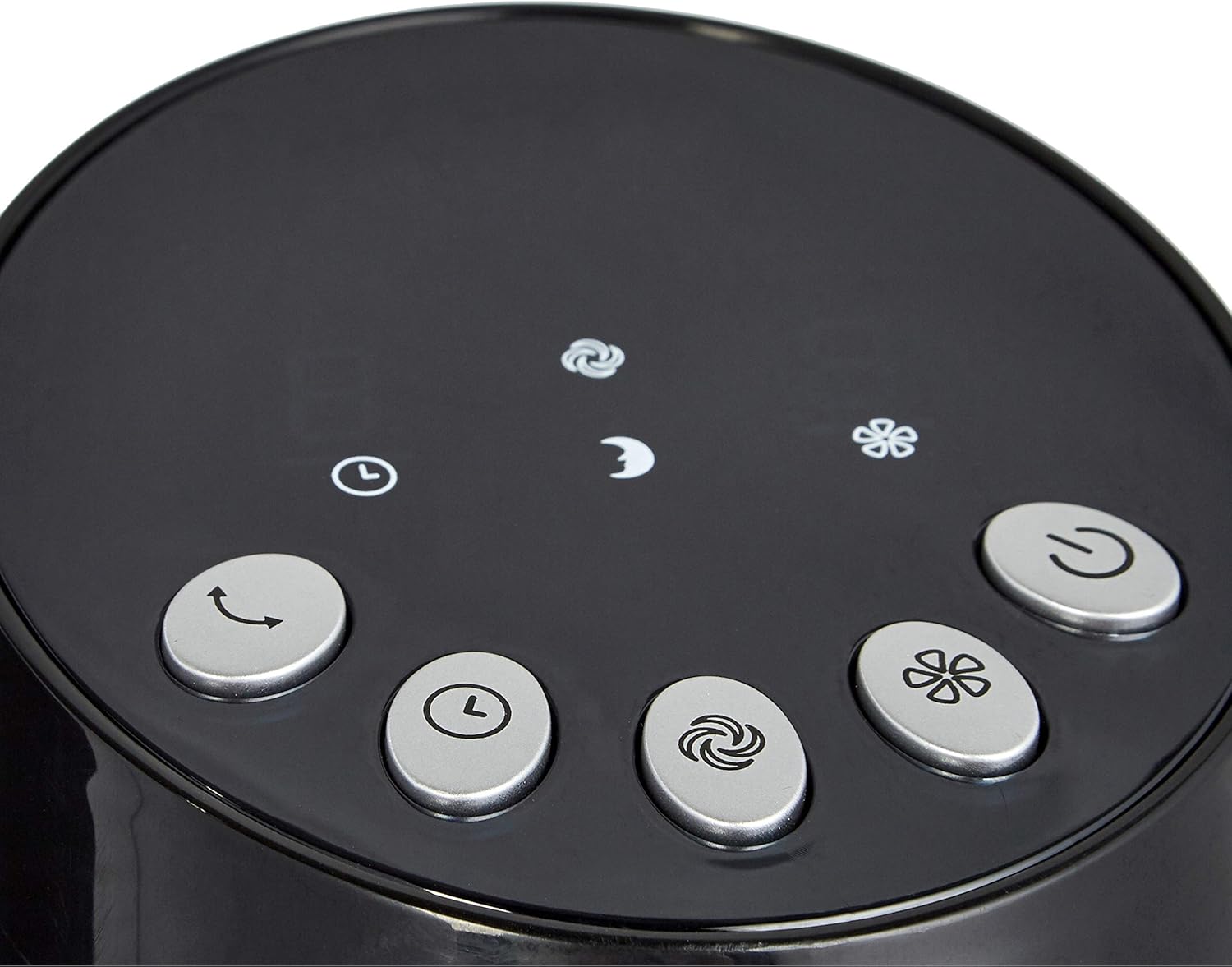
Figure 4.2: The two-piece base of the tower fan before assembly.
5. Petunjuk Pengoperasian
Your tower fan can be operated using the digital control panel on top of the unit or the included remote control.
5.1 Panel Kontrol dan Fungsi Jarak Jauh

Figure 5.1: Digital control panel with various function buttons.

Gambar 5.2: Kendali jarak jauh untuk pengoperasian yang mudah.
- Tombol Daya: Menghidupkan atau mematikan kipas.
- Pengaturan Kecepatan: Cycle through 3 speed levels (Low, Medium, High). The display will show the current speed (1, 2, or 3).
- Modus: Select from different airflow modes:
- Modus Normal: Memberikan aliran udara yang konsisten.
- Modus Alami: Mensimulasikan hembusan angin alami dengan mengubah kecepatan kipas.
- Mode tidur: Offers a softer, quieter airflow, ideal for nighttime use.
- Tombol Osilasi: Activates or deactivates the oscillating function, allowing the fan to rotate and distribute air across a wider area.
- Fungsi Pengatur Waktu: Set the fan to automatically turn off after a specified period, up to 8 hours. Repeatedly press the timer button to cycle through available time settings.
6. Pemeliharaan
Perawatan rutin memastikan kinerja optimal dan umur panjang kipas Anda.
- Selalu cabut kipas angin sebelum membersihkan.
- Gunakan yang lembut, damp kain untuk membersihkan permukaan luar. Jangan gunakan pembersih atau pelarut abrasif.
- Periodically clean the air intake and exhaust vents with a vacuum cleaner or a soft brush to prevent dust buildup, which can affect performance.
- Simpan kipas angin di tempat sejuk dan kering bila tidak digunakan.
7. Penyelesaian masalah
Jika Anda mengalami masalah dengan kipas angin Anda, lihat masalah umum dan solusi berikut:
| Masalah | Kemungkinan Penyebab | Larutan |
|---|---|---|
| Kipas tidak menyala. | Tidak ada catu daya. | Pastikan kabel daya terpasang dengan benar ke stopkontak listrik yang berfungsi. |
| Kontrol jarak jauh tidak berfungsi. | Baterai mati atau salah dimasukkan. | Replace batteries (2 AAA) and ensure they are inserted with correct polarity. |
| Aliran udara berkurang. | Penumpukan debu di ventilasi. | Clean the air intake and exhaust vents as described in the Maintenance section. |
| Kipas berisik. | Fan not on a stable surface or internal issue. | Pastikan kipas berada di permukaan yang rata dan stabil. Jika suara bising tetap ada, hubungi layanan pelanggan. |
If the problem persists after trying these solutions, please contact Amazon Basics customer support.
8. Spesifikasi
| Fitur | Detil |
|---|---|
| Merek | Dasar-Dasar Amazon |
| Nomor Model | FZ10-9LR |
| Warna | Hitam |
| Dimensi Produk | 11.81"Panjang x 11.81"Lebar x 35.91"T |
| Berat Barang | 8.18 pon |
| Sumber Daya | Listrik Kabel |
| Apatage | 35 watt |
| Jil.tage | 110-120 Volts |
| Fitur Khusus | Berosilasi |
| Metode Kontrol | Terpencil |
| Jumlah Tingkat Daya | 3 (Speeds) |
9. Garansi & Dukungan
For warranty information and customer support, please refer to the "Warranty (PDF)" document available for download from the product's Amazon page or visit the official Amazon Basics Store.


