1. Pendahuluan
The Edifier M3600D is a high-performance 2.1 active speaker system designed for multimedia use. Featuring THX certification and a total RMS output of 200 Watts, this system delivers powerful and clear audio. It includes a robust subwoofer and two satellite speakers, offering versatile connectivity options for various audio sources.
2. Apa yang ada di dalam kotak
- 1 buah speaker aktif
- 2 x Speaker Satelit
- 1 x Kabel Daya
- Connecting Cables (for satellites and audio input)
- 1 x Panduan Pengguna
3. Pengaturan
Follow these steps to set up your Edifier M3600D speaker system:
- Penempatan: Position the subwoofer on the floor, ideally near a wall for enhanced bass. Place the satellite speakers on either side of your listening area, ensuring they are equidistant from you for optimal stereo imaging.
- Hubungkan Speaker Satelit: Connect the right and left satellite speakers to the corresponding output ports on the rear of the subwoofer using the provided cables. The right satellite speaker typically features the volume control and input selection.
- Hubungkan Sumber Audio: Choose your preferred audio input method (Optical, Coaxial, Line In, or AUX) and connect the appropriate cable from your audio source (e.g., computer, TV, smartphone) to the subwoofer's input ports.
- Sambungan Daya: Plug the power cable into the subwoofer's power input, then connect it to a wall outlet.
- Nyalakan: Turn on the power switch located on the rear of the subwoofer. The system is now ready for operation.

Figure 3.1: Edifier M3600D Multimedia 2.1 Active Speaker System. This image shows the main subwoofer unit alongside the two satellite speakers, illustrating the complete system setup.
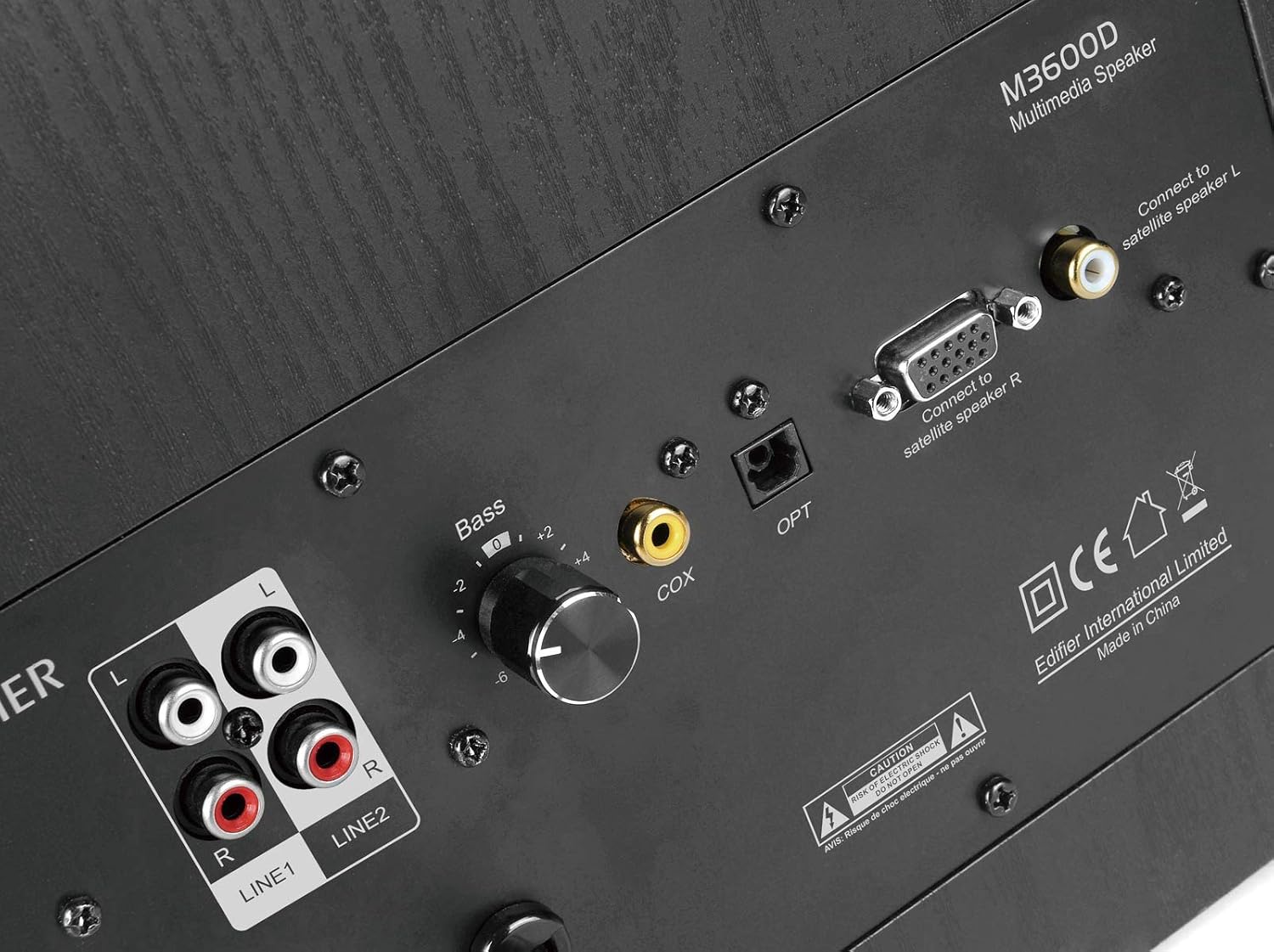
Figure 3.2: Rear panel of the M3600D subwoofer. This image highlights the various input ports (Line In 1, Line In 2, Coaxial, Optical) and the output connections for the satellite speakers, along with the bass control knob and power switch.
4. Petunjuk Pengoperasian
Once the system is set up, follow these instructions for operation:
- Daya Hidup/Mati: Use the main power switch on the rear of the subwoofer to turn the system on or off.
- Kontrol Volume: The large rotary dial on the front of the right satellite speaker controls the master volume. Rotate clockwise to increase volume and counter-clockwise to decrease it.
- Pemilihan Input: Press the volume dial on the right satellite speaker to cycle through the available audio inputs (Optical, Coaxial, Line In 1, Line In 2, AUX). An indicator light will show the currently selected input.
- Penyesuaian Bass: Use the 'Bass' control knob located on the rear panel of the subwoofer to adjust the bass level to your preference.
- Keluaran Headphone: A 3.5mm headphone jack is available on the right satellite speaker for private listening. Plugging in headphones will mute the speakers.
5. Konektivitas
The M3600D offers multiple connectivity options:
- Input Optik (OPT): For high-quality digital audio connection from devices like TVs, game consoles, or Blu-ray players.
- Coaxial Input (COX): Another digital audio input option, suitable for similar devices as the optical input.
- Line In 1 (RCA): Stereo RCA input for connecting devices with RCA audio outputs.
- Line In 2 (RCA): Additional stereo RCA input for another audio source.
- Masukan AUX (3.5mm): A standard 3.5mm auxiliary input for connecting smartphones, tablets, laptops, or MP3 players.
Catatan: This system does not support Bluetooth connectivity. For wireless audio, an external Bluetooth adapter would be required (not included).
6. Spesifikasi
| Fitur | Spesifikasi |
|---|---|
| Nama Model | Nomor telepon M3600D |
| Jenis Pembicara | 2.1 Multimedia Speaker System (Subwoofer) |
| Output Daya Total | 200 Watts RMS (Subwoofer: 130W, Satellites: 2 x 35W) |
| Bersertifikat THX | Ya |
| Bahan | Wood (MDF cabinet with vinyl wood grain laminate) |
| Masukan | Optical, Coaxial, Line In (RCA x2), AUX (3.5mm) |
| Metode Kontrol | Rotary Volume/Input Dial (on satellite), Bass Knob (on subwoofer) |
| Diameter Subwoofer | 7 Centimeters (Woofer Diameter) |
| Ukuran Driver Audio | 17.78 Sentimeter |
| Warna | Hitam |
| Dimensi Produk | 12x16.75x11 inci |
| Berat Barang | 21 pon |
| Perangkat yang Kompatibel | Smartphone, Tablet, Desktop, Laptop, MP3 Player, Television, Projector |
7. Penyelesaian masalah
If you encounter issues with your M3600D speaker system, please refer to the following common troubleshooting steps:
- Tidak ada suara:
- Ensure the power cable is securely connected and the power switch on the subwoofer is ON.
- Verify that the correct input source is selected on the right satellite speaker.
- Check all audio cables for secure connections between the source, satellites, and subwoofer.
- Increase the volume on both the speaker system and your audio source.
- If using headphones, ensure they are unplugged from the satellite speaker.
- Suara Terdistorsi:
- Reduce the volume on both the speaker system and your audio source.
- Check if the audio source itself is producing distorted sound. Try a different source.
- Pastikan semua kabel terhubung dengan benar dan tidak rusak.
- Adjust the bass control knob on the subwoofer.
- Suara Intermiten:
- Periksa sambungan kabel yang longgar.
- Ensure there are no strong electromagnetic interferences near the speakers.
- Cobalah kabel audio atau sumber input yang berbeda untuk mengisolasi masalah.
If the issue persists after trying these steps, please contact Edifier customer support.
8. Pemeliharaan
To ensure the longevity and optimal performance of your Edifier M3600D speaker system, follow these maintenance guidelines:
- Pembersihan: Gunakan kain lembut dan kering untuk membersihkan permukaan speaker dan subwoofer. Hindari penggunaan pembersih abrasif, lilin, atau pelarut.
- Penempatan: Place the speakers on a stable, level surface to prevent accidental falls. Avoid placing them in direct sunlight, near heat sources, or in areas with high humidity or dust.
- Ventilasi: Pastikan ventilasi yang memadai di sekitar subwoofer untuk mencegah panas berlebih. Jangan menghalangi lubang ventilasi apa pun.
- Manajemen Kabel: Jaga agar kabel tetap rapi dan bebas dari tekukan atau tegangan berlebihan untuk mencegah kerusakan.
- Matikan Saat Tidak Digunakan: For extended periods of inactivity, it is recommended to turn off the system using the main power switch.
9. Garansi dan Dukungan
The Edifier M3600D Multimedia 2.1 Active Speaker System comes with a Garansi terbatas 2 tahun. This warranty covers manufacturing defects and ensures hassle-free full replacement in the USA and Canada.
For warranty claims, technical assistance, or further inquiries, please contact Edifier USA customer support. Refer to the official Edifier websitus atau informasi kontak yang tersedia dalam kemasan produk Anda untuk mendapatkan detail dukungan terkini.


