1. Pendahuluan
This manual provides detailed instructions for the DROK DC-DC Buck Converter Module. This module is a highly efficient, compact step-down voltagregulator yang dirancang untuk mengubah tegangan input DC yang lebih tinggitagke tegangan keluaran DC yang lebih rendah dan stabil.tage. It offers both adjustable and selectable fixed output voltage options, making it versatile for various electronic projects and applications.
Key features include a wide input voltage range, high conversion efficiency, ultra-small size, low ripple, and stable performance. The robust construction incorporates an imported potentiometer, a 3A current chip, a high-current shielded inductor, and long-life solid capacitors (MLCC).

Gambar 1: Lebihview of five DROK DC-DC Buck Converter Modules.
2. Spesifikasi
| Parameter | Nilai |
|---|---|
| Masukan Voltage Rentang | DC 4.5V ke 24V |
| Volume Keluaran yang Dapat Disesuaikantage Rentang | 0.8V ke 17V |
| Keluaran Tetap Voltage Opsi | 1.8V, 2.5V, 3.3V, 5V, 9V, 12V |
| Arus Keluaran Maksimum | 3A (requires enhanced cooling for full load) |
| Dimensi (P x L x T) | Approximately 13.4 x 6.2 x 3.2 cm (for package, module is smaller) |
| Berat | Sekitar 10g |

Figure 2: Module dimensions for integration.
3. Pengaturan dan Instalasi
3.1 Modul Selesaiview dan Koneksi
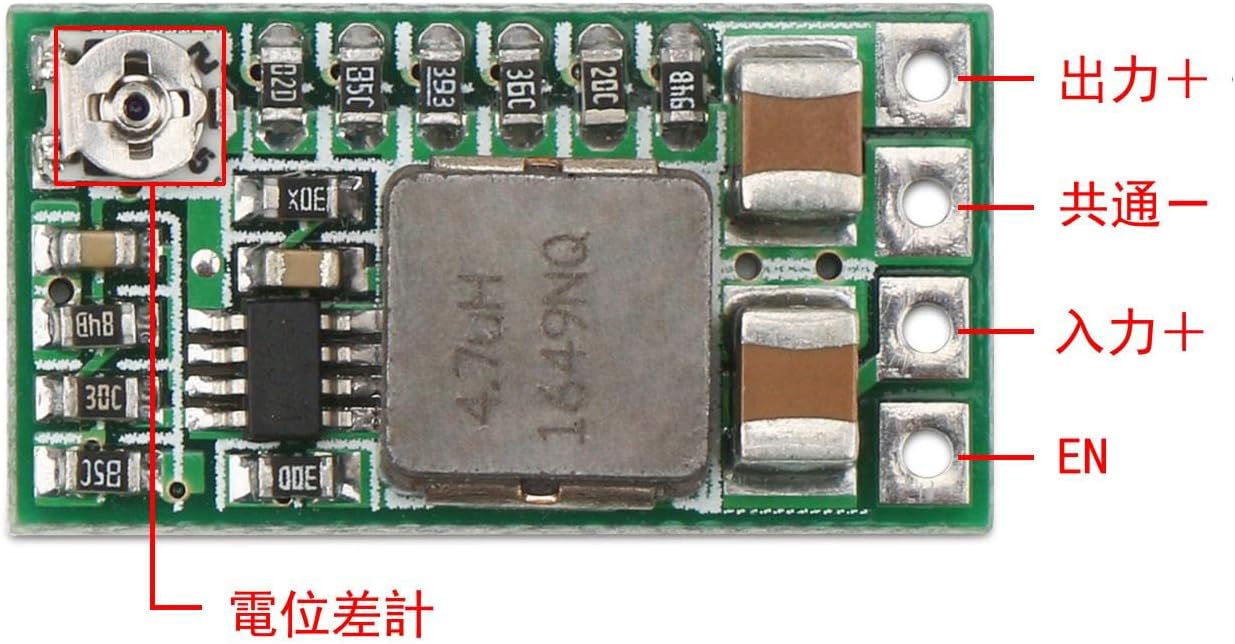
The module features clearly marked terminals for input, output, ground, and an enable pin. The potentiometer allows for adjustable output voltage.

Gambar 3: Atas view of the module with connection points and potentiometer.
- DI+: Positive input voltage (DC 4.5V-24V)
- GND: Common ground for input and output
- VOUT+: Positive output voltage
- EN: Enable pin (default active, low level turns off)
- Potensiometer: For adjusting output voltage when not using fixed output.
3.2 Mengatur Volume Keluarantage
The module supports two modes for output voltage: adjustable and fixed. By default, the module is in adjustable mode, controlled by the onboard potentiometer.
Volume Keluaran yang Dapat Disesuaikantage:
To set an adjustable output voltage between 0.8V and 17V, connect your input power to IN+ and GND. Then, use a small screwdriver to turn the onboard potentiometer (located on the top left of the module, as shown in Figure 3) clockwise to increase the voltage or counter-clockwise to decrease it. Monitor the output voltage with a multimeter connected to VOUT+ and GND.
Keluaran Tetap Voltage:
For specific fixed output voltages (1.8V, 2.5V, 3.3V, 5V, 9V, 12V), the module provides solder pads on the backside. To select a fixed voltage, you must first cut the trace to the 'ADJ' pad and then solder the desired voltage pad to the adjacent common pad. This disables the potentiometer for fixed output operation.
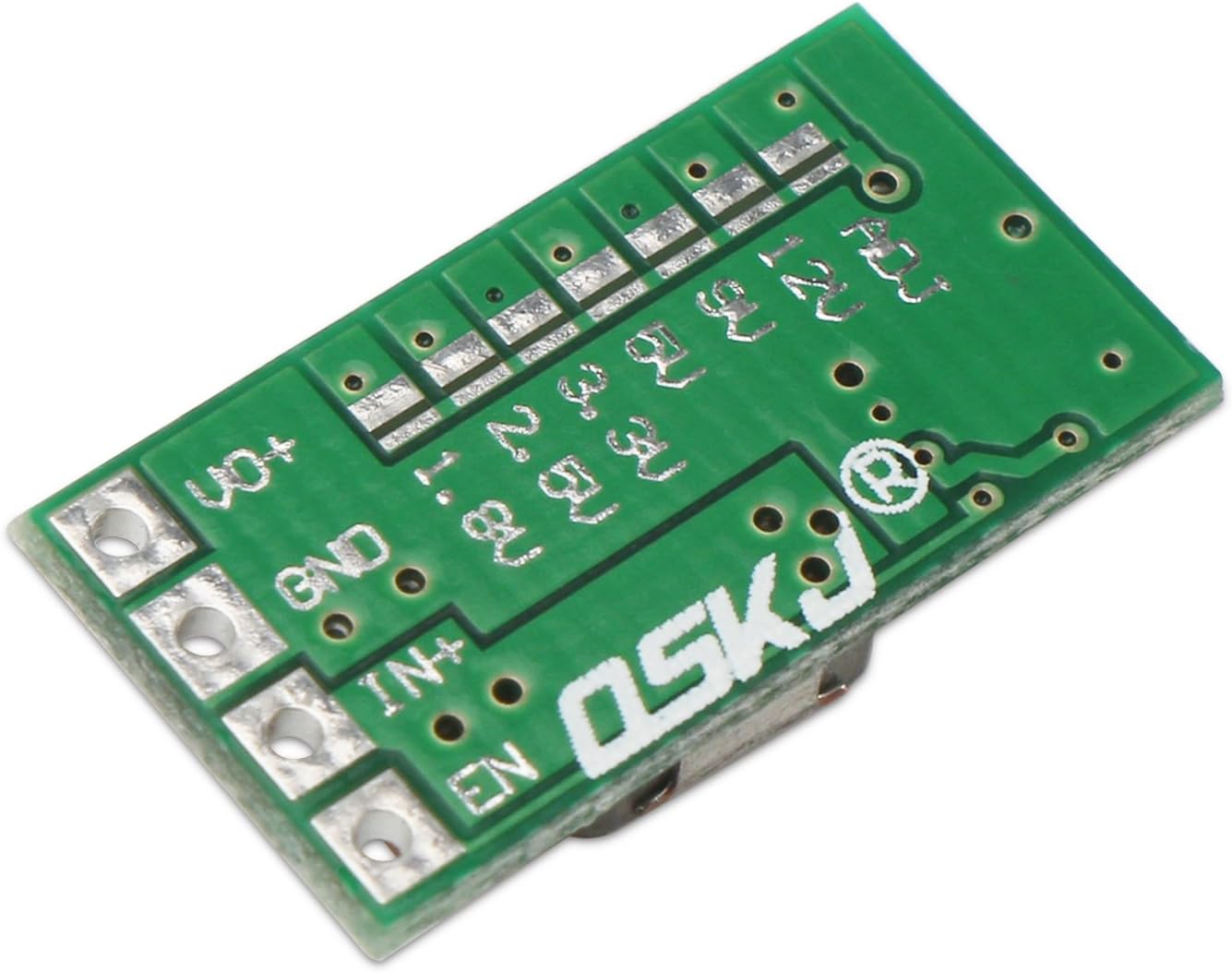
Gambar 4: Bawah view of the module with fixed voltage selection pads.
Procedure for Fixed Voltage Pilihan:
- Putuskan Daya: Ensure the module is completely disconnected from any power source before proceeding.
- Cut ADJ Trace: Locate the 'ADJ' pad on the backside of the module (top left, as shown in Figure 4). Carefully cut the trace connecting the 'ADJ' pad to the main circuit. This disables the adjustable function.
- Solder Desired Voltage Pad: Identify the solder pad corresponding to your desired fixed output voltage (e.g., 5V). Solder this pad to its adjacent common pad.
Gambar 5: Contohample of setting fixed 5V output by cutting the ADJ trace and soldering the 5V pad.

Gambar 6: Rinci view of the soldered 5V pad after cutting the ADJ trace.
Catatan: Some users have reported that the silk screen labels for fixed voltage pads might be offset. Always verify the output voltage with a multimeter after soldering to ensure the correct voltage is achieved. If the initial fixed voltage is not as expected, you may need to adjust the potentiometer slightly after selecting a fixed output, or re-evaluate the soldering points.
4. Petunjuk Pengoperasian
Setelah output yang diinginkan voltage is set (either adjustable or fixed), connect your load to the VOUT+ and GND terminals. Ensure that the input voltage is within the specified range (DC 4.5V-24V) and that the output current does not exceed 3A.
- Enable Pin (EN): The integrated enable port is set to operate by default. When the electrical level is low, the module will turn off. This feature can be used for external control of the module's operation.
- Pendinginan: For output currents approaching the maximum 3A, it is recommended to enhance cooling. This may involve adding a heatsink or ensuring adequate airflow around the module to prevent overheating and maintain stable performance.
5. Pemeliharaan
The DROK DC-DC Buck Converter Module is designed for reliable operation with minimal maintenance. Follow these guidelines to ensure longevity:
- Jaga kebersihan: Periodically inspect the module for dust or debris accumulation. Clean gently with a soft, dry brush if necessary.
- Hindari Kelembaban: Protect the module from moisture and corrosive environments.
- Ventilasi: Ensure proper ventilation, especially when operating at higher loads, to dissipate heat effectively.
- Koneksi Aman: Regularly check all input and output connections to ensure they are secure and free from shorts.
6. Penyelesaian masalah
If you encounter issues with your DROK DC-DC Buck Converter Module, consider the following troubleshooting steps:
- Tidak ada Volume Keluarantage:
- Verifikasi masukan voltage is present and within the 4.5V-24V range.
- Periksa semua sambungan kabel untuk memastikan polaritas yang benar dan kontak yang aman.
- Ensure the EN pin is not pulled low, which would disable the module.
- Volume Keluaran Tidak Tepattage:
- Adjustable Mode: If using the potentiometer, ensure it is properly adjusted. Turn it slowly and check with a multimeter.
- Mode Tetap: If fixed voltage is selected, verify that the ADJ trace was correctly cut and the desired voltage pad was properly soldered. Due to potential silk screen offsets, always confirm the output with a multimeter. Re-check soldering if necessary.
- Pastikan volume inputtage jauh lebih tinggi daripada volume keluaran yang diinginkan.tage (at least 1.5V-2V difference for stable buck conversion).
- Modul Terlalu Panas:
- Reduce the output current if it exceeds 1.5A without additional cooling.
- Ensure adequate ventilation around the module. Consider adding a small heatsink for continuous high-current operation.
- Keluaran Tidak Stabil:
- Check for loose connections or intermittent shorts.
- Ensure the load is not exceeding the module's current capacity.
- Verify the input power supply is stable and capable of providing sufficient current.
7. Garansi dan Dukungan
For warranty information or technical support, please refer to the product listing on the retailer's websitus web atau hubungi penjual secara langsung. Simpan struk pembelian Anda sebagai bukti pembelian.


