1. Pendahuluan
This manual provides comprehensive instructions for the installation, operation, and maintenance of your BlueBird A1390 Automatic Irrigation Tap Programmer. This device is designed to automate your garden watering schedule, ensuring efficient and consistent irrigation. Please read this manual thoroughly before using the product to ensure correct operation and to prevent damage.
2. Informasi Keselamatan
- Do not immerse the unit in water. The unit is designed to be weather-resistant, but not submersible.
- Gunakan hanya baterai alkaline AA 1.5V. Jangan mencampur baterai lama dan baru, atau berbagai jenis baterai.
- Lepaskan baterai jika unit tidak akan digunakan dalam jangka waktu lama untuk mencegah kebocoran.
- Jauhkan dari jangkauan anak-anak.
- Jangan mencoba membongkar atau memperbaiki unit sendiri. Hubungi teknisi yang berkualifikasi untuk mendapatkan layanan.
- Pastikan semua sambungan aman untuk mencegah kebocoran.
3. Isi Paket
Silakan periksa paket untuk item berikut:
- 1x BlueBird A1390 Automatic Irrigation Tap Programmer
- 1x Panduan Pengguna (dokumen ini)
Note: 2 AA 1.5V batteries are required for operation and are not included in the package.
4. Produk Lebihview
The BlueBird A1390 features two main rotary dials for setting irrigation frequency and duration, along with a battery indicator and an ON/OFF switch.
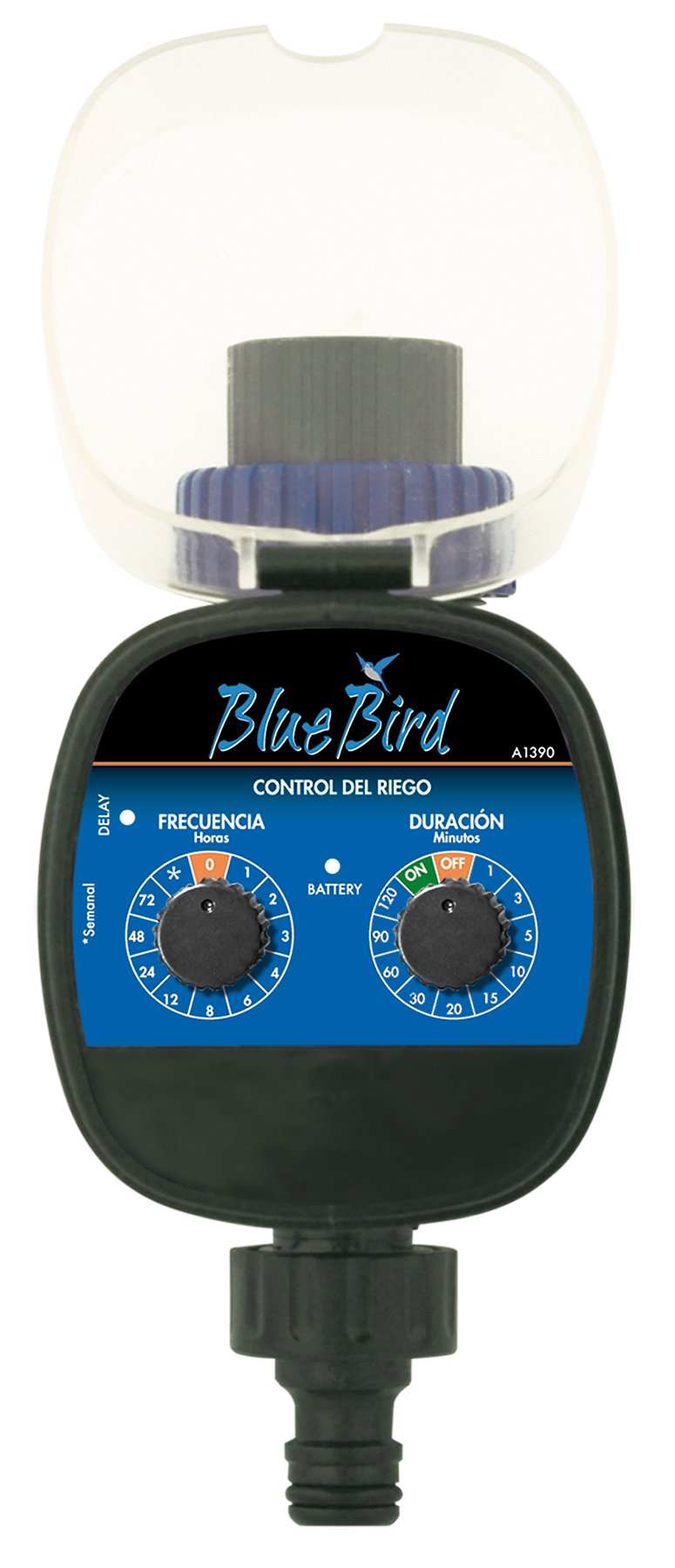
Gambar 1: Depan view of the BlueBird A1390 Irrigation Programmer. The left dial controls irrigation frequency, and the right dial controls irrigation duration. A battery indicator light is located between the dials.
Komponen:
- Frequency Dial (Frecuencia): Sets how often the irrigation occurs. Options include 0 (off), 1, 2, 3, 4, 6, 8, 12, 24, 48, 72 hours, and a '*' setting for manual or weekly operation.
- Duration Dial (Duración): Sets how long each irrigation cycle lasts. Options include 0 (off), 1, 3, 5, 10, 15, 20, 30, 60, 90, 120 minutes.
- Saklar ON/OFF: Located on the Duration Dial, allows for manual override or turning the unit off.
- Indikator Baterai: A light that indicates battery status.
- Kompartemen Baterai: Located at the rear of the unit (not visible in Figure 1).
- Saluran Masuk/Keluar Air: Standard tap and hose connections.
5. Pengaturan
5.1 Pemasangan Baterai
- Temukan penutup kompartemen baterai di bagian belakang unit.
- Remove the cover by twisting or sliding it open.
- Insert two (2) new 1.5V AA alkaline batteries, ensuring correct polarity (+/-).
- Pasang kembali penutup kompartemen baterai dengan aman untuk menjaga ketahanan terhadap air.
5.2 Connecting to the Tap
- Ensure your outdoor tap is turned off.
- Screw the BlueBird A1390 programmer onto your tap. Hand-tighten only to prevent damage.
- Connect your garden hose or irrigation system to the outlet of the programmer. Ensure a tight connection to prevent leaks.
- Slowly turn on your outdoor tap. Check for any leaks at the connections.
6. Petunjuk Pengoperasian
The BlueBird A1390 is designed for simple, intuitive programming using its two rotary dials.
6.1 Setting Irrigation Frequency
- Putar Panggilan Frekuensi (left dial) to your desired irrigation interval.
- Pengaturan yang tersedia adalah:
- 0: No irrigation (off).
- 1, 2, 3, 4, 6, 8, 12, 24, 48, 72: Irrigation every X hours.
- *: This setting typically indicates a manual mode or a weekly cycle, depending on the specific model's internal logic. Refer to the example below for common usage.
6.2 Setting Irrigation Duration
- Putar Duration Dial (right dial) to your desired watering time per cycle.
- Pengaturan yang tersedia adalah:
- MATI: No irrigation.
- DI: Continuous irrigation (use with caution).
- 1, 3, 5, 10, 15, 20, 30, 60, 90, 120: Irrigation for X minutes.
6.3 Contohample Pemrograman
To water every 6 hours for 10 minutes:
- Mengatur Panggilan Frekuensi ke 6 (jam).
- Mengatur Duration Dial ke 10 (menit).
The programmer will automatically begin the cycle based on these settings. The first cycle will typically start shortly after programming, or after a short delay.
6.4 Manual ON/OFF
To manually turn on the water, rotate the Duration Dial to the ON position. To stop manual watering, rotate the dial back to MATI or a timed setting.
7. Pemeliharaan
7.1 Penggantian Baterai
When the battery indicator light dims or the unit stops functioning, it's time to replace the batteries. Follow the steps in Section 5.1 for battery installation.
7.2 Pembersihan
Clean the exterior of the programmer with a damp cloth. Do not use abrasive cleaners or solvents. Ensure no water enters the battery compartment or internal electronics.
7.3 Penyimpanan Musim Dingin
Before the first frost, disconnect the programmer from the tap and hose. Remove the batteries. Store the unit indoors in a dry, frost-free location to prevent damage from freezing water.
8. Penyelesaian masalah
| Masalah | Kemungkinan Penyebab | Larutan |
|---|---|---|
| Unit does not turn on/display. | Baterai mati atau tidak terpasang dengan benar. | Ganti baterai, pastikan polaritasnya benar. |
| Air tidak mengalir. | Tap is off; programmer set to '0' or 'OFF'; low water pressure; clogged filter. | Ensure tap is fully open. Check frequency/duration settings. Verify water pressure. Clean any filters. |
| Unit leaks at connections. | Sambungan longgar; ring pengunci hilang atau rusak. | Tighten connections. Check and replace washers if necessary. |
| Irrigation schedule is incorrect. | Incorrect frequency or duration settings. | Re-check and adjust the Frequency and Duration Dials according to your desired schedule. |
9. Spesifikasi
- Model: Nomor telepon A1390
- Merek: Burung biru
- Pabrikan: Altadex
- Sumber Daya: 2 buah baterai alkaline AA 1.5V (tidak termasuk)
- Frekuensi Irigasi: 0, 1, 2, 3, 4, 6, 8, 12, 24, 48, 72 hours, or '*' (manual/weekly)
- Durasi Irigasi: OFF, ON, 1, 3, 5, 10, 15, 20, 30, 60, 90, 120 minutes
- Dimensi Produk: Sekitar 19.4x10.6x10 cm
- Berat Produk: Sekitar 280g
- GTIN (UPC): 8426375113909
10. Garansi dan Dukungan
This product is covered by a standard manufacturer's warranty. For specific warranty details, please refer to the documentation provided at the time of purchase or contact your retailer. For technical support or inquiries, please contact the seller or manufacturer directly.