Perkenalan
This manual provides essential information for the safe and efficient operation of your Behringer EUROPORT MPA200BT portable PA system. Please read these instructions thoroughly before using the device to ensure proper setup, usage, and maintenance. Retain this manual for future reference.
The Behringer EUROPORT MPA200BT is an all-in-one portable PA system designed for various applications, featuring 200 watts of power, Bluetooth connectivity for audio streaming, and a wireless microphone for vocal performances or presentations. Its battery operation allows for use in locations without direct power access.
Petunjuk Keselamatan Penting
Selalu ikuti tindakan pencegahan keselamatan dasar ini saat menggunakan peralatan listrik:
- Baca semua petunjuk sebelum mengoperasikan produk.
- Do not use this product near water or in wet environments.
- Bersihkan hanya dengan kain kering.
- Jangan halangi lubang ventilasi apa pun. Pasang sesuai petunjuk produsen.
- Jangan memasang di dekat sumber panas seperti radiator, pemanas, kompor, atau peralatan lainnya (termasuk amppengangkat) yang menghasilkan panas.
- Jangan abaikan tujuan keselamatan dari steker terpolarisasi atau tipe pentanahan. Steker terpolarisasi memiliki dua bilah dengan satu bilah lebih lebar dari yang lain. Steker tipe pentanahan memiliki dua bilah dan colokan pentanahan ketiga. Bilah lebar atau colokan ketiga disediakan untuk keselamatan Anda. Jika steker yang disediakan tidak pas dengan stopkontak Anda, hubungi teknisi listrik untuk mengganti stopkontak yang sudah usang.
- Lindungi kabel daya agar tidak terinjak atau terjepit, terutama pada bagian steker, stopkontak, dan titik keluarnya kabel dari peralatan.
- Gunakan hanya perlengkapan/aksesoris yang ditentukan oleh produsen.
- Cabut peralatan ini saat terjadi badai petir atau bila tidak digunakan dalam waktu lama.
- Serahkan semua perbaikan ke teknisi servis yang berkualifikasi. Perbaikan diperlukan jika peralatan mengalami kerusakan, seperti kabel atau steker catu daya rusak, cairan tumpah atau benda jatuh ke dalam peralatan, peralatan terkena hujan atau lembap, tidak beroperasi secara normal, atau terjatuh.
Isi Paket
Upon unpacking your Behringer EUROPORT MPA200BT, please verify that all components are present and in good condition:
- Behringer EUROPORT MPA200BT Portable PA System
- Wireless Microphone (ULM300M)
- USB Receiver for Wireless Microphone (ULM300USB)
- Kabel listrik
- User Manual (dokumen ini)

Image: The Behringer EUROPORT MPA200BT portable PA system shown with its accompanying wireless microphone.
Produk Selesaiview: Kontrol dan Koneksi
Familiarize yourself with the various controls and connection points on your MPA200BT unit.

Image: Rear panel of the MPA200BT, highlighting the main control interface, inputs, and outputs.

Gambar: Detail view of the MPA200BT's control panel, including display, rotary encoder, and buttons.
Fitur Panel Kontrol:
- Tampilan Layar: Shows current settings, input levels, and Bluetooth status.
- Pembuat Enkode Putar: Used to navigate menus and adjust parameters. Press to confirm selections.
- PROCESS Button: Activates or deactivates sound processing effects.
- Tombol PENGATURAN: Enters the system setup menu.
- Tombol KELUAR: Exits current menu or setting.
- Tombol ENTER: Mengkonfirmasi pilihan dalam menu.
- Tombol Bluetooth: Memulai mode pemasangan Bluetooth.
Koneksi Masukan/Keluaran:
- INPUT 1 & 2 (XLR/TRS Combo Jacks): For connecting microphones or line-level instruments.
- WIRELESS SYSTEM (USB Port): For connecting the ULM300USB wireless microphone receiver.
- MP3 Input (3.5mm Stereo Jack): Untuk menghubungkan pemutar audio eksternal.
- MIX OUTPUT (XLR): For sending the mixed audio signal to another PA system or recording device.
- Saluran Masuk Daya AC: Untuk menghubungkan kabel daya.
Pengaturan
- Sambungan Daya:
Connect the supplied power cable to the AC Power Inlet on the rear of the MPA200BT and then to a suitable power outlet. The unit can also operate on its internal battery.
- Nyalakan Daya Pertama:
Press the power switch to turn on the unit. The display will illuminate.
- Penempatan:
Place the MPA200BT on a stable, flat surface or mount it on a speaker stand (sold separately). Ensure proper ventilation around the unit.
- Menghubungkan Input:
- Mikrofon/Instrumen Berkabel: Connect to INPUT 1 or INPUT 2 using XLR or 1/4" TRS cables.
- Pemutar Audio Eksternal: Connect to the MP3 Input using a 3.5mm stereo cable.
Petunjuk Pengoperasian
Streaming Audio Bluetooth

Image: The Bluetooth logo, representing wireless audio streaming capability.
- Pastikan MPA200BT dihidupkan.
- Tekan tombol Bahasa Indonesia: Bluetooth button on the control panel. The Bluetooth icon on the display will flash, indicating pairing mode.
- On your smartphone or Bluetooth-enabled device, navigate to the Bluetooth settings and select "BEHRINGER MPA200BT" from the list of available devices.
- Once paired, the Bluetooth icon on the MPA200BT display will stop flashing and remain solid.
- You can now stream audio from your device to the MPA200BT. Adjust the volume using your device's controls and the MPA200BT's master volume.
Wireless Microphone Usage (ULM300M/ULM300USB)
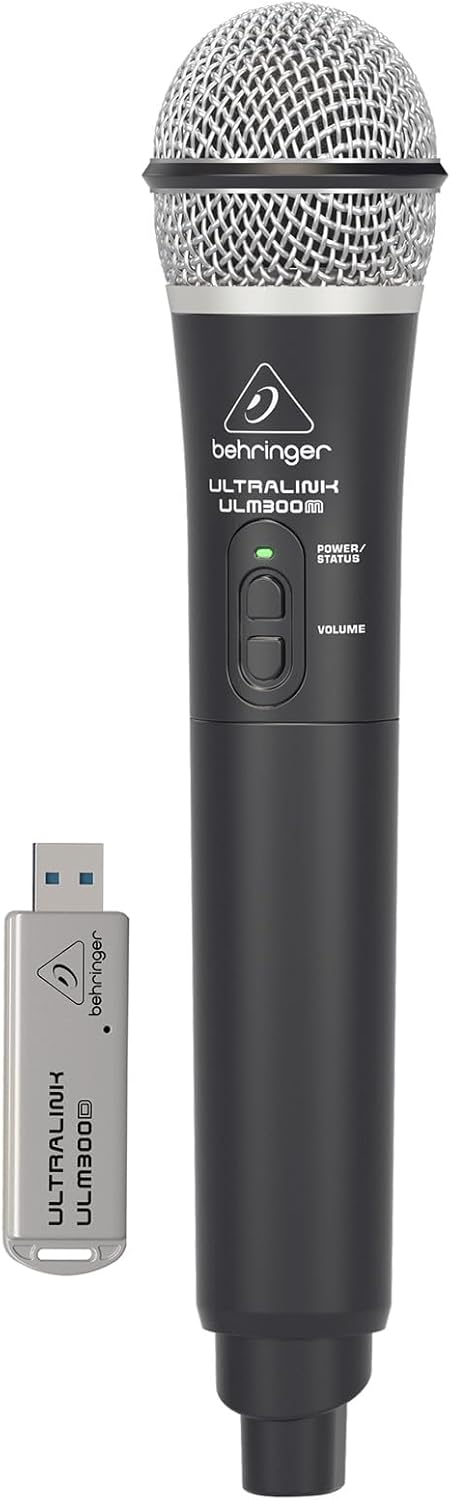
Image: The Behringer ULM300M wireless microphone shown with its USB receiver, the ULM300USB.
- Insert the ULM300USB receiver into the SISTEM NIRKABEL USB port on the MPA200BT.
- Ensure the ULM300M wireless microphone has fresh batteries installed.
- Power on the wireless microphone. The status LED on both the microphone and the receiver should indicate a successful connection (usually a solid green light).
- Adjust the microphone's volume using the controls on the microphone itself and the MPA200BT's input gain settings.
Remote Control via Smartphone App

Image: A smartphone screen showing the graphical user interface of the Behringer remote control application, used to manage the PA system settings.
The MPA200BT can be controlled remotely using a dedicated smartphone application. This allows for adjustments to volume, EQ, and effects from a distance.
- Download the official Behringer MPA200BT control app from your device's app store (iOS/Android).
- Ensure your smartphone is connected to the MPA200BT via Bluetooth (as described in the "Bluetooth Audio Streaming" section).
- Open the app. It should automatically detect and connect to your MPA200BT unit.
- Use the app's interface to control various parameters of the PA system.
Operasi Baterai
The MPA200BT features an internal rechargeable battery for portable use.
- The battery charges automatically when the unit is connected to AC power.
- A battery level indicator on the display shows the remaining charge.
- For optimal battery life, fully charge the unit before its first use and periodically when not in use for extended periods.
Pemeliharaan
- Pembersihan: Gunakan kain lembut dan kering untuk membersihkan bagian luar unit. Jangan gunakan pembersih abrasif atau pelarut.
- Penyimpanan: When not in use, store the MPA200BT in a cool, dry place, away from direct sunlight and extreme temperatures.
- Perawatan Baterai: If storing for extended periods, ensure the battery is partially charged (around 50%) and recharge it every few months to prevent deep discharge.
- Ventilasi: Ensure that the ventilation openings are not obstructed during operation to prevent overheating.
Penyelesaian Masalah
| Masalah | Kemungkinan Penyebab | Larutan |
|---|---|---|
| Tidak ada daya | Power cable not connected; unit not switched on; battery depleted. | Check power cable connection; ensure power switch is ON; charge battery. |
| Tidak ada keluaran suara | Volume too low; input source not connected or selected; faulty cable; microphone off. | Increase master volume and input gain; check input connections; test cables; ensure microphone is powered on and paired. |
| Pemasangan Bluetooth gagal | MPA200BT not in pairing mode; device too far; interference. | Press Bluetooth button to enter pairing mode; move device closer; restart both devices. |
| Mikrofon nirkabel tidak berfungsi | USB receiver not connected; microphone off; depleted batteries in microphone; interference. | Ensure ULM300USB is fully inserted; power on microphone; replace microphone batteries; ensure clear line of sight. |
| Squealing/Feedback | Microphone too close to speaker; microphone gain too high. | Move microphone further from speaker; reduce microphone input gain. |
Spesifikasi
| Fitur | Detil |
|---|---|
| Model | EROPA PORT MPA200BT |
| Keluaran Wattage | 200 Watt |
| Sumber Daya | Bertenaga Baterai / Daya AC |
| Teknologi Konektivitas | Bahasa Indonesia: Bluetooth |
| Jumlah Saluran | 2 |
| Berat Barang | 12.1 kg (26.6 pon) |
| Dimensi Produk (P x L x T) | 11.02x10.11x16.53 inci |
| Jenis Pemasangan | Meja |
| Perangkat yang Kompatibel | Telepon pintar |
| Pabrikan | Suku Musik AS |
Garansi dan Dukungan
Untuk informasi garansi terperinci dan dukungan teknis, silakan merujuk ke situs web resmi Behringer websitus web atau hubungi layanan pelanggan mereka. Simpan struk pembelian Anda sebagai bukti pembelian.
Sumber Daya Daring: www.behringer.com
Pabrikan: Suku Musik AS
Video Produk Resmi
No relevant official product videos from the seller were found in the provided data for embedding.


