1. Pendahuluan dan Selesaiview
The Dio DiOCAMRI01 is an advanced 360° HD WiFi camera designed for indoor surveillance, offering comprehensive monitoring while prioritizing user privacy. This camera features a motorized lens, 1080p resolution, and infrared night vision, ensuring clear visuals day and night. Its unique geo-fencing capability automatically activates a privacy mode when you are home, retracting the lens to ensure your personal space remains private. The camera also includes motion and noise detection, two-way audio communication, and local recording options via a Micro SD card.
This manual provides essential information for the proper installation, operation, and maintenance of your DiOCAMRI01 camera.
2. Informasi Keselamatan
- Bacalah semua petunjuk dengan saksama sebelum digunakan.
- Gunakan hanya adaptor daya yang disertakan dengan perangkat.
- Do not expose the camera to water, moisture, or extreme temperatures.
- Avoid placing the camera near heat sources or in direct sunlight.
- Jangan mencoba membongkar atau memperbaiki kamera sendiri. Serahkan semua perbaikan kepada personel yang berkualifikasi.
- Ensure the camera is securely mounted if using wall or ceiling installation.
3. Isi Paket
Verifikasi bahwa semua komponen ada dalam paket Anda:
- DiOCAMRI01 HD WiFi Camera
- Adaptor Daya
- Mounting Kit (screws, wall plugs, mounting bracket)
- User Manual (dokumen ini)
4. Fitur Produk
- Pemantauan Jarak Jauh: Day and night vision (infrared night vision up to 10m).
- Wide-Angle Motorized Lens: Offers 360° horizontal and 150° vertical rotation for comprehensive coverage.
- Perlindungan Privasi: Geo-fencing feature automatically puts the camera in standby mode and closes the lens when the owner is present. Manual standby mode is also available via the app.
- Motion and Noise Detection: Adjustable sensitivity with 3 levels. Sends direct notifications to your smartphone.
- Audio Dua Arah: Built-in microphone and intercom function allow you to hear and speak through the camera.
- Rekaman Lokal: Supports Micro SD card (up to 128GB, not included) for manual or automatic recording upon detection. Remote viewing of recordings is available via the smartphone app.
- Pengaturan Mudah: Quick and intuitive installation via the DiO Cam+ mobile application.
- Pemasangan Fleksibel: Designed for discreet integration, can be mounted on a wall, ceiling, or placed on a shelf.
5. Pengaturan
5.1 Pengaturan Awal
- Sambungan Daya: Connect the camera to a power outlet using the provided power adapter. The camera will power on.
- Download DiO Cam+ App: Pencarian untuk "DiO Cam+" in your smartphone's app store (iOS or Android) and download the application.
- Daftar/Masuk: Buka aplikasi dan ikuti petunjuk di layar untuk membuat akun atau masuk jika Anda sudah memilikinya.
- Tambahkan Kamera: Within the DiO Cam+ app, select the option to add a new device. Follow the in-app wizard to connect your camera to your Wi-Fi network. This typically involves scanning a QR code on the camera or entering Wi-Fi credentials.
- Penempatan: Position the camera in your desired location. It can be placed on a flat surface, or mounted on a wall or ceiling using the included mounting kit. Ensure the camera has a clear line of sight to the area you wish to monitor.
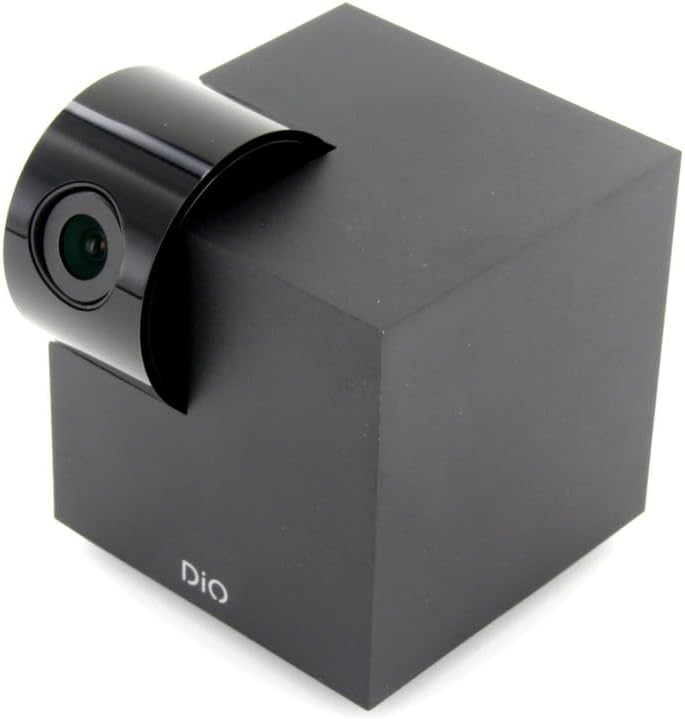
Figure 5.1: The DiOCAMRI01 camera in its standard upright position.

Figure 5.2: Camera placed on a shelf, demonstrating discreet integration.

Figure 5.3: Camera mounted on a ceiling for overhead surveillance.
5.2 Pemasangan Kartu Micro SD (Opsional)
To enable local video recording, insert a Micro SD card (up to 128GB, not included) into the designated slot on the camera. Ensure the camera is powered off before inserting or removing the card.
5.3 Sharing Camera Access
The DiO Cam+ app allows you to easily share access to your camera with family members or trusted friends. Navigate to the camera settings within the app and select the sharing option to invite others to view Siaran langsung dan rekaman.
6. Petunjuk Pengoperasian
6.1 Langsung View dan Remote Control
Once connected, open the DiO Cam+ app to access the live video feed from your camera. From the live view di layar, Anda dapat:
- Menyesuaikan View Sudut: Use the on-screen controls to remotely rotate the camera lens up to 350° horizontally and 150° vertically to cover all corners of your room.
- Audio Dua Arah: Tap the microphone icon to speak through the camera's speaker, and listen to audio from the camera's microphone.
- Take Snapshots/Record Video: Capture still images or start manual video recordings directly from the live view.

Figure 6.1: Camera interacting with the DiO Cam+ smartphone application.

Gambar 6.2: Sisi view of the camera, highlighting the rotating lens mechanism.
6.2 Privacy Features (Geo-Fencing and Manual Standby)
The DiOCAMRI01 camera offers advanced privacy protection:
- Pembatasan Geografis (Geo-Fencing): Configure geo-fencing in the app to automatically switch the camera to privacy mode when your smartphone enters a predefined home zone. In privacy mode, the camera lens will retract, ensuring no recording or live viewterjadi.
- Manual Standby: You can manually activate or deactivate the camera's standby mode (privacy mode) at any time through the DiO Cam+ app.
- Scheduled Standby: Set a schedule within the app for the camera to automatically enter or exit standby mode at specific times.

Figure 6.3: Camera with lens retracted, indicating privacy mode.
6.3 Motion and Noise Detection
The camera can detect motion and noise within its field of view. When triggered, it will send a notification to your smartphone and can automatically begin recording to the Micro SD card.
- Penyesuaian Sensitivitas: Adjust the detection sensitivity (3 levels) in the app settings to minimize false alarms.
- Opsi Perekaman: Configure recording duration (1, 3, or 5 minutes per clip) or continuous recording if a Micro SD card is installed.
7. Pemeliharaan
- Pembersihan: Use a soft, dry cloth to clean the camera body and lens. Do not use liquid cleaners or abrasive materials.
- Pembaruan Perangkat Lunak: Regularly check the DiO Cam+ app for firmware updates to ensure optimal performance and security. Follow the in-app instructions for any available updates.
- Manajemen Kartu Micro SD: Secara berkalaview and manage recordings on your Micro SD card. Format the card through the app if necessary to maintain performance.
8. Penyelesaian masalah
- Kamera Offline: Ensure the camera is powered on and connected to your Wi-Fi network. Check your Wi-Fi router and internet connection. Try restarting the camera and your router.
- Tidak Dapat Terhubung ke Aplikasi: Verify your Wi-Fi password. Ensure your smartphone is connected to a 2.4GHz Wi-Fi network during initial setup, as the camera may not support 5GHz networks.
- Kualitas Video Buruk: Periksa kecepatan koneksi internet Anda. Pastikan lensa kamera bersih dan bebas dari halangan. Sesuaikan posisi kamera untuk pencahayaan optimal.
- Motion/Noise Detection Not Working: Check the sensitivity settings in the app. Ensure the detection zones are correctly configured.
- Tidak ada perekaman ke kartu SD: Ensure the Micro SD card is correctly inserted and formatted. Check if the card is full. The camera supports up to 128GB.
- Privacy Mode Not Activating: Verify that geo-fencing is enabled and configured correctly in the app, and that your smartphone's location services are active.
9. Spesifikasi
| Fitur | Spesifikasi |
|---|---|
| Nomor Model | DIOCAM-RI01 |
| Jenis Pemasangan | Dudukan Dinding |
| Resolusi Pengambilan Video | 1080p |
| Warna | Putih |
| Jumlah Barang | 1 |
| Komponen yang Termasuk | DiOCAMRI01 WiFi HD 360° Rotating 1080P 2MP Camera with Geo-Fencing |
| Teknologi Komunikasi Nirkabel | Wifi gratis |
| Faktor Bentuk | Dome (Cube with rotating lens) |
| Resolusi Video yang Efektif | 1080 |
| Viewsudut ing | 360 Derajat (Horizontal) |
| Rentang Penglihatan Malam | 10 Meter |
| Bahan | Logam |
| Jil.tage | 5 Volt |
| Apatage | 5 watt |
| Dimensi Barang (P x L x T) | 9.4x4.9x31.9 sentimeter |
| Pabrikan | CHACON |
| Fitur Khusus | Local Recording, Night Vision |
| Baterai Termasuk | TIDAK |
| Baterai Diperlukan | TIDAK |
| Penggunaan yang Direkomendasikan | Motion Detection, Night Vision |
| Teknologi Konektivitas | Nirkabel |
| Penggunaan Dalam/Luar Ruangan | Dalam |
| Perangkat yang Kompatibel | Telepon pintar |
| Sumber Daya | Battery Powered (Note: Product specs indicate 'No batteries required', implying external power) |
| Protokol Konektivitas | Wifi gratis |
| Tipe Pengendali | Bahasa Indonesia: Android |
10. Garansi dan Dukungan
For information regarding warranty coverage, technical support, or service, please refer to the official Dio websitus web atau hubungi tempat pembelian Anda. Simpan bukti pembelian Anda untuk klaim garansi.
Pabrikan: CHACON


