1. Produk Lebihview
The Integra DTM-7 is a Network A/V Stereo Receiver designed to integrate modern digital audio and video technologies with traditional stereo sound. It supports advanced HDMI switching for 4K and HDR10 content, offers robust network connectivity for streaming services, and includes wireless audio capabilities. The receiver is built with a focus on sound quality and versatile control options.
Gambar 1.1: Depan view of the Integra DTM-7 Network A/V Stereo Receiver. This image displays the front panel controls, display, and input jacks.
Fitur Utama:
- Output Daya Tinggi: Delivers 100 Watts per channel (8 Ohms, 20 Hz-20 kHz, 0.08% THD, 2 Channels Driven, FTC) with 4-ohm stability, housed in an anti-resonant steel chassis and audiophile-grade aluminum front panel.
- Advanced HDMI Connectivity: Features 4 HDMI inputs and 1 HDMI output, supporting 4K/60 Hz, HDR10, HLG (Hybrid Log-Gamma), Dolby Vision, and BT.2020 Pass-thru with HDCP 2.2, 4:4:4 Color Space, and WCG (Wide Color Gamut).
- Integrasi Sonos: Compatible with existing Sonos Home Sound Systems or as a starting point for a new one, allowing for music streaming capability with Sonos Connect and a firmware update.
- Extensive Network and Wireless Audio: Includes Wi-Fi and Bluetooth compatibility, providing access to internet radio sources such as Tidal, Pandora, Spotify, Deezer, and TuneIn. Supports Chromecast Built-In, DTS Play-Fi technology, and AirPlay for wireless audio streaming.
- Analog Connectivity: Features a built-in phono preamp for turntable connection.
- Flexible Control Options: Controllable via the included IR remote, the Integra Control Pro app (for iOS and Android devices), or through 3rd party control systems utilizing IP or RS232C.
2. Apa yang ada di dalam kotak
Verifikasi bahwa semua item yang tercantum di bawah ini disertakan dalam paket:
- Integra DTM-7 Network A/V Stereo Receiver
- Kabel listrik
- Antena FM dalam ruangan
- Antena loop AM
- Mikrofon pengaturan speaker
- Basic manual (this document provides detailed instructions)
- Kontrol Jarak Jauh
- 2 Baterai AAA (untuk kendali jarak jauh)
3. Pengaturan
3.1 Menghubungkan Komponen Anda
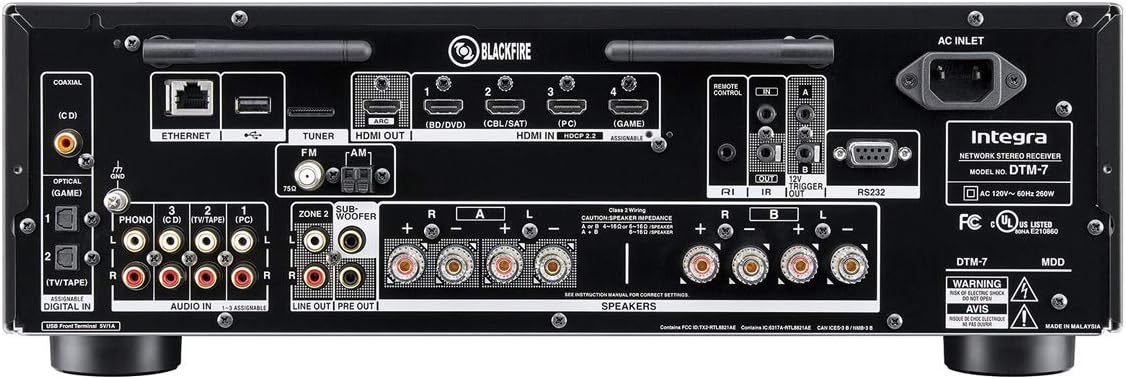
Before making any connections, ensure the receiver and all components are powered off and unplugged from the wall outlet. Refer to the rear panel diagram for connection points.

Gambar 3.1: Rear panel connections of the Integra DTM-7. This image illustrates the various input and output ports for audio, video, and network connections.
- Koneksi Pembicara: Connect your passive speakers to the SPEAKER terminals on the rear panel. Ensure correct polarity (+ to + and - to -) for each speaker. The DTM-7 supports 4-ohm compatible speakers. For optimal performance, use high-quality speaker cables.
- Koneksi HDMI: Connect your video sources (e.g., Blu-ray player, game console, streaming device) to the HDMI IN ports. Connect your TV or projector to the HDMI OUT port. The HDMI ports support 4K/60 Hz, HDR10, Dolby Vision, and HDCP 2.2.
- Koneksi jaringan: For wired network access, connect an Ethernet cable from your router to the ETHERNET port. For wireless network access, ensure the Wi-Fi antennas are properly attached and positioned.
- Koneksi Audio Analog: Connect analog audio sources (e.g., CD player, cassette deck) to the AUDIO IN ports. For turntables, connect to the PHONO input, which includes a built-in preamppengangkat.
- Koneksi Antena: Connect the supplied FM and AM antennas to their respective terminals for radio reception.
- Sambungan Daya: After all other connections are made, connect the power cord to the AC INLET on the receiver and then to a wall outlet.
3.2 Pengaturan Awal dan Kalibrasi
After connecting your components, perform the initial setup:
- Nyalakan: Tekan tombol SIAGA button on the front panel or remote control to power on the receiver.
- On-Screen Setup Guide: Follow the on-screen instructions displayed on your TV for initial configuration, including language selection and network settings.
- Kalibrasi Pembicara: Use the supplied speaker setup microphone. Connect it to the dedicated port on the front panel. Place the microphone at your primary listening position and follow the on-screen prompts to automatically calibrate your speakers for optimal sound.
4. Petunjuk Pengoperasian
4.1 Operasi Dasar
- Daya Hidup/Mati: Tekan tombol SIAGA tombol di panel depan atau remote.
- Pemilihan Input: Gunakan MASUKAN selector buttons on the front panel or the remote control to choose your desired audio/video source (e.g., HDMI 1, CD, NET).
- Kontrol Volume: Sesuaikan VOLUME UTAMA tombol pada panel depan atau VOLUME +/- tombol pada kendali jarak jauh.
- Kontrol Nada: Gunakan BAS Dan TIGA KALI LIPAT knobs on the front panel to adjust the sound characteristics to your preference.
4.2 Network and Wireless Features
The DTM-7 offers a range of network and wireless audio capabilities:
- Layanan Streaming: Access integrated streaming services such as Tidal, Pandora, Spotify, Deezer, and TuneIn directly from the receiver's menu. A stable internet connection is required.
- Chromecast Bawaan: Cast audio from compatible apps on your smartphone, tablet, or computer directly to the receiver.
- DTS Play-Fi: Enjoy high-quality wireless audio from your mobile device or PC to the receiver and other DTS Play-Fi enabled products.
- AirPlay: Stream audio from your Apple devices (iPhone, iPad, Mac) to the receiver over your home network.
- Bluetooth dapat digunakan untuk berbagai keperluan, seperti: Pair your Bluetooth-enabled devices to stream audio wirelessly to the receiver.
4.3 Opsi Kontrol
- Kontrol Jarak Jauh IR: Use the included remote for direct control of all receiver functions. Ensure line of sight to the receiver's IR sensor.
- Integra Control Pro App: Download the free Integra Control Pro app for iOS and Android devices. This app provides comprehensive control over the receiver's functions, including input selection, volume, network features, and settings.
- 3rd Party Control: The DTM-7 supports integration with custom installation systems via IP control or RS232C for advanced home automation.
5. Pemeliharaan
To ensure the longevity and optimal performance of your Integra DTM-7 receiver, follow these maintenance guidelines:
- Pembersihan: Gently wipe the exterior surfaces with a soft, dry cloth. Do not use abrasive cleaners, waxes, or solvents, as they can damage the finish.
- Ventilasi: Ensure adequate ventilation around the receiver. Do not block the ventilation openings on the top or sides. Avoid placing the unit in an enclosed cabinet without proper airflow.
- Penghilangan Debu: Gunakan sikat lembut atau penyedot debu dengan alat tambahan sikat secara berkala untuk membersihkan debu dari kisi-kisi ventilasi.
- Kabel Daya: Periksa kabel daya secara berkala untuk melihat tanda-tanda kerusakan. Jika rusak, hentikan penggunaan dan hubungi layanan pelanggan untuk penggantian.
6. Penyelesaian masalah
If you encounter issues with your DTM-7 receiver, refer to the following common troubleshooting steps:
- Tidak Ada Daya:
- Pastikan kabel daya terpasang dengan benar ke penerima dan stopkontak dinding yang berfungsi.
- Periksa apakah stopkontak dinding berfungsi dengan mencolokkan perangkat lain.
- Tidak ada suara:
- Verifikasi bahwa sumber masukan yang benar telah dipilih.
- Periksa semua sambungan speaker untuk memastikan polaritas yang benar dan terpasang dengan aman.
- Pastikan volume tidak diatur ke minimum atau dimatikan.
- Confirm that your speakers are functional.
- Tidak Ada Video:
- Ensure the HDMI cables are securely connected to both the source device, the receiver's HDMI IN, and the TV's HDMI OUT.
- Verify that the correct HDMI input is selected on the receiver and the correct HDMI input is selected on your TV.
- Coba kabel atau port HDMI yang berbeda.
- Masalah Koneksi Jaringan:
- For wired connections, ensure the Ethernet cable is properly connected to the receiver and your router.
- For Wi-Fi, check your router's status and ensure the receiver is within range. Re-enter Wi-Fi credentials if necessary.
- Restart router dan receiver Anda.
- Kontrol Jarak Jauh Tidak Berfungsi:
- Ganti baterai pada remote control.
- Pastikan tidak ada penghalang antara remote dan sensor IR penerima.
If the problem persists after trying these steps, please refer to the Integra support websitus atau hubungi layanan pelanggan.
7. Spesifikasi
| Fitur | Spesifikasi |
|---|---|
| Daya Keluaran | 100 W/Ch. (8 Ohms, 20 Hz-20 kHz, 0.08% THD, 2 Channels Driven, FTC) |
| Masukan/Keluaran HDMI | 4 Masuk / 1 Keluar |
| Fitur HDMI | 4K/60 Hz, HDR10, HLG, Dolby Vision, BT.2020 Pass-thru, HDCP 2.2, 4:4:4 Color Space, WCG |
| Teknologi Konektivitas | AirPlay, Bluetooth, HDMI, Wi-Fi, Ethernet |
| Wireless Audio Features | Chromecast Built-In, DTS Play-Fi, AirPlay, Spotify, Pandora, Tidal, Deezer, TuneIn |
| Mode Keluaran Audio | Stereo |
| Konfigurasi Saluran Suara Surround | 2.1 |
| Masukan Telepon | Yes (Built-in phono preamp) |
| Jenis Kontrol | IR Remote, Android/iOS App (Integra Control Pro), IP, RS232C |
| Dimensi Produk (W x H x D) | 17.1 x 5.9 x 12.9 inci (kira-kira) |
| Berat Barang | 18.7 pon |
| Pabrikan | Onkyo |
8. Garansi dan Dukungan
For detailed warranty information, please refer to the warranty card included with your product or visit the official Integra website. For technical support, product registration, or service inquiries, please contact Integra customer support or visit their official websitus untuk informasi terbaru.
Manufacturer: Onkyo


