1. Produk Lebihview
The Philips SENSEO Switch HD6592/61 is a versatile 2-in-1 coffee machine designed to brew both single-serve pod coffee and a full pot of filter coffee. This manual provides instructions for safe and efficient use of your appliance.

Image 1.1: The Philips SENSEO Switch coffee machine, showcasing its dual functionality for both pod and filter coffee preparation.
Fitur Utama:
- Sistem Penyeduhan Ganda: Prepare single cups of SENSEO pod coffee or a full pot of filter coffee.
- Pematian Otomatis: The machine automatically turns off after a period of inactivity to save energy.
- Easy Water Tank Filling: The water tank features a clear level indication for precise and convenient filling.
- Sistem Penghenti Tetesan: Allows you to pause brewing and pour a cup of filter coffee before the full cycle is complete.
- Bagian yang Aman untuk Pencuci Piring: The jug and filter holder are designed for easy cleaning in a dishwasher.
2. Informasi Keselamatan
Read this instruction manual carefully before using the appliance and save it for future reference. Always follow basic safety precautions when using electrical appliances to reduce the risk of fire, electric shock, and personal injury.
- Pastikan voltage yang ditunjukkan pada alat sesuai dengan voltase listrik lokal Andatage sebelum menghubungkan.
- Do not immerse the appliance, plug, or power cord in water or any other liquid.
- Jauhkan alat ini dari jangkauan anak-anak.
- Jangan mengoperasikan peralatan jika steker, kabel listrik, atau peralatan itu sendiri rusak.
- Place the appliance on a stable, flat, heat-resistant surface, away from hot surfaces or open flames.
- Selalu cabut steker alat sebelum membersihkan atau saat tidak digunakan.
- Jangan membuka casing alat. Perbaikan hanya boleh dilakukan oleh petugas servis yang berwenang.
3. Pengaturan
3.1 Membongkar dan Membersihkan Awal
- Keluarkan semua bahan kemasan dari mesin kopi.
- Wash the removable parts (water reservoir, jug, filter holder, drip tray) with warm water and a mild detergent. Rinse thoroughly and dry.
- Bersihkan bagian luar mesin dengan adamp kain.
3.2 First Use (Rinsing Cycle)
Before brewing coffee for the first time, perform a rinsing cycle to clean the internal system.
- Isi wadah air dengan air dingin segar hingga tanda MAX.
- Place the empty jug (for filter coffee) or a cup (for pod coffee) on the drip tray.
- Close the lid of the pod holder (without a pod) or ensure the filter holder is empty and correctly placed.
- Tekan tombol daya untuk menghidupkan mesin.
- Press the button for filter coffee or the 2-cup button for pod coffee to start a brewing cycle with only water.
- Repeat this process once or twice until the water reservoir is empty.

Gambar 3.1: Belakang view of the coffee machine, showing the transparent water reservoir with level indicators and the filter coffee carafe in position.

Image 3.2: The coffee machine with the filter coffee section open, illustrating how to access the filter holder and water inlet for filter coffee brewing.
4. Petunjuk Pengoperasian
4.1 Brewing SENSEO Pod Coffee
- Ensure the water reservoir is filled with fresh cold water.
- Open the lid of the pod holder.
- Place one or two SENSEO coffee pods in the appropriate pod holder. For one cup, use the 1-cup pod holder; for two cups, use the 2-cup pod holder. Ensure the pod is centered.
- Tutup penutupnya dengan rapat hingga berbunyi klik.
- Letakkan satu atau dua cangkir di atas nampan tetesan.
- Press the 1-cup or 2-cup button to start brewing. The machine will automatically stop when the coffee is ready.

Image 4.1: The SENSEO Switch machine actively brewing two cups of pod coffee, demonstrating the pod coffee function.

Image 4.2: A close-up of the machine brewing a single cup of SENSEO pod coffee, highlighting the single-serve capability.
4.2 Brewing Filter Coffee
- Ensure the water reservoir is filled with fresh cold water up to the desired number of cups for filter coffee.
- Open the filter coffee section.
- Place a paper filter (size 1x4 or similar) into the filter holder.
- Add the desired amount of ground filter coffee into the paper filter.
- Close the filter coffee section and ensure the thermal jug is correctly placed on the heating plate.
- Press the filter coffee button to start brewing. The machine will brew the coffee and keep it warm in the thermal jug.
- The drip stop system allows you to remove the jug temporarily to pour a cup before brewing is complete.

Image 4.3: The SENSEO Switch machine configured for filter coffee, featuring the thermal carafe and filter holder.
4.3 Intensity Select
The machine features an Intensity Select function, allowing you to choose between a regular or a strong coffee. Refer to the control panel for specific buttons related to intensity selection.

Gambar 4.4: Atas view of the control panel, showing the power button, 1-cup and 2-cup buttons for pod coffee, the filter coffee button, and the Intensity Select option.

Image 4.5: A hand interacting with the control panel, demonstrating the ease of selecting brewing options.
5. Pemeliharaan
5.1 Pembersihan
Pembersihan rutin memastikan kinerja optimal dan memperpanjang umur mesin kopi Anda.
- Pembersihan Harian: After each use, empty and rinse the water reservoir, drip tray, and pod holder. Wipe the exterior with a damp kain.
- Bagian yang Aman untuk Pencuci Piring: The jug and filter holder can be safely cleaned in the dishwasher.
- Pemegang Pod: Remove the pod holder and rinse it under running water. Use a small brush if necessary to remove any coffee residue.
- Baki Tetes: Empty and clean the drip tray and grid regularly.
5.2 Kerak
Descaling is crucial to prevent limescale buildup, which can affect brewing performance and taste. The frequency of descaling depends on water hardness and usage.
- Use a descaling solution specifically designed for coffee machines. Follow the instructions provided with the descaling agent.
- Typically, the process involves filling the water reservoir with the descaling solution and running several brewing cycles without coffee.
- After descaling, rinse the machine thoroughly by running several cycles with fresh water to remove any descaling residue.
6. Penyelesaian masalah
If you encounter issues with your Philips SENSEO Switch coffee machine, consult the following common troubleshooting steps:
- Mesin tidak menyala: Periksa apakah kabel daya terpasang dengan benar ke stopkontak listrik yang berfungsi.
- Coffee is not brewing: Ensure the water reservoir is filled, the pod holder/filter holder is correctly placed, and the lid is closed properly.
- Coffee tastes weak: Check if you are using the correct amount of coffee (pods or ground coffee) and if the Intensity Select setting is appropriate. Descaling might also be necessary.
- Kebocoran air: Ensure all removable parts are correctly assembled and seated. Check for any cracks or damage to the water reservoir or other components.
- Limescale indicator light is on: Lakukan siklus pembersihan kerak seperti dijelaskan di bagian Pemeliharaan.
If the problem persists after attempting these solutions, please contact Philips customer support for further assistance.
7. Spesifikasi
Detailed technical specifications for the Philips SENSEO Switch HD6592/61 coffee machine:
| Spesifikasi | Nilai |
|---|---|
| Merek | PILIHAN |
| Nomor Model | HD6592/61 |
| Warna | Hitam |
| Dimensi Produk (P x L x T) | Ukuran 28x15x40 cm |
| Berat Barang | 2.4 Kilogram |
| Kapasitas | 1 liter |
| Kekuatan | 1450 Watt |
| Jil.tage | 145 Volt |
| Bahan | Baja tahan karat |
| Fitur Khusus | Thermal (for carafe) |
| Jenis Pembuat Kopi | Electric filter coffee maker |
| Gaya | Senseo Switch |
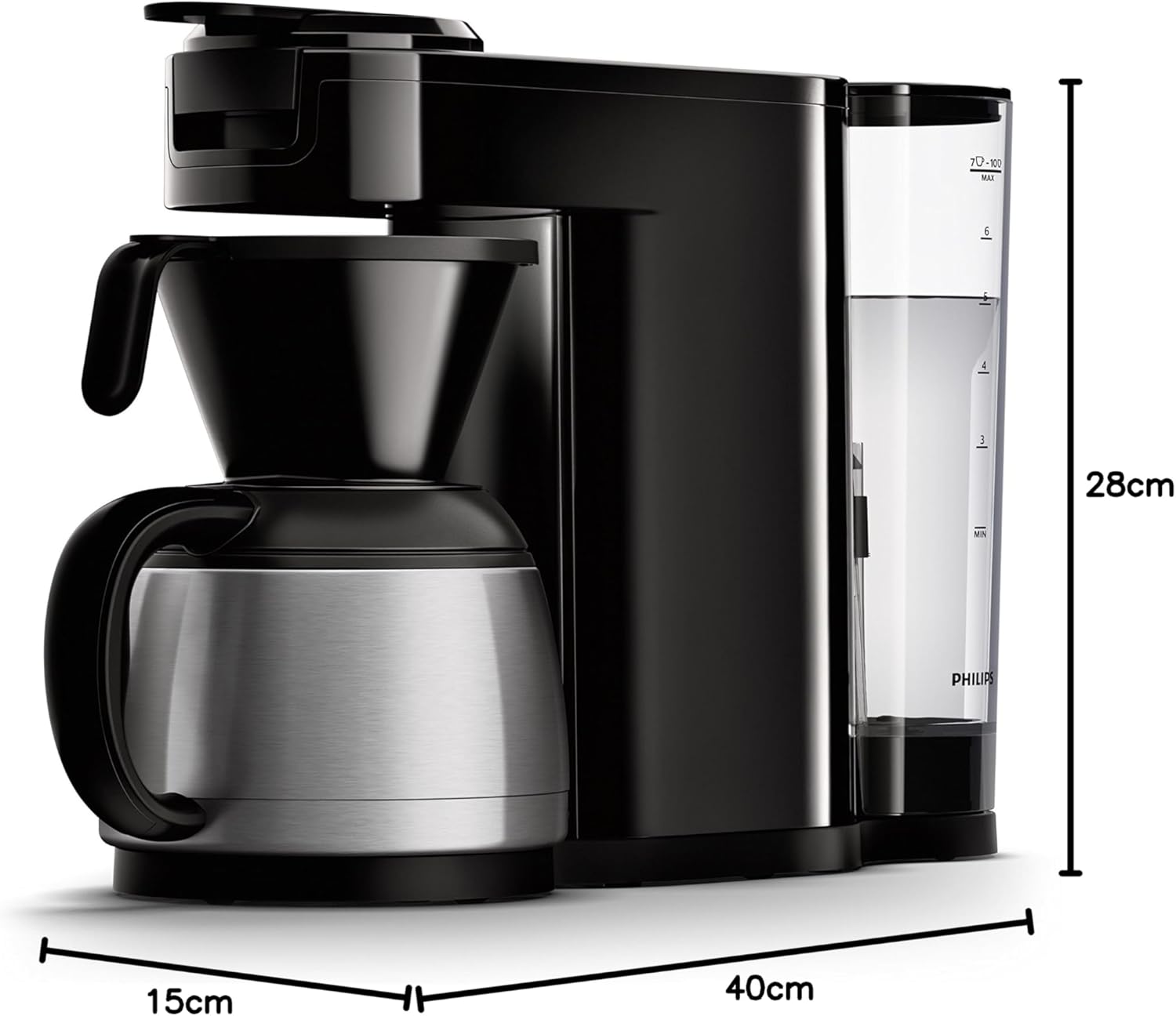
Image 7.1: Diagram illustrating the dimensions of the Philips SENSEO Switch coffee machine.
8. Garansi dan Dukungan
This Philips appliance comes with a standard manufacturer's warranty. Please refer to the warranty card included in your product packaging for specific terms and conditions, including warranty period and coverage.
For technical support, service, or to register your product, please visit the official Philips websitus web atau hubungi layanan pelanggan mereka. Simpan bukti pembelian Anda untuk klaim garansi.
You can find more information and support at the official Philips weblokasi: www.philips.com


