1. Informasi Keselamatan Penting
Before using the ProfiCare PC-IPL 30240, it is crucial to read and understand all safety instructions. Failure to do so may result in injury or damage to the device.
- Perlindungan Mata: Always wear the included protective glasses during treatment to shield your eyes from intense light pulses.
- Jenis Kulit dan Rambut: This device is suitable for skin types I-IV and for light brown/dark blonde to black hair. It is not effective on white, grey, light blonde, or red hair, nor is it suitable for very dark skin tones (type V-VI).
- Skin Contact Sensor: The device features an automatic safety sensor that only activates light pulses when in full contact with the skin, preventing accidental flashes.
- Filter UV: An integrated UV filter protects your skin from harmful UV light.
- Avoid Use On: Do not use on tattoos, moles, birthmarks, open wounds, irritated skin, or areas with skin conditions. Consult a doctor if you have any concerns.
- Pregnancy/Breastfeeding: Jangan gunakan jika hamil atau menyusui.
2. Produk Lebihview
The ProfiCare PC-IPL 30240 is an IPL (Intense Pulsed Light) hair removal system designed for long-lasting hair reduction. It works by deactivating hair roots deep under the skin to prevent regrowth.
Fitur Utama:
- IPL Technology for permanent hair reduction.
- 5 light intensity levels for various skin and hair types.
- Up to 50,000 light pulses.
- Integrated UV filter.
- Mati otomatis setelah 10 menit tidak aktif.
- Desain ergonomis untuk penggunaan yang nyaman.
- Automatic safety sensor for skin contact.
Komponen:
- ProfiCare PC-IPL 30240 Device
- Adaptor Daya
- Kacamata Pelindung

Image: The ProfiCare PC-IPL 30240 device, showing its ergonomic shape and control panel.

Image: Close-up of the device's control dial, indicating 5 levels of light intensity for different skin types.
3. Pengaturan
- Membongkar: Carefully remove the device, power adapter, and protective glasses from the packaging. Retain the packaging for future storage or transport.
- Memeriksa: Check the device and accessories for any signs of damage. Do not use if damaged.
- Siapkan Kulit: Ensure the treatment area is clean, dry, and shaved. Do not wax, pluck, or use depilatory creams, as the hair root must be present for IPL to be effective.
- Hubungkan Daya: Plug the power adapter into the device and then into a suitable electrical outlet (100-240 V, 50/60 Hz).
- Wear Protective Glasses: Always put on the protective glasses before turning on the device.

Image: The ProfiCare PC-IPL 30240 product packaging, illustrating the device and its features.
4. Petunjuk Pengoperasian
4.1 Menghidupkan/Mematikan
- To turn on, press and hold the 'START' button until the indicator light illuminates.
- To turn off, press and hold the 'START' button again until the indicator light turns off. The device also features an automatic shut-off after 10 minutes of inactivity.
4.2 Selecting Light Intensity
The device has 5 light intensity levels. Start with the lowest intensity (Level 1) and gradually increase it as your skin tolerates it. Refer to the skin tone chart in your separate user guide for recommended settings.
- Rotate the dial around the 'START' button to select the desired intensity level (1-5).
- Higher intensity levels are generally more effective but require careful skin tolerance assessment.
4.3 Teknik Aplikasi
- Ensure your skin is clean, dry, and shaved.
- Place the light window of the device firmly and completely against the skin in the desired treatment area. The safety sensor will detect skin contact.
- Press the 'START' button to emit a light pulse. You will see a flash of light.
- Lift the device and move it to the next adjacent area, ensuring slight overlap to cover all areas. Do not treat the same spot multiple times in one session.
- Continue this process until the entire desired area has been treated.

Image: Illustration demonstrating the IPL hair removal process, showing unwanted hair before use, hair roots being heated by IPL technology, and deactivated hair roots.
4.4 Treatment Areas and Frequency
The PC-IPL 30240 is suitable for use on legs, arms, bikini zone, armpits, chest, and back.

Image: The ProfiCare PC-IPL 30240 device shown with circles highlighting common application areas: legs, arms, bikini zone, and armpits.
For optimal results, follow a consistent treatment schedule. Initial results, such as up to 55% hair reduction, may be observed after approximately 4 weeks of regular use. The exact frequency will depend on individual hair growth cycles and skin tolerance. Typically, treatments are performed every 1-2 weeks for the first few sessions, then reduced to monthly maintenance as hair growth diminishes.
5. Pemeliharaan
5.1 Membersihkan Perangkat
- Selalu pastikan perangkat dimatikan dan dicabut sebelum membersihkan.
- Use a soft, dry cloth to gently wipe the light window and the body of the device.
- Jangan gunakan pembersih abrasif, pelarut, atau bahan kimia keras, karena dapat merusak perangkat.
- Pastikan tidak ada cairan yang masuk ke dalam perangkat.
5.2 Penyimpanan
- Simpan perangkat dan aksesorinya di tempat yang sejuk dan kering, jauh dari sinar matahari langsung dan suhu ekstrem.
- Jauhkan dari jangkauan anak-anak.
6. Penyelesaian masalah
If you encounter issues with your ProfiCare PC-IPL 30240, refer to the following common problems and solutions:
| Masalah | Kemungkinan Penyebab | Larutan |
|---|---|---|
| Perangkat tidak menyala. | Tidak terhubung dengan benar ke sumber daya listrik. | Ensure the power adapter is securely plugged into both the device and the electrical outlet. |
| Tidak ada denyut cahaya yang dipancarkan. | Device not in full contact with skin; incorrect intensity setting. | Ensure the light window is pressed firmly and completely against the skin. Check that an intensity level (1-5) is selected. |
| Iritasi atau ketidaknyamanan pada kulit. | Intensity level too high for your skin type. | Reduce the intensity level. If irritation persists, discontinue use and consult a healthcare professional. |
| Hair regrowth not significantly reduced. | Inconsistent use; unsuitable hair/skin type; insufficient intensity. | Ensure consistent treatment as per schedule. Verify your hair and skin type are compatible. Gradually increase intensity if tolerated. |
If the problem persists after trying these solutions, please contact ProfiCare customer support.
7. Spesifikasi
- Nomor Model: 330240 (PC-IPL 30240)
- Catu Daya: Tegangan 100-240 V, 50/60 Hz
- Light Pulses: Hingga 50,000
- Light Intensity Levels: 5
- Light Surface Area: Luas 2.7 cm²
- Intensity Density: 4J/cm²
- Panjang gelombang: Panjang gelombang 475 - 1200nm
- Pematian Otomatis: Setelah 10 menit tidak aktif
- Fitur Terintegrasi: UV filter, automatic skin contact sensor
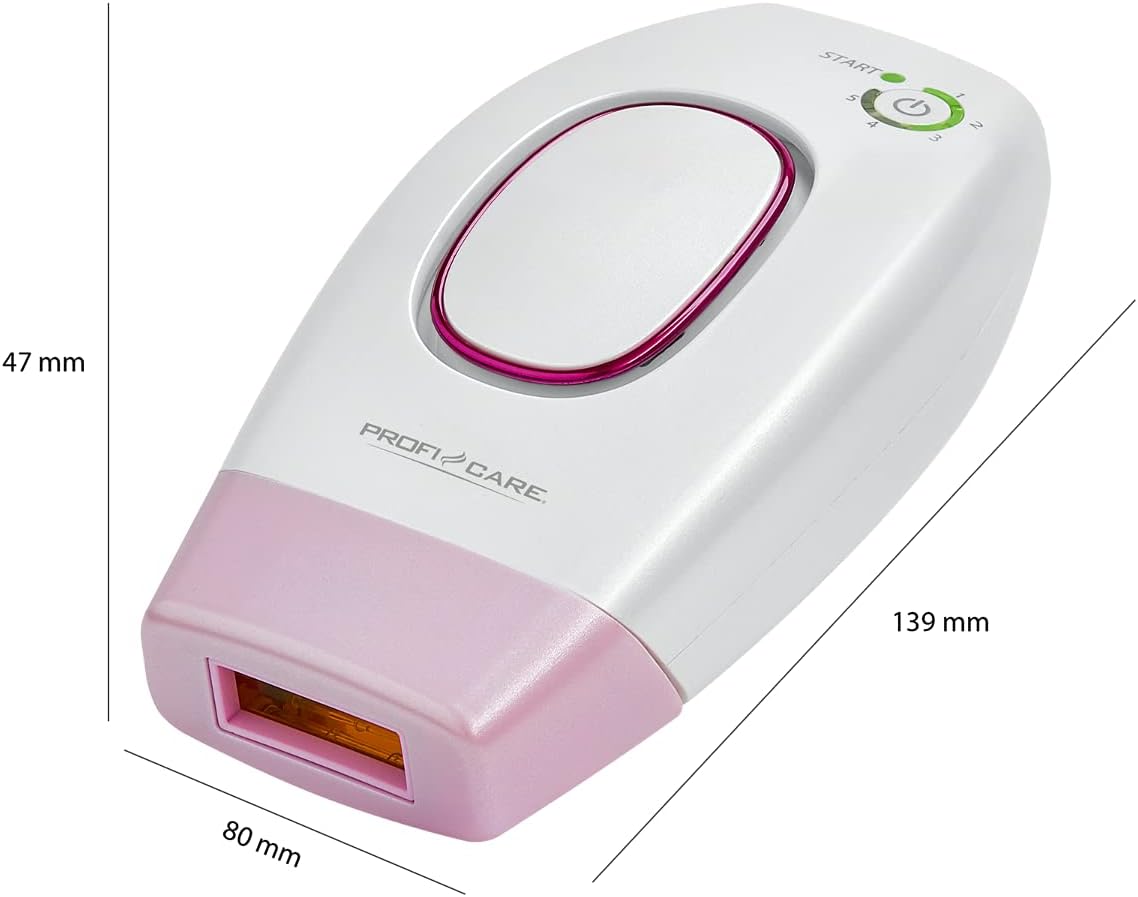
Image: Diagram showing the dimensions of the ProfiCare PC-IPL 30240 device: 139 mm length, 80 mm width, and 47 mm height.
8. Garansi dan Dukungan
Warranty information for your ProfiCare PC-IPL 30240 is typically provided with your purchase documentation or can be found on the official ProfiCare websitus. Harap simpan bukti pembelian Anda untuk klaim garansi.
For technical support, service, or further inquiries, please contact ProfiCare customer service directly. Contact details can usually be found on the manufacturer's websitus atau dalam kemasan produk.


