Perkenalan
The LG Watch W7 is a sophisticated hybrid smartwatch that seamlessly integrates traditional analog watch movement with advanced smartwatch functionalities. Crafted with a premium stainless steel body, it caters to users who appreciate the timeless elegance of a mechanical timepiece alongside the convenience and features of modern smart technology.
This device is powered by Wear OS and utilizes its physical analog hands to enhance the user experience. In 'Just Watch' mode, the LG Watch W7 can operate for an extended period of up to 100 days on a single full charge, focusing solely on accurate timekeeping.
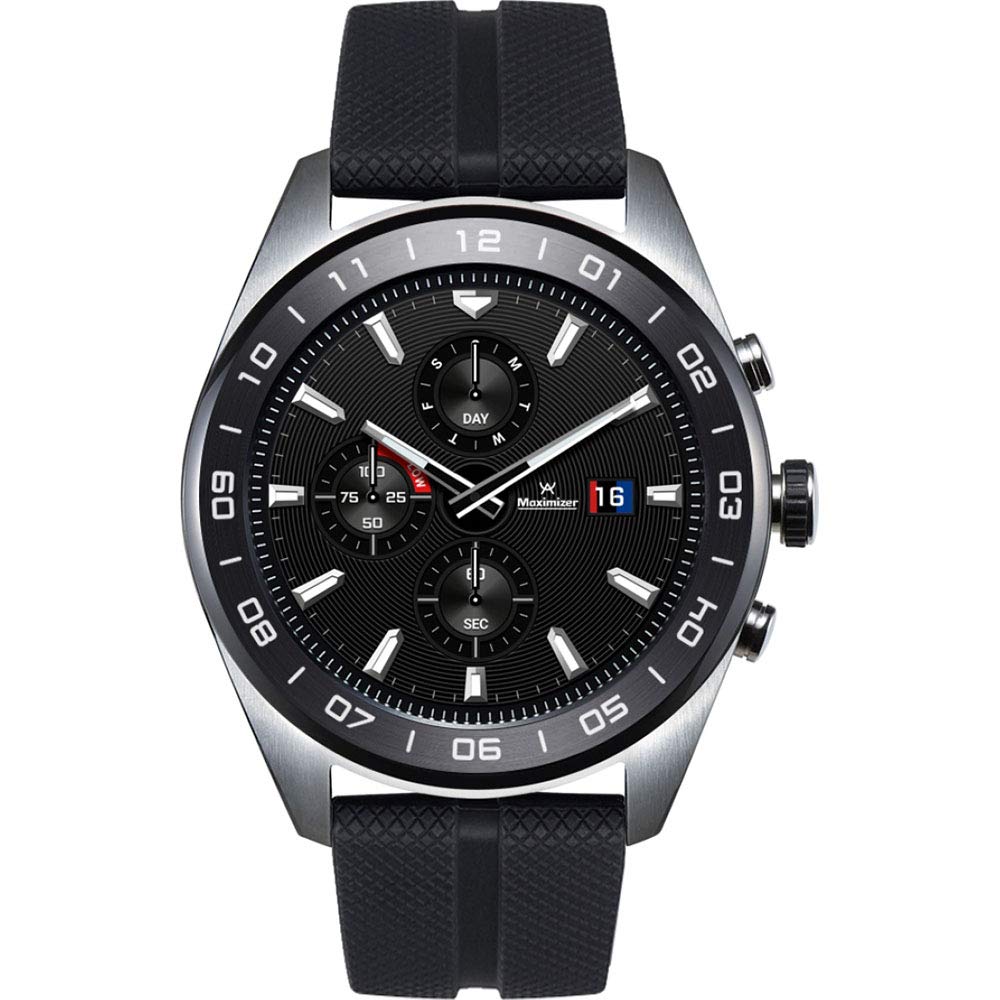
Gambar: The LG Watch W7, featuring a round black dial with silver hour markers and hands, set within a stainless steel case. The watch is fitted with a textured black silicone strap. Sub-dials indicate day, seconds, and battery level. A digital display is visible behind the analog hands.
Pengaturan
1. Unboxing dan Biaya Awal
Upon unboxing your LG Watch W7, ensure all components are present:
- LG Watch W7
- Adaptor Perjalanan
- Kabel Data
- Tempat Pengisian Daya
- Panduan Memulai Cepat
Before first use, fully charge your watch. Connect the data cable to the travel adapter and the charging cradle. Place the LG Watch W7 onto the charging cradle, ensuring proper alignment. The watch display will indicate charging status. A full charge is recommended for optimal battery calibration.
2. Memasangkan dengan Ponsel Pintar Anda
- Unduh Wear OS oleh Google app from the Google Play Store or Apple App Store on your smartphone.
- Turn on your LG Watch W7 by pressing and holding the power button (usually the middle button on the right side).
- Follow the on-screen instructions on your watch to select your language and accept terms.
- Open the Wear OS app on your smartphone and tap 'Set up a new watch'.
- Your phone will search for nearby devices. Select your LG Watch W7 from the list.
- A pairing code will appear on both your watch and phone. Verify they match and confirm pairing.
- Complete the setup process by following the remaining prompts in the Wear OS app, including signing into your Google account and granting necessary permissions.
Petunjuk Pengoperasian
Navigasi Dasar
- Layar sentuh: Geser ke atas, bawah, kiri, atau kanan untuk menavigasi menu, notifikasi, dan pengaturan cepat. Ketuk untuk memilih item.
- Mahkota (Tombol Tengah): Press to return to the watch face or app list. Rotate to scroll through menus and notifications.
- Tombol atas: Customizable shortcut, often defaults to Google Fit.
- Tombol bawah: Customizable shortcut, often defaults to LG Master Tools.
Fitur Smartwatch
- Pemberitahuan: Receive alerts for calls, emails, text messages, and other app notifications directly on your wrist. Swipe up from the watch face to view.
- Asisten Google: Press and hold the crown, or say "Hey Google" to activate the voice assistant for queries, commands, and smart home control.
- Google Fit: Track your daily activity, including steps, distance, and workouts. Access via the top button or app list.
- Wear OS Applications: Download and use various apps from the Google Play Store directly on your watch.
LG Master Tools
The LG Watch W7 features unique tools that utilize its physical analog hands for enhanced functionality:
- Kompas: The analog hands will point north, providing a clear directional indicator.
- Alat pengukur tinggi: Displays your current altitude.
- Barometer: Shows atmospheric pressure readings.
- Stopwatch: Use the digital display and analog hands for precise timing.
- Pengatur waktu: Set countdown timers with visual cues from the analog hands.
Konektivitas
The watch supports Wi-Fi and Bluetooth 4.2LE for seamless connection to your smartphone and network services.
Just Watch Mode
To conserve battery life, you can activate 'Just Watch' mode. In this mode, the digital display and smart features are turned off, and only the analog hands function to tell time. This significantly extends the battery life, allowing for up to 100 days of operation.
Pemeliharaan
Pembersihan
To clean your LG Watch W7, gently wipe the stainless steel case and display with a soft, lint-free cloth. For the silicone strap, a mild soap solution and water can be used, followed by thorough rinsing and drying. Avoid using harsh chemicals or abrasive materials.
Tahan Air
The LG Watch W7 has an IP68 water resistance rating, meaning it is protected against dust and can withstand immersion in up to 1.5 meters of fresh water for up to 30 minutes. It is suitable for everyday use and light water exposure, but not recommended for swimming, diving, or high-pressure water activities.
Perawatan Baterai
For optimal battery longevity, avoid fully discharging the watch frequently. Charge the device when the battery level is low. Utilizing 'Just Watch' mode when smart features are not needed can also help preserve battery health over time.
Pembaruan Perangkat Lunak
Ensure your watch's Wear OS software is kept up-to-date. Updates often include performance improvements, new features, and security enhancements. You can check for updates through the Wear OS app on your smartphone or directly on the watch settings.
Penyelesaian Masalah
- Jam Tangan Tidak Menyala: Ensure the watch is fully charged. Place it on the charging cradle for at least 30 minutes.
- Masalah Konektivitas (Bluetooth/Wi-Fi): Check that Bluetooth is enabled on your smartphone and the Wear OS app is running. Try restarting both your watch and smartphone. For Wi-Fi, ensure the network credentials are correct.
- Display Unresponsive: If the touchscreen is not responding, try restarting the watch by holding down the power button until it reboots.
- Inaccurate Sensor Readings (Compass, Altimeter): Ensure the watch is calibrated. Refer to the LG Master Tools section in the watch's settings for calibration options. Environmental factors can also affect accuracy.
- Daya Tahan Baterai Pendek: Review your usage patterns. Frequent use of GPS (via smartphone), constant notifications, and high screen brightness can drain the battery faster. Consider using 'Just Watch' mode or adjusting settings to optimize battery life.
- Tombol Tidak Merespons: Ensure no debris is obstructing the buttons. The middle dial button, in particular, may require a firm press.
For more detailed troubleshooting or issues not covered here, please refer to the official LG support websitus atau hubungi layanan pelanggan.
Spesifikasi
| Fitur | Detil |
|---|---|
| Nomor Model | LMW315.AUSASK |
| Dimensi (P x L x T) | 1.75x0.5x1.78 inci |
| Berat | 2.72 ons |
| Ukuran Layar | 1.2 inci |
| Teknologi Tampilan | Layar LCD |
| Masukan Antarmuka Manusia | Layar sentuh |
| Konektivitas | Bluetooth, WiFi |
| Bahasa Indonesia: GPS | Melalui Smartphone |
| Fitur Khusus | Compass, Altimeter, Barometer, Stopwatch, Timer |
| Sensor | Accelerometer, Magnetic, Gyro, Pressure |
| Tahan Air | Tingkat IP68 |
| Warna | Baja tahan karat |
| Kapasitas Baterai | 2000 (unit not specified, typically mAh) |
Apa yang ada di dalam kotak
The LG Watch W7 package includes the following items:
- LG Watch W7 Smartwatch
- Adaptor Perjalanan
- Kabel Data
- Tempat Pengisian Daya
- Panduan Memulai Cepat
Garansi dan Dukungan
Your LG Watch W7 is covered by a manufacturer's warranty. Please refer to the warranty card included in your product packaging or visit the official LG website for detailed information regarding warranty terms, conditions, and registration.
For technical support, service, or additional inquiries, please visit the official LG support website or contact LG customer service directly. You can find contact information and support resources on their weblokasi.
Resmi LG Weblokasi: www.lg.com