1. Pendahuluan
This manual provides detailed instructions for the installation, operation, and maintenance of your TooQ TQE-2528B 2.5-inch SATA USB 3.1 Gen1 HDD Enclosure. This device allows you to convert a 2.5-inch SATA I/II/III hard disk drive or solid-state drive into an external storage solution, connecting via USB 3.1 Gen1 for high-speed data transfer.
2. Isi Paket
Harap verifikasi bahwa semua item ada dalam paket:
- TooQ TQE-2528B 2.5-inch SATA USB 3.1 Gen1 HDD Enclosure
- USB 3.0 Type-A to Micro-B Cable
- User Manual (dokumen ini)

Image 2.1: The TooQ TQE-2528B enclosure shown with its included USB 3.0 cable.
3. Produk Lebihview
The TooQ TQE-2528B is designed for ease of use and portability. Key features include:
- Compatible with 2.5-inch SATA I/II/III HDDs and SSDs up to 9.5mm height.
- USB 3.1 Gen1 (USB 3.0) interface for data transfer speeds up to 5.0 Gbps.
- Tool-free installation for quick setup.
- LED indicator for connection status and data access.
- Powered directly via USB port.
3.1. Identifikasi Komponen
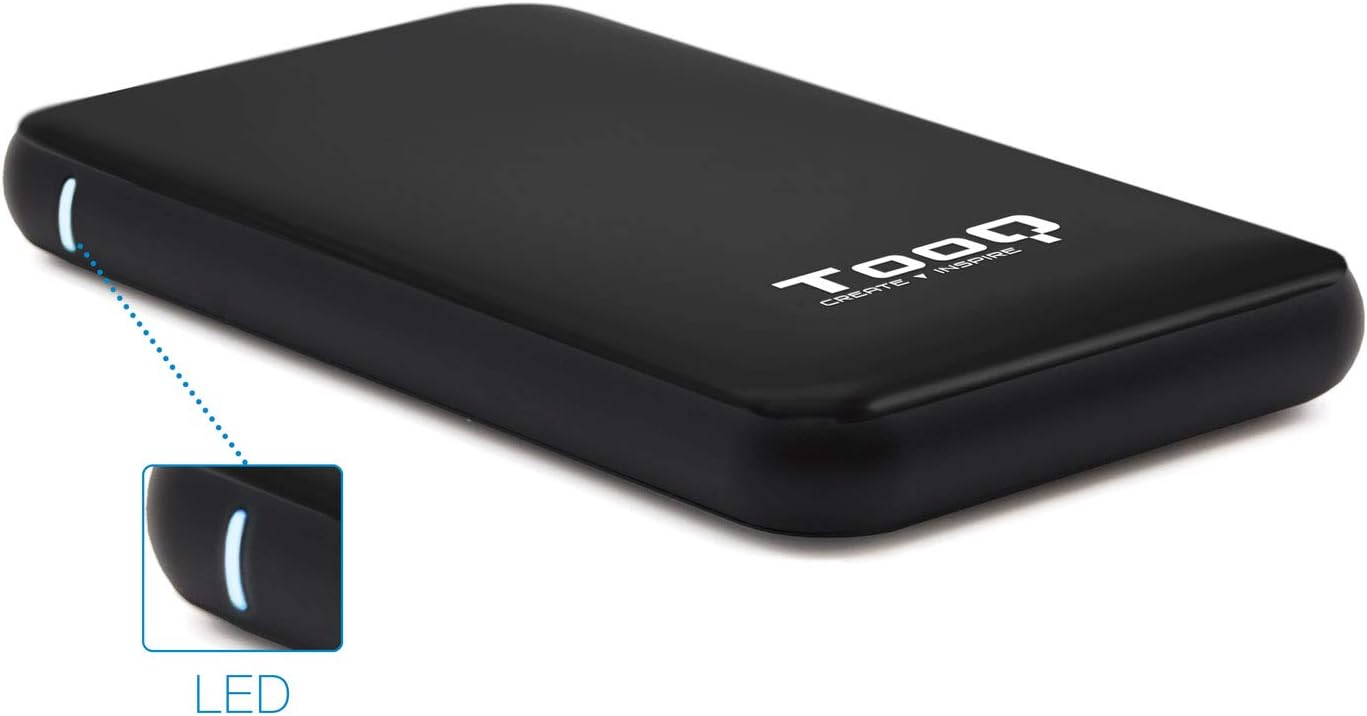
Image 3.1: The enclosure features an LED indicator on the side, which illuminates to show power and data activity.

Image 3.2: The rear of the enclosure includes a power button and a Micro-USB port for connection.
4. Setup: Hard Drive Installation
Follow these steps to install a 2.5-inch SATA HDD or SSD into the enclosure:
- Buka Lampiran: Gently slide the top cover of the enclosure to open it. The design allows for tool-free access.
- Hubungkan Drive: Align your 2.5-inch SATA HDD/SSD with the SATA connector inside the enclosure. Carefully push the drive into the connector until it is firmly seated. Ensure the drive is flush with the internal tray.
- Tutup pagar pembatas: Slide the top cover back into place until it clicks securely.
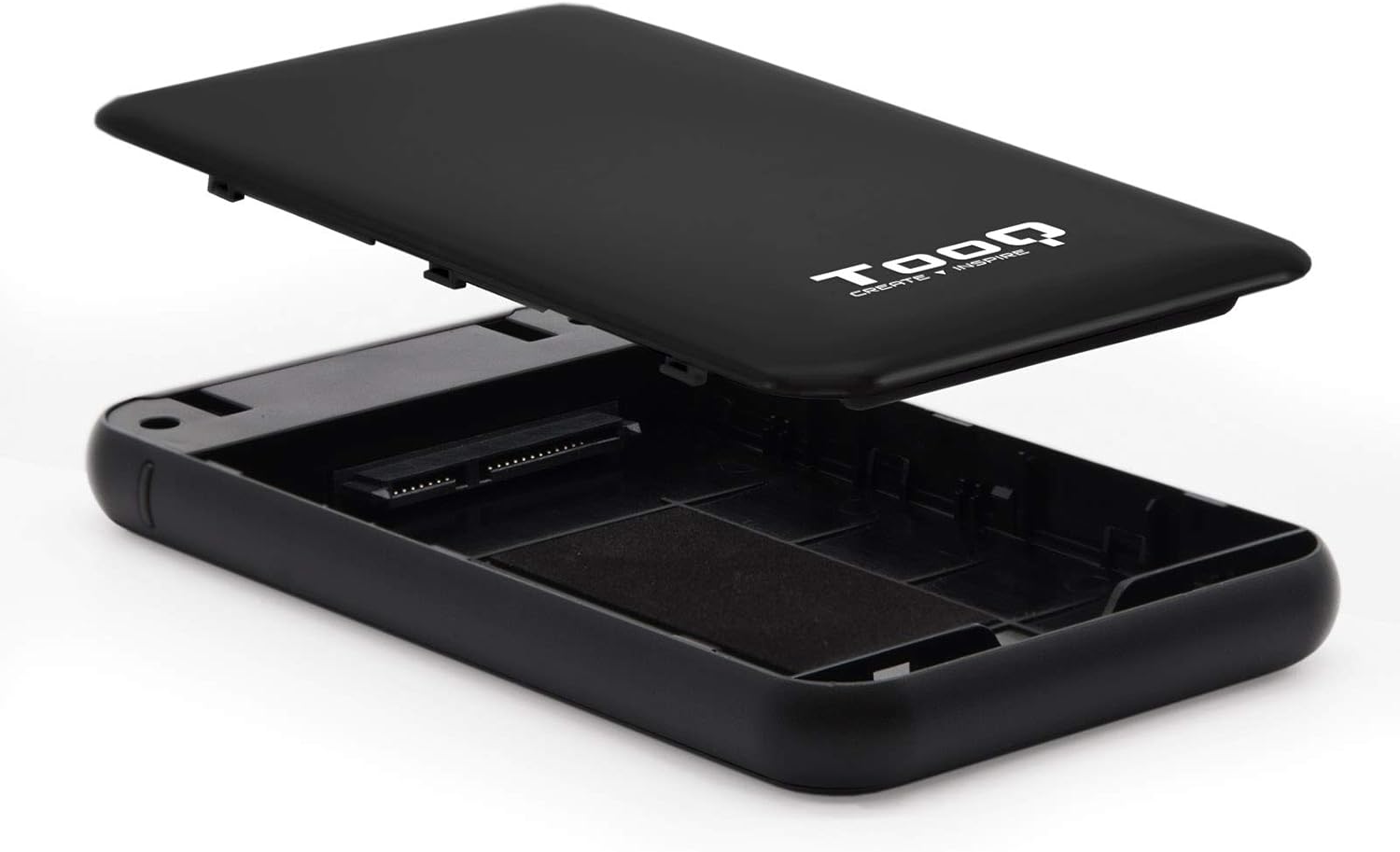
Image 4.1: The enclosure opened, revealing the internal SATA data and power connector for a 2.5-inch drive.
5. Petunjuk Pengoperasian
After installing your hard drive, connect the enclosure to your computer:
- Hubungkan Kabel USB: Plug the Micro-B end of the included USB 3.0 cable into the enclosure's Micro-USB port.
- Hubungkan ke Komputer: Plug the Type-A end of the USB cable into an available USB port on your computer. For optimal performance, use a USB 3.0 or USB 3.1 Gen1 port.
- Nyalakan: If the enclosure has a power button (refer to Image 3.2), press it to turn on the device. The LED indicator (Image 3.1) will illuminate, indicating power and connection status.
- Mengakses Drive: Your operating system should automatically detect the new storage device.
- New Drives: If you are using a brand new hard drive, it may need to be initialized and formatted before use. Refer to your operating system's disk management tools for this process.
- Existing Drives: If the drive contains data, it should appear as a removable drive in 'My Computer' (Windows) or on the desktop (macOS).

Image 5.1: The TooQ TQE-2528B enclosure connected to a laptop, demonstrating a typical usage scenario.
6. Pemeliharaan
To ensure the longevity and optimal performance of your enclosure:
- Jaga agar kandang tetap bersih dan bebas debu. Gunakan kain lembut dan kering untuk membersihkannya.
- Hindari memaparkan perangkat pada suhu ekstrem, kelembapan, atau sinar matahari langsung.
- Jangan menjatuhkan atau membiarkan penutup terkena benturan keras.
- Selalu keluarkan drive dengan aman dari sistem operasi Anda sebelum mencabut kabel USB untuk mencegah kerusakan data.
7. Penyelesaian masalah
If you encounter issues with your TooQ TQE-2528B enclosure, refer to the following common solutions:
- Drive Tidak Terdeteksi:
- Pastikan kabel USB terhubung dengan aman ke casing dan komputer.
- Coba sambungkan ke port USB lain di komputer Anda.
- Verify that the hard drive is correctly seated within the enclosure's SATA connector.
- Periksa Manajemen Disk (Windows) atau Utilitas Disk (macOS) di komputer Anda untuk melihat apakah drive tersebut dikenali tetapi belum diinisialisasi atau belum diformat.
- Test the enclosure with a different 2.5-inch SATA drive, if available, to rule out a drive issue.
- Transfer Data Lambat:
- Ensure you are connected to a USB 3.0 or USB 3.1 Gen1 port on your computer. Connecting to a USB 2.0 port will result in slower speeds.
- Pastikan sistem operasi dan driver Anda sudah mutakhir.
- Enclosure Does Not Power On:
- Ensure the USB cable is properly connected and providing power. The enclosure is bus-powered.
- Coba port USB lain di komputer Anda.
8. Spesifikasi
| Nomor Model | TQE-2528B |
| Drive yang Kompatibel | 2.5-inch SATA I/II/III HDD/SSD (up to 9.5mm height) |
| Antarmuka | USB 3.1 Gen1 (USB 3.0) |
| Kecepatan Transfer Data | Hingga 5.0 Gbps |
| Catu Daya | USB Bus-powered (5 Volts) |
| Bahan | Plastik ABS |
| Dimensi (P x L x T) | 13.5 cm x 8 cm x 1.6 cm (sekitar 5.3 x 3.1 x 0.6 inci) |
| Berat | 50 g (sekitar 0.11 lbs) |
| Kompatibilitas Sistem Operasi | Universal (Windows, macOS, Linux) |

Image 8.1: Technical drawing illustrating the dimensions of the TooQ TQE-2528B enclosure.
9. Garansi dan Dukungan
TooQ products are designed for reliability and performance. This product comes with a standard manufacturer's warranty. For specific warranty terms and conditions, please refer to the warranty card included with your product or visit the official TooQ weblokasi.
For technical support, frequently asked questions, or to download the latest drivers (if applicable), please visit the official TooQ support websitus web atau hubungi departemen layanan pelanggan mereka. Informasi kontak biasanya dapat ditemukan pada kemasan produk atau pada label resmi. weblokasi.
Pabrikan: TOOQ
Nomor Barang Perdagangan Global (GTIN): 08433281008304


