Panduan Pengguna Ponsel SERVO 225
Model: SERVO 225
1. Pendahuluan
This user manual provides comprehensive instructions for the operation and maintenance of your new SERVO 225 mobile phone. Please read this manual carefully before using the device to ensure proper functionality and to maximize its lifespan. The SERVO 225 is a compact and reliable mobile phone featuring dual SIM capability, a 2.4-inch display, and essential functions for daily communication.

Gambar 1.1: Depan dan belakang view of the SERVO 225 mobile phone, showcasing its compact design and keypad.
2. Informasi Keselamatan
- Jangan membongkar atau memodifikasi perangkat.
- Jauhkan perangkat dari air dan kelembapan.
- Gunakan hanya aksesori asli atau yang telah disetujui.
- Hindari suhu ekstrem.
- Jangan menggunakan telepon saat mengemudi.
- Buang baterai dan perangkat secara bertanggung jawab sesuai dengan peraturan setempat.
- Before first use, ensure to remove any insulating tape from the battery terminals.
3. Isi Paket
Mohon periksa isi paket Anda. Jika ada barang yang hilang atau rusak, hubungi pengecer Anda.
- 1 x SERVO 225 Mobile Phone
- 1 x Battery (1400 mAh Li-ion)
- 1 x Pengisi Daya
- 1 x Kotak Pelindung
- 1 x Panduan Pengguna (dokumen ini)

Figure 3.1: The SERVO 225 package contents, including the phone, battery, charger, and protective case.
4. Produk Lebihview
The SERVO 225 features a classic candy bar design with a physical keypad and a 2.4-inch display. It supports dual SIM cards for flexible network usage.
4.1. Ciri Fisik
- Menampilkan: 2.4-inch VGA screen.
- Papan tombol: Standard alphanumeric keypad with navigation keys.
- Kamera: 0.3 Megapixel CMOS camera with flash on the rear.
- Sampul Belakang: Features a mechanical back cover, available in various colors like Black, Brown, and Gold.
- Ukuran: Sekitar 122 x 52 x 11 mm (4.80 x 2.05 x 0.43 inci).
- Berat: Sekitar 80 gram.

Figure 4.1: Close-up of the SERVO 225's rear, highlighting the camera and dual LED flash for improved low-light photography.

Figure 4.2: Various color options for the SERVO 225, demonstrating the 2.4-inch screen size.
5. Pengaturan
5.1. Pemasangan dan Pengisian Baterai
- Lepaskan penutup belakang ponsel dengan cara mencongkelnya perlahan dari bagian lekukan (notch).
- If present, remove the insulating tape from the battery terminals.
- Insert the 1400 mAh Li-ion battery into the battery compartment, ensuring the gold contacts align with the phone's terminals.
- Pasang kembali penutup belakang, tekan dengan kuat hingga berbunyi klik dan terkunci pada tempatnya.
- Connect the charger to the phone's charging port and plug it into a power outlet. Charge the battery fully before first use.

Figure 5.1: The 1400 mAh battery and the phone's zinc alloy paint shell design.
5.2. Memasang Kartu SIM dan Kartu Memori
The SERVO 225 supports dual SIM cards (Dual GSM) and a T-Flash memory card (up to 32GB, not included).
- With the back cover and battery removed, locate the SIM card slots. The phone supports two SIM cards.
- Carefully insert your SIM cards into the designated slots with the gold contacts facing down.
- Locate the T-Flash (microSD) card slot. Insert the memory card until it clicks into place.
- Pasang kembali baterai dan penutup belakang.
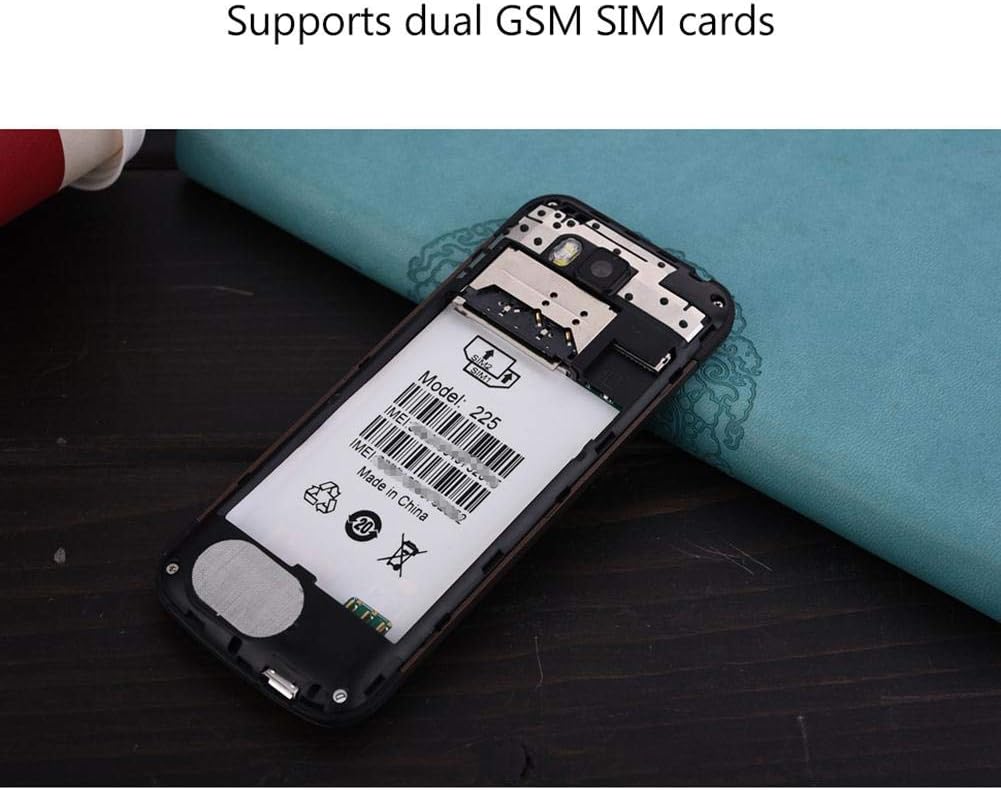
Gambar 5.2: Internal view of the SERVO 225, illustrating the dual SIM card slots and the memory card slot.
6. Petunjuk Pengoperasian
6.1. Daya Hidup/Mati
- Untuk menghidupkan: Tekan dan tahan tombol Daya/Akhiri Panggilan hingga layar menyala.
- Untuk mematikan: Tekan dan tahan tombol Daya/Akhiri Panggilan hingga opsi mematikan daya muncul, lalu pilih "Matikan daya".
6.2. Fungsi Dasar
- Membuat panggilan: Masukkan nomor telepon menggunakan keypad dan tekan tombol Panggil.
- Menjawab Panggilan: Tekan tombol Panggil saat telepon berdering.
- Mengirim Pesan: Navigate to the "Messages" menu, select "Write message", enter your text, and send to the desired recipient.
- Navigasi Menu: Use the navigation keys (up, down, left, right) to browse through menus and the center key to select.
6.3. Fitur Utama
- Bluetooth dapat digunakan untuk berbagai keperluan, seperti: Connect to other Bluetooth-enabled devices for file transfer or hands-free communication.
- Radio FM: Listen to your favorite radio stations. Requires headphones to be plugged in as an antenna.
- MP3/MP4 Player: Putar audio dan video files disimpan di kartu memori Anda.
- GPRS/WAP: Access basic internet services and WAP sites.
- Kamera: Capture photos with the 0.3MP rear camera.
- Alat Tambahan: Calendar, Sound Recorder, Calculator, World Clock, Alarm.
7. Pemeliharaan
- Pembersihan: Gunakan kain lembut dan kering untuk membersihkan permukaan ponsel. Jangan gunakan cairan pembersih atau aerosol.
- Penyimpanan: Simpan ponsel di tempat yang sejuk dan kering saat tidak digunakan dalam jangka waktu lama.
- Perawatan Baterai: Avoid overcharging or completely draining the battery frequently to prolong its life.
8. Penyelesaian masalah
| Masalah | Kemungkinan Penyebab | Larutan |
|---|---|---|
| Telepon tidak menyala. | Baterai lemah atau tidak terpasang dengan benar. | Charge the battery. Ensure battery is properly inserted and insulating tape is removed. |
| Tidak ada sinyal jaringan. | Kartu SIM tidak terpasang dengan benar atau berada di luar jangkauan jaringan. | Masukkan kembali kartu SIM. Pindah ke area dengan jangkauan jaringan yang lebih baik. |
| Tidak dapat membuat atau menerima panggilan. | No network, SIM card issue, or call barring enabled. | Check network signal. Verify SIM card. Disable call barring if active. |
| Kartu memori tidak terdeteksi. | Memory card not inserted correctly or corrupted. | Reinsert memory card. Try a different memory card. |
9. Spesifikasi
| Fitur | Spesifikasi |
|---|---|
| Merek | SERVO |
| Model | 225 |
| Menampilkan | 2.4-inch VGA |
| Platform | Spreadtrum6531CA |
| Tipe SIM | Dual SIM, Dual Standby (Dual GSM) |
| Frekuensi Jaringan | GSM850/900/1800/1900 MHz (2G) |
| Memori Internal | 32MB RAM, 32MB ROM |
| Memori yang Dapat Diperluas | Up to 32GB (T-Flash / microSD card, not included) |
| Kamera | 0.3 Megapixel CMOS (Rear) with Flash |
| Baterai | Baterai Lithium Ion 1400mAh |
| Waktu Bicara | Sekitar 6 jam |
| Ukuran | 122 x 52 x 11 mm (4.80 x 2.05 x 0.43 inci) |
| Berat | Sekitar 80 gram |
| Konektivitas | Bahasa Indonesia: Bluetooth |
| Fitur Lainnya | FM Radio, MP3/MP4 Player, GPRS, WAP, Calendar, Recorder, Calculator, World Clock, Alarm |
10. Garansi dan Dukungan
Your SERVO 225 mobile phone comes with a standard manufacturer's warranty. Please refer to the warranty card included in your package for specific terms and conditions. For technical support, troubleshooting assistance, or warranty claims, please contact your point of purchase or the official SERVO customer service channels.
Simpan tanda terima pembelian Anda sebagai bukti pembelian untuk tujuan garansi.


