Jabra Evolve 20 MS Stereo Headset Instruction Manual
Model: Evolve 20 (GSA4999-823-109)
1. Pendahuluan
The Jabra Evolve 20 MS Stereo Headset is a professional wired headset designed for clear communication and music listening. It features a noise-canceling microphone to reduce background distractions and an intuitive control unit for easy call management. This manual provides essential information for setting up, operating, and maintaining your headset.
2. Isi Paket
Silakan periksa paket untuk item berikut:
- Jabra Evolve 20 MS Stereo Headset with integrated control unit
3. Produk Lebihview
3.1 Komponen Headset
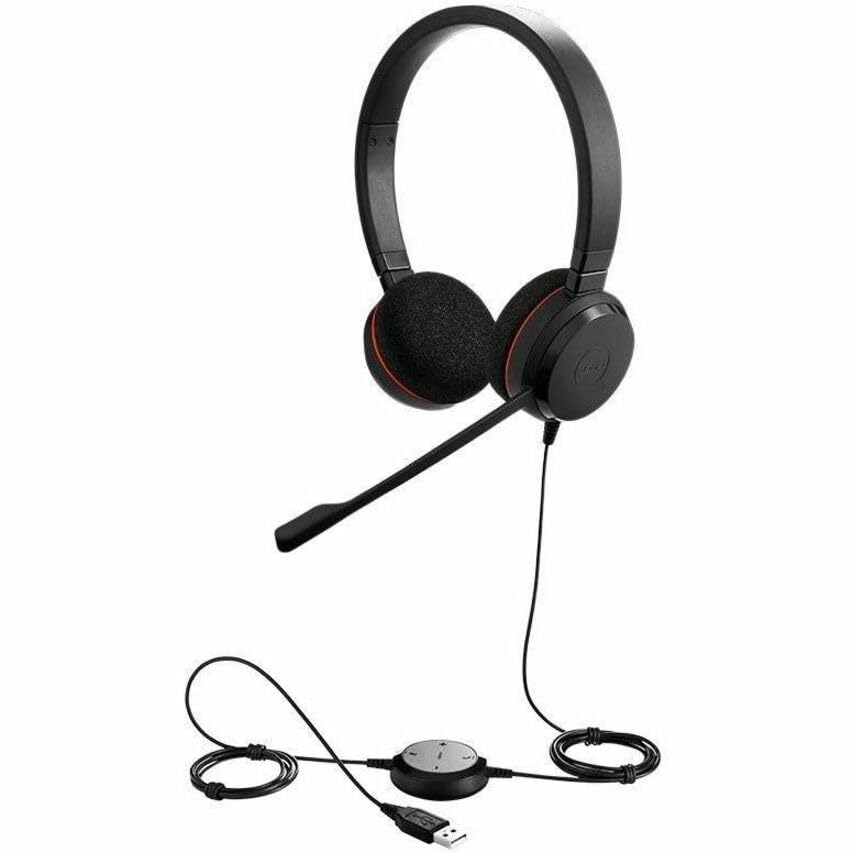
The Jabra Evolve 20 MS Stereo Headset features an adjustable headband, foam ear cushions for comfort, and a flexible microphone boom arm that can be positioned for optimal voice pickup.
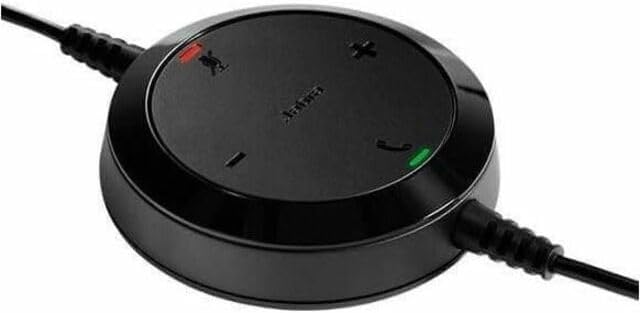
The inline control unit provides easy access to essential call management functions, including volume adjustment, microphone mute, and answer/end call buttons.
4. Pengaturan
4.1 Menghubungkan ke Komputer Anda
- Cari port USB yang tersedia di komputer Anda (desktop atau laptop).
- Plug the USB connector of the Jabra Evolve 20 headset into the USB port.
- Komputer Anda akan secara otomatis mendeteksi dan menginstal driver yang diperlukan. Proses ini mungkin membutuhkan beberapa saat.
- Once installed, the headset will be ready for use. You may need to select the Jabra Evolve 20 as your default audio device (microphone and speaker) in your operating system's sound settings or your communication software (e.g., Microsoft Teams, Skype for Business).
5. Petunjuk Pengoperasian
5.1 Mengenakan Headset
- Sesuaikan ikat kepala untuk memastikan kenyamanan dan keamanan saat dikenakan di kepala Anda.
- Position the microphone boom arm so that the microphone is approximately 2-3 cm (1 inch) from your mouth.
5.2 Using the Control Unit
- Volume Naik (+): Tekan untuk meningkatkan volume mendengarkan.
- Volume Turun (-): Tekan untuk mengurangi volume mendengarkan.
- Bisukan Mikrofon: Press the microphone icon button to mute or unmute your microphone during a call. An indicator light on the control unit may show the mute status.
- Menjawab/Mengakhiri Panggilan: Press the phone icon button to answer an incoming call or end an active call.
6. Pemeliharaan
Perawatan yang tepat memastikan umur panjang dan kinerja headset Anda.
- Pembersihan: Gently wipe the headset and control unit with a soft, dry cloth. For ear cushions, use a slightly damp Gunakan kain jika perlu, tetapi hindari kelembapan berlebihan. Jangan gunakan bahan kimia keras atau pembersih abrasif.
- Penyimpanan: Saat tidak digunakan, simpan headset di tempat yang bersih dan kering, jauhkan dari suhu ekstrem dan sinar matahari langsung. Hindari kabel yang kusut.
- Perawatan Kabel: Do not pull on the cable to disconnect the headset. Always grasp the USB connector.
7. Penyelesaian masalah
If you encounter issues with your Jabra Evolve 20 headset, refer to the table below for common problems and solutions.
| Masalah | Larutan |
|---|---|
| Tidak ada suara dari headset |
|
| Mikrofon tidak berfungsi |
|
| Tombol kontrol panggilan tidak merespons |
|
8. Spesifikasi
Key technical specifications for the Jabra Evolve 20 MS Stereo Headset:
| Fitur | Keterangan |
|---|---|
| Nama Model | Berkembang 20 |
| Teknologi Konektivitas | Berkabel (USB) |
| Kontrol Kebisingan | Peredam Kebisingan Aktif, Peredam Kebisingan Pasif |
| Mikropon | Peredam kebisingan |
| Penempatan Telinga | Di Atas Telinga |
| Faktor Bentuk | Di Telinga |
| Material (Ear Cushions) | Busa |
| Berat Barang | 4.6 ons (0.29 pon) |
| Dimensi Produk | 8x7x1.5 inci |
| Perangkat yang Kompatibel | Desktops, Laptops, Softphones, Web Clients, Desk Phones |
| Tipe Pengendali | Answer/End, Mute, Volume |
9. Garansi dan Dukungan
For detailed warranty information, please refer to the warranty card included with your product or visit the official Jabra webSyarat dan ketentuan garansi dapat bervariasi berdasarkan wilayah dan pengecer.
For technical support, product registration, or to access additional resources, please visit the official Jabra support websitus web atau hubungi layanan pelanggan mereka secara langsung. Simpan bukti pembelian Anda untuk klaim garansi.


