1. Pendahuluan
The BNT Dummy Fake Security Camera is designed to provide a realistic visual deterrent against potential intruders. Its appearance closely mimics that of a functional surveillance camera, aiming to reduce the likelihood of criminal activity by creating the impression of active monitoring. This manual provides essential information for the proper setup, operation, and maintenance of your dummy camera.

Image 1.1: Two BNT white dummy fake security cameras, showcasindesainnya yang realistis.
2. Apa yang ada di dalam kotak
Upon opening your package, you should find the following components:
- BNT Bullet Simulation Fake Camera (White) x 2
- Sekrup untuk pemasangan
- User Manual (dokumen ini)
- Warning Security Alert Sticker Decal x 2

Image 2.1: Package contents showing two dummy cameras, warning stickers, and screws.
3. Fitur
- Desain Realistis: Mimics the appearance of a real surveillance camera.
- Lampu LED Berkedip: Features a built-in red LED light that illuminates at night, simulating active recording.
- Sensor Fotolistrik: Automatically activates the red LED light in low-light conditions.
- Konstruksi Tahan Lama: Made from Acrylonitrile Butadiene Styrene (ABS) for indoor and outdoor use.
- Tahan cuaca: IP65 International Protection Rating ensures resistance to water.
- Instalasi Mudah: No wiring required, mounts easily to ceilings or walls.
- Sudut yang dapat disesuaikan: Features 2-axis rotation for flexible positioning (360-degree rotation, 90-degree tilt).
- Sumber Daya: Operates on 2 AA batteries (not included).
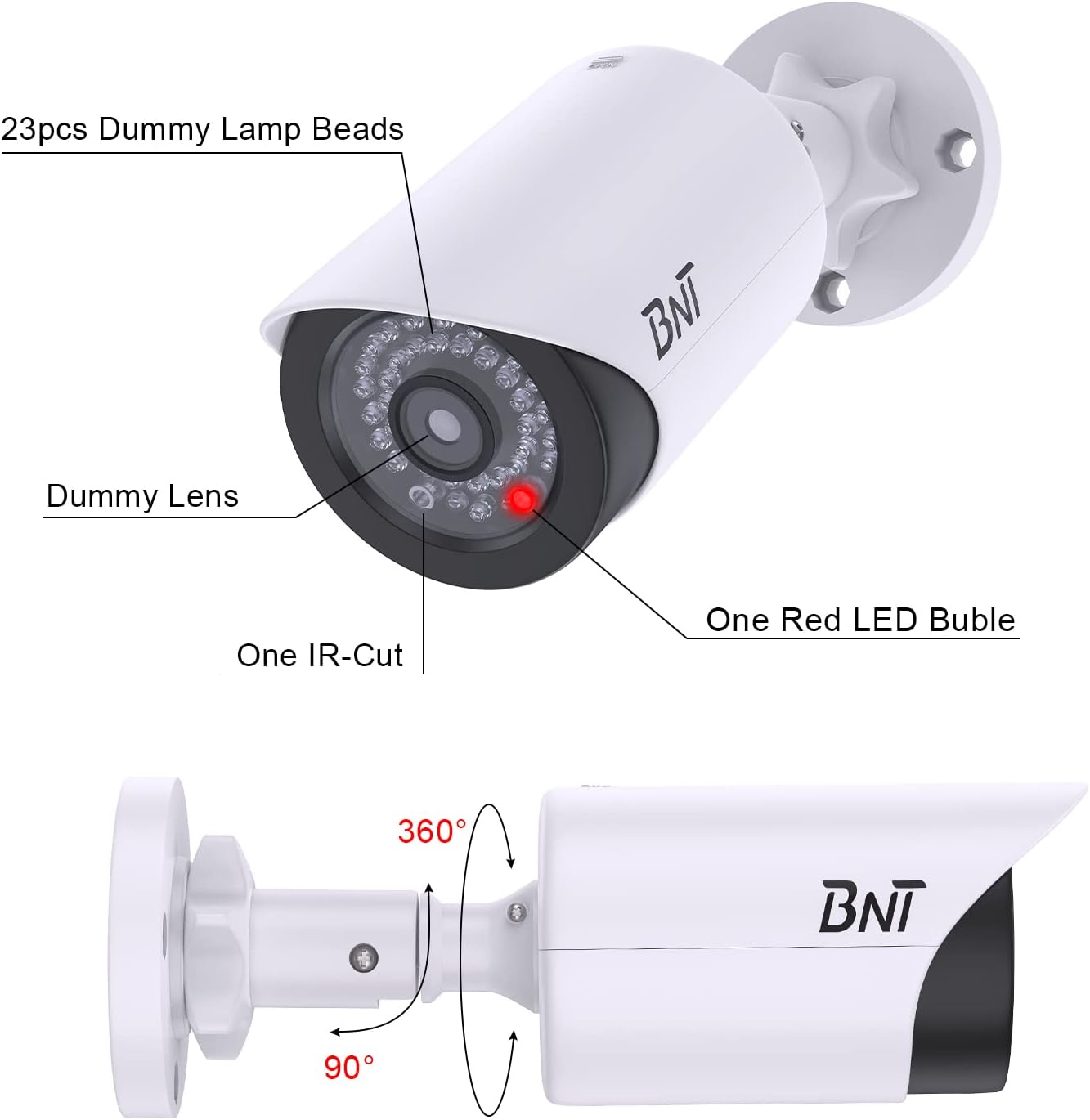
Image 3.1: Close-up of the dummy camera's front, showing the dummy lens, red LED, and rotation capabilities.
4. Pengaturan & Instalasi
4.1. Pemasangan Baterai
- Locate the battery compartment on the camera. This is typically found by sliding open the back cover.
- Masukkan 2 baterai AA (tidak termasuk) ke dalam kompartemen, pastikan polaritas yang benar (+/-).
- Tutup rapat tempat baterai.

Image 4.1: Illustration of battery insertion into the dummy camera.
4.2. Memasang Kamera
The camera can be easily installed on a ceiling or wall using the provided screws. No complex wiring is necessary.
- Choose a suitable location for installation, considering visibility and desired deterrent effect.
- Position the mounting base against the surface and mark the screw holes.
- Drill pilot holes if necessary, then secure the mounting base with the provided screws.
- Pasangkan kamera pada alas yang telah terpasang.
- Adjust the camera's angle using its 2-axis rotation feature to achieve the desired coverage.
Video: BNT Dummy Fake Security Camera Overview
Video 4.2.1: Video ini memberikan gambaran umumview of the BNT Dummy Fake Security Camera, highlighting its features and realistic appearance.
Video: Protecting Property with Fake Cameras
Video 4.2.2: This video demonstrates how fake cameras can be used to enhance property security and deter potential threats.
5. Petunjuk Pengoperasian
The BNT Dummy Fake Security Camera is designed for simple, autonomous operation:
- Once batteries are installed, the built-in photoelectric sensor will detect ambient light levels.
- During daylight hours, the red LED light will remain off.
- As darkness falls, the photoelectric sensor will automatically activate the red LED light, causing it to illuminate. This simulates the operation of a real security camera's night vision or recording indicator.
- The camera provides 24/7 visual deterrence without any manual intervention after initial setup.

Image 5.1: The dummy camera's red LED light is active at night, providing a visual deterrent.
6. Pemeliharaan
- Penggantian Baterai: When the red LED light dims or stops illuminating, it is time to replace the batteries. Ensure to use high-quality AA batteries to prevent leakage and damage to the battery case.
- Perlindungan Lingkungan: When replacing batteries, take care to avoid exposing the internal components to rain or moisture to maintain the lifespan of the battery case.
- Pembuangan: Please dispose of used batteries properly according to local regulations to protect the environment.
- Pembersihan: Periodically wipe the camera's exterior with a soft, damp kain untuk menghilangkan debu dan kotoran. Hindari penggunaan bahan kimia keras.
7. Penyelesaian masalah
7.1. LED Light Not Illuminating at Night
- Periksa Baterai: Ensure that 2 AA batteries are correctly installed and are not depleted. Replace if necessary.
- Test Photoelectric Sensor: In a dark environment, cover the LED light with your hand. If the red LED light turns on, the product is functioning correctly. If it does not, check battery installation again.
- Faktor Lingkungan: Ensure the camera is not installed in an area with ambient light at night (e.g., streetlights, porch lights) that might prevent the photoelectric sensor from detecting sufficient darkness to activate the LED.
8. Spesifikasi
| Fitur | Detil |
|---|---|
| Nama Model | BNT Dummy (Model BNT-K8FaCam-2PW) |
| Penggunaan Dalam/Luar Ruangan | Dalam Ruangan, Luar Ruangan |
| Sumber Daya | Bertenaga Baterai (2 baterai AA, tidak termasuk) |
| Bahan | Akrilonitril Butadiena Stirena (ABS) |
| Jenis Pemasangan | Langit-langit, Dinding |
| Viewsudut ing | 120 Derajat |
| Penilaian Perlindungan Internasional | IP65 (Tahan Air) |
| Dimensi Barang (P x L x T) | 7.6x5.4x2.9 inci |
| Berat Barang | 5.2 ons (148 gram) |
| Fitur Khusus | Powered by 2 AA batteries (not included) |
9. Garansi & Dukungan
BNT provides reliable 24-month after-sales service for this product. If you have any questions, concerns, or require assistance with your BNT Dummy Fake Security Camera, please contact our dedicated customer service team. We are committed to ensuring your satisfaction.


