1. Pendahuluan
Thank you for choosing the Cuddeback G-5086 CuddeLink Double Barrel 20MP Trail Camera. This manual provides essential information for the proper setup, operation, and maintenance of your camera. Please read it thoroughly before using the device to ensure optimal performance and longevity.
2. Fitur Produk
The Cuddeback G-5086 trail camera is designed for reliable outdoor surveillance and wildlife monitoring, offering advanced features for high-quality image capture.
- 20 Megapixel Camera: Mampu mengambil gambar diam beresolusi tinggi.
- 0.25-Second Trigger Speed: Memastikan pengambilan gambar subjek bergerak dengan cepat.
- CuddeLink Compatibility: Integrates with CuddeLink and CuddeLink Cell networks for remote image transmission.
- Double Barrel Flash Strobe: Utilizes two 1-inch xenon flash tubes for powerful illumination up to 100 feet.
- Picture Recovery Time: Fast 1 to 2 second recovery for subsequent shots.
- Mode Serangkaian: Capable of capturing 1 to 5 images per trigger event.
- Sumber Daya: Beroperasi menggunakan 4 baterai D (tidak termasuk).
3. Isi Paket
Verifikasi bahwa semua item ada dalam paket Anda:
- Cuddeback G-5086 Trail Camera
- Antena
- Mounting Strap (may vary by package)
- User Manual (dokumen ini)
4. Pengaturan
4.1. Pemasangan Baterai
The G-5086 camera requires 4 D-cell batteries for operation. For best performance, use high-quality alkaline or lithium batteries.
- Buka penutup kompartemen baterai yang terletak di samping atau bagian bawah kamera.
- Masukkan 4 baterai D-cell, pastikan polaritasnya benar (+/-) seperti yang tertera di dalam kompartemen.
- Close the battery compartment door securely to maintain the weather seal.

Figure 4.1: Battery compartment with D-cell batteries installed.
4.2. Pemasangan Kartu SD
A Class 10 or higher SD card (up to 32GB recommended) is required to store images and videos.
- Locate the SD card slot, typically found under a protective cover on the camera's side or bottom.
- Insert the SD card with the metal contacts facing down (or as indicated by the slot diagram) until it clicks into place.
- Untuk melepasnya, tekan kartu perlahan hingga kartu terlepas.

Figure 4.2: SD card slot and external ports.
4.3. Pemasangan Antena
The antenna is crucial for CuddeLink network communication.
- Screw the provided antenna clockwise into the antenna port located on the top or side of the camera until it is finger-tight.
- Ensure the antenna is oriented vertically for optimal signal reception.
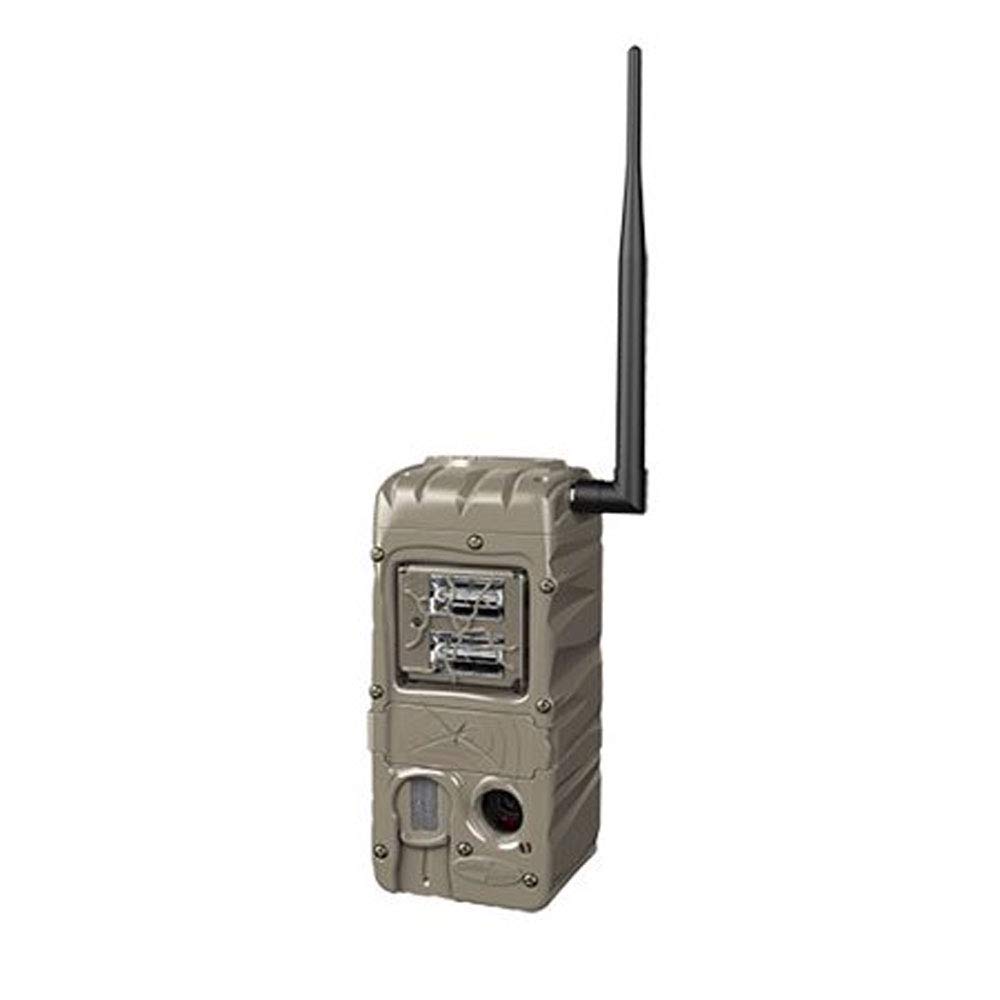
Figure 4.3: Cuddeback G-5086 Trail Camera with antenna.
4.4. Memasang Kamera
Mount the camera to a tree or post using the provided strap or a compatible mounting accessory.
- Position the camera approximately 3-6 feet (1-2 meters) off the ground.
- Aim the camera towards the desired monitoring area, avoiding direct sunlight if possible to prevent overexposure.
- Ensure the camera is stable and secure to prevent movement from wind or animals.
5. Petunjuk Pengoperasian
5.1. Menghidupkan/Mematikan
Locate the power switch inside the camera housing. Slide it to the 'ON' position to power on the camera. Slide to 'OFF' to power down.
5.2. Pengaturan dasar
Access the camera's menu via the internal display and control buttons to configure settings:
- Mode: Select between Photo, Video, or Time-Lapse.
- Resolusi: Set image (e.g., 20MP) or video resolution (e.g., 720p).
- Pemicu Penundaan: Adjust the time interval before the camera triggers again after an event.
- Meletus: Configure the number of photos taken per trigger (1-5 images).
- Tanggal/Waktu: Atur tanggal dan waktu saat ini untuk pengaturan waktu yang akurat.amps on captures.
5.3. CuddeLink Network Setup
The G-5086 is CuddeLink compatible, allowing it to send images to a CuddeLink Home camera or Cell camera. Refer to the CuddeLink system manual for detailed instructions on network configuration, pairing, and data transmission settings.
5.4. Mengambil Data
Images and videos are stored on the SD card. To retrieve them:
- Matikan kamera.
- Keluarkan kartu SD.
- Insert the SD card into a computer's card reader or a compatible device to view dan transfer files.
6. Pemeliharaan
6.1. Pembersihan
Regularly clean the camera lens, flash, and PIR sensor window with a soft, lint-free cloth. Avoid abrasive materials or harsh chemicals.
6.2. Penggantian Baterai
Ganti baterai saat indikator baterai lemah muncul atau saat kinerja menurun. Selalu ganti semua baterai sekaligus dengan yang baru dan berjenis sama.
6.3. Manajemen Kartu SD
Periodically format the SD card using the camera's menu option to ensure optimal performance and prevent data corruption. Back up important files sebelum memformat.
7. Penyelesaian masalah
- Kamera tidak menyala: Periksa pemasangan baterai dan pastikan baterai dalam kondisi baru. Pastikan sakelar daya berada pada posisi 'ON'.
- Kualitas gambar buruk: Clean the lens and flash window. Ensure the camera is not aimed directly into strong light sources. Check settings for appropriate resolution.
- No images captured: Ensure the SD card is properly inserted and has sufficient free space. Check trigger delay and sensitivity settings. Verify the camera is in an active mode.
- Masa pakai baterai pendek: This can be influenced by extreme temperatures, frequent triggers, or extensive CuddeLink activity. Use high-quality batteries.
- CuddeLink connectivity issues: Ensure the antenna is securely attached. Check the distance between cameras and any obstructions. Refer to the CuddeLink system manual for network diagnostics.
8. Spesifikasi
| Nama Model | G-5086 |
| Resolusi Diam Efektif | 20 MP |
| Kecepatan Pemicu | 0.25 detik |
| Jangkauan Flash | 100 Feet (Double Barrel Flash Strobe) |
| Waktu Pemulihan Gambar | 1 hingga 2 detik |
| Burst Images | 1 to 5 images |
| Teknologi Konektivitas | Wireless (CuddeLink compatible) |
| Sumber Daya | 4 D Batteries (not included) |
| Penggunaan Dalam/Luar Ruangan | Luar ruangan |
| Bahan | Plastik |
| Dimensi (P x L x T) | 10.05x4.35x7.4 inci |
| Berat Barang | 2.4 ons |
9. Garansi dan Dukungan
For warranty information and technical support, please refer to the official Cuddeback websitus web atau hubungi layanan pelanggan mereka secara langsung. Simpan struk pembelian Anda sebagai bukti pembelian.


