Perkenalan
This manual provides detailed instructions for the proper setup, operation, and maintenance of your Timex TW4B17400 Analog-Digital Watch. Please read this manual thoroughly to ensure optimal performance and longevity of your timepiece. Keep this manual for future reference.
Produk Selesaiview
The Timex TW4B17400 is a men's analog-digital watch featuring a black dial and a brown leather strap. It combines traditional analog timekeeping with digital functionalities.
Fitur Utama:
- Tampilan Waktu Analog dan Digital
- Durable Leather Strap
- Lampu Malam Indiglo
- Fungsionalitas Kronograf
- Fungsi Alarm
Komponen Jam Tangan:
Kenali komponen-komponen utama jam tangan Anda:

Gambar: Samping view of the Timex TW4B17400 watch. This image displays the watch case from the side, highlighting the crown (center knob) and two pushers (buttons) on either side of the crown, used for adjusting time and accessing digital functions. The brown leather strap is also visible.
- Mahkota: Digunakan untuk mengatur waktu analog.
- Penekan (Tombol): Used for operating digital functions such as setting digital time, date, alarm, and chronograph.
- Tekan: Displays analog time and includes a digital display window.
- Mengikat: Brown leather strap with a buckle closure.
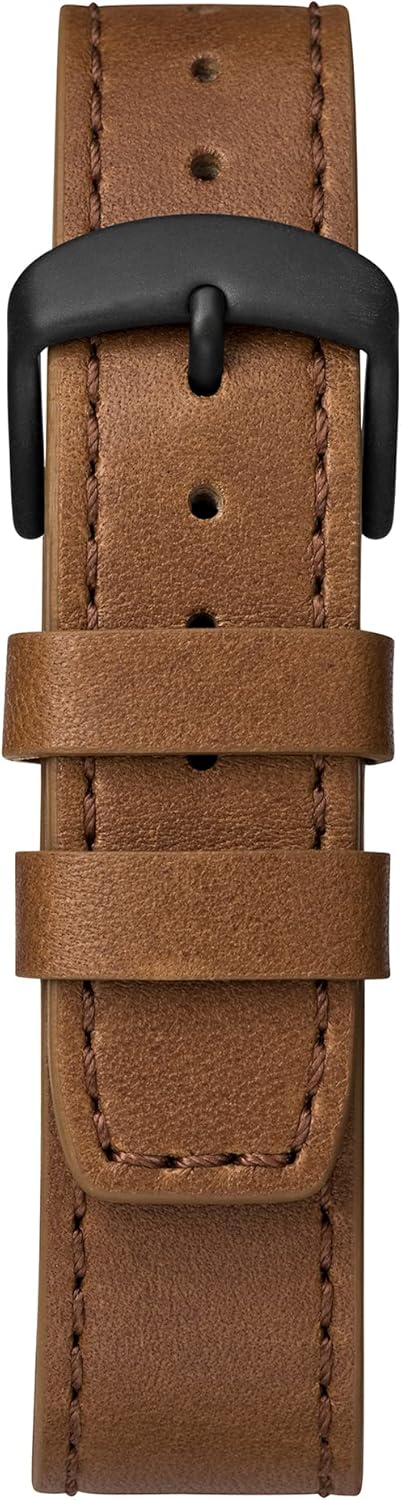
Image: Close-up of the brown leather strap and black buckle of the Timex TW4B17400 watch. The detailed stitching on the leather and the two strap loops are clearly visible.
Pengaturan
Battery Installation (If Required):
Your watch comes with a CR2 battery installed. If the watch is not functioning, the battery may need to be replaced. It is recommended to have battery replacement performed by a qualified watch technician to ensure proper sealing and water resistance.
Mengatur Waktu Analog:
- Pull the crown (center knob) out to the furthest position.
- Putar kenop searah jarum jam atau berlawanan arah jarum jam untuk menggerakkan jarum jam dan menit ke waktu yang tepat.
- Setelah waktu diatur, dorong mahkota kembali ke posisi semula untuk memulai pergerakan jam.
Mengatur Waktu dan Tanggal Digital:
The digital functions are typically controlled by the pushers. Refer to the specific instructions below for common digital settings. The exact sequence may vary slightly; consult the full Timex manual for your movement if detailed steps are needed.
- Press the MODE button (usually one of the side pushers) repeatedly until the digital display shows the time setting mode (often indicated by flashing digits).
- Use the SET/ADJUST button (another pusher) to select the digit you wish to change (e.g., hours, minutes, 12/24-hour format).
- Use the START/STOP button (another pusher) to increase the value of the flashing digit.
- Repeat steps 2 and 3 for minutes, year, month, and day.
- Setelah semua pengaturan sudah benar, tekan tombol MODE untuk keluar dari mode pengaturan.
Pengoperasian
Reading Analog Time:
The hour and minute hands indicate the current time in a traditional format.
Using Digital Functions:
- Tombol Mode: Cycles through different digital modes (Time, Date, Alarm, Chronograph, Timer).
- Set/Adjust Button: Used to select items for adjustment within a mode.
- Tombol Mulai/Berhenti: Used to start/stop functions (e.g., chronograph) or increment values during setting.
Lampu Tidur Indiglo:
To illuminate the watch face in low-light conditions, press and hold the crown or a designated pusher (refer to your watch's specific button layout). The Indiglo feature will light up the dial for a few seconds.
Fungsi Alarm:
- Press the MODE button until the alarm mode is displayed.
- Use the SET/ADJUST button to select the hour or minute to set.
- Use the START/STOP button to change the alarm time.
- Press the MODE button to confirm and exit.
- To activate/deactivate the alarm, typically press a specific pusher while in alarm mode.
Kronograf (Stopwatch):
- Press the MODE button until the chronograph mode is displayed (usually shows 00:00:00).
- Press the START/STOP button to start timing.
- Press the START/STOP button again to stop timing.
- Press the RESET button (often the same as SET/ADJUST) to clear the chronograph to zero.
Pemeliharaan
Membersihkan Jam Tangan Anda:
Usap casing dan kaca jam tangan dengan kain lembut.amp cloth. For the leather strap, use a dry, soft cloth. Avoid using harsh chemicals or abrasive materials, as these can damage the watch's finish or strap.
Tahan Air:
While your watch may be water-resistant, it is not waterproof. Avoid prolonged exposure to water, such as swimming or showering, unless the specific water resistance rating (e.g., 50m, 100m) is clearly indicated on the watch and suitable for such activities. Always ensure the crown is pushed in completely to maintain water resistance.
Leather Strap Care:
Tali jam tangan berbahan kulit dapat terpengaruh oleh kelembapan, keringat, dan sinar matahari langsung. Untuk memperpanjang umur tali jam tangan kulit Anda:
- Hindari kontak yang terlalu lama dengan air.
- Bersihkan dengan kain kering dan lembut.
- Allow the strap to air dry if it gets wet; do not use direct heat.
- Avoid contact with cosmetics, oils, and perfumes.
Penyelesaian Masalah
Watch Not Running / Digital Display Blank:
- Periksa apakah kenop putar sudah ditekan sepenuhnya.
- Baterai mungkin perlu diganti. Konsultasikan dengan teknisi jam tangan profesional.
Tampilan Waktu yang Salah:
- Refer to the "Setting Analog Time" and "Setting Digital Time and Date" sections to reset the time.
- Ensure the watch has not been exposed to strong magnetic fields, which can affect accuracy.
Indiglo Not Working:
- Pastikan baterai memiliki daya yang cukup.
- Confirm you are pressing the correct button for Indiglo activation.
Spesifikasi
| Fitur | Detil |
|---|---|
| Merek | Waktu |
| Nomor Model | TW4B17400 |
| Departemen | Pria |
| Bahan | Leather (Strap) |
| Dimensi Produk | Ukuran 3.99x10.01x5.99 cm |
| Berat Barang | 66.3 gram |
| Jenis Baterai | 1 CR2 (Termasuk) |
| Tanggal Pertama Tersedia | 26 Agustus 2019 |
| ASIN | B07PJCC2TK |
Garansi dan Dukungan
Untuk informasi garansi dan dukungan pelanggan, silakan merujuk ke situs resmi Timex. webSimpan bukti pembelian Anda untuk klaim garansi apa pun. Lihat situs web atau kartu garansi yang disertakan dengan pembelian Anda.
For further assistance, you may visit the official Timex support page: Dukungan Timex


