1. Pendahuluan dan Selesaiview
Thank you for choosing the Lorex Analog 4K Weatherproof Indoor/Outdoor HD Wired Add-On Security Camera. This manual provides essential information for the proper installation, operation, and maintenance of your new security camera. This camera is designed as an add-on unit and requires a compatible Lorex recorder (DVR/NVR) for full functionality.
This camera features 4K resolution for superior image clarity, robust weatherproof construction for reliable indoor and outdoor use, and advanced deterrence features such as motion-activated lights and remote-triggered sirens. Its long-range night vision ensures comprehensive surveillance even in low-light conditions.
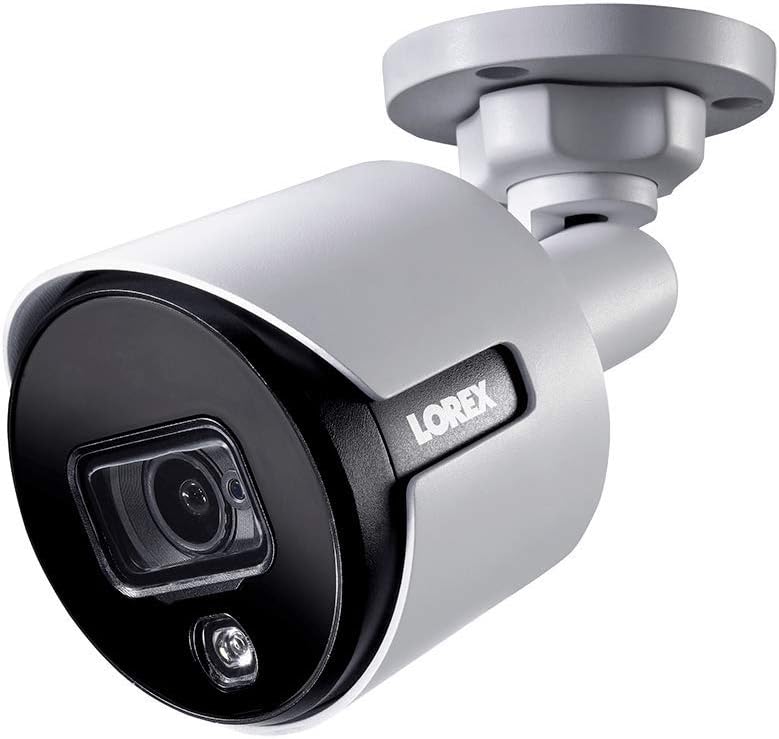
Gambar 1.1: Sudut depan view of the Lorex 4K Weatherproof Security Camera. This image shows the camera's bullet form factor, lens, and integrated light.
2. Isi Paket
The Lorex Analog 4K Weatherproof Indoor/Outdoor HD Wired Add-On Security Camera package includes:
- 1 x Lorex Analog 4K Weatherproof Indoor/Outdoor HD Wired Add-On Security Camera (Model: LBV8543XW)
- Mounting Kit (screws and wall plugs)
- Allen Key (for adjustment)
Note: This is an add-on camera. Video cables, power adapters, and a compatible Lorex recorder are sold separately and are required for operation.
3. Fitur Utama
- Resolusi Ultra HD 4K: Provides exceptional detail and clarity with an 8MP effective still resolution.
- Desain Tahan Cuaca (IP67): Durable metal housing ensures reliable performance in various weather conditions, suitable for both indoor and outdoor installation.
- Long Range Night Vision: See clearly up to 150 feet (45m) in ambient night conditions and up to 98 feet (30m) in total darkness. Features Color Night Vision for enhanced detail in low light.
- Motion-Activated Warning Light: Integrated LED light can be triggered by motion to deter intruders.
- Remote-Triggered Siren: Activate a loud siren directly from your Lorex recorder or connected app to scare away unwanted visitors.
- Wired Connectivity (BNC): Ensures a stable and secure connection to your Lorex DVR/NVR system.
- Suhu Operasional Lebar: Functions reliably in temperatures up to 60 degrees Celsius.
4. Pengaturan dan Instalasi
Before installation, ensure you have a compatible Lorex recorder (DVR/NVR) and necessary video/power cables.
4.1 Memilih Lokasi
Pilih lokasi yang menyediakan yang diinginkan viewing angle and is within reach of your Lorex recorder and a power source. Consider areas prone to intrusion, such as entry points or vulnerable perimeters. The camera is suitable for ceiling mount and wall mount applications.

Gambar 4.1: Sisi view of the Lorex 4K Weatherproof Security Camera, showing its adjustable mounting base.
4.2 Memasang Kamera
- Tandai Lubang Bor: Use the mounting template (if provided) or the camera base to mark the positions for drilling.
- Lubang Bor: Drill pilot holes for the mounting screws. If mounting on drywall or masonry, insert the provided wall plugs.
- Kamera Aman: Align the camera base with the drilled holes and secure it using the provided screws.
- Sesuaikan Sudut: Loosen the adjustment screws on the camera body using the Allen key to position the camera for the optimal viewsudut kemiringan. Kencangkan sekrup setelah disetel.
4.3 Menghubungkan Kamera
- Hubungkan Kabel Video: Connect one end of the BNC video cable (not included) to the camera's BNC port and the other end to an available video input channel on your Lorex recorder.
- Hubungkan Daya: Connect the camera's power input to a compatible power adapter (not included). Ensure the power adapter is connected to a power outlet.
- Power On Recorder: Ensure your Lorex recorder is powered on and properly configured.
5. Petunjuk Pengoperasian
Once the camera is physically installed and connected to your Lorex recorder, you can begin operation.
5.1 Viewmelakukan Umpan Langsung
Access your Lorex recorder's interface (via monitor, Lorex Home app, or client software) to view the live video feed from the camera. Ensure the correct channel is selected.

Gambar 5.1: Tampilan jarak dekat view of the Lorex 4K Weatherproof Security Camera's lens and integrated light.
5.2 Motion Detection and Smart Deterrence
Your Lorex recorder manages motion detection settings. Refer to your recorder's manual for detailed instructions on configuring motion zones and sensitivity.
- Motion-Activated Light: The camera's integrated light can be set to activate automatically upon motion detection. This setting is typically configured within your Lorex recorder's deterrence or alarm settings.
- Remote-Triggered Siren: You can manually activate the camera's siren through your Lorex recorder's interface or the Lorex Home app. This feature is useful for immediate deterrence.

Figure 5.2: The Lorex 4K Weatherproof Security Camera mounted on a brick wall at night, demonstrating its motion-activated light feature.
5.3 Penglihatan Malam
The camera automatically switches to night vision mode in low-light conditions. The infrared (IR) LEDs provide illumination for clear black and white video. Color Night Vision (CNV) may be available if there is sufficient ambient light, providing full-color video in low-light scenarios.
6. Pemeliharaan
Perawatan rutin memastikan kinerja optimal dan umur pakai yang lebih lama untuk kamera keamanan Anda.
- Pembersihan: Bersihkan lensa dan casing kamera secara berkala dengan kain lembut dan halus.amp Gunakan kain. Hindari pembersih abrasif atau pelarut yang dapat merusak lapisan atau lensa.
- Periksa Koneksi: Ensure all cable connections (BNC and power) are secure and free from corrosion, especially for outdoor installations.
- Pembaruan Firmware: Regularly check the Lorex website or your recorder's settings for available firmware updates for your camera and recorder to ensure the latest features and security enhancements.
- Kondisi Lingkungan: While weatherproof, extreme conditions outside the specified operating temperature range (up to 60°C) may affect performance.
7. Penyelesaian masalah
If you encounter issues with your Lorex camera, refer to the following common troubleshooting steps:
| Masalah | Kemungkinan Penyebab | Larutan |
|---|---|---|
| Tidak ada tayangan video dari kamera. | Sambungan kabel longgar Tidak ada daya ke kamera Incorrect channel selected on recorder | Check BNC and power connections. Pastikan adaptor daya berfungsi dan terhubung. Verify the correct input channel on your Lorex recorder. |
| Kualitas gambar buruk / video buram | Lensa kotor Fokus tidak tepat (jika dapat disesuaikan) Cable interference/damage | Bersihkan lensa kamera dengan kain lembut. Ensure the camera is properly focused (if applicable). Check video cable for damage or interference. Use high-quality cables. |
| Penglihatan malam tidak berfungsi | IR LEDs obstructed Daya tidak mencukupi Pengaturan kamera | Ensure nothing is blocking the IR LEDs. Pastikan pasokan daya stabil. Check night vision settings on your Lorex recorder. |
| Deteksi gerakan tidak terpicu. | Incorrect motion zone setup Sensitivitas terlalu rendah Hambatan di view | Review and adjust motion detection zones on your recorder. Tingkatkan sensitivitas gerakan. Clear any obstructions from the camera's field of view. |
For more advanced troubleshooting, consult your Lorex recorder's user manual or visit the Lorex support weblokasi.
8. Spesifikasi
| Fitur | Spesifikasi |
|---|---|
| Nomor Model | LBV8543XW |
| Resolusi Pengambilan Video | 4K (Resolusi Gambar Diam Efektif 8MP) |
| Teknologi Konektivitas | BNC (Wired) |
| Penggunaan Dalam/Luar Ruangan | Dalam Ruangan, Luar Ruangan |
| Penilaian Perlindungan Internasional | IP67 (Tahan Cuaca) |
| Rentang Penglihatan Malam | 150 Kaki (45m) |
| Fitur Khusus | Motion Sensor, Night Vision, Motion Activated Lights, Remote-Triggered Siren |
| Faktor Bentuk | Peluru |
| Bahan | Logam |
| Suhu Operasional (Atas) | 60 Derajat Celcius |
| Dimensi Produk (P x L x T) | 16x6x6 inci |
| Berat Barang | 0.01 Ons |
| UPC | 695529017136 |
| Metode Kontrol | App, Remote (via compatible Lorex recorder) |
9. Garansi dan Dukungan
Lorex products are designed for reliability and performance. For information regarding your product's warranty, please refer to the warranty policy available on the official Lorex website or the documentation included with your Lorex recorder.
For technical support, product registration, or to download the latest software and firmware updates, please visit the official Lorex support page or the Lorex Store:
- Lorex Store: Visit the Lorex Store on Amazon
- Panduan Pengguna (PDF): Panduan pengguna lengkap dalam format PDF juga tersedia untuk diunduh: Unduh Panduan Pengguna
When contacting support, please have your product model number (LBV8543XW) and serial number ready.


