Perkenalan
This manual provides essential information for the safe and efficient operation of your Amazon Basics Line Interactive Uninterruptible Power Supply (UPS) 1000VA/550W. A UPS provides battery backup power and surge protection for connected electronic devices, safeguarding against power outages, surges, and fluctuations. Please read this manual thoroughly before installation and use, and retain it for future reference.

Image: The Amazon Basics Line Interactive UPS 1000VA/550W positioned on a desk, providing power protection for a computer setup.
Petunjuk Keselamatan Penting
Please adhere to these safety guidelines to prevent injury or damage to the UPS and connected equipment:
- UPS ini dirancang untuk penggunaan di dalam ruangan saja.
- Do not install the UPS in direct sunlight, near heat-emitting appliances, or in areas with excessive humidity or dust.
- Pastikan UPS terhubung ke stopkontak AC yang memiliki ground.
- Jangan membuka kotak UPS.asing. Tidak ada komponen di dalamnya yang dapat diservis oleh pengguna. Serahkan semua servis kepada teknisi servis yang berkualifikasi.
- Risk of electric shock. Do not connect or disconnect the UPS during a thunderstorm.
- The battery inside the UPS is not user-replaceable. Attempting to replace the battery yourself may void the warranty and pose a safety risk.
- In case of fire, use a dry chemical fire extinguisher. Water may cause electrical hazards.
Isi Paket
Verifikasi bahwa semua item ada dalam paket Anda:
- Amazon Basics Line Interactive UPS 1000VA/550W Unit
- Kabel Komunikasi USB
- User Manual (dokumen ini)

Image: USB Communication Cable included with the UPS.
Produk Selesaiview
Panel Depan

Gambar: Depan view of the Amazon Basics Line Interactive UPS 1000VA/550W, showing the power button, mute button, and LED indicators.
- Tombol Daya: Press to turn the UPS ON or OFF.
- Tombol Bisu: Press to silence audible alarms.
- Indikator LED:
- ON LINE: Illuminates when the UPS is providing utility power to connected devices.
- PADA BATERAI: Illuminates when the UPS is operating on battery power.
- AVR (Vol Otomatistage Peraturan): Illuminates when the UPS is correcting minor voltage fluctuations without switching to battery power.
- KELEBIHAN MUATAN: Illuminates if connected equipment exceeds the UPS's capacity.
Panel Belakang
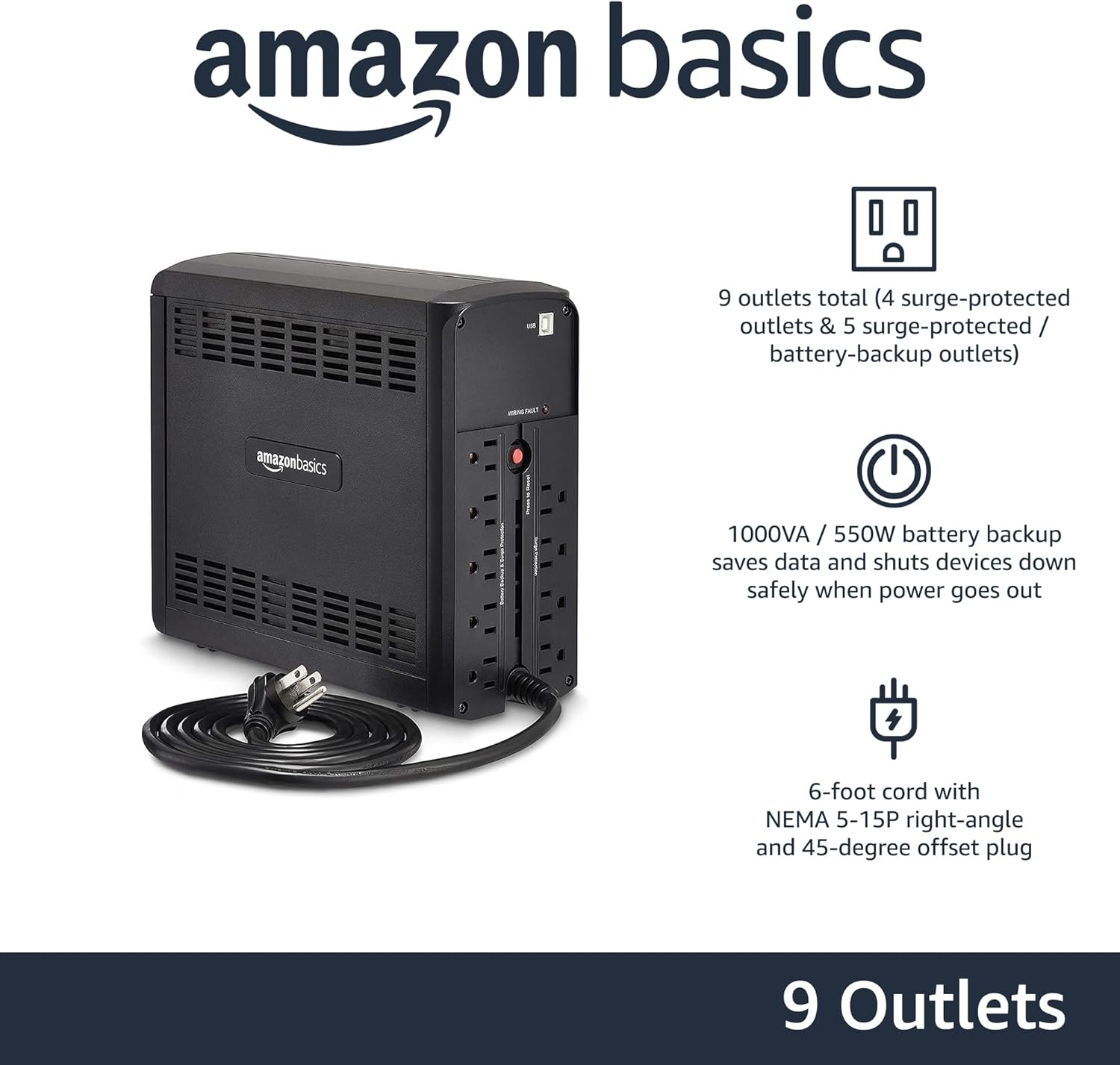
Gambar: Belakang view of the Amazon Basics Line Interactive UPS 1000VA/550W, displaying the power cord, battery backup outlets, and surge-only outlets.
- Stopkontak dengan Cadangan Baterai & Perlindungan Lonjakan Arus (5 stopkontak): These outlets provide both battery backup power during outages and surge protection. Connect critical devices such as computers, monitors, and network equipment here.
- Surge Protected Outlets (4 outlets): These outlets provide surge protection only. Connect non-critical devices like printers or scanners here.
- Port Komunikasi USB: Connects to a computer for power management software (e.g., CyberPower PowerPanel Personal).
- Kabel Daya Masukan AC: Connects the UPS to a wall outlet.
Pengaturan
- Bongkar dan Periksa: Carefully remove the UPS from its packaging. Inspect for any shipping damage. If damage is found, do not use the unit and contact customer support.
- Pengisian Baterai Awal: Before initial use, connect the UPS to a standard wall outlet and allow it to charge for at least 8 hours. This ensures the battery is fully charged and ready to provide optimal backup power. The UPS will charge whether it is turned ON or OFF.
- Hubungkan Perangkat:
- Colokkan peralatan penting (misalnya, komputer, monitor, router) ke Cadangan Baterai & Outlet Terlindung dari Lonjakan.
- Plug non-critical equipment (e.g., printer, desk lamp) ke dalam Outlet yang Dilindungi Surge.
- Peringatan: Do not plug laser printers into battery backup outlets, as their high power draw can overload the UPS.
- Hubungkan ke Komputer (Opsional): Use the provided USB cable to connect the UPS's USB port to your computer's USB port. This allows for power management software installation, enabling features like automatic shutdown during extended power outagyaitu.
- Nyalakan: Press and hold the Power Button on the front panel for approximately 2 seconds until you hear a beep and the UPS powers on.
Petunjuk Pengoperasian
Turning the UPS On/Off
- Untuk Mengaktifkan: Press and hold the Power Button for 2 seconds. The UPS will beep, and the ONLINE LED will illuminate.
- Mematikan: Press and hold the Power Button for 2 seconds. The UPS will beep, and all LEDs will turn off.
Understanding LED Indicators and Alarms
- ONLINE (Green LED): Solid green indicates the UPS is receiving utility power and providing it to connected devices.
- ON BATTERY (Yellow LED): Solid yellow indicates the UPS is supplying battery power. An audible alarm will sound (beeping every 10 seconds).
- AVR (Yellow LED): Solid yellow indicates the UPS is automatically regulating input voltage tanpa menggunakan daya baterai.
- OVERLOAD (Red LED): Solid red indicates that the connected load exceeds the UPS's capacity. An audible alarm will sound continuously. Immediately disconnect non-essential equipment from the battery backup outlets until the alarm stops.
- Baterai Lemah: When the UPS is on battery power and the battery level is low, the ON BATTERY LED will flash, and the alarm will beep more frequently (every 1 second).
- Bisukan Alarm: Press the Mute Button to silence audible alarms. The alarm will reactivate if the condition changes (e.g., low battery).
Waktu Kerja Baterai
The battery runtime depends on the power consumption of the connected devices. For this 1000VA/550W model:
- At half load (500VA/275W), the UPS provides approximately 7 menit of backup power.
- At full load (1000VA/550W), the UPS provides approximately 1 menit of backup power.
It is recommended to save your work and safely shut down your computer during a power outage to prevent data loss.
Pemeliharaan
Perawatan Baterai
- To maintain optimal battery life, keep the UPS connected to an AC outlet at all times.
- Jika UPS disimpan dalam jangka waktu lama, isi ulang baterainya setiap tiga bulan selama minimal 8 jam untuk mencegah kerusakan baterai.
- Batteries have a finite lifespan and will eventually require replacement. If you notice a significant decrease in runtime, contact Amazon Basics customer support for guidance on battery replacement options.
Pembersihan
- Always unplug the UPS from the wall outlet before cleaning.
- Use a soft, dry cloth to wipe the exterior surfaces of the UPS.
- Do not use liquid or aerosol cleaners, as they may contain flammable substances or cause electrical shock.
Penyelesaian Masalah
| Masalah | Kemungkinan Penyebab | Larutan |
|---|---|---|
| UPS tidak menyala. | Baterai habis atau tidak terhubung. | Connect the UPS to an AC outlet and allow it to charge for 8 hours. Ensure the power cord is securely plugged in. |
| UPS is beeping continuously and OVERLOAD LED is on. | Too many devices connected to battery backup outlets. | Disconnect non-essential equipment from the battery backup outlets until the alarm stops. Ensure total load does not exceed 550W. |
| UPS sering beralih ke mode baterai. | Unstable utility power or voltage. fluktuasi. | This is normal operation for a line interactive UPS. The AVR function is working. If it happens excessively, consult an electrician about your home's wiring. |
| Waktu pengoperasian baterai pendek. | Baterai sudah tua atau tidak terisi penuh. | Ensure the battery is fully charged (8 hours). If the battery is several years old, it may need replacement. Contact Amazon Basics support. |
| UPS tidak menyediakan daya ke perangkat yang terhubung. | UPS is off, or outlets are surge-only. | Ensure the UPS is turned on. Verify devices are plugged into the correct battery backup outlets. |
Spesifikasi
| Fitur | Detil |
|---|---|
| Nomor Model | ABMT1000 |
| Kapasitas | 1000VA / 550W |
| Masukan Voltage | 120 Volts AC |
| Outlet | 9 total (5 Battery Backup & Surge Protected, 4 Surge Protected) |
| Jenis Baterai | Asam Timbal Tertutup |
| Waktu Pengisian Ulang Biasa | 8 jam hingga kapasitas 90% |
| Dimensi (P x L x T) | 10.2 x 3.9 x 9 inci (25.91 x 9.91 x 22.86 cm) |
| Berat | 15 pon (6.8 kg) |
| Warna | Hitam |

Image: Diagram showing the dimensions of the Amazon Basics Line Interactive UPS 1000VA/550W.
Garansi dan Dukungan
This Amazon Basics UPS is backed by a limited 1-year warranty, which includes the battery. For warranty claims, technical support, or questions regarding battery replacement, please contact Amazon Basics customer support through the Amazon websitus atau platform pembelian Anda.
For the most up-to-date support information, please visit the official Amazon Basics support page or refer to your purchase documentation.


