1. Pendahuluan
The Zenec Z-E1010 is an advanced 10.1-inch infotainment system designed for vehicle integration. This system provides a wide range of features including digital radio (DAB+), FM radio, Bluetooth connectivity, USB media playback, and smartphone integration capabilities. It is part of the ZENEC E>GO CORE series, offering a large display and intuitive operation for an enhanced in-car experience. This manual provides essential information for the proper installation, operation, and maintenance of your Z-E1010 unit.
2. Informasi Keselamatan
- Baca semua instruksi dengan seksama sebelum pemasangan dan pengoperasian.
- Installation should be performed by a qualified professional to prevent damage to the unit or vehicle.
- Jangan mengoperasikan perangkat dengan cara yang mengalihkan perhatian Anda dari mengemudi. Selalu prioritaskan keselamatan jalan.
- Hindari memaparkan unit pada suhu ekstrem, sinar matahari langsung dalam jangka waktu lama, atau kelembapan berlebihan.
- Use only approved accessories and parts with the Z-E1010.
3. Isi Paket
Verifikasi bahwa semua item ada dalam paket:
- Zenec Z-E1010 Infotainment Unit
- Harness Pengkabelan Utama
- USB Extension Cables (2x)
- Antena GPS
- Mikropon
- User Manual (dokumen ini)
- Note: Vehicle-specific mounting kits and DAB+ antenna are optional and sold separately.
4. Pengaturan dan Instalasi
The Z-E1010 is designed for integration into specific vehicle models using dedicated installation kits. These kits typically include mounting frames and necessary components for vehicle connection.
4.1. Pemeriksaan Pra-Instalasi
- Pastikan kunci kontak kendaraan dimatikan dan baterai dilepas sebelum memulai pemasangan.
- Confirm compatibility with your vehicle model and that you have the correct vehicle-specific mounting kit.
4.2. Koneksi Kabel
Connect the main wiring harness to the vehicle's electrical system. The Z-E1010 features an integrated CAN BUS adapter for automatic vehicle model detection and simplified connection. Connect the GPS antenna, microphone, and USB extension cables to the designated ports on the unit.
4.3. Memasang Unit
Follow the instructions provided with your vehicle-specific mounting kit to securely install the Z-E1010 into the dashboard. Ensure all cables are routed safely and do not interfere with vehicle operation.
5. Petunjuk Pengoperasian
The Zenec Z-E1010 features a 10.1-inch capacitive touchscreen for intuitive control. The main interface provides access to various functions via distinct icons.
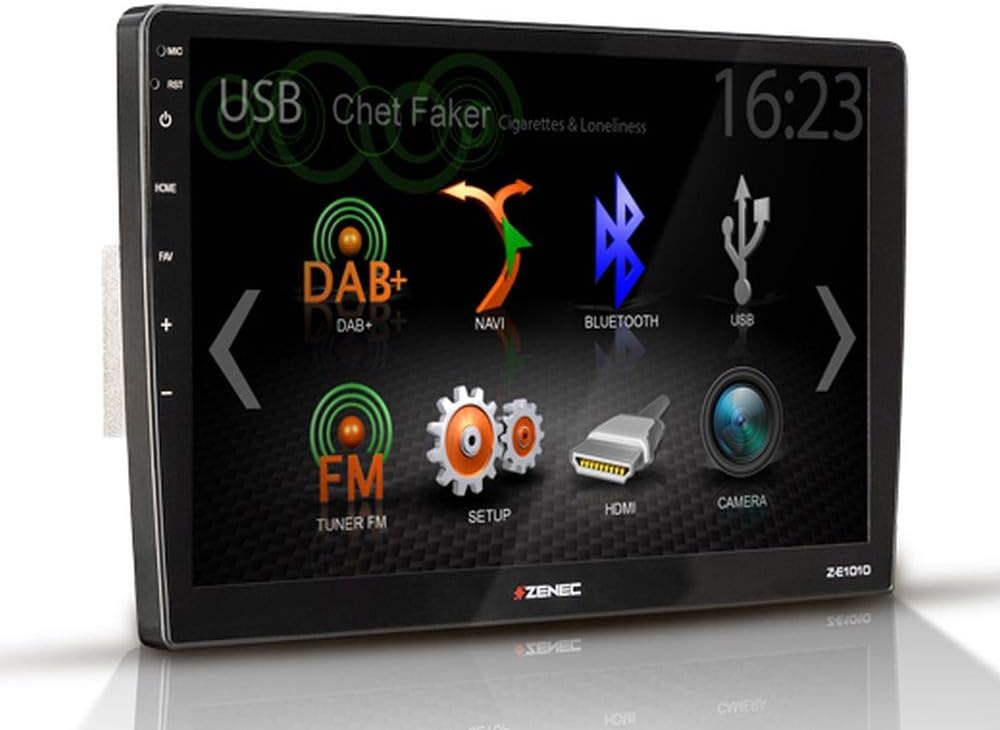
Gambar 5.1: Zenec Z-E1010 Infotainment System main screen. This image illustrates the primary user interface of the Zenec Z-E1010 Infotainment System. The screen shows various selectable icons for core functions such as USB media playback, DAB+ digital radio, navigation, Bluetooth connectivity, FM radio, system setup, HDMI input, and camera view. The current time '16:23' is visible in the top right corner, and 'Chet Faker - Cigarettes & Loneliness' is displayed as the currently playing track via USB.
5.1. Operasi Umum
- Daya Hidup/Mati: Press and hold the power button (usually on the left side) to turn the unit on or off. A short press may mute audio or switch modes.
- Layar sentuh: Navigate through menus and select functions by tapping the corresponding icons on the capacitive touchscreen.
- Kontrol Volume: Use the physical volume buttons or on-screen controls to adjust audio levels.
5.2. Fitur Audio
- DAB+ Tuner: Select the 'DAB+' icon to access digital radio. Features include service following, MOT Slideshow, DLS (Dynamic Label Segment), and DLS text. The tuner provides clear digital radio reception.
- Tuner FM: Select the 'FM Tuner' icon for analog radio. It supports RDS (Radio Data System) functions.
- Pemutaran USB: Connect USB storage devices to the two USB 2.0 ports for audio and video file pemutaran.
- Equalizer: The unit includes a 3-band equalizer for audio customization.
5.3. Konektivitas
- Bluetooth 4.1: Access the 'Bluetooth' function for hands-free calling with good voice quality and A2DP music streaming. Pair your smartphone via the Bluetooth settings menu.
- SmartLink: This feature allows direct connection for Apple CarPlay and Android Auto, making smartphone applications available on the infotainment screen.
- WebLink 2.0: Extends integration of online content such as YouTube, ShoutCast, and various audio/video players, controllable via the Z-E1010.
5.4. Navigasi
The Z-E1010 can be upgraded to a fully equipped GPS receiver with the optional Z-EMAP-CORE navigation package. Once installed, select the 'NAVI' icon to access navigation functions.
5.5. RealDash Application
The RealDash application provides a virtual dashboard display. This feature requires an optional OBDII dongle to connect to your vehicle's diagnostic port and display various vehicle data on the Z-E1010 screen.
5.6. System Settings ('SETUP')
Access the 'SETUP' menu to configure various system parameters, including audio settings, display preferences, Bluetooth pairing, and general device settings.
5.7. Fungsi Kamera
Jika bagian belakang yang kompatibelview camera is connected, select the 'CAMERA' icon to view the camera feed. This function is typically activated automatically when the vehicle is put into reverse gear.
6. Pemeliharaan
- Membersihkan Layar: Gunakan kain lembut dan bebas serat untuk menyeka layar sentuh dengan lembut. Untuk noda membandel, sedikit gosok.ampBasahi kain dengan air atau larutan pembersih layar. Hindari bahan kimia keras atau bahan abrasif.
- Pembersihan Umum: Jaga agar unit terbebas dari debu dan kotoran. Gunakan sikat lembut atau udara bertekanan untuk membersihkan celah-celah.
- Pembaruan Perangkat Lunak: Periodically check the Zenec official website for available software updates to ensure optimal performance and access to new features.
7. Penyelesaian masalah
This section addresses common issues you might encounter with your Z-E1010 unit.
- Tidak Ada Daya: Periksa semua sambungan daya dan sekering kendaraan. Pastikan kunci kontak dalam posisi ON.
- Tidak Ada Audio: Periksa pengaturan volume, periksa sambungan speaker, dan pastikan sumber audio yang benar telah dipilih.
- Masalah Pemasangan Bluetooth: Ensure Bluetooth is enabled on both the Z-E1010 and your smartphone. Delete previous pairings and attempt to pair again.
- Layar Sentuh Tidak Responsif: Try restarting the unit. If the issue persists, a factory reset might be necessary (refer to the 'SETUP' menu).
- DAB+ Reception Poor: Ensure the DAB+ antenna is correctly installed and positioned. Check for signal strength in your area.
If you experience persistent issues not covered here, please contact Zenec customer support or a qualified service technician.
8. Spesifikasi
| Fitur | Spesifikasi |
|---|---|
| Merek | zenec |
| Nomor Model | Z-E1010 |
| Ukuran Layar | 10.1 inci (25.7 cm) |
| Resolusi Layar | 1024 x 600 piksel |
| Jenis Tampilan | Layar sentuh kapasitif |
| Konektivitas | USB (2x), Bluetooth 4.1 |
| Fitur Khusus | DAB+, RDS, SmartLink (Apple CarPlay, Android Auto), WebLink 2.0, RealDash App, Integrated CAN BUS Adapter |
| Perangkat yang Kompatibel | Ponsel Pintar |
| Mode Keluaran Audio | Stereo |
| Konfigurasi Suara Sekitar | 4.0 |
| Jumlah Port HDMI | 1 |
| Daya Keluaran | 4 x 50W |
9. Garansi dan Dukungan
For detailed warranty information, please refer to the warranty card included with your product or visit the official Zenec website. For technical support, troubleshooting assistance beyond this manual, or inquiries about spare parts, please contact your authorized Zenec dealer or Zenec customer service directly. Keep your proof of purchase for warranty claims.


