1. Pendahuluan
Thank you for choosing the Kungfuking Surge Protector Power Strip with USB Ports. This device is designed to provide convenient power access and surge protection for your electronic devices. It features two AC outlets and two USB ports, along with a 6.56 ft extension cord and a flat plug for versatile placement. This manual provides essential information for safe installation, operation, and maintenance of your power strip.

Figure 1: Kungfuking Surge Protector Power Strip (Model: Kungfuking 2AC+2USB)
2. Petunjuk Keselamatan Penting
Harap baca dan pahami semua petunjuk keselamatan sebelum menggunakan produk ini. Kegagalan mengikuti petunjuk ini dapat mengakibatkan sengatan listrik, kebakaran, atau cedera serius.
- TIDAK exceed the electrical ratings of 120V, 12A, 60Hz, and 2.1A for USB ports.
- TIDAK use in wet environments or near water.
- TIDAK disassemble or modify the device.
- TIDAK use with aquariums or other water-related products.
- TIDAK sambungkan ke keran listrik lain yang dapat dipindahkan.
- TIDAK use if the cord or plug is damaged.
- Jauhkan dari jangkauan anak-anak.
- Pastikan steker terpasang sepenuhnya ke stopkontak di dinding.
- Produk ini hanya untuk penggunaan di dalam ruangan.
3. Fitur Produk
The Kungfuking Surge Protector Power Strip is designed for convenience and safety, offering multiple power options in a compact form factor.
- 2 Outlet AC: Provides standard power for electronic devices.
- 2 Port USB-A: Delivers 5V/2.1A for charging smartphones, tablets, and other USB-powered devices.
- 6.56 FT Extension Cord: Offers flexibility in placement, reaching distant outlets.
- Desain Steker Datar: Minimizes obstruction and allows furniture to be placed closer to the wall.
- Perlindungan Lonjakan Arus: Melindungi perangkat yang terhubung dari lonjakan dan lonjakan listrik.
- Konstruksi Tahan Lama: Built with fireproof ABS+PC materials for enhanced safety.
- Desain yang Dapat Dipasang: Can be easily mounted on or under desks, walls, or other surfaces.

Gambar 2: Fitur dan Spesifikasi Utama

Figure 3: All-in-One Charging Station in use
4. Pengaturan dan Instalasi
The power strip can be installed in various locations to suit your needs. Mounting screws are included for secure installation.
4.1 Opsi Pemasangan
The power strip offers flexible mounting options:
- Under Desk/Table: Mount horizontally or vertically under a desk or table to keep surfaces clear.
- Wall Mount: Secure to a wall for convenient access, such as near a TV or bedside.
- Side of Cabinets/Headboards: Install vertically on the side of furniture for discreet power access.

Figure 4: Installation Options and Dimensions
4.2 Langkah Instalasi
- Pilih Lokasi: Select a flat, stable surface for mounting, ensuring it is within reach of a wall outlet and your devices.
- Tandai Lubang Sekrup: Place the power strip in the desired position and mark the locations for the mounting screws using a pencil.
- Drill Pilot Holes (Optional): For wood surfaces, you may pre-drill small pilot holes to prevent wood splitting.
- Secure the Power Strip: Use the provided screws to firmly attach the power strip to the surface. Ensure it is securely fastened before use.
- Hubungkan ke Daya: Plug the power strip's flat plug into a standard 120V wall outlet. The flat plug design allows for placement behind furniture.
4.3 Contohample Instalasi
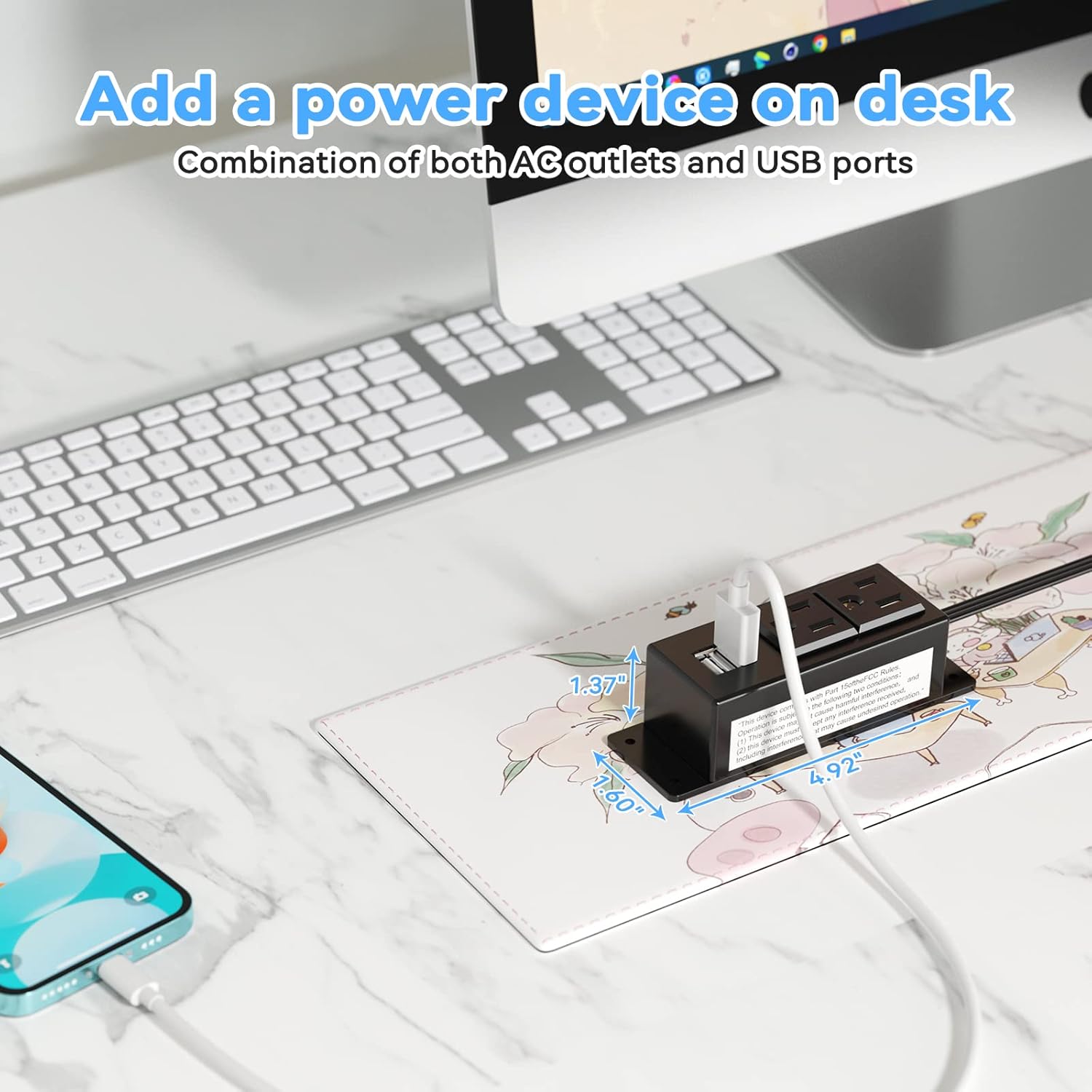
Figure 5: Desk Surface Installation

Figure 6: Under-Desk Installation

Figure 7: Wall-Mounted for TV

Figure 8: Nightstand Installation

Figure 9: Kitchen Cabinet Installation

Figure 10: Flat Plug for Space-Saving Placement
5. Petunjuk Pengoperasian
Using your Kungfuking Surge Protector Power Strip is straightforward:
- Colokkan ke Stopkontak: Ensure the power strip's flat plug is securely connected to a grounded 120V AC wall outlet.
- Hubungkan Perangkat AC: Insert the power cords of your electronic devices into the two AC outlets.
- Hubungkan Perangkat USB: Plug your USB charging cables into the two USB-A ports to charge compatible devices.
- Nyalakan: The power strip is designed for continuous operation once plugged in. There is no on/off switch.
- Memantau Penggunaan: Avoid overloading the power strip by ensuring the total power consumption of connected devices does not exceed the rated capacity (12A, 120V).
6. Penyelesaian masalah
Jika Anda mengalami masalah dengan stopkontak Anda, lihat masalah dan solusi umum berikut ini:
| Masalah | Kemungkinan Penyebab | Larutan |
|---|---|---|
| Tidak ada daya dari stopkontak AC atau port USB. |
|
|
| Perangkat USB tidak mengisi daya. |
|
|
| Power strip feels hot. |
|
|
7. Spesifikasi
| Fitur | Detil |
|---|---|
| Model | Kungfuking 2AC+2USB |
| Outlet AC | 2 |
| Port USB | 2 (USB-A) |
| Masukan Voltage | Tegangan AC 120V |
| Peringkat Arus AC | 12A |
| Frekuensi | frekuensi 60Hz |
| Keluaran USB | 5V / 2.1A (Total) |
| Panjang Kabel | 6.56 kaki (2 meter) |
| Jenis Steker | Steker Datar |
| Bahan | ABS+PC tahan api |
| Dimensi (Perkiraan) | 4.92 x 3.74 x 1.37 inci (L x W x H) |
| Berat (Perkiraan) | 10.5 ons |
| Fitur Khusus | Surge Protection, Mountable Design |
8. Pemeliharaan
Proper maintenance ensures the longevity and safe operation of your power strip:
- Pembersihan: Disconnect the power strip from the wall outlet before cleaning. Use a dry, soft cloth to wipe the exterior. Do not use liquid cleaners or sprays.
- Inspeksi: Periodically inspect the power cord, plug, and housing for any signs of damage, such as cuts, fraying, or cracks. If damage is found, discontinue use immediately.
- Penyimpanan: Saat tidak digunakan dalam jangka waktu lama, simpan stopkontak di tempat yang sejuk dan kering, jauh dari sinar matahari langsung dan kelembapan.
9. Garansi dan Dukungan
Kungfuking products are designed for reliability and performance. For warranty information, technical support, or any questions regarding your product, please refer to the contact information provided at the point of purchase or visit the official Kungfuking weblokasi.
Harap simpan bukti pembelian Anda untuk klaim garansi.