1. Pendahuluan
The Maxell Bass 13 Wireless Headphones (Model B13-WHPS) are designed to provide a versatile audio experience. These headphones feature 40mm drivers for clear sound, an integrated microphone for communication, and comfortable ear pads for extended listening. They offer both wireless Bluetooth connectivity and a traditional 3.5mm wired option.
2. Apa yang ada di dalam kotak
- Maxell Bass 13 Wireless Headphones
- Kabel Pengisian Daya USB
- 3.5mm Audio Cable (if applicable, not explicitly listed but common for hybrid headphones)
- Panduan Pengguna
3. Produk Lebihview
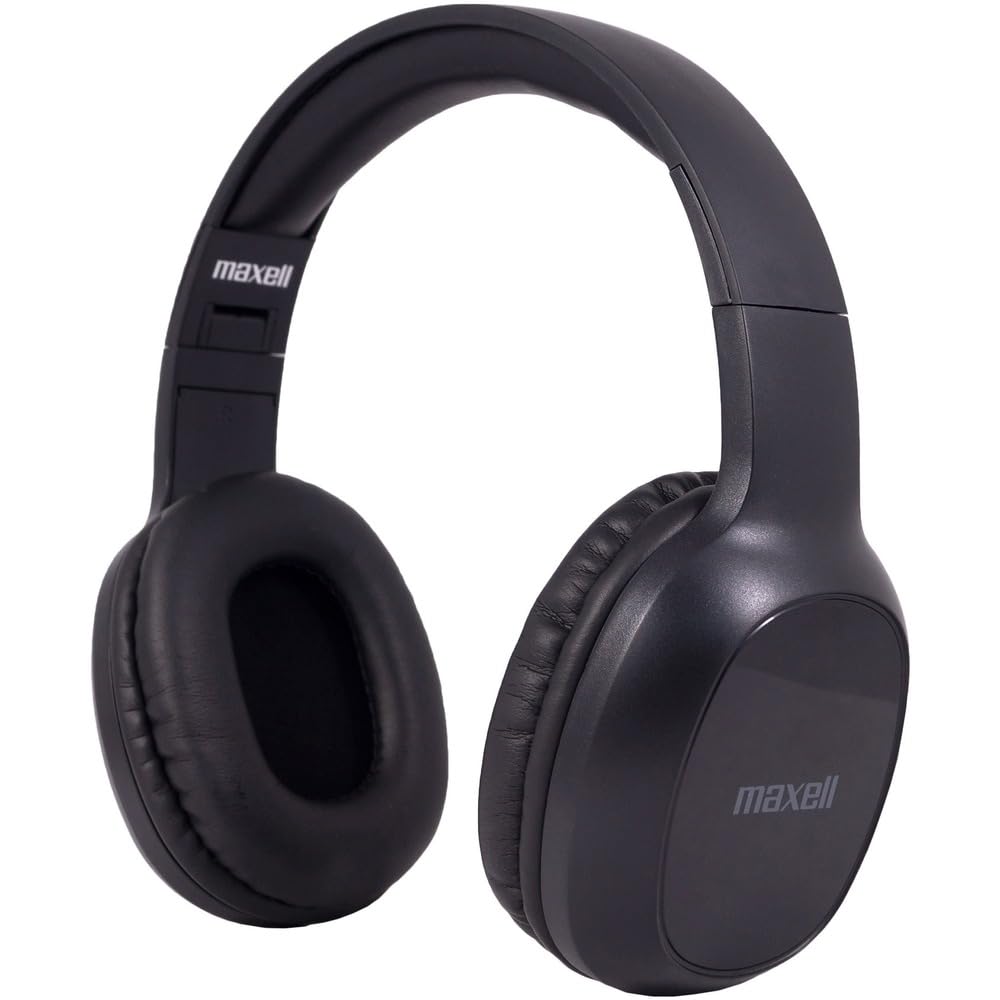
Figure 1: Maxell Bass 13 Wireless Headphones

Figure 2: Earcup Controls (Power, Volume, Play/Pause)
Fitur Utama:
- Driver Dinamis 40mm: Deliver clear and powerful audio performance.
- Mikrofon Terintegrasi: Memungkinkan panggilan bebas genggam.
- Noise-Isolating Earpads: Provide comfort and help reduce external distractions.
- Konektivitas Bluetooth 5.0: For stable wireless connection.
- Jack Audio 3.5mm: Allows for wired connection to compatible devices.
- Ikat kepala yang dapat disesuaikan: Ensures a comfortable fit for various head sizes.
- Daya tahan baterai hingga 8 jam: For extended listening and talk time.
4. Pengaturan
4.1 Mengisi Daya Headphone

Figure 3: Connecting the USB Charging Cable
- Locate the charging port on the headphone earcup.
- Connect the small end of the provided USB charging cable to the headphone's charging port.
- Hubungkan ujung kabel USB yang lebih besar ke sumber daya USB (misalnya, port USB komputer, adaptor dinding USB).
- The LED indicator on the headphones will illuminate to show charging status. It will typically turn off or change color when fully charged.
- A full charge provides up to 8 hours of continuous talk/play time.
4.2 Pemasangan Bluetooth
- Pastikan headphone terisi penuh.
- Tekan dan tahan tombol Daya pada penutup telinga headphone hingga indikator LED berkedip biru dan merah, yang menunjukkan mode pemasangan.
- Pada perangkat Anda (ponsel pintar, tablet, komputer), buka pengaturan Bluetooth.
- Pencarian untuk available devices. Select "Maxell Bass 13" from the list.
- Once paired, the LED indicator will typically show a solid blue light or flash blue slowly.
- Jika diminta kode sandi, masukkan "0000".
4.3 Koneksi Berkabel (Jack Audio 3.5mm)

Figure 4: Connecting the 3.5mm Audio Cable
For devices without Bluetooth or when battery is low, you can use the 3.5mm audio cable:
- Colokkan salah satu ujung kabel audio 3.5 mm ke jack input audio pada penutup telinga headphone.
- Plug the other end into the 3.5mm audio output jack of your device.
- Headphone akan beroperasi dalam mode pasif, dan fungsi Bluetooth akan dinonaktifkan.
5. Petunjuk Pengoperasian
5.1 Daya Hidup/Mati
- Nyalakan: Tekan dan tahan tombol Daya selama sekitar 3 detik hingga indikator LED menyala.
- Matikan: Tekan dan tahan tombol daya selama kurang lebih 3-5 detik hingga indikator LED mati.
5.2 Kontrol Volume
- Tingkatkan Volume: Tekan tombol Volume Naik (+).
- Kurangi Volume: Tekan tombol Volume Turun (-).
5.3 Pemutaran Musik
- Putar/Jeda: Tekan tombol multifungsi (biasanya tombol daya atau tombol putar/jeda khusus) sekali.
- Lagu Berikutnya: Press and hold the Volume Up (+) button (or double-press, refer to specific product button layout).
- Lagu Sebelumnya: Press and hold the Volume Down (-) button (or double-press, refer to specific product button layout).
5.4 Manajemen Panggilan
- Menjawab/Mengakhiri Panggilan: Tekan tombol Multifungsi sekali.
- Tolak Panggilan: Tekan dan tahan tombol multifungsi selama kurang lebih 2 detik.
- Panggil Ulang Nomor Terakhir: Tekan dua kali tombol Multifungsi.
6. Pemeliharaan
6.1 Pembersihan
- Bersihkan headphone dengan kain yang lembut, kering, dan tidak berbulu.
- Jangan gunakan pembersih abrasif, pelarut, atau semprotan aerosol.
- Hindari masuknya uap air ke dalam celah mana pun.
6.2 Penyimpanan

Figure 5: Headphones Folded for Storage
- Simpan headphone di tempat sejuk dan kering, jauhkan dari suhu ekstrem.
- When not in use for extended periods, ensure the headphones are fully charged before storage to preserve battery health.
- Headphone ini memiliki desain yang dapat dilipat untuk penyimpanan yang ringkas dan mudah dibawa.
6.3 Perawatan Baterai
- Hindari mengosongkan baterai sepenuhnya secara sering.
- Charge the headphones regularly, even if not used often.
- Jangan biarkan baterai terkena panas berlebihan atau sinar matahari langsung.
7. Penyelesaian masalah
| Masalah | Kemungkinan Penyebab | Larutan |
|---|---|---|
| Headphone tidak menyala | Baterai lemah | Isi daya headphone hingga penuh. |
| Tidak dapat memasangkan melalui Bluetooth | Headphone tidak dalam mode pemasangan; Bluetooth perangkat mati; Terlalu jauh dari perangkat | Pastikan headphone dalam mode pemasangan (lampu biru/merah berkedip). Aktifkan Bluetooth perangkat. Dekatkan headphone ke perangkat. |
| Tidak ada suara | Volume too low; Incorrect audio source; Headphones not connected | Increase headphone and device volume. Check if headphones are properly paired/connected. Verify audio output settings on your device. |
| Kualitas panggilan buruk | Weak Bluetooth signal; Microphone obstructed | Move closer to your device. Ensure microphone is not covered. |
8. Spesifikasi
| Fitur | Detil |
|---|---|
| Nomor Model | B13-WHPS |
| Merek | Maxell |
| Teknologi Konektivitas | Bluetooth 5.0 |
| Ukuran Driver Audio | 40 mm |
| Daya Tahan Baterai | Up to 8 Hours (continuous talk/play time) |
| Jack Headphone | 3.5 mm Jack |
| Fitur Pengendalian Kebisingan | Sound Isolation, Noise Cancelling |
| Impedansi | 32 Ohm |
| Kepekaan | 100dB |
| Respon Frekuensi | 20Hz |
| Penempatan Telinga | Di Telinga |
| Faktor Bentuk | Di Atas Telinga |
| Dimensi Produk | 7.25x3x9 inci |
| Berat Barang | 8.4 ons |
| Bahan | Electronic Components, Foam, Plastic, Wire |
| Perangkat yang Kompatibel | Tablets, Laptops, Desktops, Portable Devices with 3.5mm Audio Jack |
9. Video Produk Resmi
Video 1: Maxell Bass 13 Bluetooth Headphones Overview. This video provides a visual demonstration of the headphones' features and design.
10. Garansi dan Dukungan
Maxell products are designed for reliability and performance. For specific warranty information, please refer to the warranty card included with your purchase or visit the official Maxell website. For technical support or customer service inquiries, please contact Maxell customer support through their official channels.


